Twitch: Live Streaming
- 241.84K
- 4.0
- Installs
- 100.00M
- Price
- Free

Screenshots
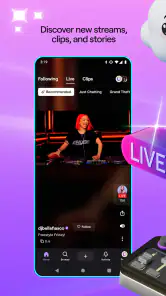
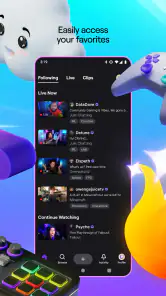
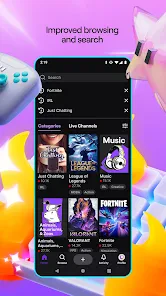
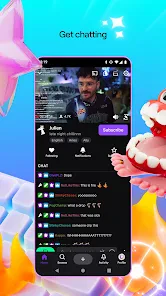
Analysis by Reviewed
I get the most out of Twitch when I treat it less like a channel to leave running and more like a place to check in on people and topics I care about. It is an entertainment app from Twitch Interactive, Inc., and its live focus makes it feel different from services built mainly around finished videos. I can drop into a broadcast while it is happening, follow the conversation, and leave when I have had enough. That immediacy is the main draw, but it also means the experience depends on who is live and how active their community is.
A practical routine for finding streams
My simplest routine is to start with a game, subject, or creator I already enjoy, then follow a few channels rather than trying to browse everything at once. Following gives me a manageable way to notice when familiar broadcasters are live. From there, I use search and category browsing when I want something different. This works better than opening the app with no idea what to watch, because a live directory can feel busy when you are choosing on the fly.
A typical evening might look like this: I check whether a creator I follow is broadcasting, watch for a while during dinner, and move to another stream if the pace or topic is not right for me. I keep chat open when the conversation adds to the show, but I am also happy to focus on the video when messages move too quickly to follow. That choice matters: Twitch is still enjoyable as a viewer even when I do not participate in every chat.
Small habits that make viewing smoother
Notifications are handy if I want to catch a particular broadcaster live, but I would be selective about which channels I follow and which alerts I keep enabled. Otherwise, a hobby can start to feel like a steady stream of interruptions. I also find it useful to decide whether I am watching for the gameplay, the host’s commentary, or the audience interaction. Knowing that makes it easier to choose a stream and less tempting to keep hopping between rooms.
Chat is one of Twitch’s defining differences from ordinary on-demand video, but it is not automatically the best part of every broadcast. In a smaller conversation, messages can feel personal; in a busy one, the pace may make individual comments hard to notice. I treat polls and viewer requests as an extra layer rather than a promise that my input will shape every stream. If I want a quieter session, I can simply watch without trying to keep up with the messages.
Where Twitch fits—and where it doesn’t
Compared with standard video platforms, Twitch is strongest when I want something unfolding live and enjoy seeing a community react together. A video-on-demand service is usually a better pick when I need a specific episode, want a polished presentation, or prefer to pause and resume a finished program at my own pace. Twitch can also be less predictable: a stream may be entertaining because of an unscripted moment, but it may also have stretches that feel slow. I would not choose it as my only option for tightly edited entertainment.
The app is free to install, carries a Teen content rating, and has a 4.0 average from around 5.7 million ratings, with over 100 million installs. It has been available since May 20, 2015. Subscriptions and other in-app purchases can range from $0.99 to $1,598.00 per item, so I would check the purchase details carefully before spending. Watching casually does not require me to support every creator financially, and I would set a personal limit before buying channel perks or other paid items.
More From Our News Desk

Clash of Clans Is Won Between the Battles

Android Auto Makes the Case for Quieter Car Software

MobiOffice: Transforming Mobile Productivity with Seamless Integration

EA SPORTS FC™ Mobile Soccer: Redefining Mobile Sports Gaming

How Microsoft OneDrive Became a Mobile Productivity Giant

How Google Translate Breaks Language Barriers Effortlessly
For people who enjoy gaming broadcasts, live events, or relaxed conversations with a familiar host, Twitch is easy to make part of a daily routine. It is less suitable if you dislike live chat, want every video to be short and tightly edited, or find notifications distracting. Its audience is reflected in around 242,000 reviews, but the best experience still comes from choosing communities that suit your interests and comfort level.
Making a session fit the moment
I get more out of Twitch when I choose a stream to match the time I actually have. With only a few minutes free, I look for a familiar channel or a live event I can sample without needing much context. When I have a longer stretch, I am more willing to explore an unfamiliar category and let the host’s style grow on me. That simple distinction helps avoid a common frustration: expecting a live broadcast to deliver a quick, neatly packaged payoff every time.
It also changes how I use chat. If I am listening while cooking or doing a small chore, I keep the stream as background entertainment and do not try to read every message. If I am sitting down specifically to follow a tournament or a detailed build, I give the video more attention and use chat only when it adds useful reactions. Choosing one reason to watch before opening a stream is a practical way to avoid endless browsing and make a session feel intentional.
Settings and spending deserve a quick check
I would review notification choices soon after following channels, rather than waiting until alerts become irritating. The useful balance is to keep reminders for creators I genuinely hope to catch live and reduce the noise from channels I only visit occasionally. I also pay attention to whether I am opening Twitch to watch or to participate; those are different habits, and the second can pull me into a much longer session than I planned.
Paid support is optional, and I would treat each channel purchase as a separate decision rather than an automatic next step after enjoying a broadcast. Before confirming anything, I check the amount and what that particular purchase offers. The range of possible in-app purchases is broad, so a clear spending boundary matters more than the feeling that I should reward every creator I like. If all I want is to watch, I can stay with free viewing and decide later whether a specific channel merits support.
What live viewing asks of you
A live stream is not a searchable, edited answer to a question. If I want to learn one exact technique or revisit a particular moment, I may find a focused tutorial or a finished video more efficient. Twitch works better when the value is the unfolding process: seeing a player make decisions, hearing a host react in real time, or sharing the mood of an event with other viewers. That difference is worth understanding before making it a daily go-to.
There is also a social trade-off. Chat can make a broadcast feel welcoming, but it can be fast, distracting, or simply unrelated to what I came to watch. I do not assume that joining the room means I need to speak, and I would not recommend Twitch to someone who finds live audience chatter stressful. Watching quietly is a perfectly reasonable way to use it, but people who want a fully controlled, solitary viewing experience may feel more at home with on-demand services.
Choosing streams with a little more purpose
When I am deciding whether to follow a new channel, I try not to judge it by a single exciting moment. A lively opening can be fun, but a channel’s usual pace and chat culture matter more if I plan to return. I give myself time to see how the host handles quieter stretches and whether the conversation stays welcoming. This helps me follow fewer channels with more confidence instead of building a long list that I rarely revisit.
For a newcomer, a useful first session is to search for a subject they already know, watch without feeling obliged to chat, and follow only a creator whose regular style genuinely appeals. That makes the app easier to understand than jumping among unrelated popular streams. If the first room feels overwhelming, switching to another broadcast is reasonable; the experience can vary sharply from one community to the next.
When live beats a replay
The strongest reason I choose Twitch over a typical video app is not simply that a stream is happening now. It is the way the audience and host share the same moment. During a live competition, reactions arrive as the action unfolds, and the chat can make a close finish feel communal. A replay can show the same result, but it does not recreate that shared uncertainty. On the other hand, if I want to skip directly to a particular moment, a replay or edited video is more practical.
This difference also helps answer whether Twitch is suitable for casual viewing. It can be, especially when I pick a familiar channel and treat the broadcast as company rather than a program I must watch from beginning to end. But live content does not always fit a strict schedule. If I need a reliable, short viewing break, I choose a finished video; if I have room for something open-ended, I am more likely to enjoy a live session.
Keeping the experience comfortable
I would make personal boundaries part of my routine: choose a few notifications, decide whether chat is adding anything, and stop browsing when I have found a stream that suits the moment. That last step sounds small, but it prevents the home screen from turning a quick check-in into a long search for the perfect broadcast. Twitch rewards curiosity, yet it is easier to enjoy when I do not treat every live channel as something I might be missing.
It is also worth remembering that interaction is optional. A viewer can follow a broadcast quietly, and there is no need to buy a subscription just because a creator is entertaining. If I do decide to pay, I check the specific purchase before confirming it and keep it within a budget I chose in advance. That approach lets support remain a deliberate choice rather than a reflex prompted by the energy of a live chat.
So, let's dive right into the world of Twitch: Live Streaming, the app that's taken the gaming community by storm. If you're anything like me, spending hours watching gamers conquer digital realms is your idea of a good time. Well, Twitch: Live Streaming is the place for that, and it doesn’t disappoint.
Discovering New Content
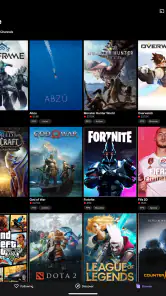
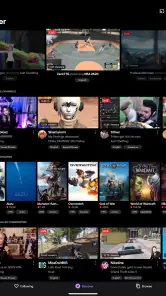
One of the coolest things about Twitch is the sheer variety of content you can stumble upon. Whether you're into gaming, cooking, or even just chatting, there's a stream for you. I found myself watching a live chess tournament one minute, then hopping over to a stream of a gamer building an intricate world in Minecraft the next. It's like channel surfing, but way more interactive and engaging.
Interactive Experience
Let's talk about the interaction. Unlike traditional TV, Twitch allows viewers to chat with streamers in real-time. This feature adds a personal touch to each stream and makes you feel like part of a community. I can't tell you how many times I've dropped a comment in a chat and got a shoutout from the streamer. It's a small interaction, but it makes the experience so much more personal and fun.
Plus, the chat isn't just for chit-chat. Streamers often run polls or take requests from viewers, which can influence the content of their stream. This interactive element is a game-changer for engagement and keeps viewers coming back for more.
Usability and Features
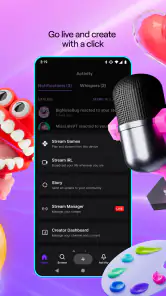
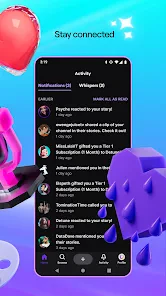
From a usability standpoint, the app is pretty user-friendly. The interface is straightforward, and finding streams is a breeze. You can follow your favorite streamers to get notified when they're live, which is super handy. The search function is robust, helping you find new content based on your interests.
Another neat feature is the ability to subscribe to channels for exclusive content. For a small fee, you can support your favorite streamers directly. It’s a win-win because you get cool perks like custom emojis and ad-free viewing, while the streamer gets financial support to keep doing what they love.
Conclusion
All in all, Twitch: Live Streaming is a fantastic app for anyone interested in live content. Whether you're a hardcore gamer or just enjoy watching live shows, there's something here for you. The interactive nature and wide range of content make it a standout in the streaming world. So, if you haven't already, give it a whirl. Who knows, you might just find your new favorite streamer!
Remember, the app is free, but be prepared to get hooked and maybe even spend a few bucks supporting some awesome streamers. Happy streaming!
Twitch: Live Streaming Frequently Asked Questions
Can I use Twitch while traveling or in different time zones?
Twitch’s live format can fit into a changing schedule because you can browse channels whenever you have time, but a broadcast may already be underway or have ended by the time you open the app. Following channels can help you notice when creators are live, while browsing lets you discover other streams in the moment. If you are traveling, consider whether you want to watch over Wi-Fi or use mobile data.
Does Twitch offer anything to watch when a channel is not live?
Twitch is centered on live broadcasts, so its main appeal is watching creators and communities as events happen. You can browse other channels if one you follow is offline, or return when a creator you like is streaming. The experience differs from selecting a fixed library of videos: what is available changes with live programming, and each channel brings its own subject and atmosphere.
Can I use Twitch if I have never watched a live stream before?
Yes. You can start by browsing channels and topics, then watch a broadcast to see how the live format feels. Chat is available for interaction, but you do not need to post or stream to use Twitch. Since channels cover different interests and have distinct communities, sampling a few can help you find content and a style of conversation that suit you.
Is Twitch mainly a video app, or is the chat just as important?
Twitch combines live video with real-time community interaction. You can focus on the broadcast, read along with chat, or take part in the conversation, depending on what you enjoy. The balance varies from channel to channel: some viewers come primarily for the stream, while others value the shared experience around it. You can watch without posting if you would rather keep things quiet.
Can I use Twitch with headphones or listen while doing other things?
Headphones can make it easier to hear a stream clearly, especially when you are watching in a busy place, and they can help keep audio private. Twitch is centered on live video and chat, so how well it fits alongside other activities depends on what you are watching and how much attention it needs. For streams where visual details matter, you will get more from watching the screen.
Pros
- User-friendly interface for easy navigation.
- Wide variety of streaming content available.
- Interactive live chat with streamers.
- Customizable notification settings.
- Supports multiple streaming devices.
Cons
- Can consume a lot of mobile data.
- Occasional app crashes reported.
- Ads can be intrusive during streams.
- Limited offline content availability.
- Subscription can be costly for premium features.

- Category
- Entertainment
- Version
- Varies with device