Truth Bible: Audio+Verse
- 595.00
- 4.7
- Installs
- 1.00M
- Price
- Free

Screenshots





Analysis by Reviewed
Choosing a Bible app comes down to how you actually want to spend time with scripture. I look for three things: whether I can read without a connection, whether listening fits into busy parts of the day, and whether the app gives me a useful place to keep track of passages I want to revisit. Truth Bible: Audio+Verse is aimed at people who want those habits together rather than a reading tool alone. It is a free Books & Reference app from JATHLEHEM LIMITED, rated for Everyone, and its offline, audio, and notebook emphasis gives it a clear everyday purpose.
Start with the routine you want to build
If you mostly need a searchable text for close study, a dedicated reading or study app may suit you better. If you want scripture to accompany a commute, household tasks, or a quiet moment away from home, combining listening and offline access is more relevant. I would decide based on that difference first: audio can make scripture easier to fit into a day, but it does not replace the attention that comes with sitting down to read.
A practical way to test the fit is to choose one small routine before you install it. For example, you could read a passage at breakfast, then listen at another point in the day and use the notebook to capture a question or reflection. That gives the app a real job instead of turning it into one more icon you open occasionally and forget.
Questions to ask before making it your regular reader
If you are deciding whether this can replace your current Bible app, I would start with the material you use most often: a particular translation, passages you have saved, and notes you refer back to. Then try a small sample rather than moving your whole routine at once. A comfortable reading experience matters more over weeks than an impressive first impression, and the notebook is only helpful if you can find and use your reflections when you need them.
One useful test is to see whether audio suits the way you concentrate. Listening may be a good companion for a walk or routine task, but it asks less of your eyes, not necessarily less of your attention. If you often lose the thread while multitasking, treat listening as a first pass and keep a quiet reading session for passages you want to understand closely.
Getting Started with Truth Bible: Audio+Verse
Once you download and open the Truth Bible: Audio+Verse app, the first thing you'll notice is its clean and intuitive interface. Whether you're a tech-savvy individual or someone who prefers simplicity, this app caters to all. The setup process is straightforward, and within minutes, you're ready to dive into the world of scripture.
User Experience and Features
One of the standout features of this app is the audio functionality. Imagine being able to absorb the Word while driving, cooking, or even during a workout. The audio feature is clear, with options to choose different narrators, allowing you to find a voice that resonates with you. Plus, for those who like to reflect deeply, the app includes a bookmarking option to save your favorite verses for later.
More From Our News Desk

Weather by Xiaomi Review: Clear at a Glance, Less Clear Up Close

X Under Pressure: Can It Recover When Posting Goes Wrong?

Clash of Clans Is Won Between the Battles

Android Auto Makes the Case for Quieter Car Software

MobiOffice: Transforming Mobile Productivity with Seamless Integration

EA SPORTS FC™ Mobile Soccer: Redefining Mobile Sports Gaming
For a realistic day-to-day example, I would use listening for a familiar passage while preparing dinner, then return to a bookmarked verse later when I have a quieter moment. That split between listening and reading is more useful than treating audio as a substitute for study: hearing a passage can help me notice its flow, while the saved verse gives me a specific place to begin reflecting. One small trade-off is that listening while doing something else can make it easy to miss a detail, so I would replay or read a passage when I want to examine its wording closely.
Now, let’s talk about the reading experience. The app provides multiple translations of the Bible, ensuring you find the version that speaks to you. You can easily switch between translations, making it a versatile tool for study and reflection. The search functionality is robust, helping you find specific verses or topics in a flash.
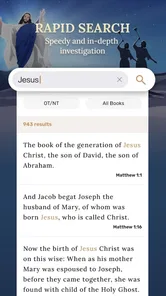
When comparing translations, I find it useful to read the same passage in more than one version, then settle on one for a longer reading session. Switching can clarify phrasing, but frequent hopping may interrupt the thread of a chapter. Search works best when I have a word or reference in mind; if I am still forming a question, browsing and reading in context is a better starting point than expecting a search box to guide the whole study.
Personal Reflection
Personally, what I love about Truth Bible: Audio+Verse is how it seamlessly integrates into my daily routine. The ability to listen to scriptures while multitasking has been a game-changer for me. It’s like having a spiritual companion always at hand, ready to offer wisdom and comfort whenever needed.
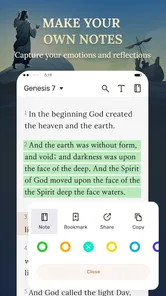
The notebook angle also makes a difference in how I would use the app. Rather than trying to write a polished journal entry every time, I would keep short notes: a question to revisit, a connection between two passages, or a line that stayed with me. That is a low-pressure way to build continuity across brief sessions. If you already keep detailed study notes in another system, though, this may feel like a second place to manage the same thoughts; choose one home for your reflections so useful notes do not become scattered.
For someone who is new to Bible reading, the combination of audio and a notebook can make it easier to start with manageable sessions and return to a passage without needing a complicated study setup. Someone who wants extensive scholarly tools, structured lesson plans, or a particular study workflow should compare specialist reference apps before settling in. Truth Bible’s appeal is its simple combination of reading, listening, and personal reflection, not a promise to cover every kind of research.
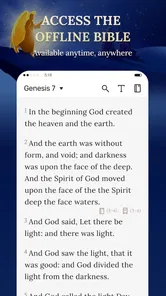
The offline aspect is especially practical when I expect to be somewhere with unreliable reception. I would prepare by opening the material I plan to use while connected, rather than assuming every part of an app will automatically be available without internet. That small habit can prevent a reading plan from being disrupted, and it is useful for travel, a basement room, or a break at work where the signal is inconsistent.
The app has an average rating of 4.7 from around 13,000 ratings, and more than 1 million installs. It is free, so trying it does not require a purchase, and it runs on Android 6.0 or later. Its current version is 1.0.62, following its release on April 17, 2024. Those figures suggest it has reached a sizeable audience, but the better test is still whether its reading and listening style matches your own routine.
The design is another highlight. It’s visually appealing without being distracting, allowing the content to shine. The developers have done a fantastic job of keeping it user-friendly while packing in useful features. Whether you're a lifelong believer or someone exploring spirituality, this app offers something valuable.
Where another kind of app may fit better
Compared with a plain digital Bible, this app is a stronger fit if you want audio and a place for personal notes alongside reading. Compared with a specialist study reference, it may be the less suitable choice if your main goal is deep research or a highly organized library of study materials. These are different priorities, not a simple ranking: the right option depends on whether convenience, reflection, or detailed analysis matters most to you.
There is also a practical distinction between an all-in-one reader and a tool built around one task. A paper Bible avoids screen distractions and suits readers who like marking pages by hand. A focused audio option may be preferable if listening is your main habit, while a study-focused reference is a better match when you need structured research. I would choose this app when I want reading, listening, and personal reflection to sit together, not because that combination automatically beats every alternative.
Moving your routine without creating extra work
Switching is easiest if you keep your first week modest. Try one short reading session, one listening session, and a note you will genuinely want to revisit. If you already have bookmarks or reflections elsewhere, do not move everything at once; start with a few passages and see whether the app’s way of organizing your routine feels natural. This limits the friction of maintaining two systems while giving you a fair sense of its fit.
I would also decide in advance what a useful notebook entry looks like for you. A short question or a reference to revisit is often easier to act on than a long entry written because a journaling app seems to demand one. At the end of a few sessions, check whether those notes helped you return to the text. If they did not, keep the notebook simple rather than creating a second chore alongside reading.
For offline use, make preparation part of the routine instead of waiting until the moment you lose reception. Before leaving home, open the passages you intend to read or listen to while connected and check that the material you need is accessible. That is a sensible precaution for a trip or a workplace with patchy service; it also prevents assuming that offline availability means every app function behaves exactly as it does online.
Who I would recommend it to
I would recommend it to readers who want scripture close at hand, especially those who enjoy listening as well as reading and value being able to continue offline. It also makes sense for someone building a modest daily habit and wanting a simple notebook for thoughts. I would steer people toward another option if they need advanced reference material, prefer paper and uninterrupted reading, or know that audio will distract them rather than help them focus.
It is also a reasonable starting point for someone who wants to explore a regular reading habit without paying for an app. The age rating is Everyone, and the app has 595 reviews alongside its broader rating history. I would not use popularity as a substitute for checking whether its reading style works for you, but it can reassure a new user that this is an established choice rather than an obscure experiment.
Final Thoughts
In conclusion, if you're searching for an app that enhances your spiritual journey, Truth Bible: Audio+Verse might just be what you need. It combines functionality with accessibility, making it easier than ever to engage with the Bible. With its audio options and multiple translations, it offers a unique way to experience the scriptures. So, why not give it a try and see how it fits into your life?
My recommendation is to try it with a specific routine in mind rather than expecting one app to suit every kind of Bible study. Its strongest case is the mix of reading, listening, offline use, and a place for reflection; its limits matter most when you want a research-heavy toolkit or prefer a single, focused format. If that balance sounds like what you need, it is an easy free option to explore and keep only if it genuinely helps you return to the text.
A simple way to decide after trying it
After a few days, ask yourself whether you actually used more than one part of the app and whether the notes or saved verses made it easier to pick up where you left off. If the answer is yes, the combination is doing useful work. If you only wanted a searchable text, or audio made you less attentive, there is little reason to keep extra features in your routine when a more focused alternative would serve you better.
For me, the strongest reason to keep this app is not that it tries to replace every Bible resource. It is that it can make a small, repeatable habit feel easier: listen when the day is busy, read when concentration allows, and leave yourself a reminder for later. That is a practical fit for readers who value flexibility, while people who prefer a quiet, paper-based practice or in-depth reference work should choose around those priorities instead.
Truth Bible: Audio+Verse Frequently Asked Questions
What devices and operating systems can I use Truth Bible: Audio+Verse on?
Truth Bible: Audio+Verse is a Books & Reference app developed by JATHLEHEM LIMITED. It is available for Android devices running version 6.0 or later, so it is worth checking your device’s software before downloading. The app is free and rated for Everyone, making it suitable for a broad range of readers who want Bible access on a mobile device.
What features does Truth Bible: Audio+Verse offer?
Truth Bible: Audio+Verse is packed with features such as audio playback of Bible verses, verse bookmarking, daily verse notifications, and offline access. The app also supports multiple translations, allowing users to switch between different versions of the Bible seamlessly. Additionally, it offers a verse sharing option, enabling users to share inspirational verses with friends and family easily.
Is Truth Bible: Audio+Verse free to use?
Yes, Truth Bible: Audio+Verse is free to download and use. However, it may offer in-app purchases for premium features or ad-free experiences. Users can enjoy the basic functionalities without any cost, but purchasing additional features can enhance the overall experience with more tools and options.
Can I listen to Bible verses offline with this app?
Yes, Truth Bible: Audio+Verse allows users to download audio files of Bible verses for offline listening. This feature is especially useful for those who want to access their favorite verses without needing an internet connection, making it convenient for travel or when in areas with limited connectivity.
Can I keep notes or save verses for later in Truth Bible: Audio+Verse?
The app’s store summary highlights a notebook for your spiritual journey, alongside offline and audio features. That makes it relevant for readers who want a place to reflect while using the Bible, while the listed bookmarking feature can help keep verses easy to find again. Together, these tools suit personal study and revisiting passages over time.
Pros
- Comprehensive offline access.
- High-quality audio narrations.
- Includes diverse Bible versions.
- Interactive verse sharing.
- User-friendly interface.
Cons
- Limited customization options.
- Ads present in free version.
- Occasional app crashes.
- Requires internet for updates.
- No night mode available.













