Track Any Phone
- 1.25K
- 4.5
- Installs
- 10.00M
- Price
- Free

Screenshots

Analysis by Reviewed
I tend to judge a location app by what happens when a map is actually useful: coordinating a meeting, checking that a family member has arrived, or finding a phone I have misplaced. Track Any Phone is a social app from Family Locator Apps built around sharing a phone’s location, and its one-way approach is worth understanding before you rely on it. It is free to install, although in-app purchases range from $4.99 to $59.99 per item, so I would check the available options before assuming every use is included at no cost.
Make a plan for weak or interrupted connections
Before making location sharing part of a family routine, I would decide what to do when someone’s marker is delayed or unavailable. A short message, a call, or a familiar meeting point gives everyone a fallback without turning a network hiccup into an emergency. That is particularly useful during school pickups, when a parent may be deciding whether to wait by the entrance or walk toward a nearby stop.
I would also avoid checking the map repeatedly when nothing has changed. If the connection is slow, refreshing your expectations every few seconds does not make the information more current. Agreeing on a sensible check-in time is often calmer and more practical than treating every pause in updates as a problem.
Fit location sharing to the day
The best use is not necessarily constant tracking. For a crowded festival or a busy shopping area, sharing a location for the time it takes to meet can help people converge without a string of “where are you?” messages. For a regular commute, a family might use it to coordinate who is collecting whom, while still relying on direct contact if the route or schedule changes.
There is a trade-off between convenience and attention. A map can help answer “Are they close?” but it can also invite someone to watch every movement when a simple arrival message would do. I would agree in advance on the purpose and duration of sharing, then use the least intrusive arrangement that solves the actual coordination problem.
Choose the right tool for the job
Compared with temporary location sharing inside a messaging app, a dedicated locator can make more sense when the same people need to coordinate repeatedly. A messaging option may be easier for a one-time meetup because it keeps the task in a conversation everyone already has open. For recovering a lost device, the phone maker’s built-in service is usually the more appropriate starting point, since it is designed for the owner to locate and manage their own device.
Track Any Phone’s one-way focus may suit people who want a specific location-sharing arrangement rather than a full social platform. It may be less suitable for a household expecting a comprehensive family-management tool, or for people who need features beyond location coordination. I would compare the actual needs of everyone involved before asking them to install another app.
More From Our News Desk

Weather by Xiaomi Review: Clear at a Glance, Less Clear Up Close

X Under Pressure: Can It Recover When Posting Goes Wrong?

Clash of Clans Is Won Between the Battles

Android Auto Makes the Case for Quieter Car Software

MobiOffice: Transforming Mobile Productivity with Seamless Integration

EA SPORTS FC™ Mobile Soccer: Redefining Mobile Sports Gaming
Set expectations before relying on it
One practical test is to try the app during an ordinary, low-stakes trip while the people involved can still contact one another. Check whether the location view is useful enough for your routine, and agree on what a delayed marker means. This is more informative than discovering the app’s limitations when someone is already waiting in an unfamiliar place.
For a child’s journey home, for instance, a parent could use the shared location as a cue to get ready rather than as proof that the child has arrived safely. A direct confirmation at the agreed point remains clearer. For adults meeting after work, the map can help narrow down where to look, while a text identifying the entrance or landmark handles the final few steps.
Where location sharing helps—and where it can frustrate
I’d use this section to set realistic expectations before location sharing becomes part of anyone’s routine: a map can help people coordinate, but it is only as useful as the connection carrying its updates. I’d also decide in advance what the group will do when a location seems stale, so a brief delay leads to a calm check-in rather than guesswork.
When a connection matters
Location tracking depends on information reaching the app, so I would treat it as a way to coordinate rather than a guarantee of someone’s exact position at every moment. A weak or interrupted connection can make a location less useful for an immediate decision. If a person’s marker appears delayed, a quick message or call is the sensible backup; I would not interpret an old position as proof of where they are now.
That distinction matters in ordinary situations. Imagine a parent waiting after school while a child is travelling home: a shared location can help the parent decide when to head outside, but it should not replace an agreed meeting point or direct contact if plans change. The benefit is less needless checking and uncertainty, not certainty in every network condition.
Choosing the right setting
The app is most appealing to people who have a clear, mutual reason to share locations, such as coordinating family routines or finding one another at a busy event. Its one-way framing can suit a person who wants to share their position without turning the arrangement into constant mutual monitoring. Before depending on it, I would agree with the other person on when sharing is appropriate and what to do if the map does not help.
For a one-off meetup, a messaging app’s temporary location-sharing option may be simpler, especially if everyone already uses it. For a group that wants ongoing coordination, a dedicated family locator may feel more suitable. A misplaced phone is another use case, but this app should not be treated as a substitute for the phone’s built-in find-device tools, which are designed around the owner’s account and device recovery.
Practical habits for fewer surprises
A useful habit is to check that location sharing is working before leaving, rather than discovering a problem at the destination. I would also keep a simple fallback—such as a meeting spot or a text saying “I’m here”—for crowded places and travel disruptions. These small steps prevent a map from becoming the only plan, particularly when someone’s battery or network access is limited.
Location data is sensitive even when sharing is consensual. I would share only with people who need it, explain the purpose, and revisit the arrangement when that purpose ends. The app’s focus on one-way sharing makes it especially important to be clear about who can see whose location; consent should be ongoing, not treated as a box checked once.
Track Any Phone is free and aimed at a broad audience, with an Everyone age rating. It has an average rating of 4.5 from around 170,000 ratings, and has been installed over 10 million times. Those figures suggest it has reached many users, but they do not tell me whether its connection will suit a particular household or commute. I would try it in a low-stakes situation first and decide whether its behavior meets my needs.
What to expect from the app
The app’s description centers on one-way location sharing, which is a more focused proposition than a general social network. That focus is useful if the main task is seeing a consenting person’s location, but it may feel limited if you want a broader family dashboard or a set of device-recovery tools. The developer is Family Locator Apps, and the current version is 3.3.3; it requires Android 6.0 or later. It was released on December 2, 2018.
I would also think about the cost before making it part of a routine. The app itself is free, but optional purchases can range from $4.99 to $59.99 per item. Since the purchase range is broad, I would inspect what each option covers in the app before paying, rather than assuming a particular feature or subscription is necessary. That is especially relevant if you only need occasional location sharing.
A measured connectivity verdict
For me, this is best viewed as a convenient coordination aid for people who have agreed to share location, not as a safety guarantee or a way to monitor someone secretly. It can make a family pickup or a crowded-event meetup easier, while a direct message remains the better choice when timing or accuracy is critical. If you want a broad device-finding system, prefer built-in recovery tools; if you need simple, occasional coordination, this app may be worth trying with realistic expectations.
Ever found yourself in a situation where you desperately needed to know the whereabouts of a loved one or maybe just your misplaced phone? Well, let me introduce you to Track Any Phone, a nifty app that's been quite the lifesaver in those moments of panic. I decided to give it a whirl, and here’s my take on it.
What Exactly is Track Any Phone?
So, Track Any Phone is essentially a location tracking app designed to provide real-time information about the location of any phone. Now, before you get any James Bond ideas, it’s crucial to note that this app requires consent from the person you’re trying to track. It’s all about safety, not snooping!
A Dive into the Features
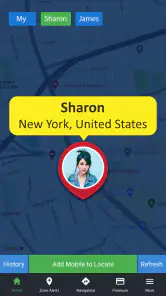
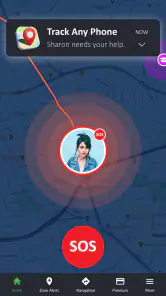
What struck me first was the app’s user-friendly interface. You don’t need to be a tech wizard to navigate through it. The home screen gives you options to track a phone by entering the number, or you can sync it with another device, provided you have permission. I tried both features and found them incredibly intuitive.
Another aspect worth mentioning is the real-time tracking. You can literally see the person’s movement on the map. It’s almost like watching a live stream of their journey! This feature can be a game-changer, especially for parents wanting to ensure their kids' safety or friends trying to meet up in a crowded place.
Security and Privacy Concerns
Now, I’m sure the next question popping into your mind is about privacy. Trust me, I was a bit skeptical too. But after a bit of digging, I found that Track Any Phone takes privacy seriously. The app uses end-to-end encryption, meaning your data is safe from prying eyes. Plus, it requires explicit consent from both parties, ensuring that you’re not stepping over any boundaries.
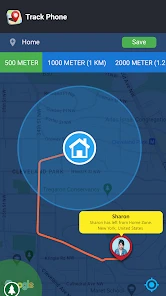
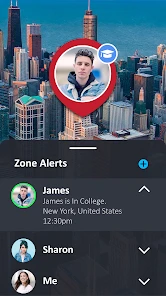
The app also allows you to set up alerts for specific locations. So, if your child reaches school or your partner leaves work, you get a notification. It’s like having a personal assistant letting you know the whereabouts of your loved ones without having to constantly check your phone.
Final Thoughts
In a world where knowing the location of our loved ones can sometimes be crucial, it provides a reliable and efficient solution. It's easy to use, respects privacy, and offers real-time updates that can ease your worries in seconds. Whether you’re a parent, partner, or just someone who misplaces their phone way too often, this app might just become your new best friend.
So, give it a try and see how much more connected and secure you feel. Just remember, with great power comes great responsibility. Use it wisely!
Track Any Phone Frequently Asked Questions
Is Track Any Phone free to download, and what might cost extra?
Track Any Phone is free to download, but some features or options may involve in-app purchases. Those purchases range from $4.99 to $59.99 per item, so check the available offers and their terms before buying. You can consider the free experience first and decide whether any paid option fits your needs.
What age group is Track Any Phone suitable for?
Track Any Phone has an Everyone content rating, which indicates that its listed content is suitable for a broad audience. However, location sharing involves personal information, so age suitability is only one consideration. Families should talk about when and with whom locations are shared, and make sure users understand the privacy implications before enabling tracking.
What should I know about Track Any Phone before downloading it?
Track Any Phone is a social app developed by Family Locator Apps, with a focus on one-way location sharing. It is free to download and is rated for Everyone, though in-app purchases are available. The app has a 4.5 average rating from around 170,000 ratings and over 10 million installs. Before using it, consider whether one-way location sharing fits your needs and whether the app’s permissions and purchase options suit you.
What features does Track Any Phone offer?
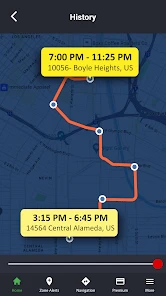
Track Any Phone is designed to help users locate any mobile device with ease. The app offers features such as real-time location tracking, history of visited places, and geofencing alerts. Additionally, it provides detailed location reports and is compatible with both Android and iOS platforms, making it versatile for various users.
Is Track Any Phone safe and secure to use?
Yes, Track Any Phone prioritizes user privacy and data security. The app uses encrypted channels to transmit location data, ensuring that user information remains confidential. Furthermore, it requires user consent for tracking, and you can easily deactivate tracking whenever desired, providing peace of mind for users concerned about privacy.
Pros
- Accurate location tracking
- User-friendly interface
- Real-time updates
- Supports multiple devices
- Battery efficient
Cons
- Requires internet connection
- Limited free features
- May raise privacy concerns
- Subscription-based pricing
- Not available for all regions
- Category
- Social
- Version
- 3.3.3











