Timemark: Photo Proof for Work
- 392.00
- 4.8
- Installs
- 10.00M
- Price
- Free

Screenshots
Analysis by Reviewed
I see Timemark: Photo Proof as a focused tool for a common problem: photos can preserve what happened, but it is easy to lose track of when and where. Its appeal is the directness of that job, rather than a promise to replace a full photo library or editing suite. If you regularly need dated visual records, that narrow focus can be useful; if you mainly want filters and creative edits, it is probably not where I would start.
Why a dedicated timestamp workflow can help
When I compare Timemark with the usual alternatives, I think of three different approaches: use the phone’s camera and rely on image details later, add text manually in a general editor, or use an app built around visible photo records. The first keeps the picture clean but can make dates less obvious to someone viewing a shared copy. The second offers flexibility but asks you to repeat the same steps. Timemark is appealing when you want a more consistent routine and do not need a full editing toolbox.
That consistency is most valuable when photographs are part of a repeated task rather than a one-off keepsake. If I were checking the same room after each stage of a renovation, for example, I would keep the camera position similar, capture the relevant detail, and use the same stamp treatment each time. The date can help distinguish one visit from another, while the repeated framing makes changes easier to spot. Neither element replaces a written log, but together they can make a simple record more readable.
A useful habit is to decide on a naming and filing routine before a large batch arrives. I would group pictures by project or trip, then process only the images that need visible labels. That avoids turning a personal camera roll into a set of permanently marked pictures just because the option is available. It also makes it easier to find the unmarked originals later if I want to crop, print, or share a cleaner version.
A small trial can prevent a large cleanup
Before relying on any stamp style for a recurring job, I would test it on more than one kind of scene: a bright surface, a dim corner, and a busy background. A label that reads clearly in one photo may blend into another, and a larger treatment may cover a small crack, serial label, or other detail that matters. That is a practical trade-off of putting information directly on the image: it is easy to read at a glance, but it becomes part of the visual composition.
I would also keep the recipient in mind. A timestamp that helps me sort pictures may not be the format a client, manager, or claims contact expects. A quick sample shared with the intended viewer can reveal whether the text is legible and whether the image still shows enough context. If the recipient needs a formal report, the photo may be only one supporting piece rather than the report itself.
For occasional documentation, a phone’s existing photo details may be enough. They keep the image free of overlaid text and can be useful when I am the only person who needs to check the date. The drawback is that someone receiving a copied or compressed image may not see that information immediately. Timemark makes more sense when the label needs to travel with the picture, while a standard editor is the better choice when I want precise control over typography, placement, or a more polished presentation.
More From Our News Desk

 MX Player
 and the Small, Private Rituals of Mobile Viewing
A practical video player reveals how mobile viewing has become private, portable, and woven into the spare minutes of ordinary life.

 Piano Fire: Edm Music & Piano
Piano Fire Tested: How Well Does It Recover When a Run Breaks?
A rhythm game lives or dies by recovery as much as reflexes. Piano Fire makes a brisk, colorful loop, but its rough edges matter most after a missed note or interrupted run.

 Ludo King®
Ludo King Turns Quick Matches Into a Lasting Social Ritual
A close look at how quick matches, private rooms and familiar rivalries turn this digital Ludo game into a small, durable social ritual—and where that community has limits.

 YouTube Music
 Turns Video Discovery Into Listening Power
A capable music service with an unusually strong route into discovery, YouTube Music shows how Google can turn a video habit into control over what listeners hear next.

 Netflix
 Is Building a Daily Habit Beyond Its Biggest Shows
A familiar streaming app is gaining new weight as Netflix pushes games, live programming, and discovery into the same daily habit. The growth is real, but so are the limits.

 Ramp Car Games: GT Car Stunts
Ramp Car Games: The Risk-and-Reward of Every Jump
A stunt racer built around one deceptively rich decision: how much speed to carry into a jump, and how much control to keep for the landing.
Latest News



Best suited to repeated, practical records
I can see the app helping a small business owner who photographs a delivered item before it is installed, a renter keeping a visual record of a move-in, or a field worker documenting a sequence of visits. The key is not simply taking pictures; it is needing each one to make sense later without asking, “When was this taken?” For a travel journal, the same approach can be useful when a trip produces many similar images and a visible date or place helps organize the story.
It is less suited to someone who wants every photograph to remain visually untouched. If I were taking portraits, preparing images for a portfolio, or making a photo book, I would avoid a permanent stamp on the main copy. I would also choose a dedicated project-management or reporting workflow if I needed structured notes, approvals, or a complete history of a job. A timestamped picture can make one part of that process clearer, but it is not a substitute for the rest.
For privacy, I would treat location information as a deliberate choice, not a default decoration. A picture of a public landmark may benefit from a place label; a photo taken at home or at a private appointment may not. Before sharing, I would review the finished image and consider whether the visible details disclose more than the recipient needs. This check is especially worthwhile when images are going into a group chat or public post rather than a private project folder.
A practical tool for records, not a full photo workflow
Timemark is a free photography app from OG Co. It has an average rating of 4.8 from around 487,000 ratings, and it has passed 10 million installs. Those figures suggest that the idea has broad appeal, but I would judge it by whether its timestamping workflow fits the way you actually take and sort pictures.
The basic distinction from a phone’s camera app is purpose. A standard camera is built to capture images quickly; this app is intended for photos where the date or location needs to be visible as part of the record. Compared with editing a picture later in a general-purpose photo editor, adding the mark while taking or processing images can make the task more consistent. The trade-off is that a stamp is visually intrusive: it may help a work record, but it can spoil a photo you want to frame or share as a memory.
Getting Started with Timemark
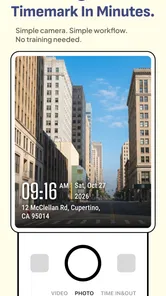
When you first open up Timemark, you're greeted with a clean and intuitive interface. I found it super easy to navigate, even if you're not the most tech-savvy person out there. The app allows you to take photos directly through its interface, which was a breeze. The standout feature here is the ability to automatically add a timestamp to any photo you take. It's like having a personal assistant that never forgets the details!
Features that Make a Difference
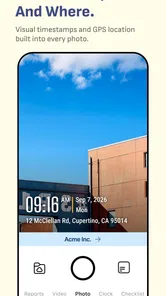
One of the best things about Timemark is its versatility. Not only can you add timestamps, but you can also customize them. Want a different font or size? No problem. You can adjust these settings to suit your personal style. The app also supports geotagging, so you can always remember where a photo was snapped. This feature is particularly handy for travelers like me who love to document their adventures.
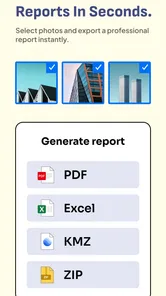
Another cool feature is the batch processing capability. If you’ve got a bunch of photos that all need timestamps, Timemark can handle it in one go. It's a real time-saver for those moments when you’ve got hundreds of images from a weekend getaway.
Where the Workflow Helps—and Where It Can Annoy
Batch processing is most useful when you already have a defined group of images, such as progress photos from a home repair or a folder of travel pictures you want to label consistently. My practical tip is to test the chosen stamp on one unimportant image first. A date that looks tidy on a bright wall can disappear against a dark scene, while a large label can cover the detail you meant to document. Checking the result before applying the same treatment across a set avoids a lot of cleanup.
There is also a useful distinction between a visible timestamp and an evidentiary record. A date printed onto an image makes it easier for another person to read, but it should not be treated as proof that a photo is authentic or that its details cannot be altered. For serious claims, I would keep the original files and any related paperwork, rather than relying on a stamped copy alone. That is a sensible safeguard whether the image is for a property issue, a repair log, or an insurance conversation.
Geotagging is helpful when place matters, but location labels are not always desirable. For a public travel album, a visible place can add context; for photos of a home, workplace, or private appointment, it may reveal more than you intend to share. I would check the image before sending it on and choose whether location belongs in that particular record. This is one reason the app suits deliberate documentation better than automatically marking every photo in a personal camera roll.
Practical Uses and Benefits
Now, you might be wondering, "Why would I need timestamps on my photos?" Well, there are countless reasons! For instance, if you're in a line of work where proof of time and place is essential, like real estate or insurance, this app is a game-changer. It ensures that your photos are credible and verifiable without any extra hassle.
A realistic everyday use is documenting a small leak for a landlord: I could photograph the first damp patch, then take another picture after a repair visit, keeping the sequence clear without relying on memory. For a contractor, a similar routine could help track job progress from one visit to the next. In both cases, consistent framing and a short note kept elsewhere about what changed can make the images more useful than a timestamp by itself.
For the average user, it's a fun way to keep memories organized. I personally love looking back at old photos and knowing exactly when and where they were taken. It adds a layer of nostalgia that's hard to beat.
I would recommend it most to people who repeatedly need labeled records: property owners, field workers, travelers building a chronological journal, or anyone sorting a large batch of images for a specific purpose. If you only want occasional date labels, your phone’s built-in camera details or a conventional editor may be enough. If your priority is polished photography, an editing app gives you more creative control without permanently placing text over the picture. Timemark makes more sense when clarity and repeatability matter more than an untouched image.
What to Know Before You Rely on It
The app is rated for Everyone and runs on Android 8.0 or later. It is free to download, with in-app purchases ranging from $4.99 to $39.99 per item, so I would try the basic workflow before paying for anything. The current version is 4.1.45.0, and the app was released on May 5, 2023. Those details are useful context, but compatibility and purchase decisions should still be checked against your own device and needs.
One question I would ask before making it part of a work routine is whether the visible stamp matches the format a client, employer, or claims process expects. Another is whether you need the original image preserved separately. A quick trial with a few sample photos can answer both: check legibility in different lighting, confirm that the saved result is easy to find, and make sure the output suits the person who will receive it. That small test is more reliable than assuming one stamp style works everywhere.
As a photography utility, it is best understood as a specialized layer in a larger process. It can make a record easier to scan, but it cannot decide what should be documented, keep a complete project log, or replace good file organization. I would use descriptive folder names and retain unmarked originals when a photo might matter later. That keeps the convenience of an on-image date without making the stamp carry more responsibility than it should.
Final Thoughts
All in all, Timemark: Photo Proof is a nifty app that delivers exactly what it promises. It's straightforward, efficient, and packed with useful features. Whether you're a professional needing precise documentation or just someone who loves to keep their photo album organized, this app is definitely worth a try. So go ahead, give it a download, and let Timemark help you timestamp your world.
My recommendation is more specific: try it if visible dates and locations would save you time or prevent confusion, especially when you handle repeated photo sets. I would skip it if you want a general camera upgrade, sophisticated image editing, or a guarantee that a stamped picture alone will settle a dispute. Used with a little care—test the layout, consider privacy, and retain originals—it fills a practical niche without needing to become the center of your photo workflow.
Timemark: Photo Proof for Work Frequently Asked Questions
Can I use Timemark: Photo Proof on my device?
Timemark: Photo Proof runs on Android devices using version 8.0 or later. Before downloading, check your device’s operating system version so you know it meets that requirement. The app is intended for capturing and organizing photos, so consider whether you have a phone or tablet that suits the way you plan to document places, tasks, or other moments.
What kinds of photos is Timemark: Photo Proof useful for capturing?
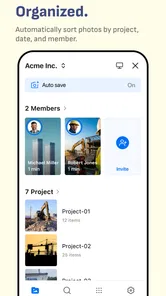
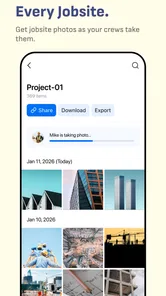
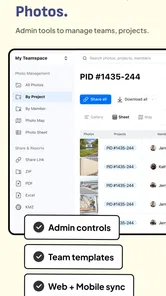
Timemark: Photo Proof is designed around capturing, collecting, and organizing site photos. It may be useful when you want a photo record of a work area, a property, or another location that needs visual documentation. Its emphasis on timestamped photos and location details makes it a more focused choice than a general camera app, especially for people who want context attached to their images.
Is Timemark: Photo Proof free to download, and does it include paid features?
Timemark: Photo Proof is free to download, so you can try the app without paying upfront. It also offers in-app purchases, with individual items priced from $4.99 to $39.99. If you are considering using it regularly, check the available purchase options in the app and decide whether its paid features suit your needs before making a purchase.
What is Timemark: Photo Proof and what does it do?
Timemark: Photo Proof is an innovative photography app designed to assist users in capturing and verifying moments with a timestamped photo proof. This application is particularly useful for professionals who need to document their work with precise timing, such as in legal or construction fields. It automatically adds a timestamp and GPS location to photos, ensuring that the captured images can serve as reliable documentation.
How does Timemark ensure the authenticity of the photos taken?
Timemark ensures photo authenticity by embedding critical metadata, including timestamps and GPS coordinates, directly into each photo. This metadata is tamper-proof, meaning that once a photo is taken, the time and location data cannot be altered. This feature is essential for users who require trustworthy photo documentation for legal or professional purposes.
Pros
- User-friendly interface for easy navigation.
- High-quality photo output.
- Efficient time-stamping feature.
- Offers cloud storage integration.
- Supports multiple photo formats.
Cons
- Limited free version features.
- Requires internet for full functionality.
- Occasional crashes on older devices.
- Subscription can be pricey.
- Limited editing tools.