TikTok Shop Seller Center
- 1.39K
- 4.4
- Installs
- 10.00M
- Price
- Free

Screenshots

Analysis by Reviewed
When a household shares a phone or tablet, a seller app can quickly become tangled up with someone’s personal scrolling, shopping, or messages. I find it easier to think of TikTok Shop Seller Center as a work tool first: it is for people managing a shop, not a general TikTok companion. That distinction matters if you are deciding whether it belongs on a shared device or should stay on the seller’s own phone.
A work app on a shared device
A realistic use case is a small business owner checking orders between other daily tasks while a partner helps pack products later. The app can make those moments more convenient, but the seller account still needs a clear owner. Before signing in on a household device, I would agree who can handle listings and order decisions, and avoid leaving the account open for casual use by everyone who picks up the phone.
This is especially useful when one person runs the shop and another only needs to help with practical tasks such as preparing parcels. It is less suitable when several people need independent access or when the device is also used by children. I would not assume the app provides household profiles or separate family permissions; keep the login and any business decisions within the account owner’s control.
Set boundaries before the first listing
Getting started is not just a matter of installing an app. A seller should have product details, images, prices, and shipping information ready, then check each entry before publishing. I would draft descriptions and gather photos before sitting down with the phone, because editing a listing while juggling other household interruptions is an easy way to overlook a detail.
For a shared device, a simple routine helps: the account owner signs in to make changes, reviews the final listing, and signs out when finished if other people use the device. That is ordinary account hygiene rather than a special family feature. It also reduces the chance that someone browsing the phone unintentionally changes shop information or sees seller activity.
I would also decide in advance which tasks really belong on the phone. A quick order check or a small correction may fit naturally into a spare moment; writing several product descriptions or comparing lots of details is easier when interruptions are less likely. Preparing the material elsewhere and using the app for the final review can make the mobile workflow more dependable without turning every household pause into shop administration.
Coordinate work without mixing up decisions
Seller Center makes most sense when the person using it can act on the shop’s behalf. If a partner helps with packing, decide outside the app who checks orders and who confirms that an item is ready to send. Keeping a small shared note of stock levels or packing progress can prevent two people from making conflicting assumptions, especially when the phone itself is not always available to both.
More From Our News Desk

Weather by Xiaomi Review: Clear at a Glance, Less Clear Up Close

X Under Pressure: Can It Recover When Posting Goes Wrong?

Clash of Clans Is Won Between the Battles

Android Auto Makes the Case for Quieter Car Software

MobiOffice: Transforming Mobile Productivity with Seamless Integration

EA SPORTS FC™ Mobile Soccer: Redefining Mobile Sports Gaming
Promotions deserve the same care. A discount or short sale can change what a customer pays, so I would settle the offer and its timing with anyone involved before applying it. The promotional tools may be convenient, but they are not a substitute for agreeing on margins, available stock, and who is responsible for monitoring the result.
A useful division of labour is to let one person make account changes and have the other report what has been packed or what stock is running low. That keeps the app’s decisions with the seller while still making help from a partner practical. It also avoids a common small-shop muddle: two people thinking the other has checked an order, or someone changing a listing based on an outdated stock count.
Age, trust, and the right person to use it
The app is listed for everyone, but its purpose is seller work, not entertainment for children. In my view, an age label should not be mistaken for a reason to hand over a business login. Adults responsible for the shop should manage account access and decisions, and younger household members should not be asked to handle order or customer matters without appropriate adult oversight.
TikTok Pte. Ltd. makes this free shopping app, which has an average rating of 4.4 from around 386,000 ratings and more than 10 million installs. Those figures suggest plenty of people use it, but they do not tell me whether its workflow suits a particular shop. I would judge that by how often the seller needs to work from a phone and whether the business already relies on TikTok to reach customers.
For a family business, the more important trust question is not simply who can hold the phone, but who is allowed to make a change that affects customers. I would keep account access with the person responsible for the shop, and make any helper’s responsibilities specific and limited to agreed tasks. If a child wants to help, safer contributions are practical ones such as organizing packing materials alongside an adult, rather than managing customer or account decisions.
Getting Started with TikTok Shop Seller Center
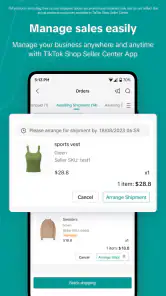
First off, setting up shop on the TikTok Shop Seller Center was surprisingly straightforward. I was greeted with a user-friendly interface that guided me through the process of creating listings, managing orders, and analyzing sales data. For someone who isn’t exactly tech-savvy, this was a huge relief!
The app provides a step-by-step tutorial for new users, which I found incredibly helpful. It’s like having a personal guide right there with you, ensuring you don’t miss out on any crucial details. I was able to upload product images, set prices, and even manage shipping details with ease. The integration with TikTok’s social media platform is seamless, allowing me to showcase my products to a wider audience almost instantly.
Even with guided setup, I would treat the first listing as a test of the whole routine rather than a box to tick. Check that the photo shows the item clearly, that the description matches what is actually available, and that the price and shipping details have been reviewed by the account owner. This gives a new seller a chance to learn the process at a manageable pace before putting several products into the workflow.
The Features That Stand Out
What truly sets this app apart are its diverse features. Apart from the basic functionalities, there’s a whole suite of tools designed to enhance your selling experience. One of my favorites is the real-time analytics section. It provides insights into customer behavior and sales trends, helping me tailor my marketing strategies effectively.
I also appreciate the customer support feature. Anytime I had a query, I was able to get assistance promptly, which is crucial when running an online business. The community aspect of the app is also worth mentioning. It’s like being part of a vibrant marketplace where you can interact with other sellers, share tips, and even collaborate on special promotions.
For me, analytics are most useful when they lead to a small, informed adjustment rather than a hurried overhaul. If a product attracts attention, I would first make sure there is enough stock and that the listing still answers likely customer questions before changing the promotion. Looking at trends alongside the shop’s own capacity helps avoid chasing a spike in interest that the seller cannot comfortably fulfil.
Support can be valuable when a seller is unsure how to proceed, but I would still keep a record of the practical question and the action taken. That is especially helpful in a shared-work setup: the account owner and helper can stay aligned without relying on someone’s memory of a conversation. The community can offer ideas, too, but I would treat other sellers’ approaches as suggestions to assess against my own products and workload.
Using it alongside other selling channels
Compared with a general marketplace app, this tool is most compelling when TikTok is already part of how a seller finds customers. A standalone storefront or a broader marketplace may be a better fit for someone who wants to build sales without relying on social discovery. I see Seller Center as a way to manage the seller side of TikTok commerce from a phone, rather than as a replacement for every other sales channel.
One practical approach is to treat social attention and shop operations as separate jobs. A video may prompt interest, but the seller still needs accurate stock, clear product information, and a reliable fulfilment routine. Checking these details before promoting an item is a useful safeguard: a burst of attention is not helpful if the shop is not ready to handle the resulting orders.
The app is free, and the current version is 9.6.2 for devices running Android 6.0 or later. I would still check that the phone is suitable for regular business use and that the seller is comfortable handling shop information on it. A larger screen or desktop workflow may be more convenient for lengthy edits or reviewing several details at once, while the mobile app is appealing for quick checks away from a desk.
That distinction also answers a practical question for a new seller: does using this app mean every part of the business has to happen on TikTok? I would not approach it that way. It makes sense as the mobile management option for a seller using TikTok Shop, while other channels can remain part of the business where they serve a different purpose. The important thing is to keep stock and fulfilment information consistent across whichever places customers can buy.
If the shop is only an occasional side project, a phone-based workflow may be enough for quick checks and modest listing changes. If the seller is juggling many products or needs to review long descriptions carefully, a larger screen can be more comfortable for the heavier work. I would use the mobile app for convenience, not assume that convenience makes every detailed task equally easy on a small display.
Another cool feature is the promotional tools available within the app. From discounts to flash sales, the TikTok Shop Seller Center offers a variety of options to engage customers and boost sales. I experimented with a couple of these promotional strategies, and it was exciting to see the positive impact on my sales numbers.
Before using a promotion, I would work out the stock and fulfilment plan first, then make sure anyone helping with the shop understands what is being offered and when it ends. This is a small but important safeguard for a shared household operation: one person may be packing while another is looking at the phone, and a promotion can quickly change the pace of orders. Starting with a simple offer is easier to monitor than changing several things at once.
Where the workflow can feel limiting
The phone-first convenience has a trade-off: small-screen work can make careful review slower, and social commerce asks the seller to think about both the shop and the content that brings people to it. A new seller may also need time to learn the platform’s routine before making promotions or adjusting listings with confidence. I would begin with a small number of carefully checked products and build a repeatable order routine before adding more moving parts.
It is a strong option for a seller who wants to manage TikTok Shop activity on the go and is prepared to keep listings, fulfilment, and promotion coordinated. I would skip it if I had no interest in selling through TikTok, wanted a purely private shopping app, or needed a shared household account with distinct roles. In those cases, a conventional storefront or another sales platform may be simpler and better aligned with the job.
There is also a difference between being able to check shop activity from a phone and having a complete business system for every need. Sellers who depend on careful multi-person handoffs should create their own reliable process for noting what has been done, rather than assuming the app will coordinate household responsibilities. That extra discipline is worthwhile if orders are handled by more than one person, but it may feel like unnecessary overhead for someone who wants a simple, personal storefront.
A practical choice for the household
After spending time with the TikTok Shop Seller Center, I can confidently say it’s a must-have for any retailer looking to tap into the power of social commerce. The app not only simplifies the selling process but also opens up a whole new world of opportunities through TikTok’s massive user base.
Sure, like any platform, there’s a bit of a learning curve initially, but once you get the hang of it, the possibilities are endless. Whether you’re a seasoned seller or a newbie in the e-commerce space, this app provides the tools and support needed to succeed.
So, if you’re ready to take your business to the next level, give the TikTok Shop Seller Center a shot. You might just find, as I did, that it’s the perfect partner for your online retail journey.
My household verdict is more measured: I would recommend it to the person who owns or actively manages a TikTok Shop and wants to handle essential seller work away from a desk. For a shared phone, I would keep one clear account owner, agree who can help with packing, and use a separate note for coordination. If everyone needs their own permissions, or the business does not want its sales workflow tied to social discovery, another platform is likely the calmer fit. Used with those boundaries, this is a practical mobile tool rather than a substitute for thoughtful shop management.
TikTok Shop Seller Center Frequently Asked Questions
Is TikTok Shop Seller Center suitable for someone who wants to shop rather than sell?
TikTok Shop Seller Center is the seller-focused app, rather than the regular TikTok experience for browsing and buying. Its stated purpose is to let sellers manage a TikTok Shop from a phone. If you are looking to purchase products, this app may not be the one you need; it is intended for people who want to run a shop and handle selling tasks.
What should I check before installing TikTok Shop Seller Center?
Before installing, check that your phone runs Android 6.0 or later, as this is the listed minimum operating system. It is also worth confirming that you want a seller tool rather than a shopping app for buyers, since TikTok Shop Seller Center is designed to help merchants manage their shops. The app is free to download and has an Everyone age rating.
Is TikTok Shop Seller Center free to download, and what devices can run it?
TikTok Shop Seller Center is free to download and is intended for sellers who want to manage a TikTok Shop from a phone. The app is listed for Android devices running version 6.0 or later, so checking your device’s operating system before downloading can help avoid compatibility issues. Its age rating is Everyone.
Who develops TikTok Shop Seller Center, and what is its current version?
The app is developed by TikTok Pte. Ltd. and is described as a shopping app for managing sales on TikTok from your phone. Its current version is 9.6.2. If you are deciding whether to install it, make sure you download the seller-focused app rather than assuming it is the regular TikTok experience; its purpose is to help merchants run their shop.
What is TikTok Shop Seller Center and how does it work?
TikTok Shop Seller Center is a comprehensive platform designed for sellers to manage their online shop on TikTok. It provides tools to list products, manage inventory, track sales, and engage with customers. Sellers can easily upload products, set prices, and monitor sales performance through a user-friendly dashboard, making it an essential tool for businesses looking to capitalize on TikTok's vast user base.
Pros
- Easy setup for new sellers.
- Wide reach to potential customers.
- Integration with TikTok videos.
- Real-time sales analytics.
- User-friendly interface.
Cons
- Limited payment options.
- High competition among sellers.
- Requires regular updates.
- Strict content guidelines.
- Dependence on TikTok's algorithm.
- Category
- Shopping
- Version
- 9.6.2













