The New York Times: Live News
- 22.17K
- 4.8
- Installs
- 10.00M
- Price
- Free

Screenshots




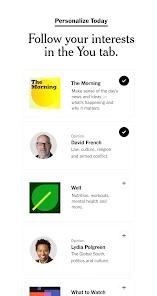



Analysis by Reviewed
I judge a news app less by how many headlines it can put in front of me than by whether it helps me choose what deserves my attention. The New York Times: Live News is a news and magazines app from The New York Times Company, and its mix of developing coverage and longer reads makes it appealing if I want more than a quick headline scan. It is free to install, but that is not the same as having unrestricted access to every article: in-app purchases range from $0.99 to $299.99 per item, so I would check the available subscription choices before building it into my daily routine.
What I would look for in a daily news app
My main decision criteria are whether the app helps me follow a story as it changes, whether its reporting gives me enough context to understand it, and whether I can control how often it interrupts me. The New York Times app has live alerts for developing stories, which can be useful when a major event is unfolding. But alerts are only helpful if I make them selective. I would turn on notifications for the subjects I genuinely follow, then use the app when I have time to read rather than treating every alert as a demand for immediate attention.
Stay Updated with Real-Time News
One of the standout features of the The New York Times: Live News app is its ability to provide real-time updates. You know that feeling when you hear about something from a friend and wonder why your news app didn’t notify you? With this app, that’s less likely to happen. From political events, global happenings, to the latest tech trends, the app ensures you’re always in the loop. The notifications are timely, and you can customize them based on your interests. How cool is that?
A Deep Dive into Quality Journalism
Let’s talk about the content quality. The New York Times is renowned for its high journalistic standards, and this app is no different. Articles are well-researched, offering a comprehensive perspective on various topics. If you’re someone who enjoys a deep dive into issues rather than just skimming the surface, this app will be your go-to. The app also hosts a plethora of opinion pieces and editorials, providing diverse viewpoints on pressing matters.
When its reporting style is the main draw
In my experience, this is most useful when I want to understand not only what happened but why a story matters. If a developing event appears in a notification, I can use the app to follow the coverage and then give a longer article my attention later. That two-step habit is more practical than trying to absorb every detail in the middle of a busy day. Opinion writing can also help me see how people interpret an issue, but I keep it distinct from reported coverage rather than treating commentary as a substitute for straight reporting.
That distinction matters when I am reading quickly. I try to check what kind of piece I opened before carrying its conclusions into a conversation: reported news, analysis, and opinion do different jobs. The app’s value for me is not that it removes the need for judgement, but that it gives me material to examine at more than headline depth. If I am researching a disputed issue, I still compare credible coverage rather than assuming one publication’s account is the whole picture.
Intuitive Design and User Experience
Have you ever used an app that felt like it was designed in the early 2000s? Thankfully, The New York Times: Live News is nothing like that. The user interface is sleek, modern, and incredibly intuitive. Navigating through different sections is a breeze, and the overall experience is quite seamless. Whether you’re checking in on your morning commute or scrolling before bed, everything is accessible with just a few taps.
More From Our News Desk

Weather by Xiaomi Review: Clear at a Glance, Less Clear Up Close

X Under Pressure: Can It Recover When Posting Goes Wrong?

Clash of Clans Is Won Between the Battles

Android Auto Makes the Case for Quieter Car Software

MobiOffice: Transforming Mobile Productivity with Seamless Integration

EA SPORTS FC™ Mobile Soccer: Redefining Mobile Sports Gaming
For a newcomer, the easiest way to judge the layout is to use it with a purpose instead of browsing every section at once. I would start with the subjects I already care about, then see whether the home feed helps me discover useful context without turning into an endless scroll. A clean interface can make reading feel easier, but it cannot decide what deserves attention; setting a stopping point is still useful, particularly when a major story keeps developing.
A practical routine, not another stream to monitor
A realistic way to use it is to glance at a few headlines over breakfast, open a live alert only when the subject matters to me, and save longer reading for a quieter break. That keeps breaking coverage from swallowing the time I meant to spend on deeper reporting. If I am commuting, I would also wait until I can read safely and comfortably rather than relying on my phone while moving. The useful distinction is between staying aware and following every turn of a story in real time.
On a busy workday, for example, I might see an alert while getting ready, read only the short update, and leave the fuller piece until lunch. If the story is still important then, I can read it with enough attention to separate confirmed developments from early reactions. This is a better fit for the app than repeatedly checking every few minutes. It also gives me a simple test for notifications: if they rarely lead to reading I value, I should narrow them rather than let them dictate my day.
Another useful habit is to treat an alert as a pointer, not as a complete account. Breaking coverage can change as more information becomes available, so I avoid repeating the first version of a developing story as settled fact. When I have only a moment, I can use the notification to know that something is happening; when accuracy matters, I return later and read the fuller coverage. That modest pause is especially helpful before sharing a claim or making a decision based on fast-moving news.
Where other news choices can work better
Compared with a broad headline aggregator, this app makes more sense when I want journalism from one established newsroom and fuller articles, not a quick cross-publication scan. A local outlet may be a better daily choice if neighborhood decisions, school notices, or nearby events are my priority. Public broadcasters and other national papers can suit readers who prefer their particular editorial approach or want to compare coverage across sources. I would not expect one app, however polished, to represent every perspective; checking another credible outlet on a consequential story is a sensible habit.
The trade-off is focus. A single publisher can give its own reporting a coherent feel, while an aggregator is more convenient when I want headlines from different organizations in one place. Neither format automatically guarantees better judgement: an aggregator can encourage skimming across many stories, while a single-publication app can leave me with a narrower range of newsroom perspectives. I would choose based on whether I want depth from this newsroom or breadth across sources, and use a second outlet when the subject calls for it.
It is also worth separating national and international coverage from practical local information. If I need a road closure, a municipal notice, or a neighborhood event, a local news source is likely to answer the question more directly. The Times app makes more sense when I am following wider events or looking for reporting that takes more time to unpack. Keeping both kinds of source available can be more useful than expecting one app to serve every news need.
Subscription Options and Accessibility
Now, let’s address the elephant in the room – the subscription model. While the app does offer some content for free, to access the full range of articles and features, a subscription is required. In my opinion, the investment is worth it if you value high-quality journalism. Plus, the app is available on both Android and iOS, making it easily accessible for most users.
Because the app costs nothing to install, trying its reading experience does not require an upfront purchase. The more important question is how often I reach a point where paid access affects what I want to read. I would not subscribe just because I receive alerts or enjoy the front page; I would first see whether I return to full articles often enough to make ongoing access worthwhile. The listed purchase range is broad, so I would read the specific terms shown in the app before choosing a plan rather than assuming every option works the same way.
Readers sometimes wonder whether a free download means every story is free to open. It does not: installation and full access are separate considerations here. I would explore the app first, then make a decision based on the articles I actually want to finish. If I use it only occasionally, free access or another source may be enough for my needs; if it becomes part of a regular reading routine, a paid option may make more sense.
What to consider before switching
The app is free, but paid access can change whether it works as a replacement for the news sources I already use. I would try it alongside my current routine first, note which articles I actually finish, and only then decide whether the subscription suits my reading habits. If I mostly want brief headlines, a paid plan may be poor value for me; if I regularly return to in-depth reporting, the cost may be easier to justify. The New York Times Company’s app is rated 4.8 on average, with around 194,000 ratings, and has been installed over 10 million times. It is rated for Everyone 10+, and version 11.53.0 requires Android 10 or later.
Switching does not have to mean deleting every other news source. I would keep my existing local source or headline reader during a trial and compare what each one helps me do: catch a nearby update, scan many publishers, or understand a larger story. That makes the decision less about app loyalty and more about whether this particular newsroom fills a gap. It also prevents a common mistake: paying for a service before knowing whether its articles fit the amount of time I realistically have to read.
For Android users, the minimum operating system requirement is worth checking before installing, especially on an older device. The age rating is Everyone 10+, which gives families a basic signal about intended suitability, though parents should still consider the topics in current news coverage and their child’s maturity. Those practical checks are more useful than assuming a news app will feel the same on every device or be appropriate for every reader in every situation.
Who should choose it—and who should pass
I would recommend it to readers who follow national and international events, appreciate long-form reporting, and are willing to consider paid access for a regular reading habit. It is less suitable if I need mostly local service updates, want a wide range of publishers in one feed, or do not want subscription prompts in a news app. A small but helpful test is to notice whether I open articles from alerts and finish them: if notifications lead to useful reading rather than distraction, the app is earning its place.
It should also suit someone who likes having breaking coverage and deeper reading from the same newsroom, but it is not the best fit for a person who wants only a neutral-looking list of headlines without a strong publisher identity. Readers who are trying to reduce phone interruptions may prefer to keep alerts off and open the app at chosen times. That still leaves the reporting available when they want it, while avoiding the assumption that every developing story needs an immediate response.
If I were helping a friend decide, I would ask what they currently wish their news app did better. If the answer is “help me follow major stories beyond the first headline,” this is a strong candidate. If the answer is “show me what is happening around my town,” “pull many outlets into one feed,” or “keep every article free,” I would point them toward a source better matched to that need. The choice depends less on a universal ranking than on the kind of reading they actually do.
My recommendation after weighing the trade-offs
In conclusion, if you’re on the hunt for a news app that delivers real-time updates, quality journalism, and a fantastic user experience, The New York Times: Live News should be on your radar. It’s like having a personal news assistant in your pocket, ready to keep you informed about the world. So, why not give it a try and see how it changes your news consumption habits?
My recommendation is to try it as one part of a deliberate news routine, not as a promise that one app can replace every source. Start with a small number of alerts, read a few stories that genuinely interest you, and notice whether the reporting earns time you would otherwise spend on scattered headlines. Then decide whether the available access suits your habits. For readers who value substantial coverage and can keep notifications in check, it is a worthwhile option; for those who need local utility, publisher variety, or no paid-access friction, another kind of news app may serve them better.
The New York Times: Live News Frequently Asked Questions
Is The New York Times: Live News available on both Android and iOS?
Yes. The New York Times: Live News is available for Android and iOS, so readers can use it on either of the two major mobile platforms. Before downloading, check that your device meets the minimum operating-system requirement, which is version 10. Keeping your software and the app up to date can help you follow articles and receive live news alerts smoothly.
Who publishes The New York Times: Live News, and when was it released?
The app is published by The New York Times Company, the publisher behind The New York Times. It was released on May 10, 2010, and remains focused on helping readers follow news and developing stories through a mobile app. Its current version is 11.53.0, so users can check the app store on their device for the version available to download.
What does The New York Times: Live News offer readers who want to follow developing stories?
The New York Times: Live News is a news and magazines app from The New York Times Company. Its focus includes the latest world news, headlines, and developing stories, with live alerts to help readers follow updates. If you prefer to check news on your phone, the app brings reporting and other newspaper content together in one place.
Is The New York Times: Live News suitable for younger readers?
The app is rated Everyone 10+, which can help families decide whether its news coverage is appropriate for a younger reader. News reporting may include serious or complex subjects, so parents may want to consider a child’s age and maturity when deciding whether to download it. The app is available for iOS and Android devices that meet its minimum operating-system requirement.
What kind of content can I access with The New York Times app?
The New York Times app provides access to a wide range of content, including breaking news, in-depth articles, opinion pieces, and multimedia features. Subscribers can enjoy unlimited access to all sections, from politics and world news to lifestyle and culture. Non-subscribers might have limited access but can still benefit from curated headlines and select free articles.
Pros
- Comprehensive news coverage
- Real-time updates
- User-friendly interface
- In-depth articles
- Offline reading feature
Cons
- Requires subscription for full access
- Occasional app crashes
- Heavy data usage
- Limited customization options
- Ads in free version
- Category
- News & Magazines
- Version
- 11.53.0













