NYT Cooking: Quick Tasty Meals
- 4.09K
- 4.9
- Installs
- 1.00M
- Price
- Free

Screenshots




Analysis by Reviewed
I use recipe apps differently depending on the day: sometimes I need a dependable dinner, and sometimes I want an idea that will teach me a new technique. NYT Cooking: Recipes & Tips is strongest when I want both inspiration and a clear path from choosing a dish to getting it onto the table. It comes from The New York Times Company and sits in the food-and-drink category, with a free download and in-app purchases. I’d think of it less as a bare recipe search tool and more as a curated cooking companion.
A practical rhythm for choosing dinner
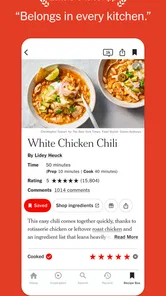
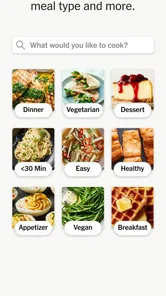
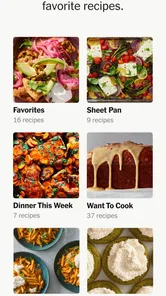
My most useful routine is to decide what kind of effort I can manage before browsing: a quick meal, a chance to practice, or something for guests. That small choice makes a large collection feel less overwhelming. I look for a recipe that suits the time and ingredients I actually have, then save promising options so I can return to them when planning another meal. The personal recipe box is especially handy here: it turns browsing into a shortlist rather than a pile of forgotten ideas.
For example, on a busy evening I might check what needs using up, pick a recipe that fits, and review its ingredient list before leaving for the shop. If I’m cooking for guests, I can save a more ambitious dish ahead of time and read through the instructions before the day itself. That advance look matters: it gives me a chance to notice unfamiliar steps and decide whether the recipe suits the occasion, instead of discovering the hard part halfway through cooking.
Discovering the Delights
From the moment I opened NYT Cooking: Recipes & Tips, I was greeted with a sleek, user-friendly interface that made navigation a breeze. The app boasts a vast collection of over 19,000 recipes. Yes, you read that right! It's like having a culinary encyclopedia at your fingertips. Be it a simple avocado toast for breakfast or a more elaborate beef Wellington for dinner, this app has got you covered.
Personalized Culinary Experience
One of the standout features for me was the ability to save recipes to a personal recipe box. This means I can plan my meals ahead and have my favorite recipes just a tap away. Additionally, the app offers personalized recommendations based on my cooking habits, which is a game-changer. It's like having a personal chef who knows exactly what you might be in the mood for.
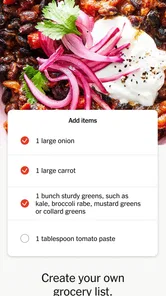
Moreover, the step-by-step instructions are clear and concise, making it easy even for a kitchen novice to whip up a gourmet meal. And if you're worried about missing any ingredients, the app lets you create a shopping list with ease. Just add the necessary items, and you're set for your next grocery run.
Getting more from each cooking session
I get the most from the recipe box when I treat it as a working shortlist: keep dishes I’m genuinely likely to cook, then remove the ones that no longer fit my plans. Before shopping, I compare the saved recipes and look for ingredients that can serve more than one meal. That is a practical way to make planning feel less like collecting links and more like deciding what to cook.
More From Our News Desk

Weather by Xiaomi Review: Clear at a Glance, Less Clear Up Close

X Under Pressure: Can It Recover When Posting Goes Wrong?

Clash of Clans Is Won Between the Battles

Android Auto Makes the Case for Quieter Car Software

MobiOffice: Transforming Mobile Productivity with Seamless Integration

EA SPORTS FC™ Mobile Soccer: Redefining Mobile Sports Gaming
Serving adjustments can help, but I still use judgement when scaling a dish. Changing ingredient amounts is useful for planning a different batch size; it does not automatically make every cooking time, pan choice, or seasoning decision foolproof. For a first attempt, I prefer to follow the method closely and use scaling mainly when the recipe’s proportions are straightforward. It is a small distinction, but it can prevent an awkward result when a dish depends on timing or texture.
Cook Like a Pro
What sets this app apart is its tips and techniques section. Whether you're looking to perfect your knife skills or learn the art of making the perfect soufflé, there's a wealth of information to explore. These insights are not only helpful but also empower you to cook with confidence and creativity.
Another nifty feature is the ability to adjust serving sizes. So whether you're cooking for one or a family of six, the app recalculates the ingredients for you. No more math headaches, just delicious food.
Who will enjoy it, and who may not
I’d recommend it to cooks who want tested-feeling guidance, a dependable place to keep recipes, and ideas beyond the same handful of weeknight meals. Beginners can use the clear steps to build confidence, while more experienced home cooks may appreciate having technique advice alongside dishes they can save for later. Its overall store rating is 4.6 from around 15,000 ratings, and it has passed 500,000 installs, so it has found a substantial audience without that being a guarantee that every recipe will suit every kitchen.
The trade-off is that this is not the best fit if your priority is a completely free, open-ended recipe database or a tool built around strict dietary filters and detailed nutritional tracking. The app is free to download, but paid in-app purchases range from $4.99 to $299.99 per item, so I’d check the purchase options before building a routine around features that may require payment. For a quick search across many independent recipe sites, a general web search may be more flexible; for a focused editorial collection and a saved personal cookbook, this app feels more considered.
Settings, access, and everyday limits
Before relying on it as my regular kitchen reference, I’d check the app’s settings and the purchase details on my device, then make sure my saved-recipe habit is simple enough to maintain. I avoid assuming that every convenience is included in the free experience. The app is rated for Everyone, currently lists version 2.121.3, and requires Android 10 or later; those details matter if you’re installing it on an older phone. Its release date was October 15, 2019, but what matters day to day is whether the current version runs well on your device and fits how you cook.
There is also a practical screen-time trade-off: following steps on a phone while handling food can be fiddly. I read the full method before starting, set out ingredients, and keep the device somewhere safe from splashes. That preparation makes a recipe app more useful than repeatedly unlocking a phone with messy hands, and it helps me spot a missing ingredient before the pan is hot.
Fitting it into a real week
A useful way to test whether this will earn a place in your routine is to give it one small job first: plan a couple of dinners, rather than trying to organize every meal at once. I’d browse when I have a quiet moment, save only dishes I can realistically shop for, and use the list while checking what is already in the kitchen. This keeps the recipe box practical. If it fills with aspirational projects, it becomes another backlog to manage instead of a shortcut to dinner.
For a household with different schedules, I’d choose a recipe early enough to see whether its steps can be paused or divided sensibly. A dish that needs focused attention may be a poor match for an evening when everyone arrives at a different time, even if its ingredients look convenient. Reading the method in advance helps me make that call. It also lets me identify which parts I can prepare earlier without guessing at changes the recipe does not suggest.
When shopping, I treat the app’s list as a planning aid rather than a complete inventory system. I still check cupboards and the refrigerator, combine duplicate ingredients from the meals I chose, and note quantities in a way that makes sense for my trip. That extra pass is worthwhile: lists assembled around several recipes can otherwise lead to buying something twice or overlooking a pantry staple I already own. The app helps me decide what to cook; a quick kitchen check makes the plan fit my actual supplies.
Settings and habits that prevent friction
I’d spend a minute exploring the available settings before settling into regular use, especially anything affecting notifications, display, or account and purchase choices if those options appear in the version on your device. I would not turn on every prompt by default. Recipe inspiration is useful when I’m ready to plan, but unsolicited reminders can make a cooking tool feel noisy. Keeping only the prompts that genuinely help your routine is a better way to make the app feel personal.
It is also worth deciding how you want to organize saved dishes. I prefer a few practical groups in my own thinking—reliable weeknight meals, things to try, and dishes for sharing—rather than saving every appealing recipe without a reason. Even if you use the recipe box simply, that distinction makes it easier to find a suitable option later. A saved recipe is most valuable when you can remember why you kept it.
Another small but useful habit is to read the full ingredient list and method before adding a recipe to a plan. A promising photo or title can hide a step that needs more time, a piece of equipment you do not own, or an ingredient that is inconvenient to find. Catching that early is not a criticism of the recipe; it is a way to choose more honestly. I’d rather save a dish for a relaxed weekend than discover at six o’clock that it does not fit a rushed evening.
Where it differs from recipe search
Compared with searching the open web, NYT Cooking feels more like choosing from a coherent editorial collection than sifting through pages of results. That can save decision energy when I want a clear recipe and useful cooking guidance, but it also means it is not my first stop for every question. If I need a very specific substitution, a narrow dietary requirement, or a broad comparison of many approaches, general search results may give me more variety. I would use each for the job it handles best rather than expecting one tool to cover every cooking need.
Compared with a blank notes app or a folder of bookmarked pages, the recipe box keeps the cooking choice closer to the recipe itself. That is convenient when I want to return to a dish and follow its steps, while notes remain better for recording my own changes, family preferences, or what I would do differently next time. I would not assume the saved recipe automatically captures those personal lessons. A short note elsewhere—such as “start the side dish earlier”—can make a repeat attempt much smoother.
The editorial approach is a strength if you want guidance and inspiration, not necessarily if you want an exhaustive filter-driven meal planner. Cooks who need carefully controlled nutrition targets or strict ingredient exclusions should verify every recipe themselves and may prefer a service built specifically around those needs. Likewise, someone who only wants to look up one basic technique now and then may be happier with free reference material. The right choice depends on whether a curated cooking library is something you will return to often enough to justify its purchase options.
Knowing when a recipe needs your judgement
Clear instructions are helpful, but I still treat cooking directions as guidance that meets the conditions in my kitchen. Ingredient size, equipment, and how quickly a stove heats can affect the result. I keep an eye on visual and texture cues instead of relying only on a timer, particularly when trying a dish for the first time. This is a practical skill rather than a special feature: an app can organize a method, but the cook still has to notice what is happening in the pan.
That matters when adjusting portions, too. The recalculated amounts are a convenient starting point, not a reason to scale every element mechanically. For a meal where timing and texture are central, I’d follow the original method closely and be cautious about changing the batch size dramatically. If I’m cooking for one, leftovers can sometimes be easier than halving a recipe whose steps depend on precise proportions. For a simple dish, scaling is more straightforward; for a delicate one, I’d make the decision based on the technique.
I also would not treat a recipe collection as a substitute for checking food needs carefully. If someone at the table has an allergy or a strict dietary requirement, I’d inspect the ingredients and instructions myself, including any packaged items I plan to use. That care is sensible with any recipe source. The app can help me find and follow a dish, but the responsibility for deciding whether it is appropriate for a particular person stays with me.
Final Thoughts
In a world where time is of the essence, NYT Cooking: Recipes & Tips serves as a reliable companion in the kitchen. Whether you're an experienced chef or someone just starting to explore the culinary world, this app provides a wealth of resources to enhance your cooking prowess. It's more than just a recipe app; it's a gateway to discovering new flavors and honing your culinary skills.
So, if you're ready to embark on a gastronomic journey, NYT Cooking: Recipes & Tips might just be the perfect app to download. Happy cooking!
My verdict after making it a habit
For me, the best approach is to use the app deliberately: browse when I have time, save only realistic choices, and check the method before I shop or start cooking. That routine makes its collection and planning tools more useful than opening it in a panic at dinnertime. I would skip it if I wanted a no-cost tool with no purchase considerations, or if I mainly needed highly specialized dietary planning. But if you enjoy trying recipes, learning from technique notes, and returning to a personal shortlist, it is a strong option to keep in the kitchen.
NYT Cooking: Quick Tasty Meals Frequently Asked Questions
Is NYT Cooking suitable for someone who is new to cooking?
NYT Cooking is presented as a digital cookbook with simple recipes and kitchen tips, which can make it approachable if you are learning your way around the kitchen. Its meal-planning focus may also help you turn recipe ideas into everyday meals. If you are deciding whether to download it, consider whether a recipe-and-tips app fits the kind of guidance you want.
What devices and operating systems can run NYT Cooking?
NYT Cooking is available for Android and iOS devices running version 10 or later. Before downloading, check that your device meets this minimum requirement so you can install the app. The current version is 2.121.3, and the app is rated for Everyone, making its age rating suitable for a broad audience.
What does NYT Cooking offer for planning everyday meals?
NYT Cooking is a Food & Drink app described as a digital cookbook, with simple recipes and kitchen tips intended to make meal planning easier. It can be a handy place to explore cooking ideas and keep meal preparation in mind when deciding what to make. The app is free to download, with in-app purchases available.
Who makes NYT Cooking, and is it available for my device?
NYT Cooking is developed by The New York Times Company. Its current version is 2.121.3 and it requires Android or iOS 10 or later, so checking your device’s operating-system version before downloading is a sensible first step. The app is rated for Everyone, making its age rating suitable for a broad audience.
What is NYT Cooking: Recipes & Tips?
NYT Cooking: Recipes & Tips is a culinary app developed by The New York Times that offers users a vast collection of recipes, cooking tips, and meal-planning resources. It is designed to help users discover new dishes, improve their cooking skills, and streamline meal preparation with expert advice and guidance from renowned chefs and food writers.
Pros
- Extensive recipe collection.
- User-friendly interface.
- Step-by-step cooking guides.
- Personalized recipe recommendations.
- Offline access to saved recipes.
Cons
- Requires subscription for full access.
- Limited free content.
- No grocery list feature.
- Occasional app crashes.
- Limited dietary-specific recipes.











