NYT Games: Word, Number, Logic
- 7.36K
- 4.6
- Installs
- 5.00M
- Price
- Free

Screenshots

Analysis by Reviewed
I like the idea of a puzzle app that can suit different moods: some days I want a quick word challenge, while other days I’m happy to sit with a longer grid. That mix is the main reason NYT Games: Word, Number, Logic stands out to me. It brings several familiar kinds of brain teasers together, so I can switch activities without searching for a separate app for each one. It is a strong fit for people who enjoy making puzzles part of an ordinary day, though it is less compelling if you want a single game with a deep progression system.
A collection built around changing moods
What makes this collection useful to me is not simply the number of formats, but the way each one asks for a different kind of attention. A word puzzle can feel playful and quick, while a crossword asks me to hold clues in mind and make connections. Sudoku gives me a steadier, more methodical task. I like being able to choose between those mental gears without making a new download or learning a completely different app.
That choice is especially handy when I have an unpredictable gap in my day. If I am waiting for an appointment and only have a little time, I can pick something that feels easy to pause. If I am settled at home, I can give a longer puzzle more care. The collection works best as a small menu of options rather than a single game I am expected to play in one prescribed way.
The World of Puzzles at Your Fingertips
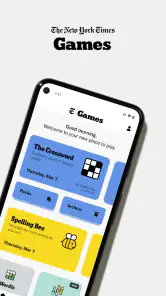
First off, the sheer variety of puzzles available in NYT Games: Word, Number, Logic is staggering. You’ve got your classic crosswords, which are as challenging as ever, and a great way to start your day with a cup of coffee. For those who are more into numbers, the Sudoku games range from easy to expert, providing a perfect brain teaser. And let’s not forget about the logic puzzles which will have you scratching your head but feeling oh-so-accomplished once solved.
Why You’ll Love It
What I absolutely love about this app is how it keeps things fresh. The daily puzzles mean there’s always something new to tackle, which is perfect for keeping boredom at bay. Plus, the interface is super intuitive, making it easy to jump between different types of puzzles without a hitch. Whether you’re on a quick lunch break or unwinding after a long day, these games are just a tap away.
That variety also changes how I use it. I might start with a short word puzzle while waiting for a bus, then choose Sudoku when I have more time and want to concentrate. At home, a crossword can turn into a slower, more satisfying session. This makes the app easier to fit around real life than a puzzle collection built around one long campaign: I can stop after a small challenge rather than feeling I need to finish a level before putting my phone away.
A useful habit is to pick the puzzle based on the kind of attention I have available, not just the time. Wordplay is a good choice when I want a lively mental nudge; a number grid suits me better when I want to focus steadily without chasing clues. If I’m tired, I avoid treating a difficult puzzle as a test of ability and switch to something lighter. That flexibility is a quiet strength, especially for people who want a pleasant routine rather than another daily obligation.
More From Our News Desk

Weather by Xiaomi Review: Clear at a Glance, Less Clear Up Close

X Under Pressure: Can It Recover When Posting Goes Wrong?

Clash of Clans Is Won Between the Battles

Android Auto Makes the Case for Quieter Car Software

MobiOffice: Transforming Mobile Productivity with Seamless Integration

EA SPORTS FC™ Mobile Soccer: Redefining Mobile Sports Gaming
Small routines that make the variety work
I find it helpful to choose one activity before opening the app, particularly when I only have a brief break. With several puzzle types available, browsing around can use up the time I meant to spend solving. Picking “a quick word challenge” or “a Sudoku session” first gives the visit a natural boundary, and I can save the other formats for another moment instead of treating the whole collection as a to-do list.
There is also a useful trade-off in the daily format: it gives me a reason to return, but it does not have to dictate my schedule. On busy days I can skip the puzzle without losing the point of having the app. When I do return, I can use the range to match my energy: a familiar format when I want to settle in quickly, or a different kind of puzzle when the usual routine feels stale. That is more sustainable for me than trying to preserve a perfect streak.
The collection is also a reasonable option for sharing a casual interest with someone else. Instead of asking a friend to install the same specialist game, I can talk about puzzle solving in general and compare how we approach different kinds of challenges. I would treat competition as an optional extra, though. If rankings turn a relaxing activity into pressure, the puzzles are still enjoyable as individual exercises; there is no need to make every session a contest.
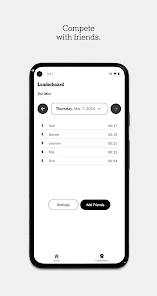
Another highlight is the sense of community. The app features leaderboards and allows you to compete with friends or other puzzle enthusiasts around the globe. This feature adds a competitive edge that motivates you to improve and climb up the ranks. It’s like having a friendly rivalry without ever needing to leave your couch!
Where the experience can feel limiting
While I’m a big fan of the app, it’s not without its quirks. Occasionally, I’ve noticed that some puzzles can be a bit repetitive, especially if you’re a daily player. Also, for those who aren’t keen on subscriptions, the app does push towards its premium service for full access to all puzzles. However, the free content is still plentiful and entertaining, making it worthwhile even if you don’t subscribe.
That access model is worth considering before you make it your only puzzle app. The game is free to download, but in-app purchases range from under a dollar to as much as $249.99 per item, so I would check the purchase details carefully and decide what I actually want to play before paying. The headline appeal is having different puzzle styles together; if you only want an unrestricted supply of one particular type, a dedicated app may be a better match for your habits and budget.
It is also worth setting expectations about the daily format. A fresh puzzle gives the app a natural stopping point, which can help keep a short break short, but it may frustrate anyone who wants endless new rounds on demand. I find it works best when I treat the daily selection as a menu, not a checklist: there is no need to complete every challenge just because it is there. That approach keeps the routine enjoyable instead of turning it into another streak to maintain.
Choosing the right puzzle for an ordinary day
For a realistic example, I might open it during a coffee break, choose one puzzle that fits the few minutes I have, and leave a crossword for the evening when I can give it proper attention. It is handy for that kind of stop-and-start use. If you are choosing a puzzle app for a child, the Everyone age rating is reassuring, but I would still review any purchase choices together, particularly because optional in-app spending can vary considerably.
On a commute, I would make a different choice from the one I make at home. A short word challenge is easier to fit into a ride with interruptions, while a more involved puzzle is better when I can give it sustained attention. This is not about one format being objectively superior; it is about avoiding the frustration of starting a puzzle that needs more focus than the moment allows. Having alternatives in one place makes that adjustment simple.
For someone deciding whether the app is suitable for a younger player, the Everyone rating is a useful starting point, but it does not replace an adult’s judgement about spending. I would look at purchase options together before handing over a device, and agree whether the aim is to try the free experience or consider paid access. That small conversation prevents a child’s interest in a particular puzzle from becoming an unexpected purchase decision.
For comparison, many standalone word or Sudoku apps do one thing and may suit someone who wants a focused practice tool or a particular style of play. This collection’s advantage is convenience and variety, not necessarily being the deepest option for every individual puzzle type. I’d choose a specialist alternative if I cared most about one specific format; I’d choose this when I want a rotating selection and the familiar feel of a daily puzzle habit. It is also a better fit for casual sessions than for players seeking elaborate progression, constant action, or a story-led game.
That distinction matters if you are used to puzzle apps that encourage continuous play. A specialist title may be more satisfying when you want to practise one format for an extended session or work through a clearly structured sequence. Here, the appeal is having different kinds of challenges ready to choose from, rather than a single skill path. I would not pick it as a substitute for every puzzle app; I would pick it as a convenient companion to a broader taste in word and logic games.
Another small gripe is the occasional ad interruptions, but hey, they’ve got to keep the lights on somehow, right? Thankfully, the ads aren’t too intrusive, so they don’t detract too much from the overall experience.
The app comes from The New York Times Company and is listed as a word game, although its appeal reaches into number and logic puzzles too. It has a 4.6 average from around 80,000 ratings and more than 5 million installs, which suggests that this blend has found a sizeable audience. It is free to start, rated Everyone, and its current version is 5.52.1; the app first appeared on November 17, 2016, and requires Android 10 or later. Those details make it accessible to many Android users, while the subscription and purchase prompts are the practical consideration I’d weigh most closely.
For a first-time user, I would keep the first session deliberately simple: open the app, choose one puzzle that sounds appealing, and see whether its pace suits you before deciding how much of the collection you want to use. You do not need to commit to every format just because they sit together. If one becomes a favourite, that is a good reason to return; if you mainly enjoy switching between types, the breadth itself is the point.
One question people often have about a collection like this is whether it is worthwhile without paying. My view is to try the free experience first and judge it by the puzzles you can actually access and enjoy, rather than assuming you need every feature. If the available selection already gives you a satisfying routine, there is no reason to spend just to make the app feel complete. If access prompts regularly interrupt the particular way you want to play, then a specialist alternative may be a better value for you.
Another practical question is whether this suits someone who wants a quick game or a longer session. I think it can do both, as long as you choose the format with the time and focus you have available. A short break is a natural fit for a compact challenge; a longer crossword or Sudoku session is better when you can concentrate without checking the clock. The app offers a choice of pace, but it cannot make every puzzle equally convenient in every setting.
In summary, if you’re in the market for a comprehensive puzzle app that offers a diverse range of challenges, NYT Games: Word, Number, Logic is definitely worth checking out. It’s engaging, user-friendly, and provides a satisfying mental workout. Just be prepared to get hooked and possibly lose track of time as you dive into your next puzzle challenge!
Who I’d Recommend It To
I’d recommend it to people who enjoy rotating between word, number, and logic puzzles, and who like the gentle structure of having a daily challenge ready when they open an app. It can also work well for friends who enjoy comparing progress, provided competition feels motivating rather than stressful. If you want a single specialist puzzle, unlimited play, or a game built around levels and a narrative, I’d look elsewhere. For everyone else, its breadth makes it an easy app to keep within reach—especially when a few spare minutes are better spent solving something than scrolling.
NYT Games: Word, Number, Logic Frequently Asked Questions
Does NYT Games include Wordle, and what else can I play?
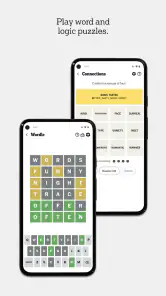
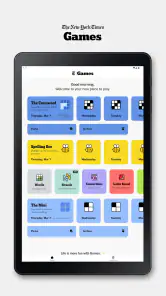
Yes. The app’s daily puzzle collection includes Wordle alongside The Crossword, Sudoku, Spelling Bee, Connections, and more. It brings together word, number, and logic challenges, so you can switch between different puzzle styles instead of focusing on just one. That variety makes it easier to find a quick daily challenge or settle into a longer puzzle session.
Who develops NYT Games, and is it suitable for all ages?
NYT Games is developed by The New York Times Company and has an Everyone content rating. Its collection focuses on puzzles, including word games, number challenges, and logic puzzles, making it suitable for a broad audience. Whether you are looking for a casual activity or a more demanding brain teaser, you can choose from different kinds of challenges within the same app.
Is NYT Games suitable for beginners and casual players?
Yes. NYT Games brings together familiar word puzzles alongside number and logic challenges, so you can choose a style that feels comfortable rather than having to master one format. The collection includes different difficulty levels, which gives newcomers room to learn while still offering more demanding puzzles for experienced players. It works well for short, focused sessions as well as a regular puzzle routine.
What does NYT Games cost, and are there in-app purchases?
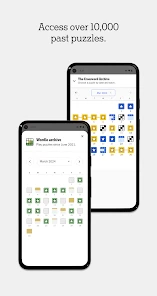
NYT Games is free to download, and some games are available to play without paying. The app also offers in-app purchases, with prices ranging from $0.99 to $249.99 per item, and a subscription is recommended for access to the full library and daily puzzles. It is worth checking which puzzles are available to you before deciding whether the paid option suits your playing habits.
What types of games are available in the NYT Games app?
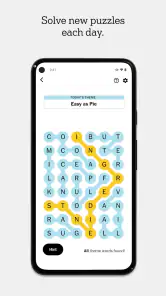
The NYT Games app offers a variety of engaging puzzles, including classic crosswords, mini crosswords, word games like Spelling Bee, number games such as Sudoku, and logic puzzles like Set and Vertex. Each game comes with varying levels of difficulty to cater to both beginners and seasoned puzzle enthusiasts, making it a versatile app for all players.
Pros
- Engaging puzzles boost cognitive skills.
- Diverse game modes cater to all tastes.
- Regular updates with new challenges.
- User-friendly interface enhances experience.
- Offline play available for convenience.
Cons
- Requires subscription for full access.
- Limited free content for non-subscribers.
- Occasional ads disrupt gameplay.
- Some puzzles can be too challenging.
- May consume significant device battery.
- Category
- Word
- Version
- 5.52.1













