Tactacam REVEAL
- 2.29K
- 4.8
- Installs
- 500.00K
- Price
- Free
Screenshots
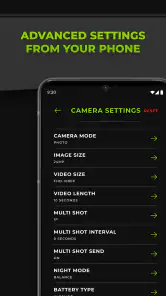
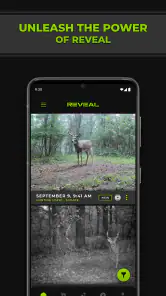
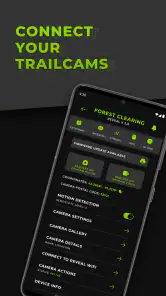
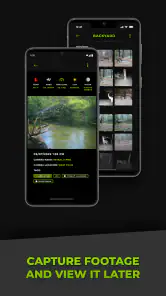
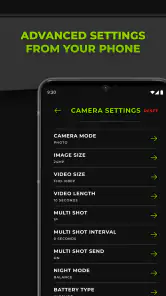
Analysis by Reviewed
Using a cellular trail camera is only useful if checking the camera becomes easier than ignoring it. That was my main question when I tried Tactacam REVEAL, a photography app made by Deer Management Systems for a TACTACAM REVEAL camera connected through Verizon or AT&T service. The first impression is appealing: instead of repeatedly visiting a camera in the field, I can use the app as the place where remote images and camera activity become part of my normal routine.
The app is free, rated for Everyone, and has built a strong audience on Android, with an average rating of 4.8 from around 25 thousand ratings and more than 500 thousand installs. Those figures suggest that the basic idea works for many camera owners. My experience is more nuanced: the app can earn a permanent place on a phone when the camera is used regularly, but it does not remove the practical work of maintaining the camera itself.
From exciting first checks to a useful daily habit
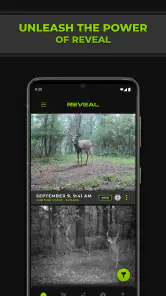
The first week is where the appeal is easiest to understand. After connecting a compatible REVEAL cellular camera, the phone becomes a convenient viewing point for activity that would otherwise require a trip outdoors. I can check whether the camera is producing images, look for changes in the area, and decide whether a visit is actually worthwhile. That shift from routine checking to selective checking is the app’s strongest everyday benefit.
I found the experience especially useful for a camera placed somewhere that is inconvenient to reach but still important to monitor. A quick look during a lunch break can answer a practical question: is there enough activity to justify packing equipment and driving out, or can the visit wait? The app does not replace being in the field, but it helps me spend field time more deliberately.
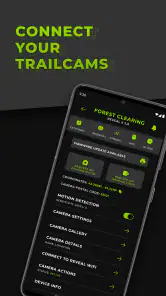
That distinction matters. This is not simply a gallery for photographs taken with a phone. Its value depends on the REVEAL camera and its cellular connection. If I do not own a compatible TACTACAM REVEAL setup, installing the app alone offers little reason to keep it. The app is part of a camera workflow, not a standalone photography editor or social photo service.
During the first few days, I naturally opened it more often than necessary. Every new image felt like an event, particularly when the camera was positioned in a place I could not visit immediately. That novelty is real, but it fades. The better sign is what remains afterward: a short, repeatable check that helps me make decisions without turning the app into another endless notification stream.
What the app changes in a real routine
Imagine placing a REVEAL camera near a remote property before a busy week. On the first morning, I check the app with coffee and see whether the camera captured anything overnight. If there is no useful activity, I avoid making a needless trip. If the images show a reason to investigate, I can plan the visit around the information already available. That is a small change, but repeated over several weeks it can make the camera feel like a practical tool rather than an expensive object left outdoors.
There is also a useful separation between observation and action. I can watch a location without disturbing it every day, then visit when there is a clear purpose. For wildlife observation, that may reduce unnecessary human presence. For property monitoring, it can provide an early reason to pay attention. The app’s lasting value comes from this decision-making role, not from the excitement of receiving one interesting image.
My advice during setup is to decide what a meaningful check looks like before opening the app repeatedly. For example, I might check at a fixed time, review the newest images, and note whether the camera needs attention. That habit prevents the first-week experience from becoming a cycle of opening the app simply because it is available.
Why the photography category is a slightly misleading fit
Although this belongs to the Photography category, I would not compare it directly with a phone camera, Lightroom-style editor, or a conventional photo backup app. There are no reasons to choose it for filters, creative editing, portrait adjustments, or casual sharing. Its photography purpose is observational: the camera captures images remotely, and the app gives those images a useful place in my routine.
Compared with physically checking a standard trail camera, the advantage is obvious convenience. Compared with a general cloud photo service, the advantage is that the app is tied to a field-camera workflow rather than a personal camera roll. Compared with a regular security camera app, the relevant question is whether a TACTACAM REVEAL camera suits the location and use case. A phone-based alternative may be better for someone who only needs photographs at home, while a conventional non-cellular trail camera may be better where remote access is unnecessary.
What remains valuable after the novelty fades
After the first month, I judge the app less by how impressive remote images feel and more by whether it helps me maintain a reliable observation habit. That is where the app can justify its place. A camera in the field is easy to forget, especially when the first few checks show nothing. The app gives me a low-effort reminder that the camera is still part of an ongoing project.
The recurring value is strongest for people managing more than one observation point or checking locations that are separated from home. Even without treating every image as important, I can use the app to compare activity over time, notice when a location becomes quiet, and decide when a physical visit has enough purpose. The benefit is not necessarily a dramatic discovery; often it is avoiding wasted effort.
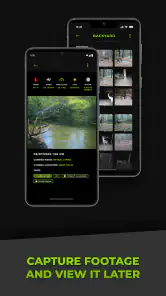
One of the more useful habits I developed was reviewing images in batches instead of reacting to every single capture. A batch view encourages me to look for patterns: repeated times of activity, changes in the background, or signs that the camera angle has shifted. This is more valuable than judging each photograph as an isolated moment. It also reduces the temptation to keep checking the phone throughout the day.
Another practical trade-off is that remote access changes what I expect from the camera. When I can see images from a distance, I become more aware of gaps in coverage, unexpected empty periods, or a camera that appears to be behaving differently. That awareness is useful, but it also means I notice problems I might otherwise discover only during a scheduled visit. The app improves visibility; it does not guarantee that everything outdoors is working perfectly.
Who gets the most from it
I would recommend the app to a landowner, wildlife observer, hunter, or outdoor photographer who already has a compatible REVEAL cellular camera and wants to reduce unnecessary trips. It is also a good match for someone who values a simple monitoring routine more than advanced image editing. The strongest user is patient enough to review activity over weeks rather than expecting every check to produce something exciting.
The app is less suitable for a person who wants a general-purpose camera companion. If the goal is editing phone photos, organizing a family gallery, or sharing creative work, another photography app will be a much better fit. It is also not the right choice for someone who dislikes maintaining outdoor equipment. Remote viewing may reduce travel, but it does not eliminate the need to pay attention to the camera, its placement, and the conditions around it.
Connectivity is another important consideration. Because the REVEAL camera connects through Verizon or AT&T, the overall experience depends on the camera’s cellular arrangement and the location where it is installed. I would not treat the app as a way to overcome a poor signal or an unsuitable placement. Before building a serious monitoring routine around it, I would test the intended location and make sure the camera can reliably communicate from there.
The maintenance work the app cannot hide
The most important long-term lesson is that an app cannot maintain an outdoor camera for me. I still need a sensible inspection routine. I would check the physical position, lens cleanliness, mounting stability, battery condition, and the surrounding growth that could block the view. The app can show me that images are arriving, but a stream of images does not prove that the framing is still ideal or that every important part of the scene is visible.
This is where remote monitoring can create false confidence. If I see recent photographs, I may assume the setup is fine. In practice, the camera could be pointed slightly differently after wind, covered by branches, or producing images that are technically present but no longer useful. I found it better to treat the app as an early-warning layer and schedule physical checks according to the environment, not according to the convenience of the phone.
A simple maintenance log helps. I can record when I checked the camera, what the recent images showed, and whether the next visit needs a specific task. That prevents vague concerns from becoming forgotten chores. If the camera is in a seasonally changing area, I would increase attention when vegetation, weather, or animal activity can alter the view.
The app also makes camera placement decisions easier to evaluate. Instead of waiting weeks for a single field visit, I can review the images and decide whether the angle, distance, and background are producing useful photographs. This is one of the less obvious strengths of remote access: it supports gradual adjustment. However, every adjustment still requires a real visit, so the app saves trips mainly when the information tells me that a visit is unnecessary.
Where fatigue begins
The biggest source of fatigue is not necessarily the interface; it is the stream of low-value images. A camera can capture plenty of activity that does not change what I need to do. If I check every alert or image with the same urgency, the app starts to feel like a task rather than a convenience. My solution is to define a review rhythm and focus on decisions: does the camera need attention, has the location changed, and is there a reason to visit?
There is also a psychological cost to remote visibility. Seeing activity can create pressure to respond immediately, even when nothing requires action. That is particularly noticeable when the camera is used for wildlife observation, where the user may begin treating every image as an update that deserves attention. The app works better when I regard it as a record to consult, not a live feed that demands constant supervision.
Another limitation is dependence on the complete hardware and service setup. The free app is attractive, but it is not the whole cost or responsibility of cellular camera ownership. The practical experience includes the REVEAL camera, its network connection, its power needs, and the location itself. Anyone comparing this with a standard camera should compare the entire workflow, not just the download price.
I also would not choose it for situations that require a fully managed security system with broader home-monitoring controls. A REVEAL camera and its companion app can make sense for remote outdoor observation, but a dedicated security platform may be more appropriate for doorways, indoor spaces, two-way communication, or a larger household monitoring setup. Choosing the right category matters more than trying to make one app handle every kind of camera task.
Version, accessibility, and everyday practicality
The current version is 5.10.4, and the app supports Android 7.0 and later. That makes it accessible to people who are not using the newest phone, although real-world smoothness will still depend on the device and the quality of the connection used by the camera. I appreciate that the app is not positioned as a premium photography editor requiring an expensive phone; its usefulness comes from access to the camera workflow.
The Everyone content rating also fits the straightforward nature of the product. Still, the rating should not be confused with suitability for every purpose. The app may be simple enough for a broad audience, but the outdoor camera responsibilities are more specialized. A first-time user should be comfortable with basic equipment placement and with checking a remote setup over time.
Deer Management Systems deserves credit for keeping the product focused around the REVEAL experience rather than turning it into a cluttered general photography tool. That focus is helpful when I open the app with a specific question about a field camera. It is less helpful if I expect a broad catalog of creative controls or photo-management features.
My long-term verdict
After the novelty fades, I still see a reason to keep Tactacam REVEAL installed, but only when the connected camera is part of a real monitoring habit. The app earns its space by reducing unnecessary travel, helping me evaluate a remote location, and making outdoor camera checks easier to fit into an ordinary week. Those benefits are practical rather than flashy, which is exactly why they can last.
The app is most valuable as a decision tool, not as an endless stream of pictures. If I use it that way, its limitations become manageable. I review images at sensible intervals, use what I see to plan physical visits, and remember that remote access does not replace maintenance. That combination gives the app a durable role instead of leaving it as a novelty I abandon after the first interesting capture.
I would choose it for someone who owns a compatible TACTACAM REVEAL cellular camera, has a location worth monitoring, and wants a lighter inspection routine. I would skip it for someone seeking phone-photo editing, a general gallery, or a complete home-security platform. At no cost, it is easy to try, and its strong 4.8 average reflects genuine usefulness for its intended audience. My final judgment is positive but conditional: it deserves lasting space when the camera serves a continuing outdoor purpose and the owner is willing to maintain both the equipment and the habit.
Pros
- Excellent cellular coverage for remote wildlife monitoring.
- Clear photo and video captures in daylight.
- Fast image delivery through the mobile app.
- Long battery life with efficient power management.
- Supports multiple cameras from one account.
Cons
- Requires a compatible cellular plan for remote features.
- Signal strength can vary significantly in wooded areas.
- Night images may lose detail in complete darkness.
- Advanced features may require a paid subscription.
- Initial setup can be time-consuming for first-time users.
- Category
- Photography
- Version
- 5.10.4











