Sweet Beauty Camera Filter
- 7.00
- 4.2
- Installs
- 1.00M
- Price
- Free
Screenshots


Analysis by Reviewed
Ever wanted to channel your inner influencer with those dreamy, flawless selfies? Enter Sweet Beauty Camera Filter, your ultimate sidekick for capturing moments that are not just photos but a work of art. Whether you’re a selfie aficionado, or just someone who likes to dabble in a bit of photo editing, this app is a game-changer. Let me take you through my experience with this nifty tool.
Getting Started with Sweet Beauty
First off, setting up Sweet Beauty Camera Filter is a breeze. A quick download from the app store, and you’re met with a user-friendly interface that feels intuitive. The app doesn’t bombard you with ads or unnecessary pop-ups, which is a breath of fresh air. It’s like the developers knew exactly what we needed—a clean, seamless experience from the get-go.
Features that Stand Out
Now, let’s talk about what makes this app pop. The range of filters is mind-boggling. From subtle enhancements to dramatic overhauls, Sweet Beauty offers something for everyone. I was particularly impressed with the real-time filter application. You can see the magic unfold live as you frame your shot, which is super handy when you’re trying to capture that perfect angle.
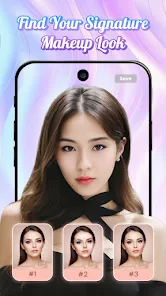
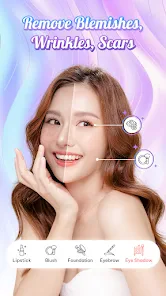
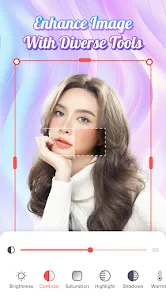
The beauty edit function is where the app truly shines. It’s like having a mini Photoshop in your pocket. You can smooth out blemishes, adjust skin tone, and even tweak your makeup—all without the edits looking too over-the-top. It maintains a natural vibe which is crucial for those who want to enhance their features without looking like a different person.
User Experience and Performance
As for performance, Sweet Beauty Camera Filter runs smoothly without any noticeable lag. Even when trying out different filters or editing features, the app responds quickly, making the entire process enjoyable rather than frustrating.
I also appreciate the straightforward sharing options. Once you’ve crafted your masterpiece, sharing it on social media platforms is just a tap away. It integrates well with all major platforms, ensuring your photos get the attention they deserve.
In conclusion, if you’re on the hunt for an app that elevates your selfie game without complicating your life, Sweet Beauty Camera Filter is a stellar choice. It combines ease of use with powerful features, making it a must-have for anyone looking to up their photo editing skills. So, go ahead, give it a whirl and watch your photos transform into something truly spectacular.
Pros
- Variety of filters available
- User-friendly interface
- Real-time editing effects
- High-resolution output
- Supports social media sharing
Cons
- Contains ads
- In-app purchases required
- Limited free features
- Requires internet connection
- Consumes battery quickly

- Category
- Photography
- Version
- 1.0.7











