StarSnap: Sports Card Scanner
- 1.52K
- 4.7
- Installs
- 100.00K
- Price
- Free

Screenshots




Analysis by Reviewed
Collecting sports cards is easy to enjoy and surprisingly difficult to manage. A few cards can sit in a binder without much effort, but once a collection grows, identifying editions, checking values, and remembering what you already own becomes a job of its own. StarSnap: Sports Card Scanner is built for that exact problem. It is a free tools app from Next Vision Limited that combines card identification, market-value checking, and collection organization in one place.
I found the idea useful because it focuses on the part of collecting that usually sends people between several services: taking a photo, searching for the right card, checking a price, and recording the result. StarSnap aims to shorten that process. It is not a replacement for careful inspection, especially with valuable cards, but it can give a collector a much faster starting point than browsing card databases manually.
Where the first scan can go wrong
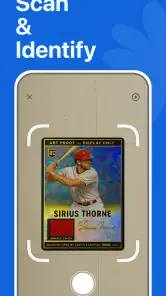
The most important thing to understand is that a scanner is only as good as the image and the card details it can read. A blurry photo, glare from a glossy surface, a sleeve covering the text, or several cards placed too close together can make identification less reliable. That is not unique to StarSnap, but it matters here because a wrong match can lead to a wrong value and an incorrectly organized collection.
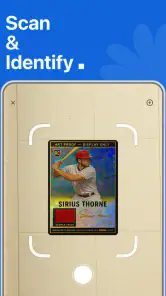
My best results came from treating the scan like a small photography task rather than quickly pointing the phone at a pile. I would place one card on a flat surface, keep the camera parallel to it, and make sure the name, team, player, season, and any visible identifying marks were readable. A plain background also makes it easier to separate the card from its surroundings.
Collectors often get stuck when a card looks almost identical to several versions. Sports cards can share the same player image while differing by set, year, parallel, insert designation, or condition. If StarSnap presents a likely match, I would still compare the result with the physical card before saving it. The app is helpful for narrowing the search, but the final decision belongs to the collector.
The practical rule is simple: use the scan as an identification shortcut, not as automatic proof of authenticity, edition, or condition. That distinction protects you from the most expensive mistake in card collecting: treating an approximate result as a confirmed valuation.
What to prepare before opening the camera
Before scanning a larger group, I recommend sorting cards into manageable batches. Separate sports, players, or sets if you already know them. This makes it easier to notice when a result does not fit the group and prevents a long session from becoming a confusing mixture of unrelated entries.
Lighting is another overlooked factor. Direct reflections can hide foil lettering and small print, while dim lighting can soften the image. Diffused room light is usually more useful than a bright lamp aimed straight at the card. If a card is in a rigid holder, try to reduce reflections by changing the angle rather than pressing the phone closer.
It also helps to decide what you want from the scan. If your goal is a quick inventory, speed matters and you may accept a preliminary match. If you are preparing cards for sale, insurance records, or a serious valuation, slow down and verify every important detail. The same app can serve both workflows, but the standard of checking should be different.
Setup checks that prevent avoidable friction
StarSnap is available as a free app, with optional in-app purchases ranging from $7.99 to $39.99 per item. That makes it easy to try before deciding whether its paid options fit your collecting habits. The content rating is Everyone, and the minimum operating system is 10, so users should check that their Android or iOS device meets that requirement before troubleshooting anything inside the app.
The current version is 1.1.1. If the app behaves unexpectedly, confirming that the installed version is current is a sensible first step. I would also close other camera-heavy apps, restart StarSnap, and try a single card under good lighting before assuming the collection workflow itself is broken. These are basic checks, but they separate a setup issue from an identification issue.
Give the app a moment to settle after installation and avoid judging it from a rushed first scan. A first-time user may be tempted to photograph an entire stack immediately, but that makes it difficult to tell whether a problem comes from the image, the card, or the way the collection is being entered. One clean test card creates a useful baseline.
If the camera view is not behaving normally, check the phone’s system settings for camera access and make sure the lens is clean. I would not keep retaking the same poor image while changing random app settings. Instead, test the camera with a clearly printed card, then compare that result with a card that has foil, a dark design, or a protective sleeve. The comparison can reveal whether the difficulty is general or limited to the card surface.
Another useful check is storage space. A collection app that relies on photographs can become inconvenient when a phone is nearly full, even if the issue first appears as a slow or incomplete scan. Freeing some space, closing background apps, and reopening the scanner can be more effective than repeatedly tapping the scan button.
Why the value result deserves a second look
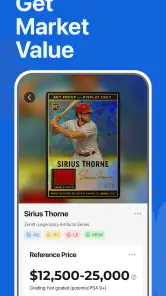
Market value is where collectors need the most restraint. A card’s value can depend on the exact release, condition, grading, demand, language, variation, and whether a sale reflects a realistic transaction or an unusually high asking price. StarSnap can make the research stage quicker, but a displayed market figure should be treated as a reference point rather than a guaranteed selling price.
I would use the value feature in three passes. First, identify the card. Second, inspect the result for details that match the physical copy. Third, compare the suggested value with the card’s condition and the context in which you plan to sell or trade it. A near-mint card and a heavily handled card may belong to the same product line but have very different practical values.
This is also why I would avoid scanning cards while they are still mixed in a box and immediately making financial decisions. The app is better used to create a shortlist of cards worth closer inspection. Once those cards are separated, you can check corners, edges, centering, surface marks, and any print differences yourself.
The rating gives the app encouraging early feedback: it holds a 4.7 average from around 19 thousand ratings, with roughly 1.5 thousand written reviews. I see that as a reason to try it, not as a promise that every obscure card will scan perfectly. The app has passed a meaningful level of user attention, but individual results will still depend on the card and the quality of the scan.
Recovering a collection workflow when a match looks wrong
When a scan produces an unlikely result, the worst response is to save it immediately and move on. That creates silent errors that are harder to fix later. I prefer a recovery routine: retake the image, remove glare, make sure the card is alone in the frame, and inspect the printed details again. If the second result still looks wrong, record the card only after manually checking the suggested identity.
A useful habit is to keep uncertain cards separate from confirmed entries. You can place them in a temporary physical pile while continuing with the easy cards. This keeps the collection organized without forcing a guess. It also prevents one difficult parallel or insert from slowing down the entire inventory session.
For large collections, work in short sessions. Scan a group, review the entries, and then continue. This creates natural checkpoints. If something goes wrong, you know which small batch needs attention instead of having to reconsider hundreds of cards. It is a less glamorous approach, but it is much safer for a collection that contains duplicates and similar designs.
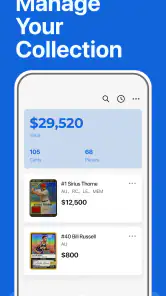
Duplicates need their own attention. A collector may want to know how many copies are owned, not simply whether a card exists. Before saving a new result, compare it with the entries already organized in the collection. If you are tracking cards for trading, keep the physical count aligned with the digital record. A scanner can identify an item, but it cannot compensate for a collection record that was not reviewed.
The same principle applies when moving cards between storage boxes or binders. Update the organization immediately after the scan while you still remember where the card went. Otherwise, the digital collection may tell you what you own but not where to find it. StarSnap is most useful when identification and organization happen as one routine rather than as separate projects.
A realistic weekend use case
Imagine finding a box of mixed basketball and baseball cards before a move. Instead of searching every card online from scratch, I would divide the box by sport, prepare a clean surface, and scan the clearest cards first. The app could help identify the cards and highlight which ones deserve closer value research. I would then separate duplicates, inspect condition, and place the confirmed entries into the collection before packing them.
For a trade night, the same workflow can be faster. I would use StarSnap beforehand to build a working inventory, but I would not rely on a quick scan alone to negotiate a high-value trade. I would verify the card’s exact version and condition, then use the app’s value information as one reference among the details that matter.
For a parent helping a younger collector, the app can turn a pile of cards into a learning exercise. The child can photograph a card, compare the result with the printed information, and decide whether the match makes sense. That encourages careful observation rather than teaching the habit of accepting the first automated answer.
When StarSnap is not the cause of the problem
Some frustrations come from the environment rather than the app. A card with a reflective finish may be difficult for any phone-based scanner. A damaged corner, faded print, or unusual custom design can make a database match uncertain. Older or less common cards may also require more manual checking because visual similarity does not always reveal the exact release.
Network conditions can create another source of confusion when an app needs to retrieve identification or value information. If a scan seems to stall, I would first test another card and check whether the phone can load an ordinary webpage. If only one card fails, the image or card variation is the more likely explanation. If every attempt is slow, a temporary connection problem may be involved.
It is also worth separating app performance from unrealistic expectations. No scanner can reliably determine a card’s physical grade from a casual photograph in the same way a professional inspection can. A clean-looking image does not prove that the surface is flawless, and a value estimate does not replace a buyer’s assessment.
Collectors who need detailed accounting may eventually outgrow a simple scanning workflow. If you require custom fields, advanced sales records, purchase costs, tax documentation, or highly specialized cataloging, a spreadsheet or dedicated collection-management system may offer more control. StarSnap is more appealing when the priority is reducing the effort of identification and keeping a practical inventory.
I would also skip it if you are unwilling to verify matches. The app rewards an organized user who checks details and corrects uncertain entries. It is less suitable for someone who wants to photograph a mixed box and receive a perfectly accurate financial report without any follow-up.
How it compares with the usual alternatives
The traditional alternative is manual searching. That approach can be precise when you know the sport, set, year, and card number, but it becomes tedious with unfamiliar cards. StarSnap’s advantage is the first step: it can help turn a visual object into a likely searchable identity without requiring you to know the right terminology in advance.
A general camera app is useful for taking reference photos, but it does not provide the same focused path from image to card information and collection organization. A spreadsheet gives excellent control over fields and personal notes, yet it does not remove the identification work. In practice, StarSnap fits between those options: faster than building every entry manually, but less customizable than designing your own complete database.
Dedicated marketplace searches may be better when you are ready to sell a specific card and need current buyer behavior, listing details, or transaction context. StarSnap is more convenient earlier in the process, when you are sorting a collection and deciding which cards deserve deeper research. I would use it as a front door to the workflow, not as the only source for a final sale decision.
The developer, Next Vision Limited, has positioned the app around a clear collector problem rather than a broad general-purpose tool. That focus is its strength. The trade-off is that users expecting a full professional inventory system may find the experience more streamlined than they want.
My practical verdict after using the workflow
StarSnap: Sports Card Scanner makes sense for collectors who want to identify cards faster and keep a more useful record of what they own. Its strongest role is sorting: scan a card, check whether the match makes sense, review the value as a starting reference, and organize the confirmed entry. That can save considerable time compared with searching every card by hand.
I especially like it for mixed collections, inherited boxes, trade preparation, and the early stage of deciding which cards deserve careful inspection. The free entry point lowers the risk of trying it, while the optional purchases mean frequent users should review what they actually need before spending more. The Everyone rating also makes it approachable for family collecting, provided younger users understand that automated identification still needs adult guidance for valuable cards.
My reservations are practical rather than deal-breaking. Image quality matters, similar card variants can confuse any visual identification process, and market values should never be accepted without checking condition and edition. The app becomes frustrating only when users expect it to remove every judgment call. Used thoughtfully, it reduces repetitive searching without pretending that collecting is completely automatic.
With over 100 thousand installs and a current version of 1.1.1, it has already attracted a substantial early audience. I would recommend giving it a controlled test with a few clearly printed cards before committing to a full collection. If those scans fit your cards and you are comfortable reviewing uncertain matches, StarSnap can become a handy part of your sorting routine. If you need deep accounting, professional grading, or guaranteed sale prices, pair it with more specialized tools instead of asking one scanner to do everything.
Overall, I would recommend it to casual and committed collectors who value speed but are willing to stay involved. StarSnap is most useful when it helps you make better decisions, not when it replaces your own inspection. That balance makes it a practical tools app for organizing sports cards, especially when the alternative is leaving a growing collection in unsorted boxes.
Pros
- Quickly identifies many sports cards using the phone camera.
- Useful for organizing large collections without manual data entry.
- Provides estimated card values for tracking collection changes.
- Search tools make it easier to find specific players or cards.
- Simple interface is approachable for beginners and casual collectors.
Cons
- Recognition may fail with damaged
- rare
- or poorly photographed cards.
- Price estimates can vary widely from current market sale prices.
- Some features or scans may require a subscription or in-app purchase.
- Coverage may be limited for international and less popular sports cards.
- Camera quality and lighting strongly affect scanning accuracy.

- Category
- Tools
- Version
- 1.1.1











