Spotify for Creators
- 7.46K
- 3.7
- Installs
- 10.00M
- Price
- Free

Screenshots
Analysis by Reviewed
I use Spotify for Creators as a companion for people who publish podcasts and want to keep an eye on how their work is reaching listeners. It is a free music-and-audio app from Spotify AB, aimed at creators rather than people simply looking for another player. The distinction matters: its value is in managing a creative presence, not replacing the everyday listening experience of Spotify’s main app.
Who will get the most from it
I can see it fitting a podcaster who already has a show and wants a convenient way to check its progress and stay involved with its audience. It also makes sense for a creator who prefers to handle routine checks on a phone instead of waiting until they are back at a computer. If you only want to discover music or play a podcast, though, a regular listening app is the more natural choice. This is a creator tool, so its usefulness depends on having something to publish and an audience to understand.
A realistic use is checking in after releasing an episode: I would look at the response, note which topics seem to be connecting, and use that as one signal when planning what to make next. I would avoid treating a single result as a verdict. Audience patterns are more useful when considered across several releases, and creative decisions still need judgment rather than a dashboard alone.
Unleashing Creativity at Your Fingertips
First off, Spotify for Creators is more than just a management tool; it’s your new best friend in the digital music world. It’s designed specifically for creators who want to have a more hands-on approach in managing their content. Whether you're an emerging artist or a seasoned podcaster, the app offers a suite of features that cater to your needs. I found the interface to be incredibly intuitive, with everything I needed just a tap away.
Analytics That Speak Volumes
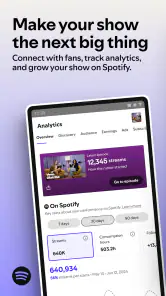
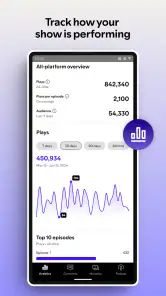
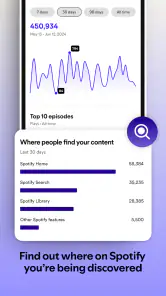
One of the standout features for me was the analytics dashboard. It’s like having a crystal ball that shows you how your content is performing. From stream counts to listener demographics, the app provides detailed insights that help tailor your strategy. I was amazed to see not just where my listeners are tuning in from, but also what tracks are resonating with them the most. This data-driven approach can truly help refine your content, ensuring it hits the right notes with your audience.
Engage Like Never Before
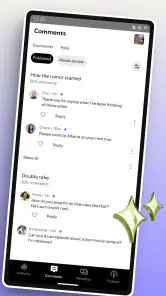
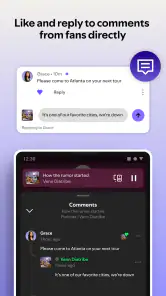
Engagement is key in the creator world, and this app makes it seamless. With features that allow interaction with your audience, such as Q&A sessions and polls, it’s easier than ever to build a community around your work. I personally loved how I could get real-time feedback from my listeners, making the whole experience feel more personal and connected.
Monetization Opportunities
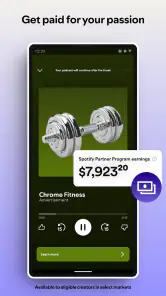
Let’s talk about the moolah! Another aspect where it shines is providing various monetization options. Whether it’s through merchandise, ticket sales, or exclusive content, the app opens up multiple revenue streams. It’s like having your own virtual store where fans can directly support your work. For me, this feature was a game-changer, turning passion into profit.
More From Our News Desk

Weather by Xiaomi Review: Clear at a Glance, Less Clear Up Close

X Under Pressure: Can It Recover When Posting Goes Wrong?

Clash of Clans Is Won Between the Battles

Android Auto Makes the Case for Quieter Car Software

MobiOffice: Transforming Mobile Productivity with Seamless Integration

EA SPORTS FC™ Mobile Soccer: Redefining Mobile Sports Gaming
Making the numbers useful
My practical tip is to decide what question you want analytics to answer before opening the dashboard. For example, if an episode is about a particular subject, compare its response with other episodes rather than reacting to a single listener figure. That keeps the information in perspective and can help you spot a promising theme without letting numbers dictate every creative choice. Audience insights can guide your next experiment, but they cannot tell you whether a story is worth telling.
For an existing creator, the main advantage is having audience-facing tools and performance information gathered into a creator-focused experience. Compared with ordinary podcast players, which are built for listening, this approach is more useful for managing a show and thinking about its relationship with listeners. A desktop workflow may still suit someone who prefers detailed planning or longer editing sessions; I would treat the mobile app as a convenient check-in and engagement companion, not assume it replaces every part of a creator’s setup.
Putting the mobile workflow to work
The strongest reason to keep a creator app on a phone is not that every production task belongs on a small screen. It is that a short check can fit into the gaps of a working day. I might review listener response while commuting, jot down a question to address in a future episode, then return to the main production setup when I have time to plan properly. That separation helps me use mobile access for decisions and audience contact without trying to do concentrated creative work in distracting moments.
For a small podcast team, the app can also serve as a shared point of reference during an informal planning conversation. One person can bring up how a recent release is landing, while the group discusses whether the response fits the topic and the show’s usual pattern. I would still keep episode outlines and production notes somewhere designed for sustained collaboration. The useful trade-off is quick access to audience context, not turning the phone into the team’s entire workspace.
Where the experience calls for care
The app’s broad creator focus may not be a perfect match for every kind of artist. The published description emphasizes podcast management, while the experience also speaks to musicians, so I would first consider what I actually need to do: check how content performs, engage an audience, or handle production work. Those are different jobs. If my priority were recording, editing, or organizing a complex production from start to finish, I would compare dedicated tools for those tasks rather than expect one creator app to cover everything.
Monetization deserves the same measured approach. Having routes such as merchandise, ticket sales, or exclusive content can be useful, but those options only help when they suit the audience and the creator’s plans. I would not build a strategy around earning money immediately; I would first focus on consistent publishing and on understanding what listeners value. That makes the commercial tools a possible next step, not a reason on their own to install the app.
How it differs from other creator tools
It helps to separate this app from both a listening service and a production suite. A typical podcast player is for following shows and hearing episodes; it is not where I would go to manage my own relationship with listeners. A dedicated recording or editing tool, on the other hand, is built around making the audio itself. Spotify for Creators sits closer to the audience-management side of that split, so it makes the most sense alongside whatever you already use to create and publish.
That distinction answers a practical question: can it replace a desktop setup? I would not count on it as a complete substitute if my work involves long editing sessions, detailed episode planning, or several production stages. A phone is better for quick checks and timely audience interaction, while a larger screen and specialist tools are usually more comfortable for intricate work. If you already have a workflow that feels reliable, this app is best judged by whether it adds useful access rather than whether it can do everything.
Small habits that improve the signal
When I look at performance, I try to compare like with like. A short conversational episode and a long interview may attract different listening patterns for reasons that have little to do with quality. I would group similar topics or formats in my own notes, then use the app’s audience information as context for the comparison. This keeps a dashboard from encouraging a quick but misleading conclusion, especially when a show is still finding its rhythm.
I would also make a habit of turning audience responses into specific, manageable experiments. If listeners ask about a subject, that does not mean the whole show needs to change; it could be a single follow-up episode or a brief segment. Likewise, a poll or Q&A can reveal what people are curious about, but it is not a substitute for deciding what fits the show. The app is most helpful when it brings feedback into view and I remain responsible for interpreting it.
Current state and what to watch
The app’s current version is 7.75.0.943, and its release history begins in September 2016. Those facts show a product with a long-running place in the creator-app space, but they do not, by themselves, tell me which individual tools have changed or how a particular feature has evolved. For someone already using it, I would judge changes by whether routine tasks feel clearer and whether the audience information remains useful to their publishing decisions.
It has a 3.7 average from around 83,000 ratings, which gives prospective users a useful sense that experiences vary. I would read that as a reason to check whether its creator-focused workflow matches my own needs, rather than as a simple verdict. It is free, rated Teen, and has over 10 million installs; an Android device needs version 10 or later. Those details make it straightforward to consider, but the best test is whether the app supports the way you already publish and connect with listeners.
Who should look elsewhere, and what to evaluate
If you are starting a podcast but have not yet settled on how you will record, edit, publish, and promote it, I would not treat this as the one app that solves the whole process. First work out which parts of production need dedicated tools and which audience tasks you want to manage from a phone. If all you need is an easy way to listen to podcasts, this creator-focused approach is unnecessary. If you mainly need professional audio editing or extensive team planning, another specialist tool will likely be a better fit for that particular job.
For a creator deciding whether to keep using it, I would watch for practical improvements rather than assume a newer version automatically means a better workflow. Are the tasks you do most often easy to find? Can you turn audience information into a decision without spending time interpreting it? Do interaction and monetization options suit the way your listeners participate? Those are the checks that matter to me. The version number tells me what is installed, while the day-to-day fit tells me whether it earns a place in my routine.
In conclusion, diving into it was a delightful journey. It empowers artists and podcasters to not only manage but also thrive in their creative pursuits. The app is a comprehensive package that combines analytics, engagement, and monetization, all wrapped up in a user-friendly interface. So, if you're looking to elevate your creative game, give it a whirl. Trust me, you won’t be disappointed!
Spotify for Creators Frequently Asked Questions
Can I manage my podcast from my phone with Spotify for Creators?
Spotify for Creators is designed to help creators manage and grow a podcast, with a mobile app for handling podcast-related tasks from a phone. It can be useful if you want creator tools close at hand rather than relying only on a computer. The app requires Android 10 or later, so check your device’s operating-system version before downloading.
Is Spotify for Creators the right app if I only want to listen to podcasts or music?
Spotify for Creators is intended for people who create or manage content, not for listening to music or podcasts as you would in regular Spotify. Its purpose is to help creators manage and grow a podcast. If you are looking for an audio player for everyday listening, regular Spotify is the more relevant app; this one is focused on creator tasks.
Can Spotify for Creators be used on both Android and iOS?
Spotify for Creators is a mobile app for managing and growing a podcast, so it is intended for creators who want to handle podcast-related tasks from a phone. Before downloading, check that your device runs a compatible operating system; the app requires version 10 or later. Its focus is on creator tools rather than listening to music or podcasts as you would in regular Spotify.
Who publishes Spotify for Creators, and what should I expect from the app?
Spotify for Creators is published by Spotify AB and belongs to the Music & Audio category. Its central purpose is to help creators manage and grow a podcast, rather than serve as a general-purpose audio player. The app has a Teen content rating, so it is worth considering that rating when choosing apps for younger users. The experience is aimed at people who already create or manage content.
What is Spotify for Creators and how does it differ from regular Spotify?
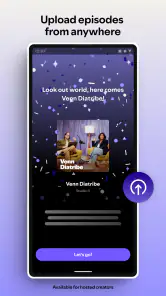
Spotify for Creators is a platform designed specifically for artists, podcasters, and other content creators to manage their presence on Spotify. Unlike regular Spotify, which is aimed at listeners, Spotify for Creators provides tools for artists to upload their music, analyze listener data, and engage with fans. It allows creators to manage their profile, track performance, and gain insights into their audience demographics.
Pros
- User-friendly interface for easy navigation.
- Comprehensive analytics for content performance.
- Seamless integration with social media.
- Customizable profile and track settings.
- Global reach to millions of Spotify users.
Cons
- Limited free features compared to premium.
- Data updates can be slow at times.
- Requires internet for most features.
- Complex for beginners to fully utilize.
- Some features locked to certain regions.
- Category
- Music & Audio
- Version
- 7.75.0.943













