SkyView® Lite
- 5.13K
- 4.3
- Installs
- 10.00M
- Price
- Free
Screenshots
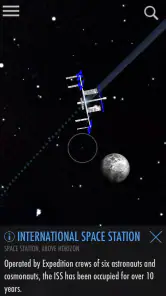
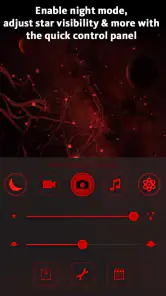
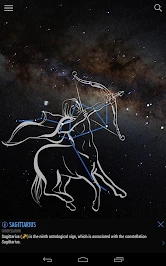
Analysis by Reviewed
When I want to make sense of a patch of night sky, I prefer an app that helps me connect what I see with the names and patterns behind it. SkyView® Lite is an education app from Terminal Eleven LLC that uses augmented reality to make stargazing approachable. It is free, rated for Everyone, and has a 4.3 average from around 57,000 ratings, with more than 10 million installs. Those figures suggest a broad audience, but the real question is whether its style of sky exploration fits how you like to learn.
Finding a clear path through the sky
The central appeal is the direct link between looking upward and identifying what is there. Rather than beginning with a dense chart or a long lesson, I can use the phone’s view of the sky as a point of reference. That makes the app especially useful for a first-time stargazer who may not yet know where one constellation ends or how to begin picking out objects. It turns a vague question—“What am I looking at?”—into a more focused invitation to explore.
Readability and navigation
Augmented reality can make astronomical information feel less abstract, because the phone’s view supplies a visual context. I find that approach easier to share than asking a beginner to interpret a conventional star chart right away. Still, an overlay is not the same as a guided course: anyone who wants a carefully sequenced astronomy curriculum may be better served by lessons or a reference source built around structured study.
One useful way to approach a session is to choose a single visible object or region, identify it, and then pause to look at the sky without the screen. That small habit prevents the app from becoming the whole activity. It also helps a learner test whether the label has made the pattern easier to remember, rather than simply collecting names while staring at a phone.
Making a short session easier to follow
I would keep the first outing deliberately simple: settle on one question, such as identifying a bright point, and resist the urge to investigate everything at once. The sky is a large subject, and a stream of labels can feel like noise if there is no purpose behind them. Returning to the same patch after a short pause can be more useful than quickly sweeping across the horizon, because it gives you time to connect the on-screen reference with what your eyes can actually pick out.
For a family or small group, taking turns holding and looking at the phone can make the activity more collaborative. One person can describe what they see while another checks the view, then everyone can look up together. This also gives a child or a beginner a chance to ask questions without being expected to understand a chart immediately. I would treat the app as a prompt for conversation, not a test of who can name the most objects.
Motor and sensory considerations
Pointing a phone around the sky is an intuitive interaction, but it does ask the user to hold and reposition a device. That can be tiring or awkward for someone with limited grip, arm movement, or balance, especially during a longer session. I would treat the app as a flexible aid rather than assume everyone can use it comfortably in the same way; a seated position, a stable place to rest the phone, or help from a companion may make the activity more manageable.
More From Our News Desk

Clash of Clans Is Won Between the Battles

Android Auto Makes the Case for Quieter Car Software

MobiOffice: Transforming Mobile Productivity with Seamless Integration

EA SPORTS FC™ Mobile Soccer: Redefining Mobile Sports Gaming

How Microsoft OneDrive Became a Mobile Productivity Giant

How Google Translate Breaks Language Barriers Effortlessly
Stargazing also involves darkness, screen brightness, and visual attention shifting between a display and the real sky. Those conditions can be uncomfortable for some people, and a bright screen can distract from the view. I recommend keeping sessions short at first and adjusting the phone’s brightness to suit the surroundings. The best result is not necessarily the most time spent looking at the display, but the moment when the screen helps you return your attention to the sky.
There is a practical trade-off here: the screen is the guide, but it can also compete with the thing you came to see. If the display feels visually tiring, I would use it briefly to orient myself, lower the brightness to a comfortable level, and then put the phone down while observing. People sensitive to bright displays or who find switching focus uncomfortable may prefer to have a companion operate the phone and describe what appears, rather than trying to manage both tasks at once.
Using it in everyday settings
A simple evening use case is stepping outside with a friend or child, picking one object to investigate, and taking turns looking between the phone and the sky. That shared routine can make the app an accessible conversation starter even for people who have never used an astronomy guide. Its Everyone age rating also makes it suitable for a broad audience, though younger users will still benefit from an adult helping them interpret what they see and keeping the phone from becoming a distraction.
Context matters. In a brightly lit neighborhood, the display may help orient a beginner, but the actual sky can offer fewer visible points to compare. A darker location can make looking upward more rewarding, yet getting there safely and comfortably is part of the plan. If a user cannot easily go outside, the app’s AR approach may be less useful than a book, a lesson, or another resource that does not depend on aiming a phone at the sky.
For an ordinary weeknight, I can imagine using it from a safe spot near home after noticing a bright object on the way back from a walk. A quick check can turn that small moment into a shared question without requiring anyone to plan a full observing trip. If the weather is poor or the sky is washed out by nearby lights, I would not force an outdoor session; a printed chart or astronomy book can still support learning indoors, while the AR view is best when there is something overhead to compare it with.
It can also suit someone who wants a low-pressure first step before deciding whether astronomy is a lasting interest. Since the app is free, trying it does not require committing to a paid course or buying observing equipment. But I would not interpret that as a reason to replace every learning resource with it: a curious learner who wants to understand the science in depth will likely want reading or instruction alongside brief identification sessions.
Where the approach has limits
Compared with a printed sky chart, an AR guide offers a more immediate visual link but depends on using a device while observing. A chart avoids that screen-based distraction and can be easier to consult with both hands free, while a detailed astronomy reference is better for sustained reading. I see SkyView® Lite as a handy starting point, not a replacement for every kind of sky-learning tool. It is a weaker fit for someone who wants a text-first experience, a formal course, or an activity that requires little physical interaction.
The app’s current version is 3.9.2, and it runs on operating systems from version 10 onward. Before installing, I would check that the device meets that requirement and consider whether its screen and controls are comfortable to use outside. Free access makes trying it low-risk, but convenience alone does not guarantee that the interaction will suit every person or setting.
There is another useful distinction between identifying something and learning why it matters. An object label can help answer what you are looking at, but a person who wants a progressive explanation of orbital motion, stellar life cycles, or observational technique may need a dedicated book, course, or astronomy resource as well. I would choose this app when the immediate task is orientation and curiosity; I would choose a structured reference when the goal is a deeper, organized study session.
It is also not the best choice for every outing. If keeping a phone steady is difficult, the surroundings are too bright to make the sky satisfying, or the user would rather stay indoors, the central point-and-look interaction loses much of its value. In those situations, a conventional chart, a spoken explanation from a companion, or a text-based learning resource may be more comfortable and less distracting.
A welcoming starting point, with practical caveats
My overall view is that this is a friendly way to turn curiosity into a short learning activity. Its strongest use is helping someone begin observing and asking questions, not replacing deeper study or accommodating every access need automatically. The app’s reach—more than 10 million installs—shows that many people have tried it, while its 4.3 average reflects generally positive reception; neither figure can tell an individual whether the display or the physical interaction will work for them.
If you are choosing between this and a conventional chart, ask yourself whether you learn better by pointing at the sky or by studying a stable page. If holding a phone up is uncomfortable, try a supported position or ask a companion to operate it; if that still feels like a barrier, a chart or spoken explanation may be a better choice. For a curious beginner who can comfortably use a phone outdoors, though, it offers an inviting way to start noticing the sky rather than treating it as an indistinct backdrop.
I would recommend it most readily to beginners, families, and casual observers who enjoy learning through visual prompts and can comfortably use a phone outdoors. Someone who already knows how to navigate a sky chart may still find the direct overlay convenient for a quick check, but may get more from a detailed astronomy reference when they want to study. For users who need a hands-free, low-vision, or indoor-first experience, I would compare alternatives carefully rather than assume an augmented-reality interface will automatically make astronomy more accessible.
Features that Shine
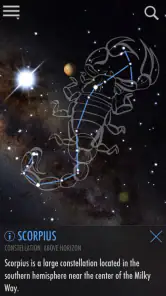
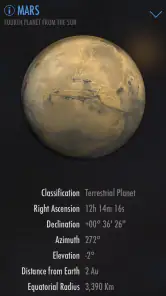
One of my favorite features is the app's ability to display information about each celestial body you encounter. Tap on a star or planet, and you’ll be treated to a wealth of information, including its name, distance from Earth, and its position in the galaxy. It's like having a mini astronomy class wherever you go.
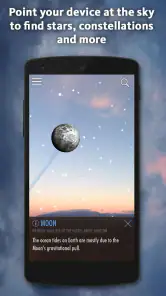
For those who love a good nighttime adventure, the app also has a night mode, which uses red light to preserve your night vision. This is especially handy when you're out in the field, surrounded by the beauty of a clear night sky. Plus, with augmented reality (AR) mode, you can see the sky in a whole new dimension, overlaying astronomical objects on your actual sky view.
Seamless Experience
SkyView® Lite doesn't just excel in functionality; its user interface is a dream to navigate. The clean, intuitive design ensures that even the most technologically challenged among us can use it with ease. And let's not forget about the stellar graphics that make stargazing more engaging than ever.
Another cool aspect is the ability to travel through time. Wondering what the sky looked like on your birthday or perhaps on a significant historical date? The time travel feature allows you to see the sky as it appeared on any given day. It's a fun way to connect with history and see how the stars have aligned over the years.
Final Thoughts
In conclusion, SkyView® Lite is more than just an app—it's an invitation to explore the universe and learn something new every day. Whether you're a seasoned astronomer or a newbie stargazer, this app offers a delightful experience that’s both educational and entertaining. Plus, it’s free, so there’s really no reason not to give it a try.
So next time you find yourself under a blanket of stars, pull out your phone, fire up SkyView® Lite, and let the night sky reveal its secrets to you. Happy stargazing!
SkyView® Lite Frequently Asked Questions
Does SkyView® Lite need camera access to show the sky?
SkyView® Lite’s augmented reality experience uses your device’s camera view to place information about celestial objects over the scene in front of you. That lets you point your phone around and explore the sky interactively. If you prefer not to use the camera, the app’s main stargazing experience may not be as useful, so consider whether this style of viewing suits you.
Can SkyView® Lite help me learn about constellations and planets?
Yes. SkyView® Lite is an education app that makes exploring the night sky visual and approachable. You can point your device toward the sky to identify objects such as constellations, stars, planets, and satellites, then use the information shown on screen to guide your curiosity. It can be a handy companion for casual learning and stargazing.
What devices and operating systems can run SkyView® Lite?
SkyView® Lite is available for mobile devices, and its current version is 3.9.2. Check that your device runs Android 10 or later before downloading. Because the app uses augmented reality to place celestial objects over a camera view, the experience is best suited to a device you can comfortably point toward the sky.
Is SkyView® Lite free, and who makes it?
SkyView® Lite is a free education app developed by Terminal Eleven LLC. It has an average rating of 4.3 from around 57,000 ratings, with more than 10 million installs. Those figures give a sense of its broad audience, but the main appeal is its accessible, visual approach to exploring the sky.
What is SkyView® Lite and what does it do?
SkyView® Lite is an augmented reality (AR) app that allows users to explore and identify celestial objects such as stars, constellations, planets, and satellites by pointing their device towards the sky. Using your smartphone's camera, it overlays information about the objects you see, providing a new way to learn about astronomy and the night sky.
Pros
- User-friendly interface
- Accurate star tracking
- Offline mode available
- AR features enhance learning
- Supports night mode for eye comfort
Cons
- Limited features in free version
- Ads can be intrusive
- Battery consumption is high
- Needs precise calibration
- Occasional GPS issues
- Category
- Education
- Version
- 3.9.2












