SkyView® Explore the Universe
- 1.31K
- 4.4
- Installs
- 500.00K
- Price
- $4.99
Screenshots
Analysis by Reviewed
I like stargazing most when I can turn a vague question—“What’s that bright point?”—into something I can explore on the spot. SkyView® Explore the Universe is an education app from Terminal Eleven LLC that helps connect what I see overhead with names and paths on my phone. It costs $4.99, has an Everyone age rating, and has a 4.4 average from around 7,600 ratings. For a curious beginner, that mix of quick identification and visual learning is its clearest appeal.
A simple routine for looking up
My most useful approach is to open the app outside, point the phone toward a visible object, and use the on-screen sky view to orient myself. Instead of guessing whether a bright point is a star or planet, I can compare the overlay with the sky and follow its path. That makes the app more engaging than a static star chart, especially when I am sharing the view with someone who has never tried stargazing before.
A practical tip is to begin with one object rather than sweeping the phone around quickly. Pause, check the label, then move gradually to nearby points or a constellation. This makes the view easier to interpret and gives a child or first-time user time to connect the display with the real sky. On a family walk or a quiet evening in the yard, that small habit can turn a brief glance upward into a short, satisfying lesson.
Discover the Cosmos
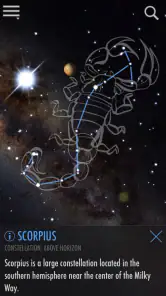
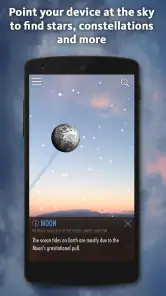
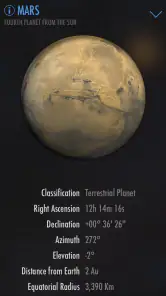
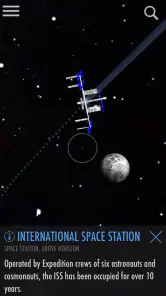
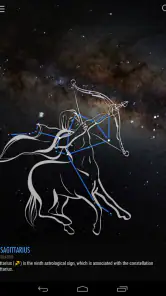
One of the coolest features of SkyView® Explore the Universe is its ability to identify celestial objects just by pointing your device at the sky. Whether it's a bright star, a distant planet, or a mysterious constellation, this app has you covered. Trust me, there’s something magical about seeing the names and paths of celestial bodies overlaying the night sky as you move your phone around. It’s like having a personal planetarium in your pocket!
Features Galore
This app isn’t just about visuals; it’s packed with features that enhance your stargazing experience. You can explore the sky during the day or night, track satellites, and even set reminders for celestial events. The augmented reality (AR) feature is a personal favorite. It’s so immersive and makes learning about the universe super fun and interactive. Plus, the time-travel feature allows you to view the sky on any date in the past or future, which is pretty mind-blowing!
Settings and faster habits
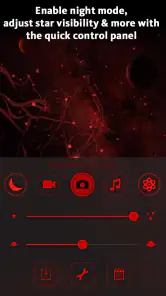
Before relying on the overlay during an outing, I would check the app’s available settings and adjust the view to suit the situation, rather than assume every label or path needs to be on screen at once. A less cluttered display is easier to scan when I am showing someone a particular object. I also find it useful to use the time-travel view deliberately: choose a date to explore a sky change, then return to the current view before trying to match anything overhead. Treating those as separate steps avoids confusing a simulated view with what is visible now.
For a quick evening routine, I would pick one goal before opening the app: identify a bright object, look for a constellation, or check where a satellite is passing. If I am planning a later look, the event reminders can help make that plan more concrete. The app’s offline operation is especially handy away from reliable internet, but it does not remove the need for a clear view of the sky. Clouds, bright outdoor lighting, and an unfamiliar horizon can still make real-world observing difficult.
More From Our News Desk

Clash of Clans Is Won Between the Battles

Android Auto Makes the Case for Quieter Car Software

MobiOffice: Transforming Mobile Productivity with Seamless Integration

EA SPORTS FC™ Mobile Soccer: Redefining Mobile Sports Gaming

How Microsoft OneDrive Became a Mobile Productivity Giant

How Google Translate Breaks Language Barriers Effortlessly
Where it fits—and where it doesn’t
Compared with a printed star chart, SkyView is more immediate because I can point my phone and see labels overlaid on the scene; a paper chart, though, never competes with screen brightness or battery use and can encourage learning the sky without looking at a display. Compared with a general astronomy article or video, the app is better for connecting a particular moment and direction with the objects being discussed. For detailed observing plans or technical analysis, I would pair it with a dedicated astronomy resource rather than expect a pocket planetarium to do every job.
That distinction matters for experienced users. SkyView makes orientation and curiosity accessible, but an overlay is not a substitute for optical equipment, dark skies, or careful observation. I would use it to decide what to look for, then put the phone away for a while and let my eyes adjust. If precise measurements or a structured observing log are the priority, a specialist tool is a better fit; if the goal is to help friends recognize what is above them, this app is much easier to share.
Features Galore
This app isn’t just about visuals; it’s packed with features that enhance your stargazing experience. You can explore the sky during the day or night, track satellites, and even set reminders for celestial events. The augmented reality (AR) feature is a personal favorite. It’s so immersive and makes learning about the universe super fun and interactive. Plus, the time-travel feature allows you to view the sky on any date in the past or future, which is pretty mind-blowing!
Another great aspect is its user-friendly interface. You don’t need to be an astronomy expert to navigate through the app. Everything is intuitive, and the learning curve is minimal. Whether you're planning a night out under the stars or just curious about what’s above you, this app is straightforward and engaging.
Learning beyond the first look
I find the time-travel option most useful as a teaching aid rather than a shortcut for tonight’s observing. It lets me compare how the sky changes across dates, which gives a child a concrete way to ask why the arrangement is different. Satellite tracking offers another reason to revisit the app: rather than only checking familiar stars, I can make a specific pass the focus of an evening. Those activities work best when I set expectations—an app can help me find and understand what to watch for, but the actual view still depends on conditions outside.
The app is a strong match for casual observers, families, and teachers who want an interactive starting point without needing astronomy expertise. Someone who mainly wants a passive, polished documentary may prefer a video, while a dedicated observer who needs technical planning should look elsewhere or use SkyView alongside specialist tools. Its $4.99 price makes most sense if I expect to return to it for repeated sky checks, lessons, or planned events, rather than open it once for a novelty.
Why You’ll Love It
If you’re anything like me, you’ll appreciate how SkyView makes stargazing accessible and exciting. The app turns casual skywatching into an educational experience, providing detailed information about stars, planets, and constellations. It’s perfect for families, educators, or anyone with a curious mind. Plus, sharing your skywatching adventures on social media is a breeze with its easy-to-use sharing features.
Moreover, the app doesn’t require an internet connection to function, which means you can use it virtually anywhere. Whether you're camping in the woods or chilling in your backyard, this app is your gateway to the stars.
What to expect from the experience
With over 500,000 installs, a 4.4 average from roughly 7,600 ratings, and around 1,300 written reviews, SkyView has attracted a sizeable audience for a paid education app. It was released on September 27, 2014, and version 3.9.2 requires OS 10 or later. I would check that minimum before buying, then think about how I plan to use the app: as a hands-on guide outdoors, a way to prompt questions at home, or both.
One question people often have is whether it is useful without a connection: yes, its core use does not require internet, making it suitable for remote trips. Another is whether it is only for nighttime; the app can show the sky during the day too, though seeing stars in daylight is a different matter from viewing an overlay. Reminders can help with planning, but they do not guarantee a clear or convenient viewing window. In practice, I treat them as prompts to step outside and check conditions, not promises of a spectacle.
The Final Verdict
All in all, SkyView is a must-have for anyone who has ever been captivated by the night sky. It’s educational, entertaining, and endlessly fascinating. So next time you find yourself looking up in wonder, remember that the universe is just a tap away. Happy stargazing!
A more grounded recommendation
I would recommend it to a friend who wants a friendly way to identify objects, introduce children to the sky, or make an ordinary evening walk more curious. I would not choose it as my only astronomy resource if I needed technical precision or a rigorous observing workflow. Its best use is a repeatable one: choose a question, use the overlay or a relevant feature to explore it, then look away from the phone and observe for yourself. That balance is what makes the experience feel educational rather than merely decorative.
Make an outing easier to follow
A little preparation helps the app feel like a guide instead of a screen that competes with the night. Before stepping outside, I would decide whether the outing is about recognizing a planet, exploring a constellation, or waiting for a satellite. That single choice gives everyone something clear to look for, and it makes the app’s labels and paths easier to use selectively. For children, I would ask them to guess first, then use the overlay to check; that keeps the real sky—not the phone display—at the center of the activity.
For a casual evening, the most useful workflow is often to check the sky indoors or near a window, then take the phone outside and use it only briefly to orient yourself. If the screen is distracting, lower its impact as much as the available display settings allow, and avoid continually moving the phone while trying to compare the overlay with a real object. I find short checks more effective than holding the device up for the whole session. They preserve the app’s convenience while giving my eyes time to adapt and notice details unaided.
Good for curious beginners, less so for every observer
This is an especially approachable choice for someone who has looked up at a bright point and wanted an answer without first learning a chart’s symbols. It also suits a parent or teacher who wants a prompt for discussion: a name on the screen can lead naturally to questions about where an object appears and how the view changes over time. Travelers and campers may appreciate being able to use the app without a connection, though local weather and the brightness of the surroundings still determine how much there is to see.
I would be more hesitant to recommend it to someone who dislikes using a phone outdoors, wants to preserve night vision, or expects exact observing data for equipment setup. A printed chart can be calmer and more dependable when battery conservation matters, while a specialist astronomy app or reference is a better choice for methodical planning. SkyView’s strength is the immediate visual bridge between a question and the sky. That is valuable, but it is a different goal from measuring, recording, or conducting a highly structured observing session.
Small trade-offs that shape the experience
The overlay is most impressive when the phone’s direction and the scene are easy to compare, but it can also make a beginner rely on the display too much. I try to use a label as a clue, then lower the phone and find the same area again with my own eyes. This simple back-and-forth turns identification into practice rather than a one-time answer. It is also a useful way to check whether I have understood the orientation, instead of assuming that seeing a name means I can recognize the object unaided.
Time travel has a similar trade-off: it can make the changing sky easier to discuss, but it is a view to explore rather than a report of what is overhead at that moment. I keep the chosen date in mind and return to the present before using the app to identify something outside. Satellite tracking and reminders are best treated as ways to give an outing a focus, not guarantees that a pass will be easy to see. This keeps expectations realistic and helps the app support the experience without promising more than the sky can deliver.
Worth returning to, if you enjoy looking up
The purchase makes most sense to me when I picture several uses rather than a single novelty: a quick identification during a walk, a family lesson at home, and a planned attempt to spot a satellite. That variety gives the app room to become a regular learning aid. If I only wanted a one-off explanation of a famous constellation, a free article or video might be enough. If I wanted to become a more confident observer, I would use SkyView as an accessible first step and build a separate habit of learning the sky without a phone.
Terminal Eleven LLC’s app is a focused education tool, not a replacement for every astronomy resource. Its combination of augmented reality, date-based sky exploration, satellite tracking, reminders, and offline use gives curious people several ways to engage with what is above them. I would install it for the moments when a simple question sparks a longer conversation, while keeping in mind that a clear sky, patience, and direct observation matter just as much. Used that way, it earns its place as a practical companion for casual stargazing.
SkyView® Explore the Universe Frequently Asked Questions
Is SkyView® Explore the Universe free to download, and what does it cost?
SkyView® Explore the Universe is a paid app priced at $4.99, so it is worth checking the purchase details in your device’s app store before downloading. Its focus is educational stargazing: the app uses augmented reality to help bring the night sky into view and make exploring celestial objects more approachable. The price is for the app itself; consider whether its sky-identification tools fit the way you want to learn and explore.
What is SkyView® Explore the Universe and how does it work?
SkyView® Explore the Universe is an app designed to help users identify stars, constellations, and satellites in the sky. By using your device's camera, it overlays information about celestial objects on your screen. Simply point your device at the sky, and the app will provide real-time data and visuals about the astronomical bodies in your view.
Is SkyView® Explore the Universe suitable for beginners in stargazing?
Yes, SkyView® is user-friendly and perfect for beginners interested in stargazing. The app offers an intuitive interface with easy-to-understand tutorials and guides. It not only identifies celestial objects but also provides educational information, making it a great tool for anyone starting their journey into astronomy.
Does SkyView® Explore the Universe require an internet connection?
No, SkyView® does not require an internet connection to operate. Once downloaded, the app uses your device's GPS and compass to function. This makes it a convenient tool for use in remote areas or locations with limited connectivity, allowing users to explore the universe anytime, anywhere.
What devices are compatible with SkyView® Explore the Universe?
SkyView® is available for both Android and iOS devices. It supports a wide range of smartphones and tablets, providing a seamless experience across different platforms. Ensure your device is running a compatible version of the operating system, as specified by the app store, to enjoy all features smoothly.
Pros
- User-friendly interface for all ages
- Accurate celestial object tracking
- Educational and fun for families
- Works offline without internet
- Beautifully designed graphics
Cons
- Limited features in free version
- In-app purchases can be pricey
- Occasional app crashes
- Requires camera permission
- Battery drains quickly when in use
- Category
- Education
- Version
- 3.9.2












