Skylight
- 10.70K
- 4.0
- Installs
- 1.00M
- Price
- Free

Screenshots




Analysis by Reviewed
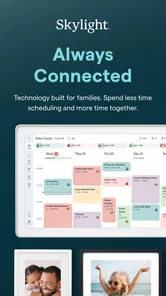
I judge a family photo display app by what happens between sending a picture and seeing it appear where everyone can enjoy it. Skylight is built around that handoff, with a companion app for managing a Skylight Frame and Skylight Calendar. It makes most sense when you want a shared household display rather than another place to browse photos on your phone.
When a photo has to travel
The network connection is part of the experience: a photo selected on a phone has to make its way to the frame, so the smoothest workflow is choosing and sending images while connected. I’d treat the app as a way to curate what appears on a separate display, not as a replacement for the phone’s gallery or a full photo-editing tool. That distinction helps set expectations before you start.
A practical routine is to choose a small batch after a family gathering, rather than trying to send every image at once. I would first pick a few clear, meaningful shots, then check the frame later to see how they look in the room. This keeps the display from becoming a stream of near-duplicates and makes it easier for relatives to notice the pictures that matter.
Useful in the middle of family life
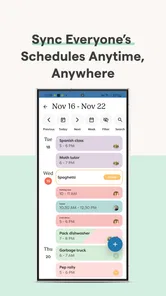
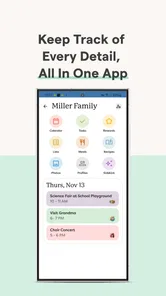
For a household with relatives in different places, the appeal is simple: someone can contribute photos through the app while the frame gives the images a shared, visible home. It can also suit a family that wants pictures beyond a phone screen but does not want to manage a shared social feed. The Calendar side broadens the app’s role for people who want a family-oriented display as well as photos.
Think of an ordinary Sunday: one person takes pictures at lunch, chooses a handful later, and sends them for grandparents to see on their frame. That is a more focused use than asking everyone to upload everything. I’d agree on who is adding pictures and what kinds of images belong there; a little coordination can prevent a pleasant family display from turning into a cluttered one.
Connection, delays, and sensible habits
Because delivery depends on connectivity, I would avoid promising someone that a just-sent picture will appear immediately. If it does not show up, I’d check that the phone and receiving device have a working connection, confirm the intended frame, and give the transfer a moment before sending the same photo repeatedly. That basic sequence can prevent duplicate submissions and makes troubleshooting less frustrating.
If you are setting up a frame for a less technical relative, it is worth testing the whole path before handing it over: send a picture, make sure it reaches the right display, and explain who to contact if future uploads seem stuck. The app’s usefulness depends not just on the phone interface but on the receiving device and household routine working together. A shared display is convenient, but it does require that small amount of setup and ongoing coordination.
More From Our News Desk
 MX Player
 and the Small, Private Rituals of Mobile Viewing
A practical video player reveals how mobile viewing has become private, portable, and woven into the spare minutes of ordinary life.
 Piano Fire: Edm Music & Piano
Piano Fire Tested: How Well Does It Recover When a Run Breaks?
A rhythm game lives or dies by recovery as much as reflexes. Piano Fire makes a brisk, colorful loop, but its rough edges matter most after a missed note or interrupted run.

 Ludo King®
Ludo King Turns Quick Matches Into a Lasting Social Ritual
A close look at how quick matches, private rooms and familiar rivalries turn this digital Ludo game into a small, durable social ritual—and where that community has limits.

 YouTube Music
 Turns Video Discovery Into Listening Power
A capable music service with an unusually strong route into discovery, YouTube Music shows how Google can turn a video habit into control over what listeners hear next.

 Netflix
 Is Building a Daily Habit Beyond Its Biggest Shows
A familiar streaming app is gaining new weight as Netflix pushes games, live programming, and discovery into the same daily habit. The growth is real, but so are the limits.

 Ramp Car Games: GT Car Stunts
Ramp Car Games: The Risk-and-Reward of Every Jump
A stunt racer built around one deceptively rich decision: how much speed to carry into a jump, and how much control to keep for the landing.
Latest News


Skylight is free to download, with in-app purchases listed from $3.99 to $39.99 per item. It is a photography app from Skylight Frame, rated 4.4 on average from around 26,000 ratings, with over 1 million installs and an Everyone age rating. The current version is 1.93.0, and it requires Android 7.0 or later. Those figures suggest a well-established app, though I would still choose it for the dedicated frame-and-calendar setup rather than for a rating alone.
Exploring the Universe with Skylight
Once you fire up Skylight, you're greeted with a beautifully crafted interface. It feels like you're holding a piece of the universe in your hand, which is both thrilling and a little humbling. The app's main feature allows you to point your device at the sky and instantly identify stars, constellations, and even planets. It’s like having a celestial map that updates in real-time.
User Experience
The user experience is smooth and intuitive. One of the things I appreciated most was how Skylight seamlessly blends detailed astronomical information with an easy-to-navigate design. Whether you're a seasoned astronomer or just a curious observer, the app caters to all levels of interest and expertise.
Another cool feature is the "Night Mode," which dims the screen to red to preserve your night vision while stargazing. This thoughtful touch really shows how much the developers understand the needs of their users. It’s these little things that make a big difference, letting you immerse yourself fully in the stargazing experience without straining your eyes.
Why Skylight Stands Out
What sets Skylight apart from other stargazing apps is its educational component. The app provides detailed information about celestial events, complete with stunning visuals and engaging descriptions. It's like having a personal astronomy tutor in your pocket.
Moreover, Skylight offers an interactive sky guide that allows you to travel through time. You can view what the sky looked like on any given date in history or fast forward to see upcoming celestial events. This feature is not only fun but also educational, providing a deeper understanding of our universe.
Skylight also includes a social aspect, where you can share your observations and discoveries with a community of fellow stargazers. It’s a fantastic way to connect with other enthusiasts and share the wonders of the night sky.
Final Thoughts
In a world full of apps vying for our attention, Skylight manages to stand out by offering a truly immersive and educational stargazing experience. Whether you're looking to learn more about the stars or simply want to enjoy a peaceful night under the sky, this app has you covered.
So, if you're eager to explore the universe and gain a new perspective on the night sky, give Skylight a try. It's more than just an app—it's your personal portal to the cosmos.
Skylight Frequently Asked Questions
What is Skylight used for?
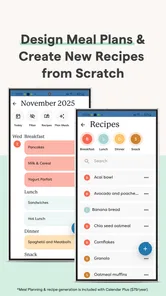
Skylight is a photography app for managing a Skylight Calendar and Skylight Frame. Its family-focused purpose is reflected in the description, “Your Family Calendar + Photos.” Before downloading, consider whether you have or plan to use one of these Skylight products, since the app is designed to manage them rather than serve as a general photo editor or a stargazing tool.
What is Skylight and what does it do?
Skylight is an innovative app designed to transform your smartphone into a portable planetarium. By leveraging augmented reality technology, Skylight allows users to explore stars, constellations, and celestial events in real-time. Simply point your device at the night sky, and Skylight will provide detailed information and visuals, making stargazing more interactive and educational.
Is Skylight available for both Android and iOS devices?
Yes, Skylight is available for download on both Android and iOS platforms. Users can find it on the Google Play Store for Android devices and the Apple App Store for iOS devices. This ensures that a wide range of users can access and enjoy the features of Skylight, regardless of their smartphone preference.
Does Skylight require an internet connection to function?
Skylight primarily operates offline, allowing users to explore the stars without the need for an internet connection. However, for features like real-time updates on celestial events or downloading additional star maps, an internet connection may be necessary. This flexibility ensures users can stargaze anywhere, anytime, even in remote locations.
Are there any costs associated with using Skylight?
Skylight is free to download, offering basic features to all users at no cost. However, the app does offer in-app purchases for advanced features, such as premium star maps and exclusive celestial event notifications. Users can choose to enhance their experience by purchasing these optional add-ons, but they are not required for enjoying the app's core functionality.
Pros
- Seamless user interface with intuitive controls.
- Wide range of customization options available.
- High-quality graphics that enhance user experience.
- Regular updates with new features and improvements.
- Efficient performance with minimal lag or crashes.
Cons
- Requires a high-performance device for optimal use.
- Limited offline functionality for remote areas.
- Subscription model may not suit all users.
- Initial setup can be time-consuming.
- In-app purchases can become costly over time.