Sketch Pro: Draw & Create Art
- 395.00
- 4.5
- Installs
- 1.00M
- Price
- Free

Screenshots

Analysis by Reviewed
I find Sketch Pro: Draw & Create Art easiest to judge as a place to practice drawing rather than as a guaranteed substitute for a full desktop art studio. Its focus on illustration, with an emphasis on anime and manga, gives a beginner a clear starting point: open a canvas, try a sketch, and learn what kinds of marks feel right. The app is free to install, though some in-app purchases range from $0.99 to $9.99 per item, so I’d explore the basic workflow before deciding whether anything paid is worthwhile.
What to expect from the pace of drawing
For casual sketching, the appeal is being able to get an idea down without first setting up a complicated workstation. Sketching a character pose during a break, testing a color combination, or keeping a small visual notebook are all sensible ways to use it. I would approach speed as something that depends on the drawing and the device, not as a promise: a simple doodle is a lighter task than a canvas full of carefully worked details.
That distinction matters if you are comparing it with a basic phone drawing tool or a larger illustration program. A simple sketch app may feel quicker because it asks less of you, while a more advanced alternative can suit people who need a highly controlled, specialized workflow. Sketch Pro sits between those expectations: it aims to make digital drawing approachable, but the description alone is not a reason to assume it will behave identically on every device or under every workload.
When a drawing gets demanding
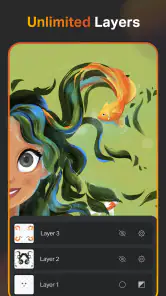
Long sessions can expose friction that a quick test will not. Zooming in to refine a face, switching between colors, and separating parts of an illustration into layers all make a drawing more deliberate. I’d build a piece in manageable stages: rough in the composition first, keep separate elements apart when that helps editing, then add small details near the end. This is a useful habit in any drawing app, and it can also make it easier to spot which part of a workflow is slowing you down.
A practical everyday example is sketching a manga-style expression while waiting for an appointment, then returning to it later to clean up the lines. The app’s illustration focus suits that kind of short, personal project better than using a notes app and trying to imitate a drawing surface. Still, if your work depends on very large, complex projects or a tightly specified professional pipeline, I’d test your usual workflow before moving important work over.
Making a small project easier to finish
I’d treat the app as a place to develop an idea in steps, rather than expecting a finished illustration to appear in one sitting. For example, I might use a short session to settle the pose and silhouette, then return when I have more time to refine the expression. That separation is helpful because it gives each session a clear goal and makes it easier to stop before I start making rushed changes just to call the piece done.
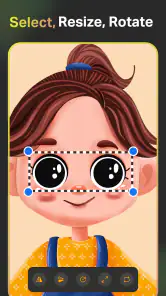
Layers can also be useful as a decision-making tool, not just a way to separate parts of a picture. I’d keep an uncertain detail apart from the main drawing while testing whether it improves the composition. If it does not, I can reconsider it without mentally untangling the whole image. This approach is especially handy for anime-style faces, where changing an eye, fringe, or accessory can affect the character’s expression more than expected.
More From Our News Desk

Clash of Clans Is Won Between the Battles

Android Auto Makes the Case for Quieter Car Software

MobiOffice: Transforming Mobile Productivity with Seamless Integration

EA SPORTS FC™ Mobile Soccer: Redefining Mobile Sports Gaming

How Microsoft OneDrive Became a Mobile Productivity Giant

How Google Translate Breaks Language Barriers Effortlessly
A Canvas for Everyone
Whether you're a seasoned illustrator or just someone who likes to doodle, Sketch Pro offers something for everyone. The app kicks off with a user-friendly interface that doesn't mess around with unnecessary clutter. It's like walking into a studio where everything is neatly organized and ready for you to start creating. You see, the app's team clearly understands that a clean workspace is a happy workspace.
Features That Spark Creativity
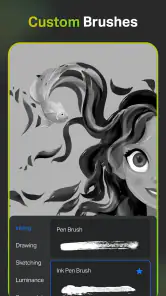
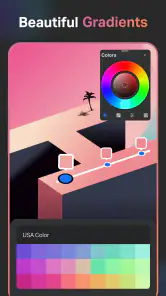
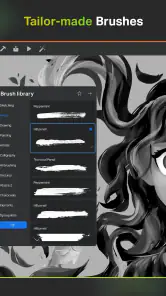
Now, let’s dive into the features. The app includes a wide array of brushes and colors that you can customize to your heart's content. Want to simulate oil painting? You got it. Prefer something more akin to pencil sketches? No problem. The layers feature is particularly impressive, allowing you to work on different elements of your piece separately without any hassle. It’s like having a digital toolbox where every tool is just a tap away.
One aspect I absolutely love is the app’s ability to zoom in with incredible precision. It’s perfect for those tiny details that make a big difference. And guess what? You can export your work in multiple formats, making it a breeze to share your masterpieces with the world or print them out for a more tangible showcase.
Choosing tools without slowing yourself down
When I’m drawing on a smaller screen, I try to avoid changing brushes every few strokes. A simple set of marks—a rough sketch, cleaner lines, and a few color choices—often gives me enough variety to make progress without turning the session into a search for the perfect tool. The practical trade-off is that experimenting with brush settings can be enjoyable, but too much tweaking can interrupt the drawing itself.
For someone deciding whether to start with a finger or a stylus, I’d think about the kind of marks they want to make. A finger is perfectly reasonable for loose doodles and quick ideas, while a stylus can make careful line work feel more natural if the device supports one. Neither choice changes the app’s basic purpose: it is aimed at drawing and painting, and the best setup is the one that lets you focus on the image rather than fighting your hand position.
Community and Learning
If you're someone who thrives on community feedback, you're in for a treat. Sketch Pro has a bustling community of artists sharing tips, tricks, and tutorials. It's like having a personal art class at your fingertips. Plus, the app frequently updates with new features based on user suggestions, so it feels like you're part of an evolving art movement.
And for those just starting, there are plenty of tutorials to help you get the hang of things. From basic techniques to advanced tips, the learning resources available are simply stellar. It’s as if the app is not just a tool, but a mentor guiding you through your artistic journey.
Who will enjoy it, and who may want another tool
I think it makes the most sense for a curious beginner, a casual sketcher, or someone who wants an anime- and manga-oriented space to practise without committing to a more involved desktop setup. It can also suit an experienced artist who wants a convenient place to test a pose or color idea away from their main workstation. In both cases, I’d treat it as a companion for exploration rather than assume it will replace every tool in a more established art workflow.
If your work depends on precise professional controls, a familiar production pipeline, or extensive finishing on a large display, I would compare it with specialist illustration software before moving over. The usual alternatives divide into simple phone sketchpads, which can be quick for loose marks, and more feature-heavy drawing programs, which may offer a better fit for tightly controlled projects. The choice comes down to what matters more: a straightforward way to begin drawing or a deep set of tools you already know how to use.
Reliability, device fit, and who should try it
For a useful reality check, I’d try the same short sketch on the device you plan to use every day before committing to a lengthy project. The app’s current version is 1.4.2, and it runs on Android 8.0 or later; those facts tell you the compatibility floor, but not how fluid every canvas will feel on older hardware. I wouldn’t read the broad user response as a guarantee of performance either: it holds a 4.5 average from around 4.9 thousand ratings, with more than a million installs.
That response does make it a reasonable candidate to try, especially because the app is free and rated for Everyone. It comes from 4Axis Technologies and is listed in the art-and-design space. If you are new to drawing, want an anime-oriented starting point, or enjoy experimenting with brushes and layers, I can see the attraction. If you need a desktop-grade production setup, advanced export control, or a workflow you already know inside out, a more established specialist tool may be a better fit.
How to judge it on your own device
A sensible first test is to draw something small but representative of what you actually plan to make: a face with a few details, a simple character pose, or a colored thumbnail. That is more informative than tapping around without a goal, because it gives you a chance to notice whether the canvas feels comfortable at your usual zoom level and whether the tools suit your hand. If a brief test already feels awkward, a longer session is unlikely to fix that by itself.
I would also judge performance by the whole drawing routine, not just whether the first strokes appear promptly. Switching between rough and detail work, zooming in and out, and returning to a project after a pause all affect how smooth a drawing session feels. The useful question is whether those ordinary actions let you stay focused. I would not assume that a complex piece behaves like a quick doodle, or that an older device handles every task the same way.
A steadier workflow and a balanced verdict
One small but useful habit is to save checkpoints at natural milestones rather than treating a drawing as one uninterrupted session. I’d keep the rough, line work, and finishing pass mentally distinct, and export a version when a piece reaches a state I’d be unhappy to lose. That is not a claim about a particular recovery feature; it is simply sensible practice when making art on a phone or tablet. The app’s 395 reviews give readers another place to weigh individual experiences, while the most meaningful test remains whether it feels comfortable on your own screen.
Overall, I’d recommend giving Sketch Pro a try if you want a low-barrier digital sketchbook for anime and manga ideas, casual practice, or learning how layers can make revisions less messy. I would not choose it solely on the promise of speed or assume that every elaborate canvas will stay effortless. Its strengths are the approachable drawing focus and the room to experiment; the trade-off is that serious artists should judge their own device and project needs before making it part of a demanding routine.
Final Thoughts
In conclusion, Sketch Pro: Draw & Create Art is more than just an app; it's a gateway to creativity. Whether you're looking to pass the time with a quick sketch or embark on a detailed project, this app has got you covered. It bridges the gap between professional-grade software and user-friendly design, making art accessible to everyone. So, grab your stylus or just your finger, and let your imagination run wild. Trust me, once you start, you won't want to stop.
Sketch Pro: Draw & Create Art Frequently Asked Questions
Is Sketch Pro free to download, and are there in-app purchases?
Sketch Pro: Draw & Create Art is free to download, so you can try the app without paying upfront. It also offers in-app purchases, with items ranging from $0.99 to $9.99. If you prefer to keep spending under control, check the purchase options before buying anything and review your device’s purchase settings. The app is listed for users of all ages.
What kind of art can I make with Sketch Pro: Draw & Create Art?
Sketch Pro: Draw & Create Art is a digital illustration and painting app, with a focus on drawing Anime and Manga art. It can appeal to anyone who wants a mobile space for sketching or developing illustrated ideas, whether they are just exploring the style or already enjoy making digital art. The app is in the Art & Design category and is developed by 4Axis Technologies.
What is Sketch Pro: Draw & Create Art, and who is it for?
Sketch Pro: Draw & Create Art is a versatile drawing and illustration app designed for artists, designers, and hobbyists. It offers a wide range of tools and features for creating detailed sketches, digital paintings, and illustrations. Whether you're a professional artist looking for a digital platform or a beginner interested in exploring your creativity, this app provides the resources needed to bring your artistic visions to life.
What features does Sketch Pro offer to enhance my digital art experience?
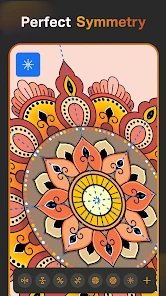
Sketch Pro includes an array of features such as customizable brushes, layers, blending modes, and a color palette to enhance your digital art experience. Additionally, it supports high-resolution canvases and offers tools like symmetry drawing and perspective grids. These features make it easy to create complex and professional-looking art pieces, giving users the flexibility they need to explore different styles and techniques.
Is Sketch Pro user-friendly for beginners?
Yes, Sketch Pro is designed to be user-friendly, even for beginners. The interface is intuitive and easy to navigate, with tutorials and guides available to help new users get started. While it offers advanced features for experienced artists, its simplicity and ease of use make it accessible for anyone interested in digital art, regardless of their skill level.
Pros
- Intuitive user interface
- Wide range of brushes
- Layer support for complex designs
- Export options in various formats
- Compatible with stylus devices
Cons
- Limited free version features
- Occasional lag with large files
- Requires high storage space
- No offline tutorials
- Subscription model for full access

- Category
- Art & Design
- Version
- 1.4.2












