Seek by iNaturalist
- 1.46K
- 3.3
- Installs
- 1.00M
- Price
- Free

Screenshots
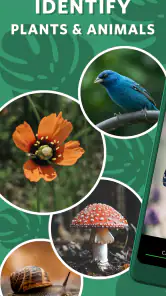
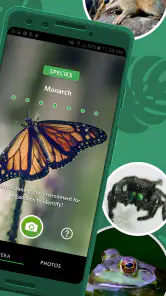
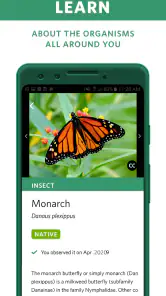
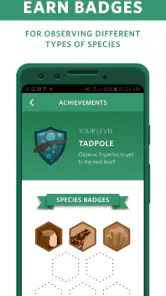
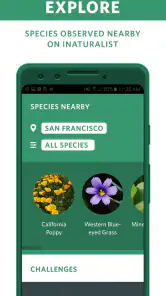
Analysis by Reviewed
I judge a nature-identification app by a few practical things: whether it helps me look more closely, whether I can use it without turning a walk into a phone session, and whether its suggestions are useful when I’m unsure. Seek by iNaturalist is best understood as a friendly learning aid, not a definitive field guide. It is a free education app from iNaturalist, rated for Everyone, and its appeal is the quick route from curiosity to a possible name for something living nearby.
A good fit for curious walks
Seek makes the most sense when the goal is discovery rather than documenting every sighting. On a neighborhood stroll, I can pause at an unfamiliar leaf, point the camera toward it, and use the identification as a starting point for looking more carefully. That small change in pace is the app’s real value: it gives children, casual hikers, and beginners a reason to notice details they might otherwise pass.
A useful habit is to frame one subject at a time and give it a clear view. If the first suggestion seems doubtful, I’d move closer, change the angle, or try again with a visible leaf, flower, or other distinctive feature rather than treating the first result as certain. That is a sensible way to use any visual identifier, especially when several species look alike or the subject is partly hidden.
Where it differs from field guides
Compared with a traditional guidebook or a general web search, Seek offers a more immediate, camera-led experience. A book can be better when I want a careful comparison of similar species or dependable reference material away from a screen. A web search gives me more room to cross-check descriptions and images, but it takes more effort and can send a beginner down a distracting trail of results. Seek is the easier first step when I simply want to ask, “What might this be?”
I would not use a quick identification to make decisions about eating a plant, handling an animal, or treating a bite or rash. In those situations, a tentative match is not enough; I would consult a qualified local source. The app works best as a prompt to observe and learn, not as a substitute for expertise or a guarantee that every suggestion is right.
Getting to Know Seek by iNaturalist
So, what's the deal with Seek by iNaturalist? At its core, this app is a nifty tool designed to help you identify plants, animals, and fungi around you. It's like having a botanist and a zoologist in your pocket, ready to tell you all about the natural world. The app is powered by iNaturalist, a joint initiative of the California Academy of Sciences and the National Geographic Society, which means it's backed by a wealth of scientific knowledge.
Features That Stand Out
One of the coolest features of Seek is its ability to use your phone's camera to identify species in real time. Just snap a picture, and bam! The app provides you with the name and some interesting facts about the organism. It’s like Pokémon Go, but for real-life nature enthusiasts.
More From Our News Desk

Clash of Clans Is Won Between the Battles

Android Auto Makes the Case for Quieter Car Software

MobiOffice: Transforming Mobile Productivity with Seamless Integration

EA SPORTS FC™ Mobile Soccer: Redefining Mobile Sports Gaming

How Microsoft OneDrive Became a Mobile Productivity Giant

How Google Translate Breaks Language Barriers Effortlessly
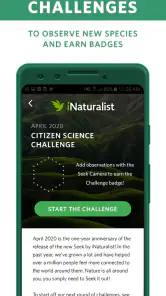
Another highlight is the app’s seasonal challenge feature, which encourages users to explore different habitats and discover new species. It's a fun way to get outside and learn something new, all while earning badges for your discoveries. Plus, the app doesn’t require an internet connection for identification, making it perfect for those remote hikes where Wi-Fi is but a dream.
User Experience and Interface
The user interface is as friendly as it gets. With a clean and intuitive design, even the least tech-savvy among us can navigate the app with ease. The home screen offers quick access to your camera, recent observations, and challenges. Each observation you make is saved in your personal collection, allowing you to track your discoveries over time.
The app also respects your privacy, which is a huge plus. You don’t need an account to use it, and your location data isn’t stored, easing any worries about data security.
Everyday use and small trade-offs
For a family outing, I’d turn a short walk into a low-pressure spotting game: let each person choose one thing to investigate, then compare what the camera suggests with what everyone can actually see. That works better than trying to identify every tree along the route, and it gives children a natural reason to slow down and observe. For a solo walk, I’d use the saved collection as a reminder of what caught my attention, rather than treating it as a complete record of local wildlife.
The offline identification option is particularly handy on a trail with poor reception, but I’d still prepare before leaving: charge the phone, keep the camera lens clean, and avoid relying on a screen when footing or surroundings need attention. A camera-based tool also has a basic limitation: it needs a view of the organism. A distant bird, a fast-moving insect, or a plant obscured by other growth may be harder to investigate than a clear, stationary subject.
Who should choose it—and who may not
Seek is a strong choice for beginners who want an approachable way to connect names with things they see, and for parents or teachers looking for an outdoor activity that invites questions. It is less suitable for someone who needs rigorous species verification, a comprehensive reference for a specialist hobby, or a permanent, carefully documented survey. In those cases, I’d pair a field guide or local expert’s advice with the app, or choose a dedicated recording workflow if building a formal observation history is the main goal.
There is also a difference between identifying something for personal curiosity and sharing a record for others to rely on. I would check an uncertain match against visible characteristics before repeating it as fact. The app’s suggestions are most useful when they narrow the possibilities and teach me what to inspect next; they are less useful when I expect a single camera result to settle a difficult identification.
Choosing a practical identification workflow
For a casual outing, I’d use Seek before reaching for a browser because it keeps the observation and the possible identification together. If I’m standing beside a plant and have only a minute, a camera-led suggestion is less cumbersome than describing the leaves in a search query. If I’m planning a longer walk around a particular habitat, though, a regional field guide can be more useful for learning what to expect and comparing details at my own pace.
There is a helpful middle ground between trusting the first result and abandoning the app whenever it hesitates. I’d treat an uncertain suggestion as a shortlist: look at the visible shape, color, and structure, then decide whether the proposed name fits what is actually in front of me. This makes the camera a way to direct attention, not just a label generator. It also keeps a quick walk from becoming a false lesson in certainty.
Seek’s personal collection is handy for revisiting what interested me, but I would not assume that a saved observation is the same thing as a carefully verified record. If I wanted to build a reliable list for a class project or a local survey, I’d note the context separately and check questionable identifications before using them. For ordinary curiosity, the collection is a pleasant memory aid; for evidence that others will depend on, I’d want a more deliberate process.
How it fits into a day outside
Imagine taking a child to a nearby park after school. Rather than handing over the phone for the whole walk, I’d agree on a simple rule: stop for a few things that genuinely catch the eye, inspect each one together, and put the phone away between discoveries. A flower with clear features is a better first subject than a tiny insect darting through grass. The child gets a question to investigate, while the walk remains about being outdoors rather than collecting screen time.
For an adult exploring an unfamiliar trail, the useful workflow is slightly different. I’d identify a few plants or animals that are easy to see, save the interesting discoveries, and leave difficult cases for later comparison with a guide. That is especially sensible when light is fading or the trail demands attention. The app can enrich a walk, but there is no benefit in stopping in an unsafe spot or staring at a screen while moving.
Families should also decide in advance how they want to handle a shared phone. Taking turns choosing the next subject can make the activity collaborative; trying to photograph every find can make it feel like a chore. For a classroom, I’d use it to prompt observation questions—what feature made this candidate plausible, and what else could it be?—rather than making the app’s answer the test of who is right.
What to expect before installing
The app has a 3.3 average from around ten thousand ratings, with roughly one and a half thousand written reviews, so it has attracted a substantial audience without being universally loved. It has over a million installs, is free, and version 2.17.6 requires Android 7.0 or later. Those details make it easy to try if your device meets that requirement, though I would decide based on the kind of nature outing I actually take rather than popularity alone.
Switching from a book or search engine is easy if all I want is a quick first guess; it is not a reason to discard those references. I’d keep a guide nearby for tricky lookalikes and use Seek to spark the question in the first place. That combination avoids the main downside of any quick visual match: mistaking convenience for certainty.
When another approach is the better choice
If my main aim were to learn species distinctions in depth, I’d choose a good field guide or trusted educational reference as my primary tool. Those formats make it easier to compare several features without being led by a single image match. If I needed a formal observation log, I’d look for a workflow built around careful records rather than treating a casual collection as documentation. Seek is strongest when immediacy and approachability matter more than exhaustive reference material.
It is also not the right companion for someone who expects a camera to identify every organism under every condition. Poor visibility, unusual angles, and close lookalikes can all make a quick match less helpful. I’d still install it if I enjoyed learning outdoors, but I would bring realistic expectations: some encounters will lead to a satisfying answer, while others will leave me with a question to investigate elsewhere.
For anyone wondering whether they need an account or a connection to begin exploring, Seek’s straightforward, camera-first approach makes it easy to try without turning setup into the main event, and identification can be used offline. I’d still prepare the phone before a remote walk and keep a book or another reference in mind for tricky cases. The practical answer is that it suits spontaneous learning, not every kind of research.
Overall, Seek is a delightful blend of education and entertainment. It's perfect for families looking to make their outings more engaging, or for solo adventurers eager to deepen their understanding of the natural world. It's like having a personal nature guide, always at your side, ready to enlighten and inspire.
So, next time you head outdoors, don't forget to take Seek along. Whether you're in the heart of the city or out in the wilderness, there's always something new to discover. Happy exploring!
Seek by iNaturalist Frequently Asked Questions
Which devices can run Seek by iNaturalist?
Seek is an educational app for identifying plants and animals, and it is available for Android and iOS. Before downloading, check that your device’s operating system meets the app’s minimum requirement: Android 7.0 or later. If your phone or tablet is compatible, you can install Seek and use its camera-based nature identification features while exploring outdoors.
What is Seek by iNaturalist and how does it work?
Seek by iNaturalist is a nature app designed to help users identify plants, animals, and fungi in the wild. By using your phone's camera, Seek utilizes image recognition technology to provide instant identification of species. The app encourages exploration by awarding badges as you observe and learn about the biodiversity around you. It's perfect for nature enthusiasts, students, and anyone curious about the environment.
Is Seek by iNaturalist free to use, and are there any in-app purchases?
Yes, Seek by iNaturalist is completely free to download and use. There are no in-app purchases or subscriptions required. The app is supported by the iNaturalist community, a joint initiative of the California Academy of Sciences and the National Geographic Society, ensuring that all features and updates remain accessible to users without any cost.
Do I need an internet connection to use Seek by iNaturalist?
While an internet connection enhances the app’s capabilities, especially for uploading observations to iNaturalist, Seek by iNaturalist can function offline to identify species using pre-downloaded data. However, to access the most up-to-date species information and community features, it is recommended to connect to the internet whenever possible.
Is Seek by iNaturalist suitable for children and educational purposes?
Absolutely. Seek by iNaturalist is designed to be family-friendly and is a great educational tool for children. It encourages outdoor exploration and learning about nature in a fun, interactive way. The app does not require an account, so it maintains user privacy and safety, making it an ideal choice for educational settings and family use.
Pros
- Enhances nature exploration
- User-friendly interface
- Real-time species identification
- Vast community support
- Educational and informative
Cons
- Requires internet connection
- Limited offline functionality
- Battery-intensive
- In-app ads
- Occasional misidentification
- Category
- Education
- Version
- 2.17.6












