iNaturalist
- 1.18K
- 3.7
- Installs
- 5.00M
- Price
- Free

Screenshots

Analysis by Reviewed
I usually open a nature app when curiosity interrupts an ordinary day: a flower beside the sidewalk, an unfamiliar insect near the porch, or a bird I can hear but can’t name. iNaturalist suits that moment because it turns a quick question into a small process: record what caught your eye, consider a suggested identification, and decide whether to share the observation. It is an education app from iNaturalist, and I find it most rewarding when I treat it as a learning tool rather than a guaranteed answer machine.
Start with the encounter, not a perfect photograph
For a useful observation, I try to capture the details that distinguish one living thing from another. With a plant, that might mean a clear view of its leaves as well as the flower; with an insect, a second angle can show markings hidden in the first shot. I also make a mental note of the setting, since where and how I found something can help me judge a suggestion later. This simple habit makes the app’s identification step more useful without turning a walk into a photo shoot.
The practical trade-off is that nature does not always cooperate. A bird may disappear before I get a picture, a flower may be damaged, or the lighting may make colors misleading. I can still use an observation as a prompt to learn, but I avoid treating a confident-looking label as proof when the image is blurry or the subject is hard to distinguish. For anyone who needs a dependable answer for a safety decision—such as whether a plant is safe to eat—I would use a qualified local source instead.
Getting to Know Nature with iNaturalist
First off, let’s talk about what makes iNaturalist so amazing. This app is a joint initiative between the California Academy of Sciences and the National Geographic Society, which already gives it some serious street cred in the world of science and exploration. What’s cool is that it’s not just a tool for identifying plants and animals; it’s actually a platform for citizen science. You can contribute your findings to a global database that helps scientists track and study biodiversity.
The User Experience
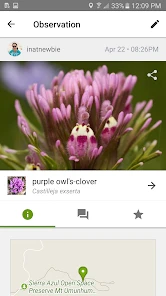
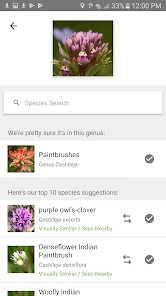
Okay, so let's dive into the user experience. The app is pretty intuitive. You snap a photo of the plant, animal, or insect you’re curious about, and voila! The app uses image recognition technology to suggest what it might be. Sometimes, it feels like magic when you see a result pop up with a name, and often, a whole lot of information about the species.
If the app’s AI isn’t quite sure, you can post your observation to the iNaturalist community. This is where it gets fun and maybe a bit addictive. Other users, including experts, can chime in and help identify what you’ve found. It’s like having a direct line to a global nature nerd community.
Move from a suggestion to a useful observation
In my experience, the important handoff is from the app’s suggestion to the people who can review an observation. I treat the first identification as a starting point, then check whether the proposed species makes sense for what I photographed. If I’m unsure, sharing the observation gives other users a chance to weigh in. That makes the process less like asking a search engine for a single answer and more like comparing evidence with people who enjoy noticing the same details.
More From Our News Desk

Clash of Clans Is Won Between the Battles

Android Auto Makes the Case for Quieter Car Software

MobiOffice: Transforming Mobile Productivity with Seamless Integration

EA SPORTS FC™ Mobile Soccer: Redefining Mobile Sports Gaming

How Microsoft OneDrive Became a Mobile Productivity Giant

How Google Translate Breaks Language Barriers Effortlessly
That community step is valuable, but it also means the result may not arrive at the exact moment I want it. If I’m on a short walk and just want a quick name, the automated suggestion is convenient; if the identification matters to me, I’m willing to wait and learn from feedback. I also try to provide a sharp image and a sensible description rather than expecting other people to infer everything from a distant speck. The quality of the handoff depends partly on what I contribute.
Features That Stand Out
One of the standout features for me is the app's ability to connect people with nature in a meaningful way. You’re not just identifying species; you’re learning about them, understanding their role in the ecosystem, and contributing to a larger database of environmental data.
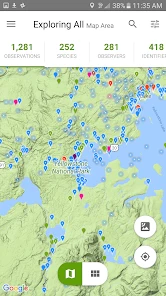
The app also offers a feature where you can join various projects or start your own. For instance, you could participate in a project tracking urban wildlife or perhaps start a local flora project in your neighborhood. It’s a fantastic way to make your outdoor adventures more purposeful and educational.
Make an outing fit your level of interest
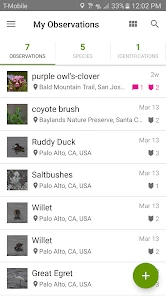
I can imagine using the app on a familiar route through a park: I photograph a plant I pass every week, check a suggestion, and then notice how many different species appear along the same path. On another day, I might record several observations during a family walk and use the results to spark questions with a child, rather than turning the outing into a lesson with a fixed answer. For a classroom or local nature group, a shared project can give repeated walks a focus, such as noticing which kinds of wildlife appear in a particular area.
There is a useful choice in how far to take that workflow. Someone casually curious can stop after looking at a likely identification. Someone who wants to contribute more can share observations and explore projects. I would not assume every photo needs to become a public contribution; selecting a few clear, meaningful observations can be more manageable than documenting every living thing on a walk. That keeps the experience enjoyable and gives each record a better chance of being useful.
How it differs from a field guide
Compared with a conventional field guide or a general image-search tool, iNaturalist makes the community and observation record part of the experience. A field guide can be quicker when I already know the broad group and want to compare a handful of likely species offline. A broad search can be handy for a fast visual clue, but it does not offer the same direct route from an observation to community input and a contribution to biodiversity records. I see the app as especially worthwhile when I want to learn over time, not just settle one question and move on.
That distinction also helps answer who might prefer something else. If your main need is a specialist reference for a particular region, or you want a guaranteed instant identification without taking photographs or sharing anything, a focused guide may suit you better. iNaturalist is strongest for curious walkers, gardeners, teachers, and nature groups who are comfortable with uncertainty and interested in the process as much as the label.
The app is available on both Android and iOS platforms, and it’s free, which is a huge plus. There’s no hidden paywall blocking you from accessing its core features, which makes exploring nature accessible to everyone.
Where the process can falter
For me, the main friction is that the quality of an identification depends on the evidence available and, when I ask the community, on someone having the opportunity to review it. A poor photo can leave several possibilities open, and a suggestion is not the same thing as a confirmed identification. I also wouldn’t choose the app when my priority is simply a tidy, comprehensive field reference or an answer that must be immediate and certain.
Before sharing, I think about whether the observation is clear enough to be helpful and whether I am comfortable putting it into a community-based learning process. The benefit is a richer outcome than a name alone; the cost is that contributing well takes more attention than snapping a picture and closing the app. For casual exploration, that extra step is optional, but it is central to what makes the experience distinctive.
Picking the right moment to use it
A practical way to get value from the app is to use it when you have time to look twice. On a weekday walk, I might photograph a cluster of unfamiliar flowers, make a note of whether they were growing in shade or beside a path, and check the suggestions later when I’m not trying to keep pace with someone else. That small separation between gathering evidence and reviewing it reduces the temptation to accept the first plausible label just because I’m in a hurry.
It also helps to think about what would make the record useful to another person. A close view of a leaf or wing can answer a question that a pretty but distant full-scene photo cannot. If I have only one image, I choose the angle that shows the most identifying detail; if I can safely take another, I use it to reveal a different feature rather than repeating the same view. This is especially worthwhile for small subjects, where scale and markings can be hard to judge.
What happens after you share
Sharing changes the goal from getting a private answer to leaving an observation that other people can assess. I see that as a handoff, not a promise that somebody will respond immediately or that every identification will be resolved to a precise species. When feedback arrives, I compare it with what I saw and with the photograph instead of treating the most confident comment as automatically correct. The useful outcome can be a better-supported identification—or simply a clearer sense of what remains uncertain.
For a group walk, I would agree on a simple routine before everyone starts: take a few focused photos, choose which records are worth sharing, and talk through suggestions together afterward. That keeps the outing social rather than turning every participant into a phone operator. It also gives children a chance to notice details and revise an early guess, which is a more honest lesson in nature than pretending every living thing has an obvious label.
Limits that matter in everyday use
The app works best when a camera can capture the subject and when I am willing to accept a degree of uncertainty. That makes it less useful for a sound-only encounter, a fleeting animal, or a plant obscured by other growth. In those moments, I can enjoy the encounter without forcing it into a record. A field guide or a local naturalist may be a better next step if I need a structured reference, a region-specific explanation, or advice tied to a practical decision.
I would also be selective about sharing. A record is most helpful when its image and context support the identification, while a rushed upload can create more ambiguity than insight. If I’m exploring casually, I can use a suggestion for my own learning and move on; if I want to contribute, I put more care into the evidence and description. That distinction lets the app serve both a quick curiosity and a more deliberate citizen-science habit without pretending they require the same effort.
Final Thoughts
In a world where we’re often glued to screens, iNaturalist offers a refreshing way to engage with the world around us. It’s a tool for discovery, learning, and contributing to science, all wrapped up in a user-friendly app. If you’re even a little bit curious about the natural world, I highly recommend giving it a try. Who knows, you might just discover a new passion for nature you never knew you had!
It has an average rating of 3.7 from around 11,000 ratings, and more than 5 million installs suggest it has found a substantial audience. The Everyone age rating makes it approachable for families, though I would still guide younger users through checking suggestions and sharing observations. The current version is 1.37.2, with Android 6.0 as the minimum operating system requirement.
My recommendation is to try it on an ordinary walk, not to test it with a rare or high-stakes identification. Give it a few clear observations and see whether the combination of image suggestions, community feedback, and projects makes you more attentive to your surroundings. If you enjoy that slower, evidence-based exchange, it offers more than a pocket identifier; if you only want a quick answer every time, its collaborative side may feel like extra work.
iNaturalist Frequently Asked Questions
Can I use iNaturalist for a school project or nature study?
Yes. iNaturalist is an education app that can support a school project, a personal nature study, or an outing with friends. You can record observations of plants and animals and share them with the community, turning a walk into an opportunity to learn about local biodiversity. It is also useful for following what you notice over time and encouraging curiosity about the natural world.
What devices can run iNaturalist?
iNaturalist is available for Android and iOS devices. On Android, it requires version 6.0 or later, so it is worth checking your device’s operating system before downloading. The app is free, and its content rating is Everyone, making it accessible to a broad audience. If you plan to use it outdoors, consider setting up the app and checking your device before heading out.
What is iNaturalist and how does it work?
iNaturalist is a citizen science project and online social network of naturalists, citizen scientists, and biologists built on the concept of mapping and sharing observations of biodiversity across the globe. Users can upload photos of plants and animals they encounter, and the community, along with image recognition software, helps identify them. It’s a great tool for learning about the wildlife around you and contributing to scientific research.
Is iNaturalist free to use?
Yes, iNaturalist is completely free to use. The app is available for download on both Android and iOS platforms. It provides an accessible platform for anyone interested in learning more about nature and contributing to biodiversity research without any cost. However, donations are welcome to support the platform’s mission.
Do I need an internet connection to use iNaturalist?
While you can take photos and save observations offline, an internet connection is required to upload these observations to the iNaturalist community for identification and sharing. This ensures that the community can help with accurate identification and that your findings contribute to the global biodiversity database.
Pros
- Large community of nature enthusiasts
- Easy identification of plants and animals
- Interactive learning through observations
- Frequent updates with new features
- Offline access to previous observations
Cons
- Requires internet for new identifications
- Limited functionality in remote areas
- Some species misidentification possible
- Battery consumption can be high
- Occasional app crashes reported
- Category
- Education
- Version
- 1.37.2












