ScratchJr
- 1.23K
- 3.9
- Installs
- 10.00M
- Price
- Free

Screenshots
Analysis by Reviewed
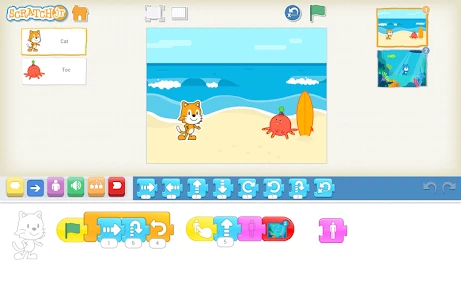
When I hand a young child a coding app, I want the first experience to feel like making something, not passing a test. ScratchJr aims for that balance: children build small animated scenes by arranging visual instructions, then see the result on screen. I find that immediate cause and effect is its strongest teaching tool, especially for kids who are curious about how characters move or stories unfold.
Who gets the most from it
It suits children who enjoy drawing, pretend play, and making up stories, as well as families who want an early introduction to programming without starting with typed code. The Scratch Foundation’s education app is free, rated for Everyone, and has reached over 10 million installs. Its average rating is 3.9 from around 37,000 ratings, so it has a substantial audience, though those figures alone can’t tell you whether its style will click with your child.
A useful way to begin is to set a tiny creative goal together: make a character cross the screen, pause, and say something. Ask the child to predict what each block will do before running the scene. That turns trial and error into a simple reasoning exercise, while keeping the child in charge of the idea. I’d avoid trying to teach a full programming vocabulary in the first sitting; the more valuable early habit is noticing how changing the order of instructions changes the outcome.
Choosing the right kind of first coding activity
It helps to decide whether your child wants to create or be guided. Many early-learning apps present a sequence of small tasks, with a defined answer at the end of each one. That structure can be reassuring for a child who likes clear instructions, but it can also make coding feel like solving somebody else’s puzzle. ScratchJr puts the child’s own scene at the center, so there is no single project brief they must follow. I would choose it for an imaginative beginner who likes to tell you what should happen next, and a lesson-led alternative for a child who loses interest without a clear task to complete.
It is also different from handing over a conventional children’s game. A game already supplies its characters, goals, and rewards; here, the child has to invent at least part of the activity. That is a real strength when a child wants to make a story, but it can feel like extra work if they simply want a ready-made game to play. I would set expectations plainly: this is a place to create a small project, not a collection of finished entertainment.
An Introduction to ScratchJr
So, what exactly is ScratchJr? Well, imagine a sandbox where children aged 5 to 7 can unleash their creativity by creating interactive stories and games. The app is available on both Android and iOS, making it accessible for most families. It’s a simplified version of the original Scratch platform, designed with little ones in mind.
Why ScratchJr Stands Out
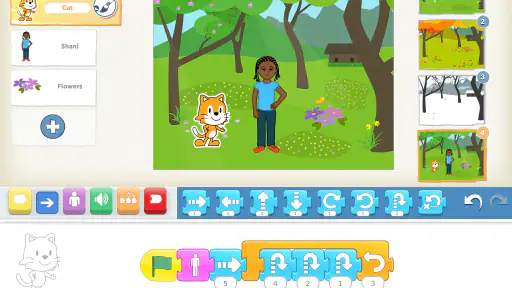
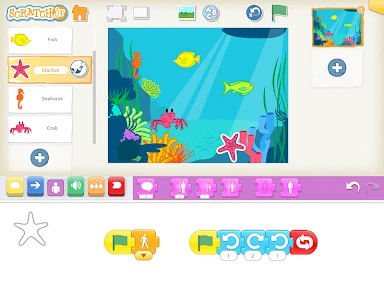
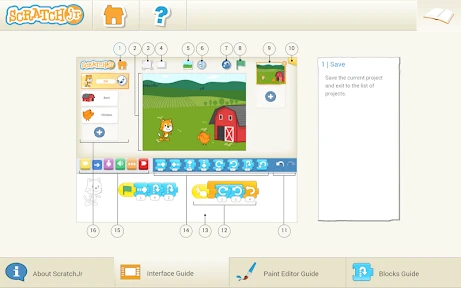
First off, let’s talk about the interface. It’s bright, engaging, and incredibly intuitive. Kids don’t need to know how to read to use it! The app uses visual programming language, which means that instead of typing out code, children can drag and drop colorful blocks to create sequences. This approach not only makes learning fun but also helps in understanding the fundamentals of coding.
More From Our News Desk

Weather by Xiaomi Review: Clear at a Glance, Less Clear Up Close

X Under Pressure: Can It Recover When Posting Goes Wrong?

Clash of Clans Is Won Between the Battles

Android Auto Makes the Case for Quieter Car Software

MobiOffice: Transforming Mobile Productivity with Seamless Integration

EA SPORTS FC™ Mobile Soccer: Redefining Mobile Sports Gaming
One of the standout features is the character creation. Kids can choose from a variety of characters, or even draw their own. This allows them to bring their wildest stories to life, all while learning the basics of animation and sequencing. Interactive stories and games they create can be as simple or as complex as they desire, offering endless hours of exploration.
Making a first project manageable
In practice, the easiest way to avoid a stalled first session is to start with a story that can fit into one simple scene. A child might decide that a drawn animal wants to greet another character; you can help them say what happens first, next, and last, then leave the choices about characters and actions to them. That small boundary gives a beginner enough direction to get started without turning the activity into an adult-designed assignment.
I would also encourage children to narrate what they expect before pressing the run control. If the result differs from the prediction, the mismatch gives you a useful question to ask: which instruction might have caused that? This is more productive than immediately correcting the project for them. The point is not to make every attempt work perfectly, but to let the child connect a sequence of blocks with what appears on screen.
Learning Through Play
ScratchJr is not just about coding; it’s about fostering creativity and problem-solving skills. As kids play around with the app, they learn how to think logically and sequentially. The app encourages experimentation, and there’s no right or wrong, which is fantastic for building confidence. Plus, it’s always satisfying to see your little one’s face light up when their creation finally works!
Another great aspect is its collaborative potential. Children can work together on projects, which teaches them the value of teamwork. Sharing their projects with family and friends can also be a great way to boost their confidence and presentation skills.
A realistic after-school use
For example, after school a child may tell you a story about a character who gets lost and finds a friend. Rather than trying to build the whole adventure at once, you can help them choose one moment to animate: the character moves, stops, and meets someone. The child can decide what the characters look like and what the scene should communicate, while you help keep the steps small. If they want to continue later, the project has a clear next idea instead of an unfinished tangle of ambitions.
This kind of use also makes the app a better shared activity than a substitute for supervision. A grown-up does not need to take over the controls; asking the child to explain a choice or predict an outcome is often enough to keep the thinking with them. For a classroom or family with several children, taking turns as the storyteller, block arranger, and tester can make collaboration concrete. It is more useful than simply putting several children in front of the same screen and hoping teamwork happens by itself.
Practical limits and next steps
In an everyday situation, I can see a child using it after school to turn a favorite made-up adventure into a few short scenes. A parent can help plan the beginning, middle, and end, then let the child test the sequences and revise them. That kind of shared activity works better than leaving a beginner alone with an open-ended blank project; a little prompting can prevent the screen from becoming a place to tap randomly.
There is a trade-off in keeping the interface accessible: children get a gentler start than they would with a text-based coding tool, but older beginners may outgrow the simplified approach once they want to write programs or explore more advanced concepts. ScratchJr is also a poor fit if the goal is structured lessons, graded progress, or a ready-made game to play. It is a making tool, so the child needs to supply some of the ideas and patience.
For a practical first project, I’d keep the scene short and change one thing at a time. If the character does something unexpected, ask the child to inspect the sequence rather than rebuilding everything. That small debugging routine helps them connect an instruction with its effect. It also makes it easier to spot when a project is becoming too ambitious: a shorter story that works is often more satisfying than a long one that is hard to finish.
Small habits that help projects succeed
One useful trade-off is deciding when to intervene. If a child is still experimenting happily, I would let the scene behave oddly for a while; unexpected movement can prompt a better question than a perfectly polished result. If frustration is building, narrow the goal rather than supplying the solution. For instance, agree to work on just the opening action and leave dialogue or a second scene for another session. This keeps the project’s scale within reach while preserving the child’s ownership.
It can also help to treat each session as a chance to finish one visible piece, rather than judging progress by how many blocks have been used. A completed short scene gives a child something they can explain to a family member, while an elaborate plan may become difficult to test. I would ask the child to describe what they want a viewer to notice. That question naturally links the story idea to choices about timing and order, without requiring a formal lesson or technical vocabulary.
Current version and continuity
The app’s current version is 1.5.11, and it first appeared on March 30, 2015. That history makes it an established option rather than a brand-new coding experiment, but the version number by itself doesn’t tell me what has changed or how often the experience has been refreshed. For families already using it, the sensible expectation is continuity with the same visual, project-making approach—not a reason to assume a particular new feature.
On Android, the stated minimum is version 5.0, which may help families assess compatibility before installing. The choice between this and a typical kids’ game is also worth making deliberately: a game supplies goals and rewards, while ScratchJr asks a child to invent the activity. Compared with beginner coding apps built around lessons, it leaves more room for personal storytelling, but offers less of a guided course structure. I would choose it when the child likes creating and explaining ideas, and choose a more lesson-led option when they need step-by-step tasks to stay engaged.
What established users should expect
For a family returning to the app after time away, I would begin by opening an existing project with the child and asking what they remember wanting to make. That gives them a low-pressure way back in and lets you see whether the visual approach still feels inviting. The long-running presence of the app is reassuring in the modest sense that it is not a brand-new experiment, but the current version alone is not evidence of a particular redesign or new teaching method. I would make plans around the creative workflow that is already apparent, rather than promising a child features they have not seen.
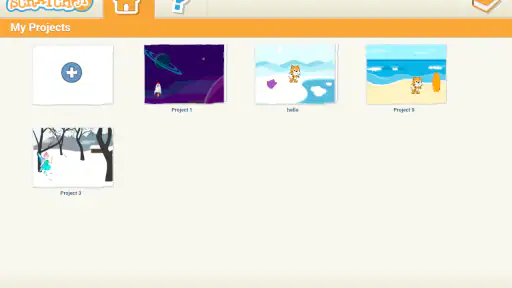
If a project is important to a child, it is sensible to let them show it to you while they are using the device, rather than assuming that a creative app automatically provides a particular sharing or backup arrangement. That is a practical habit for any child-made digital work: preserve the child’s explanation of what they made, and check the app’s available options together before relying on a project being available elsewhere. It also turns a finished scene into a conversation, not just another screen activity.
Remaining gaps and when another tool is better
The main limitation is not a flaw so much as a deliberate boundary: a very young learner benefits from simplified visual instructions, but that simplicity can become restrictive when they want fine control or a more advanced programming challenge. If a child is asking to build increasingly elaborate logic, or is ready to type and edit code, a more capable coding environment is the better next step. I would not rush that transition just because a child has mastered a few scenes; curiosity and readiness matter more than age alone.
Likewise, families looking for a curriculum with a planned order, regular checkpoints, and clear success criteria may prefer a course-based learning app. ScratchJr gives more space for a child’s own subject matter, but that openness means an adult may need to suggest a manageable starting point. A child who is not interested in drawing, storytelling, or inventing actions may not find that freedom motivating. In that case, an activity with more immediate prompts may be a better match, even if it offers less room for personal expression.
There is a practical device consideration too: the app is available for Android and iOS, but the Android minimum is version 5.0, so check that before planning a shared activity around an older device. The experience is most worthwhile when the child can comfortably see and manipulate the blocks and scene; if the screen or controls make that difficult, a different device or an adult-assisted session may be less frustrating. I would test the setup before introducing a project that matters to the child.
A sensible recommendation
Overall, ScratchJr is more than just a coding app; it’s a tool that empowers young minds to express themselves creatively. It’s perfect for parents and educators who want to introduce coding in a fun, engaging way. The app is free to download, so there’s no excuse not to give it a try!
In conclusion, if you’re on the hunt for an app that combines learning and fun, ScratchJr is definitely worth a look. It’s a great starting point for kids and might just spark a lifelong interest in coding.
When it may be time to move on
If a child starts asking to build more elaborate projects than the block sequences can comfortably support, I’d treat that curiosity as a useful signal rather than a flaw in the app. Moving to a more advanced coding environment can make sense then; for younger children who are still learning to plan a sequence and enjoy seeing their own drawings animate, ScratchJr remains a welcoming place to practice. I’d judge success less by how long a child spends in it than by whether they leave with an idea they want to keep developing.
ScratchJr Frequently Asked Questions
What can children create with ScratchJr?
ScratchJr lets young children explore coding by creating interactive stories and games. They arrange visual programming blocks to control characters and bring their ideas to life. This makes the app a hands-on introduction to programming concepts, while also giving children space to experiment creatively. It is aimed at children ages 5 and up, with projects designed around playful learning.
Who is ScratchJr intended for, and what kind of learning does it support?
ScratchJr is an education app from the Scratch Foundation, created to help young children learn to code and code to learn. Its visual, block-based approach is designed for early learners rather than people looking for a conventional programming environment. Children can explore ideas through their own projects, while parents and educators can use those creations as a starting point for conversations about sequences, actions, and problem-solving.
Is ScratchJr free to download, and does it include in-app purchases?
ScratchJr is free to download, so families and educators can try it without paying for the app. Its coding activities let children create stories and games by arranging blocks, making the app a practical way to explore basic programming. As with any app, an adult can check the relevant app store before downloading to confirm the version is compatible with the device.
What is ScratchJr and how does it work?
ScratchJr is an intuitive programming app designed for young children aged 5 and up. It introduces them to the fundamentals of coding through a block-based interface. Kids can create their own interactive stories and games by snapping together graphical programming blocks to make characters move, jump, dance, and sing. The app is specially crafted to promote creativity and problem-solving skills.
Is ScratchJr suitable for all age groups?
ScratchJr is specifically designed for early childhood education, targeting children aged 5 to 7. While older kids might also enjoy using it, the interface and complexity are tailored to younger children. For older children, the Scratch app, which offers more advanced features, might be more appropriate. Parents and educators should consider the child's age to ensure the app meets their developmental needs.
Pros
- Kid-friendly interface with colorful design.
- Encourages creativity and problem-solving skills.
- No in-app purchases or ads
- safe for kids.
- Supports multiple languages for wider reach.
- Free to download and use without restrictions.
Cons
- Limited to basic programming concepts.
- May require adult help for younger children.
- Limited device compatibility
- mostly tablets.
- No online community for sharing projects.
- Graphics and sounds are very basic.
- Category
- Education
- Version
- 1.5.11