Resume Builder - CV Engineer
- 1.08K
- 4.6
- Installs
- 5.00M
- Price
- Free
Screenshots
Analysis by Reviewed
I found Resume Builder - CV Engineer most useful when I needed a clear place to begin, rather than another blank page and a blinking cursor. It is a business app by Matt Callery, built around making a CV on a phone with guidance along the way. For a first-time user, the reassuring part is that you can work through one section at a time and get a draft taking shape before worrying about perfect wording.
What to expect from the first session
This is a resume-building tool, not a job-search service that applies for roles on your behalf. Its value is in helping you organize your experience and present it in a readable format. The app is free to install, rated for Everyone, and has a 4.6 average from around 82 thousand ratings, with over 1 million installs. In-app purchases are available, so I’d focus on the basic drafting workflow first and check any purchase screen carefully before choosing an optional item.
Compared with opening a blank document in a word processor, the guided prompts can reduce the effort of deciding what belongs in each section. A document editor may offer finer control over spacing and layout, while a professional design tool may give you more visual freedom. I’d choose this app when speed and structure matter more than elaborate graphic design.
Getting from install to a usable draft
When you start, gather the details you’ll need: employment dates, role names, education, and a few specific examples of work you’re proud of. You do not need to write polished paragraphs first. I’d begin with plain notes, then use the prompts and examples to turn those notes into concise descriptions. That keeps the app from becoming a form-filling exercise where you’re trying to invent a perfect sentence on the spot.
A practical first success is a complete, honest draft—not a finished application for every job. For example, if you have an hour after work, add your recent role, one achievement with a clear result, and your education. Then read the whole document from top to bottom and remove anything that doesn’t help explain why you fit the kind of role you want. A focused draft gives you something concrete to improve instead of leaving you stuck at the starting line.
Why Resume Builder - CV Engineer Stands Out
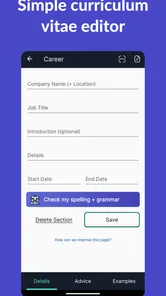
First things first, let's talk about ease of use. We all know how daunting it can be to start a resume from scratch. That's where this app shines. The user interface is clean, straightforward, and super intuitive. Trust me, you don't need to be a tech wizard to navigate through it. I found myself breezing through the process, and it was kind of fun!
Features That Make a Difference
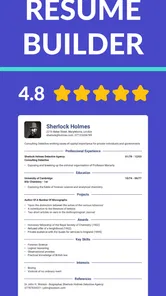
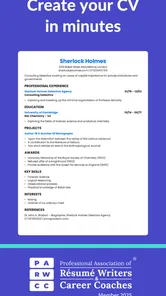
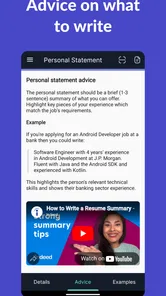
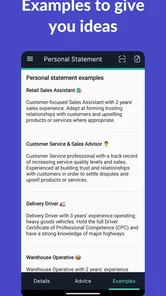
One of the standout features of this app is the guided resume building. The app walks you through each section of the resume, prompting you with questions and suggestions. It’s like having a career counselor in your pocket. And if you're ever stuck on how to phrase your experiences or achievements, the app offers templates and examples that can spark some inspiration.
More From Our News Desk

Weather by Xiaomi Review: Clear at a Glance, Less Clear Up Close

X Under Pressure: Can It Recover When Posting Goes Wrong?

Clash of Clans Is Won Between the Battles

Android Auto Makes the Case for Quieter Car Software

MobiOffice: Transforming Mobile Productivity with Seamless Integration

EA SPORTS FC™ Mobile Soccer: Redefining Mobile Sports Gaming
Another cool feature is the ability to export your finished resume in multiple formats. Whether you need a PDF or a text file, Resume Builder - CV Engineer has got you covered. Plus, it stores your resumes, so you can easily access them anytime you need to update or tweak them before sending them out.
Making the draft work for real applications
The prompts are helpful, but I would not treat a suggested phrase as a claim you can use without checking it. Keep every line accurate to your own experience, and replace broad wording with a concrete task, tool, or outcome where you can. That small editing pass matters: a polished-looking CV still needs to sound like you and hold up in an interview.
One useful workflow is to keep a strong master version, then make a copy for a particular opening and adjust the order of your most relevant experience. This is more manageable than rewriting the whole document for every application. Before exporting, check that headings, dates, and contact details are consistent, then open the exported file and inspect it on the device or computer where you plan to send it. A quick visual check can catch awkward line breaks that are easy to miss while editing.
Choosing what to include when your experience is limited
If you are applying for your first paid role, a short work history does not mean you have nothing useful to add. I’d use the prompts to think beyond job titles: coursework, volunteering, customer-facing responsibilities, and practical projects may all demonstrate relevant skills when described honestly. The important distinction is to label each experience clearly rather than making a school project sound like employment.
For example, someone applying for an entry-level office position could note a group project where they organized deadlines, prepared a presentation, or kept records. Those details are more informative than a vague claim that they are “hard-working.” The app can provide a structure for this material, but it cannot decide which example best supports the role. I’d choose one or two that show a skill the employer actually asks for and keep the description brief enough to scan.
Making a useful version for a career change
Career changers face a different challenge: a long history can crowd out the experience that matters for the next step. Rather than giving every older role equal space, I’d lead with transferable work and make the connection plain. A customer-support worker moving toward administration, for instance, might foreground accurate record-keeping, scheduling, and clear communication if those match the target posting.
This is also where keeping a master CV earns its place. Preserve the full, accurate history in one version, then tailor a copy for the new direction instead of deleting useful background permanently. That makes it easier to try a different emphasis without losing information. Still, if the new field requires a specialized portfolio, certification, or technical evidence, a resume builder alone will not supply it; use the CV to point to that evidence, not to replace it.
Where it may not be the right fit
If you already have a carefully formatted CV and enjoy controlling every margin, font, and visual detail, a full word processor may suit you better. Likewise, people applying for design-heavy roles may want a portfolio or layout tool alongside a conventional resume builder. I see this app as strongest for getting organized and producing a practical first version, not as a substitute for role-specific research or a final proofread.
It also helps to plan for the less exciting part: collecting accurate dates and examples can take longer than filling in the app itself. If you are changing careers, the prompts may help you describe transferable skills, but you still need to decide which past work supports your new direction. I’d write down two or three relevant examples before editing, so the finished document tells a coherent story rather than listing everything you have ever done.
Common points of confusion before sending a CV
A template can make a document look finished before its content is ready. I’d treat layout and wording as separate checks: first make sure the information is truthful and relevant, then review how it appears after export. A neatly aligned page does not automatically mean the dates are clear, the strongest experience is easy to find, or the wording matches the position.
Another easy mistake is assuming that one general CV will work equally well for every opening. The master copy is a reliable source, but the version you send should make the most relevant qualifications visible early. If a posting emphasizes a skill you have, use the same plain language where it accurately describes your experience. If you do not have that skill, do not borrow the wording just to look like a match.
Before sharing a file, I’d also check the destination and the final attachment. Make sure you have exported the intended version, not an older draft, and confirm that contact details are current. If a form asks for information in separate fields, keep the CV consistent with those answers. These small checks are especially worthwhile when you have several tailored copies and are applying in a hurry.
Personal Experience and Final Thoughts
On a personal note, what really impressed me was how the app caters to different professional levels and industries. I tried building a couple of resumes for different roles, and the app provided relevant suggestions each time. It’s like it knows exactly what recruiters are looking for!
That said, suggestions are a starting point, not a guarantee that a CV will match every employer’s preferences. I’d compare the final draft with the requirements in the actual job posting, especially when a role calls for particular skills or terminology. The app can help with presentation; your judgment is still what makes the application specific and credible.
Who I’d recommend it to, and who should look elsewhere
I’d recommend it most to someone who has useful experience but feels stuck turning it into a clear document, or to a first-time applicant who wants prompts rather than a blank page. It can also suit someone who needs to keep a few versions organized and wants an approachable way to revise them from a phone. The free entry point makes it reasonable to try the drafting process before deciding whether any optional purchase is relevant to you.
I would look elsewhere if your main goal is advanced visual design, precise control of every layout detail, or a complete job-search system. A word processor is often a better fit for careful formatting and custom documents; a design tool may help when visual presentation is central to your work. And if your biggest obstacle is choosing a career direction or explaining a complex work history, a template can help organize the facts, but it will not replace that decision-making.
For a realistic everyday use, imagine spotting a suitable opening during a lunch break and realizing your old CV is out of date. Rather than trying to finish everything on a phone in one sitting, you could use the app to capture the current role and a recent achievement, then return later to tailor the draft against the job requirements. That smaller first step is more likely to produce a useful document than rushing through every detail and sending it without review.
The app was released on January 30, 2018, and its current version is 18.01.22, with Android 7.0 as the minimum operating-system requirement. If you are deciding whether to try it, I’d say it is a sensible choice when you want guided structure, examples, and a way to keep drafts ready for revision. If you need deep layout control or expect a tool to write a persuasive career story for you, choose a more flexible editor or plan to do more of the writing yourself.
In conclusion, Resume Builder - CV Engineer is a fantastic tool for anyone looking to create a professional resume without the hassle. It’s user-friendly, feature-rich, and incredibly helpful. If you're serious about landing that dream job, I highly recommend giving this app a shot. Happy job hunting!
Resume Builder - CV Engineer Frequently Asked Questions
Can I use Resume Builder - CV Engineer to create a CV on my phone?
Yes. Resume Builder - CV Engineer is an app for creating a CV, so you can work on your application from a mobile device rather than starting with a desktop document. It is aimed at people who want help organizing work history and skills into a resume. Before downloading, check that your device meets the app’s operating-system requirement.
Who develops Resume Builder - CV Engineer, and is it intended for a general audience?
Resume Builder - CV Engineer is developed by Matt Callery and is a business app focused on preparing CVs and resumes. Its content rating is Everyone, so it is presented for a broad audience. That makes it relevant to job seekers at different stages, though the usefulness of its guidance and templates will depend on the type of role and application you are preparing.
Is Resume Builder - CV Engineer suitable for both first-time job seekers and experienced professionals?
Resume Builder - CV Engineer is a business app for people who want help putting their work history and skills into a CV. Its template library and CV advice can be useful whether you are preparing your first application or refreshing an existing resume. The app is free to download, and its content rating is Everyone, so it is presented for a broad audience.
What features does Resume Builder - CV Engineer offer to help create a professional resume?
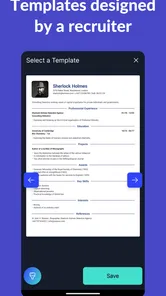
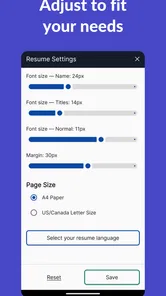
Resume Builder - CV Engineer offers a variety of features to assist users in crafting a professional resume. Users can choose from multiple templates, each designed to highlight different skills and experience levels. The app provides step-by-step guidance, tips on what to include in each section, and allows easy customization of fonts and colors. Additionally, it supports exporting in various formats, including PDF, making it convenient to share or print.
Is Resume Builder - CV Engineer free to use, or are there any in-app purchases?
Resume Builder - CV Engineer is free to download and offers numerous features at no cost. However, it also includes some premium features that require in-app purchases, with items priced from $1.99 to $29.99. These may include access to exclusive templates, advanced customization options, and additional tips and guidelines for crafting resumes. Users can choose to upgrade at their discretion, depending on their needs.
Pros
- Easy-to-use interface for quick CV creation.
- Wide variety of customizable templates.
- Guides and tips for each section of the CV.
- No need for an account to use the app.
- Free download with optional premium features.
Cons
- Limited export options in the free version.
- Ads can be intrusive during use.
- Some templates require premium access.
- No direct integration with LinkedIn.
- Limited customer support options.











