Reels Maker for Instagram BEAT
- 157.00
- 4.6
- Installs
- 1.00M
- Price
- Free

Screenshots

Analysis by Reviewed
Have you ever found yourself scrolling through social media, mesmerized by those captivating reels and wondering how people create such stunning content? Well, wonder no more because I decided to dive into the world of Reels Maker for Instagram BEAT to see what all the fuss is about. Trust me, it’s a game-changer if you're into creating eye-catching content.
Getting Started with Reels Maker for Instagram BEAT
First things first, let's talk about the interface. When I first opened Reels Maker for Instagram BEAT, I was pleasantly surprised by how user-friendly it was. The layout is intuitive, which means you don’t need to be a tech guru to navigate through it. I mean, who has time for complicated tutorials, right?
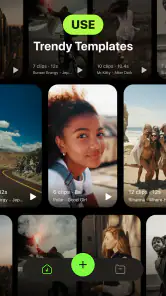
Once you’re in, you’ll find a plethora of options to choose from. The app offers a variety of templates that cater to different moods and themes. Whether you're going for something upbeat or a more serene vibe, there's something for everyone. And let me tell you, the customization options are endless! You can tweak everything to make your reel truly unique.
Features that Stand Out
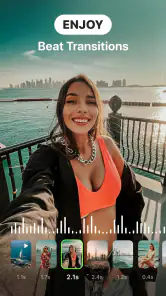
One of the coolest features I stumbled upon was the music library. It's vast and diverse, allowing you to find the perfect track to complement your visuals. The app even synchronizes the beat of the music with your reel, which just adds that extra oomph to your video. I found myself experimenting with different tracks just to see how the beat alignment would change the feel of my reel.
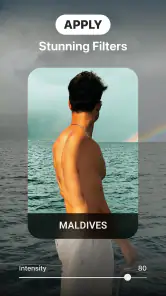
Another feature worth mentioning is the editing tools. You can adjust the speed, add filters, and even incorporate text overlays. The transitions are smooth, making your reel look professionally done without the hefty price tag of hiring a videographer. I had so much fun playing around with these tools, and it’s safe to say the perfectionist in me was satisfied.
Making a Reel That Feels Like Yours
For a practical workflow, I’d start by choosing the clips before settling on a template. A template can set the rhythm, but it cannot make unrelated footage feel coherent by itself. I’d pick a few moments from one occasion, such as a weekend walk or a quick café visit, then try a couple of visual styles and music choices. That makes it easier to judge whether the edits suit the footage instead of choosing a flashy format first and forcing every shot to fit it.
Beat alignment is most useful when the important visual changes happen near the music’s accents. I’d keep the strongest shot for a moment that deserves attention and avoid filling every beat with a cut; too many rapid changes can make an otherwise pleasant reel tiring to watch. A slower clip can also work well if the music and mood support it. The useful distinction is that a template gives you a starting rhythm, while your clip selection and restraint determine whether the finished video feels personal.
More From Our News Desk

Weather by Xiaomi Review: Clear at a Glance, Less Clear Up Close

X Under Pressure: Can It Recover When Posting Goes Wrong?

Clash of Clans Is Won Between the Battles

Android Auto Makes the Case for Quieter Car Software

MobiOffice: Transforming Mobile Productivity with Seamless Integration

EA SPORTS FC™ Mobile Soccer: Redefining Mobile Sports Gaming
When the Template Approach Helps—and When It Doesn’t
This app makes the most sense when I want a quick, stylized short video without building every transition from scratch. Compared with editing directly in a social app, a dedicated template editor can offer a more guided way to shape the look and pacing. Compared with a full-featured video editor, though, a template-first workflow is less appealing if I want detailed control over every cut, layer, or sound adjustment. I’d choose the simpler route for a casual post and a more hands-on editor for a carefully planned project.
There’s also a practical trade-off in relying on preset designs: a polished template can help a beginner get moving, but using a familiar style without adapting it may make several posts feel alike. I’d change the clip order, text, or filter choices where the app allows it, rather than treating the template as a finished answer. Before spending time on detailed tweaks, I’d preview the whole sequence with its music; a transition that looks appealing on one clip can feel abrupt in the complete reel.
Cost, Access, and the Paid Decision
The app is free to download, which makes it reasonable to try before deciding whether it belongs in a regular editing routine. It is rated for Everyone, and its average rating is 4.6 from around 24,000 ratings, with over a million installs. Those figures suggest a sizeable audience, but they do not tell me whether a particular template or workflow will suit my own taste.
There are in-app purchases, with listed items ranging from $8.99 to $99.99 each. I would treat that range as a reason to inspect the purchase details carefully, not as proof that a paid option is necessary or good value. The useful question is whether the free access already covers the kind of reels I actually make. If I only create occasional clips, I’d begin without buying anything; if I use the app often, I’d consider a purchase only after confirming exactly what it unlocks and how often I’d use it.
Who Will Get the Most from It
For a small business owner sharing a product display, a student making a quick recap, or someone who wants a more composed travel post, the guided approach can save effort at the start of editing. A realistic everyday use might be selecting a handful of clips after a day out, trying a matching template, and checking that the music doesn’t overwhelm the visuals before sharing. The app is especially appealing if you enjoy experimenting with mood and pace but don’t want to learn a complex editing setup first.
I’d skip it if my main goal were precise, frame-by-frame editing, extensive audio mixing, or a consistent professional production workflow. I’d also look elsewhere if I preferred to make every visual choice manually rather than begin with a template. In those cases, a conventional video editor is likely a better fit; for a fast, social-ready starting point, this app’s template-led style has a clearer advantage.
Features that Stand Out
One of the coolest features I stumbled upon was the music library. It's vast and diverse, allowing you to find the perfect track to complement your visuals. The app even synchronizes the beat of the music with your reel, which just adds that extra oomph to your video. I found myself experimenting with different tracks just to see how the beat alignment would change the feel of my reel.
Another feature worth mentioning is the editing tools. You can adjust the speed, add filters, and even incorporate text overlays. The transitions are smooth, making your reel look professionally done without the hefty price tag of hiring a videographer. I had so much fun playing around with these tools, and it’s safe to say the perfectionist in me was satisfied.
Perfect for Content Creators
Now, if you’re someone who’s serious about content creation, this app is a godsend. It allows you to produce high-quality reels that can boost your social media presence. And let's be honest, who doesn't want to up their Instagram game? Plus, the app updates regularly with new features and templates, keeping things fresh and exciting.
I also appreciate that the app doesn’t bombard you with ads every two seconds. It’s a breath of fresh air to use an app that’s focused on delivering quality rather than annoying pop-ups.
All in all, Reels Maker for Instagram BEAT is a fantastic tool for anyone looking to create engaging and polished reels. It’s packed with features that make the creative process a breeze. So, whether you’re a seasoned influencer or just someone who wants to have fun with video creation, this app is definitely worth a try. Happy creating!
Reels Maker for Instagram BEAT Frequently Asked Questions
Is Reels Maker for Instagram BEAT free to download?
Yes, Reels Maker for Instagram BEAT is free to download. Before installing, keep in mind that it also offers in-app purchases, with listed prices ranging from $8.99 to $99.99 per item. You can start with the free download and review any purchase options shown in the app before deciding whether to pay for additional features.
Is the app suitable for all ages?
Reels Maker for Instagram BEAT has an Everyone content rating, so it is classified as suitable for a general audience. It is a photography app focused on making video content for Instagram Reels. As with any app, parents may still want to review its features and available purchases with younger users before installation.
Does Reels Maker for Instagram BEAT work on my Android device?
Reels Maker for Instagram BEAT is an Android app for making Instagram Reels. It requires Android 10 or later, so check your device’s operating system before downloading. The app is free to install, and its content rating is Everyone. It is developed by Mobile Presets & Filters and is listed in the Photography category.
What is Reels Maker for Instagram BEAT and what does it do?
Reels Maker for Instagram BEAT is a powerful app designed to enhance your Instagram content by creating captivating reels with ease. It offers a variety of tools and features to help users craft professional-quality videos. Whether you want to add music, apply stunning effects, or utilize creative editing tools, this app makes video creation simple and fun for everyone.
Is Reels Maker for Instagram BEAT user-friendly for beginners?
Yes, Reels Maker for Instagram BEAT is designed with a user-friendly interface that caters to both beginners and experienced users. The app provides easy-to-follow tutorials and intuitive navigation, ensuring that even those new to video editing can quickly learn and start creating impressive reels without any hassle.
Pros
- User-friendly interface simplifies video creation.
- Wide range of music and sound effects.
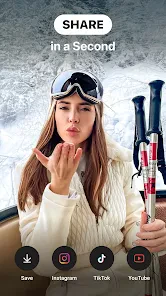
- Direct sharing to Instagram saves time.
- High-quality video export enhances content.
- Fast rendering speeds up editing process.
Cons
- Limited customization options for advanced users.
- Occasional app crashes disrupt workflow.
- Some features locked behind paywall.
- In-app ads can be intrusive.
- Requires internet connection for full functionality.
- Category
- Photography
- Version
- 1.10.0












