ProShot
- 953.00
- 4.3
- Installs
- 500.00K
- Price
- $7.99

Screenshots
Analysis by Reviewed
I judge a camera app not only by how much control it offers, but by how clearly I can make my own choices around it. A camera may point at family, paperwork, or a private room, so I separate the pleasure of shaping a photograph from the practical questions of access and sharing. ProShot appeals to me as a hands-on photography tool; that alone does not tell me how information is handled, so I’d check the permissions and privacy details available on my own device before relying on it for sensitive work.
Trust starts with what you can actually check
Rise Up Games makes this photography app, which costs $7.99. It has an average rating of 4.3 from around 19,000 ratings, and it has been installed over 500,000 times. Those figures suggest a substantial audience, but popularity is not proof of a particular privacy practice, so I wouldn’t use them as a substitute for checking the app’s current permission prompts and privacy information.
I’d pay attention when Android asks for camera or microphone access, especially if I plan to take video. Grant only what I need for the job at hand, and pause if a request doesn’t make sense in context. Permission choices can vary with the device and operating system, so I’d review them on my own phone rather than assume every setup presents the same controls.
Make deliberate choices around sensitive shots
A practical habit is to open the app, compose the frame, and check the exposure before capturing anything sensitive. If I’m photographing a form or a screen, I’d also look at the finished image before sharing it; camera controls can improve the capture, but they can’t decide whether the content is safe to send. For ordinary snapshots, I’d keep the workflow simple and use manual adjustments only when they solve a real problem.
The app is rated Everyone, has been available since July 4, 2015, and its current version is 8.32.3, with Android 10 as the minimum operating system. I’d still check compatibility and the permission screen on my own device before paying. Those practical checks matter more to me than assuming that an app’s age, rating, or update number guarantees a specific data policy.
What ProShot Adds to a Phone Camera
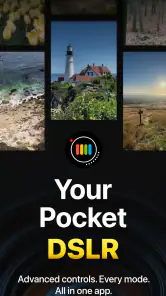
At first glance, ProShot might seem like just another camera app, but once you dive in, you'll realize it's packed with features that bring a DSLR-like experience to your smartphone. With a user-friendly interface, it’s designed for everyone. Even if you’re just getting started with photography, this app doesn’t feel overwhelming. The controls are intuitive, and it offers a plethora of options to tweak your shots.
Features That Stand Out
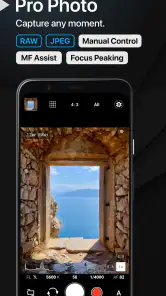
What really sets ProShot apart is its ability to give you full manual control over your camera settings. Imagine adjusting your ISO, shutter speed, and white balance right from your phone. It’s like having a mini DSLR in your pocket! Plus, the app supports RAW photo capture, which is a big deal for editing enthusiasts who want more flexibility with their photos.
More From Our News Desk

Weather by Xiaomi Review: Clear at a Glance, Less Clear Up Close

X Under Pressure: Can It Recover When Posting Goes Wrong?

Clash of Clans Is Won Between the Battles

Android Auto Makes the Case for Quieter Car Software

MobiOffice: Transforming Mobile Productivity with Seamless Integration

EA SPORTS FC™ Mobile Soccer: Redefining Mobile Sports Gaming
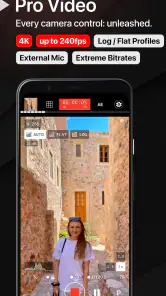
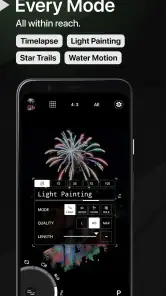
For those who love shooting videos, you’re in for a treat. The app offers various resolutions and framerates, even supporting 4K video. And if you're into time-lapses, ProShot has got you covered with customizable intervalometers. It's quite the powerhouse!
Usability and Design
One of my favorite things about ProShot is its sleek design. The interface is clean, making it easy to navigate through different settings. The real-time histogram and leveling tools are fantastic additions, especially if you’re shooting in challenging lighting conditions. They help ensure your shots are well-composed and properly exposed.
Despite its advanced features, the app is surprisingly light on resources. It runs smoothly without causing your phone to lag, which is always a plus. Whether you’re using it on Android or iOS, the experience is consistently seamless.
When more control means more work
The biggest trade-off is that manual options reward attention. If I’m trying to photograph a moving child or a pet indoors, raising the shutter speed may help freeze motion, but it can leave the image darker; I may need to balance that against ISO and available light. For a quick, casual snap, the default camera can be faster because it makes those choices for me. ProShot makes more sense when I want to shape the result rather than simply record it.
That distinction also helps with the $7.99 purchase decision. I’d consider it for someone who regularly shoots RAW, experiments with exposure, or wants the same manual approach for stills and video. Someone who mostly points, taps, and shares may get more value from the camera already on the phone. I would not pay expecting an automatic improvement to every picture: the phone’s camera hardware and the photographer’s choices still matter.
Small experiments that teach you the controls
For a bright window portrait, I’d watch the histogram while adjusting exposure so the view outside doesn’t wash out completely, then use the level guide to keep the frame straight. For a dim café, I’d test a steadier shutter speed against the risk of blur, rather than raising every setting at once. Changing one control at a time makes it easier to see what fixed the shot and to repeat that choice later.
RAW is most useful when I expect to edit afterward; it gives an editing-minded workflow a reason to spend time on capture, while adding another step before a finished image is ready to share. If I only need a quick, polished social photo, that extra work may be needless. The intervalometer is better suited to a planned scene than an impulse shot: I’d set the framing and interval before leaving the phone to capture a changing sky or a slow indoor project, then check the result rather than assume every sequence will look right.
How it compares with familiar alternatives
Compared with the standard camera app, ProShot’s appeal is the hands-on control described above, not a promise that every mode will suit every phone or scene. The built-in camera is often the easier choice when I need a fast launch, familiar automatic processing, or a simple point-and-shoot routine. ProShot is the more interesting option when I want to steer exposure, compose carefully with its guides, or plan a time-lapse. I’d try the controls on a low-stakes subject first, so I know how they feel before an important moment comes along.
For everyday use, imagine taking a photo of a friend beside a bright window: I can check the histogram, adjust exposure, and use the level tool to keep the frame tidy, then decide whether the image is worth editing as RAW. That small routine shows both the benefit and the cost: more control, but also more decisions. If I’m rushing to capture a fleeting expression, automatic mode may be the smarter choice.
Who benefits most from the extra choices
I see the clearest fit for someone who already notices why a phone photo missed the mark and wants a direct way to respond. If a bright background keeps pulling attention away from a face, exposure control gives me a chance to make a considered adjustment. If I’m documenting a craft project over time, interval shooting can turn a phone into a more deliberate recording tool. Neither use requires professional ambitions; it just helps to enjoy making choices instead of expecting the camera to make every one automatically.
There is also a learning advantage to changing settings individually. I can take a test frame, adjust shutter speed, and compare the result before touching ISO or white balance. That makes the interface useful as a practical learning space, not only as a route to a finished image. I’d avoid changing several controls at once when I’m still learning, since I may not know which adjustment helped or caused a problem.
Video and planned shooting in real life
For a short clip of a school performance or a family gathering, the video options give me room to choose a mode with the finished use in mind. A higher-resolution setting may suit footage I plan to keep or crop later, while a simpler choice may be more sensible for a clip I only need to send and watch casually. I’d make that decision before recording, check framing and sound access when prompted, and avoid spending the event navigating menus once something important is happening.
Time-lapse work calls for a different kind of preparation. I’d first decide whether the scene will change enough to justify a sequence, place the phone where it can stay still, and check that the framing will remain useful throughout. For a plant opening or a small build, that planning matters more than tapping the intervalometer and walking away. It is a creative option, not a substitute for thinking through the scene.
Privacy choices belong in the workflow
Because camera use can involve people and private surroundings, I’d make permission decisions before a shoot rather than while someone is waiting in front of the lens. I’d review the app’s access through Android settings if I later wanted to change my mind, and I’d keep the image-sharing decision separate from the act of taking the picture. For a document, I’d check the frame for names, account details, or background information before sending it; a well-exposed image can still reveal more than intended.
That cautious routine is especially useful if I switch between casual photography and work-related captures. I might use manual exposure to photograph a receipt clearly, but then crop or review the saved image before forwarding it. For a personal moment, I’d consider who else is in the frame and whether I’m comfortable sharing it. These are ordinary choices, but a camera app’s creative controls do not make them on my behalf.
Final Thoughts
So, is ProShot worth downloading? If you're serious about photography and want to squeeze every bit of capability out of your smartphone camera, then absolutely yes! The app bridges the gap between simple point-and-shoot and advanced photography, making it accessible to everyone. It’s an investment in your photography skills that you won’t regret. Happy snapping!
My cautious recommendation
I’d recommend it to curious phone photographers who will actually use manual exposure, RAW, video choices, or interval shooting, and who are comfortable checking permissions and the app’s privacy details for themselves. I’d steer a purely casual shooter toward the familiar camera app instead, and I’d avoid treating any camera app as a safe place for sensitive images without checking where those files go and how they are shared. For me, the value is in having meaningful creative choices close at hand—provided I’m willing to make them.
ProShot Frequently Asked Questions
Is ProShot suitable for casual everyday photography?
ProShot is a photography app for people who want more hands-on control than a basic camera interface may offer. Its manual options can be useful for planned shots or when you want to experiment, but they may be more than you need for quick snapshots. If you usually prefer simply pointing and shooting, consider whether its control-focused approach matches the way you take pictures.
Can I use ProShot without professional photography experience?
Yes. ProShot is designed to be user-friendly, even for those who are new to photography. The app provides a simple interface that guides users through the various settings with ease. While it offers advanced features for experienced photographers, its intuitive design ensures that beginners can also explore and enjoy capturing high-quality images without feeling overwhelmed by technical details.
Is ProShot a paid app, and what should I know before downloading it?
ProShot is a paid photography app priced at $7.99, so you can consider its cost before installing. It is designed for people who want more direct control over taking photos and recording video than a basic camera interface may provide. Its Everyone content rating makes it suitable for a broad audience, while its manual tools may be most appealing to users who enjoy adjusting camera settings.
What features does ProShot offer for professional photography?
ProShot is packed with features that cater to professional photographers. It offers manual control over settings such as ISO, shutter speed, white balance, and focus. Moreover, it supports shooting in RAW format, custom aspect ratios, and even 4K video recording. This app transforms your smartphone into a powerful DSLR-like camera, providing tools for both advanced and beginner photographers to enhance their photography skills.
Is ProShot user-friendly for beginners?
Yes, ProShot is designed to be user-friendly, even for those who are new to photography. The app provides a simple interface that guides users through the various settings with ease. While it offers advanced features for experienced photographers, its intuitive design ensures that beginners can also explore and enjoy capturing high-quality images without feeling overwhelmed by technical details.
Pros
- Intuitive user interface
- Extensive manual controls
- High-quality image output
- Supports RAW format
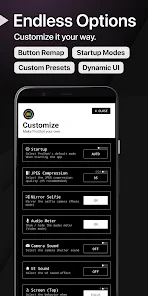
- Customizable presets
Cons
- Steep learning curve
- Limited free features
- Occasional app crashes
- Heavy on battery usage
- Lacks cloud sync
- Category
- Photography
- Version
- 8.32.3











