Contraction Timer & Counter
- 50.00
- 4.2
- Installs
- 1.00M
- Price
- Free

Screenshots


Analysis by Reviewed
In the last stretch of pregnancy, even a simple task can feel like one more thing to manage. When contractions begin, I would rather pay attention to how I feel than try to keep a mental record of every start and finish. Contraction Timer & Counter is a focused parenting app for recording that timing, giving you and a support person a more organized way to look back at what has happened. Its usefulness is practical rather than medical: it can help keep track, but it cannot tell you whether labor is progressing safely or replace advice from your healthcare professional.
What the free download does for value
The app is free to download, while optional in-app purchases range from $0.99 to $11.99 per item. That gives you a chance to try the basic experience without paying upfront. I would check what each paid item offers before purchasing rather than assume a particular feature is included or that an upgrade is essential. The developer is Wachanga, and the app is rated for Everyone.
That distinction matters here because the main reason to install a contraction timer is to have a convenient way to make and review entries. If the free experience handles the timing and record-keeping you need, there may be no reason to spend more. If you are considering a purchase, decide what problem you want it to solve first; the price range alone does not tell you whether an item will be worthwhile for your situation.
Using a timer when timing matters
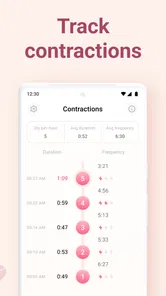
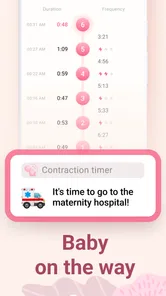
We all know that timing contractions is crucial. It’s like the first epic countdown before the main event. The Contraction Timer & Counter makes this task a breeze. It’s designed to help you keep track of the duration and frequency of contractions without any hassle. You just tap the button at the start and end of each contraction, and voila! It logs everything for you. The app even alerts you when it might be time to head to the hospital. How cool is that?
A simple workflow, with a few sensible checks
The interface is super intuitive. Even if you’re not tech-savvy, you’ll find it a cinch to use. The buttons are big, bold, and easy to tap, which is awesome when you’re, you know, a little preoccupied. Plus, the app provides a neat summary of your contractions over time, giving you and your healthcare provider a clear picture of your progress.
A practical way to use that summary is to let a support person handle the taps while you focus on breathing and changing position. Before labor, you can agree on who will keep time and where the phone will stay, so you are not searching for it between contractions. If you are managing the timer yourself, keep the device somewhere reachable and practice the start-and-stop action once beforehand; that small rehearsal may make the controls feel more familiar when you are distracted.
It is also worth choosing a routine that does not make the phone the center of the room. A partner can keep it on a nearby surface and record each contraction without asking you to report every detail while you are coping with one. If you are alone, you can still use the timer, but there is no need to force yourself to make a perfect record when doing so feels uncomfortable. A few missed entries are less important than following your care plan and getting support when you need it.
More From Our News Desk

Weather by Xiaomi Review: Clear at a Glance, Less Clear Up Close

X Under Pressure: Can It Recover When Posting Goes Wrong?

Clash of Clans Is Won Between the Battles

Android Auto Makes the Case for Quieter Car Software

MobiOffice: Transforming Mobile Productivity with Seamless Integration

EA SPORTS FC™ Mobile Soccer: Redefining Mobile Sports Gaming
What the record can—and cannot—tell you
One of my favorite things about this app is how customizable it is. You can set it up to notify you at different stages and intervals. It’s like having a personal assistant dedicated to your labor journey. And the best part? It’s all in real-time. The app also offers a history feature, so you can look back at previous contractions—a handy feature for comparing patterns.
Seeing a pattern in a log can help you describe what has been happening, but it is not a diagnosis or a personal medical recommendation. Follow the guidance your care team has given you, and contact them if you are unsure what to do; do not wait for an app alert if you have a concern. This is also where a paper note or a call may be better: a phone timer is useful only while someone can comfortably operate it and interpret the record in context.
A helpful habit is to treat the history as a prompt for a conversation, not as a score you need to improve or a rule you must obey. If you call your care team, describe how you feel as well as what the log shows; timing by itself does not capture the whole experience. If the alerts make you anxious, it is reasonable to rely on your care team’s instructions instead of letting notifications dictate your attention. The tool earns its place only when the record makes communication easier.
Another practical question is whether the app can replace a call or a written plan. I would not use it that way. It can help you keep observations together, but it cannot assess your symptoms or know the instructions your care team has given you. If a concern feels urgent, use the appropriate medical contact rather than spending time trying to make the log more complete.
Another neat feature is the ability to share your contraction data. Whether you’re texting updates to your partner or sending detailed logs to your doctor, the app makes communication seamless. It’s these little extras that really set the Contraction Timer & Counter apart.
For a realistic example, imagine contractions beginning while you are at home and your partner is getting bags ready. They can record each start and finish, then use the history to give your care team a clearer account when you call. If the phone becomes a distraction or the pattern is hard to interpret, stop focusing on the screen and follow your care team’s instructions instead. Sharing a log may help communication, but a straightforward phone call remains the better choice for urgent questions.
Sharing is most useful when you already know who needs the information and why. A support person could keep the record while you rest, then pass along the relevant details when you speak with your care team. It is less useful if you are sending updates simply because the app makes them available; extra messages can create more noise without improving the decision at hand. I would keep the record focused on what helps you explain the situation.
How it compares with a clock or notebook
A dedicated tracker sits between two familiar alternatives. A clock or stopwatch can tell you the time, but you need to remember or write down the entries yourself if you want to compare several contractions later. A notebook can keep those notes in one place and works without operating an app, but it asks someone to record and review the information manually. This app’s appeal is that it combines timing with a history, which may reduce that extra bookkeeping.
That convenience comes with a trade-off: the phone has to be available, and someone still has to operate the timer. If using a screen feels intrusive, or you prefer a simple written record, a notebook may be the calmer choice. If you only want to time one contraction at a time and do not need a running history, a basic stopwatch may be enough. I would choose the method that creates the least work in the moment, not the one that appears most sophisticated.
Who is likely to find it useful
This is a focused option for expectant parents who want a dedicated place to record contraction timing, especially if a partner or birth coach can help keep the record. Compared with timing manually on a clock or using a general stopwatch, a dedicated tracker can make reviewing several entries more convenient. A notebook is still a reasonable alternative if you prefer not to rely on a phone during labor, while a general timer may suit someone who only wants to time one contraction at a time and does not need a running history.
The app is less compelling if you expect it to make decisions for you, or if alerts and a digital log would add stress rather than reduce it. It is also worth deciding in advance whether you want someone else to manage it: when attention is needed elsewhere, entering every contraction yourself may be an unnecessary task. The best setup is the one that leaves you more present, not the one with the most data.
It is a better match for someone who values an organized record and expects a partner, birth coach, or other support person to help. It may also suit a person who prefers having past entries available when describing a pattern over the phone. By contrast, someone who finds notifications unsettling, wants a hands-off tool that makes medical decisions, or does not want a phone involved during labor should skip it or choose a paper method. The app’s focused purpose is a strength only when that purpose fits your preferences.
If you are deciding before labor, a low-pressure test can help: open the app, try the basic timing action, and see whether the controls and record feel clear to you. You can also agree with your support person on a simple handoff—who taps, who watches the clock if needed, and when you will put the phone aside. These small choices are more useful than trying to plan every possible pattern in advance, and they make it easier to avoid debating the app while you are distracted.
Fit, compatibility, and value
Wachanga’s parenting app has an average rating of 3.9 from around 14,000 ratings, and it has been installed over a million times. It was released on August 25, 2022; version 1.27.0 requires Android 9 or later. Those details make it a familiar, actively versioned option for many Android users, though they do not tell you whether its workflow will suit you personally. If you use iOS, check the relevant app store for compatibility before planning around it.
For a free starting point, the value is straightforward: you can try a dedicated contraction log without paying at download. Paid items may or may not be worthwhile depending on what you personally need, so I would first see whether the free experience handles your timing and record-keeping comfortably. Someone who already has a preferred method and does not want another app may get little benefit from switching.
With an average rating of 3.9, I would treat user feedback as a reason to check whether the app suits your own workflow, not as a guarantee that it will feel right for everyone. The number of ratings and the install base suggest that many people have tried it, but neither can tell you how easy the controls will feel in your circumstances. For an app used in a stressful moment, a quick practice run and a backup plan matter more than popularity alone.
My buy-or-skip verdict
So, if you’re expecting or know someone who is, I’d definitely recommend giving this app a go. It takes a lot of the guesswork out of timing contractions and lets you focus on what really matters—getting ready to meet your little one. With its straightforward design and helpful features, it’s like the trusty sidekick you never knew you needed. Trust me, when the big day arrives, you’ll be glad you have it in your corner.
My recommendation comes with one condition: use it as a record-keeping aid, not as an authority on when to seek care. If simple tapping, a saved history, and sharing are useful to you, the free download is an easy place to start; if you prefer a notebook or want medical guidance from the tool itself, this is not the right fit. I would try the basic workflow before considering any purchase and keep your care team’s instructions at the center of the plan.
In short, I would install it if a dedicated log could reduce the effort of remembering contraction times and a support person can help maintain it. I would skip it if the screen, alerts, or added tracking would make an already intense situation harder. Its value is not that it can tell you what labor means; it is that it may make your observations easier to review and explain. Start with the free experience, decide whether that convenience genuinely helps, and leave medical decisions to your care team.
Contraction Timer & Counter Frequently Asked Questions
Is Contraction Timer & Counter intended for pregnancy or labor tracking?
Yes. Contraction Timer & Counter is a parenting app focused on tracking contractions during labor. It is designed to help you record their timing and duration and monitor how the pattern changes. It can be a practical tool to have ready as labor begins, but it does not replace guidance from your healthcare team.
Can Contraction Timer & Counter tell me when to go to the hospital?
Contraction Timer & Counter is intended to help you track contraction timing and duration, so the recorded pattern may be useful when discussing your labor with a healthcare provider. It should not be treated as a diagnosis or a substitute for medical advice. Follow the guidance you have received from your care team, and contact them if you are unsure what to do.
Who develops Contraction Timer & Counter, and what kind of app is it?
Contraction Timer & Counter is a parenting app developed by Wachanga. Its focus is practical: it helps expectant mothers track contractions and monitor labor progress. The app has an Everyone content rating, and its straightforward purpose may make it worth considering if you want a dedicated timer rather than a general pregnancy or health app.
1. What is Contraction Timer & Counter and how does it work?
Contraction Timer & Counter is a mobile application designed to help expectant mothers track the timing and duration of their contractions. By simply tapping a button at the start and end of each contraction, the app records the data and provides insights into patterns, helping users determine when it's time to head to the hospital. The app aims to simplify contraction tracking with easy-to-read statistics and graphs.
2. Is Contraction Timer & Counter free to use?
The Contraction Timer & Counter app is available for free download, offering essential features without charge. Optional in-app purchases range from $0.99 to $11.99 per item, so some features may require an additional payment. Check the available purchase details before buying anything.
Pros
- Easy to use interface for tracking contractions.
- Customizable alerts for contraction timing.
- Allows sharing contraction data with healthcare providers.
- Supports multiple languages for wider accessibility.
- Offline mode available for use without internet.
Cons
- Limited features in the free version.
- Occasional ads may disrupt usage.
- Doesn't integrate with all health apps.
- Some users report minor bugs in the app.
- Requires manual data entry for accuracy.












