Prankster-Funny Prank Sounds
- 278.00
- 4.3
- Installs
- 10.00M
- Price
- Free
Screenshots



Analysis by Reviewed
I’d treat Prankster-Funny Prank Sounds as a pocket soundboard for a particular kind of social moment: friends are together, the mood is relaxed, and a short comic effect can add to the joke. It is less suited to elaborate pranks that need a script or exact audio production. The app is free to install, with optional in-app purchases from $2.99 to $19.99 per item, so I’d start with the free experience and decide later whether anything extra is worth paying for.
Getting ready before the moment
The most useful way to approach a prank-sound app is to prepare before the audience is waiting. I’d browse a few options in advance, pick one that suits the setting, and leave the phone ready. That is more reliable than searching through categories while conversation pauses and everyone watches. The sound may be available at a tap, but comic timing still depends on choosing the right moment and knowing whether the people nearby enjoy this kind of joke.
For a casual gathering, I’d think about the room as well as the effect. A sound that can be heard outdoors may be too harsh in a quiet living room, while a subtle effect can disappear beneath music or a busy conversation. Choosing a backup that is funny without being startling gives you a way to adapt if the atmosphere changes. It also helps to avoid repeating the same effect: once people know what is coming, the surprise is gone.
How the sounds fit into everyday use
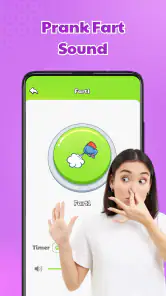
Have you ever wished you could pull off the perfect prank with just the tap of a button? Well, with Prankster-Funny Prank Sounds, you can do just that! This app is packed with an extensive collection of hilarious sounds that are sure to catch anyone off guard. From classic fart noises to eerie ghost sounds, this app has it all. Imagine the look on your friends' faces when they hear a sudden, unexpected sound coming from nowhere. It's pure comedy gold!
Speed expectations and choosing a sound
The straightforward browse-and-tap approach suits an app meant for spontaneous jokes: you are not learning a complicated editing workflow before you can use it. In practice, I would open it before the moment arrives, choose a sound, and keep the phone ready rather than start browsing while everyone is waiting. That small bit of preparation matters more than expecting a prank to land instantly; the humor depends on timing and the people around you, not just the sound effect.
A Sound for Every Occasion
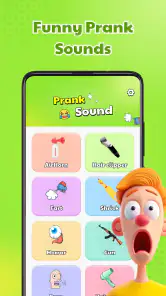
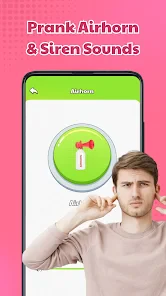
One of the app's standout features is its diverse range of sounds. Whether you're looking to create a spooky atmosphere with a creaky door sound or make someone jump with a loud air horn, this app has got you covered. The app categorizes sounds into different sections, making it easy to find the perfect sound for any situation. Plus, the app is regularly updated with new sounds, so you'll never run out of options to keep your pranks fresh and exciting.
A useful way to get more from a categorized library is to choose a small shortlist before you meet up: one sound for a quiet room, one for an outdoor gathering, and one that is funny without being startling. A loud effect can be lost in a busy place, while a sudden noise in a quiet setting can feel much harsher than intended. I would also avoid repeating the same effect in one get-together; a prank works best as a quick surprise, not a running interruption.
More From Our News Desk

Weather by Xiaomi Review: Clear at a Glance, Less Clear Up Close

X Under Pressure: Can It Recover When Posting Goes Wrong?

Clash of Clans Is Won Between the Battles

Android Auto Makes the Case for Quieter Car Software

MobiOffice: Transforming Mobile Productivity with Seamless Integration

EA SPORTS FC™ Mobile Soccer: Redefining Mobile Sports Gaming
User-Friendly Interface
Even if you're not tech-savvy, navigating through this app is a breeze. The user-friendly interface allows you to quickly browse through sound categories and play your chosen sound with just a tap. The app's design is straightforward, ensuring that you can focus on executing the perfect prank rather than getting lost in complicated menus. It's all about making pranking as easy and fun as possible.
Heavy-use moments and reliability
At a party, a family game night, or a casual hangout, the app is most useful when one person handles the phone and picks a sound at a natural pause in conversation. For example, if friends are settling in before a movie, a brief creaky-door effect might get a laugh; playing a startling noise during a serious conversation could just annoy people. I would keep the volume modest and make sure the joke is welcome, especially around anyone who dislikes sudden sounds.
For an evening with lots of attempts, the practical trade-off is that browsing and replaying can make the joke feel predictable. I would rotate between styles instead of relying on the loudest option, and stop if the group is no longer enjoying it. The app is built around quick playback rather than a complex production process, so it is a better fit for short, in-person gags than for carefully timed audio skits or edited videos.
Making the joke work for the group
A realistic use is a relaxed game night where one friend is already telling a spooky story and the group is enjoying the theatrics. I’d choose a brief eerie effect beforehand and use it at a pause, rather than interrupting the story or trying to frighten someone who has not opted into the joke. That small distinction changes the app from a source of random noise into a prop that supports what the group is already doing.
It can also be useful as a shared prompt rather than a surprise: send a sound to a friend who likes silly effects, then let them decide whether to play it. That approach is less dramatic, but it avoids putting someone on the spot. If the group includes people who are sensitive to loud or sudden sounds, keep the volume low or skip the prank. No sound library can judge the room for you.
Sharing the Laughter
What's a good prank if you can't share it with others? Prankster-Funny Prank Sounds makes it easy to spread the laughter by allowing you to share your favorite sounds with friends and family. Whether you're at a party or just hanging out, this app ensures that the fun never stops. Simply select a sound, hit the share button, and watch as your friends burst into laughter.
Sharing a sound can also work better than springing it on someone: send a favorite to a friend who enjoys this kind of humor, or use it as a prompt for a group joke. If your goal is a polished clip with narration, layered effects, or precise editing, a dedicated audio or video editor is the more suitable alternative. If you only want a quick soundboard-style gag, this app keeps the task simpler.
How it compares with other ways to play sound effects
Compared with searching for individual audio files, a categorized soundboard is more convenient when you want to browse a handful of effects in the moment. That convenience is most valuable when the joke is casual and immediate; it matters less if you already have a specific clip saved and know exactly when to play it. Compared with an audio editor, the app is the simpler choice for quick playback, but an editor is better when you need to trim a clip, combine sounds, or control a sequence.
I would not use it as a substitute for a carefully planned video gag, either. A video or audio editing tool gives you more control over timing and presentation, while this app is aimed at playing an effect in a social setting. The trade-off is straightforward: less setup for a quick laugh, less control for a finished piece. If you are unsure which you need, ask whether the sound should happen live or become part of something you will edit and share later.
Who will enjoy it, and who may prefer something else
I can see this being a good fit for friends and families who trade harmless jokes and want effects ready without searching through separate files. It is less suitable for people who need discreet audio controls, professional sound design, or a prank that works without a willing audience. A sound app cannot guarantee a funny reaction, and the same effect can be amusing to one person and irritating to another; reading the room is part of using it well.
Parents should also bear in mind that the app carries a Teen age rating. That makes it worth checking whether its style of humor is appropriate for younger listeners before handing over a device. For shared use, I would pick sounds together rather than let a child surprise someone who may be uncomfortable with sudden noises.
I would also skip it if your main aim is to prank strangers, create a convincing illusion, or play sounds in a setting where people cannot easily opt out. A harmless joke should end when it stops being funny to the person hearing it. For people who want a private collection of effects, a regular soundboard may be enough; for anyone looking for careful control over playback and mixing, a dedicated editing app is a better fit.
Device fit and performance expectations
The app is currently at version 3.1.88 and supports Android 6.0 or later. It has a 4.3 average from around 60,000 ratings and more than 10 million installs, which suggests that many people have tried it, though popularity alone does not tell me how it will behave on every phone. ZenithAI Works publishes it as a free entertainment app, and the optional purchases are worth keeping in mind if you are deciding whether to spend beyond the basic download.
Because the experience centers on browsing and playing short sounds, I would not choose it for heavy audio work or assume it can replace a sound-editing app. On an older or busy device, closing other demanding apps before a gathering is a sensible general precaution, but I would not treat that as a special requirement. If playback does not behave as expected, reopening the app and selecting the sound again is a simple first step; for a prank that must happen at an exact moment, test the chosen sound beforehand rather than relying on a last-second surprise.
For practical use, I’d check the selected effect at a comfortable volume before handing the phone to someone else. That quick test helps avoid an unexpectedly loud playback in a small room and gives you a chance to confirm that you have picked the intended sound. It is also a sensible way to see whether the phone’s current audio setup suits the setting, without assuming that every device or environment will behave the same way.
What to expect from repeated use
For occasional jokes, the app’s simple purpose is an advantage: there is little reason to turn a one-off sound effect into a project. If you expect to use it repeatedly during a long gathering, though, the novelty of individual effects may wear off. I’d treat it as an occasional prop rather than the entertainment for an entire evening, and give the group room to move on to conversation or another activity.
The free download also makes it easy to try before deciding whether any paid item is useful to you. I would not buy extras simply because a prank collection feels incomplete; first see whether the available sounds match the humor of your group and whether you actually reach for the app. Since purchases are optional, the sensible choice is to keep spending tied to a clear use rather than assume that buying more will make a joke funnier.
My performance verdict
For a quick, low-effort laugh among people who enjoy pranks, this is an easy app to understand and use. I like that its categories make browsing less of a hunt, and that it can serve a casual social moment without requiring an editing session. Its limits are just as clear: timing, volume, and the audience matter more than having a large collection, and a different tool is better when you need control over a full audio sequence.
Overall, I’d recommend it to someone who wants a simple soundboard for friendly, in-person humor and is willing to use it with a little restraint. I would not rely on it for a prank that has to work at a precise instant, a polished audio project, or a situation where an unexpected sound could upset someone. Used as an occasional prop among friends who are in on the fun, it has a clear role; outside that setting, a saved clip or editing tool may be the more practical choice.
In conclusion, if you're looking for an app that delivers endless fun and laughter, Prankster-Funny Prank Sounds is the way to go. Its wide range of sounds, user-friendly interface, and sharing capabilities make it a must-have for anyone who loves a good prank. So, why wait? Download the app today and get ready to become the ultimate prankster!
Prankster-Funny Prank Sounds Frequently Asked Questions
Is Prankster-Funny Prank Sounds available on iPhone and iPad?
Prankster-Funny Prank Sounds is an entertainment app from ZenithAI Works, and its listed minimum operating system is Android 6.0. If you are considering it for an iPhone or iPad, check the relevant app store for availability and compatibility before downloading. On an Android device, checking the operating system version first can help you avoid compatibility problems.
Does Prankster-Funny Prank Sounds need special permissions or access to my contacts?
The main idea is to choose and play humorous sound effects, so you can think of it as a soundboard-style prank app. Before installing, take a moment to review the permission requests shown by your device and decide whether they make sense for how you plan to use it. You can also manage app permissions in your device settings after installation.
Can I use Prankster-Funny Prank Sounds through my phone’s speaker or headphones?
Prankster-Funny Prank Sounds is built around playing comedic sound effects, making a phone’s speaker a straightforward way to share a joke with people nearby. Headphones can be useful if you want to preview sounds privately before playing them aloud. The best choice depends on the setting and the kind of prank you have in mind; keep volume and other people’s comfort in mind.
What devices and operating systems can run Prankster-Funny Prank Sounds?
Prankster-Funny Prank Sounds is an entertainment app from ZenithAI Works. It runs on Android devices using version 6.0 or later, so checking your device’s operating system before downloading can help avoid compatibility problems. The app is free to download, and its Teen age rating is worth considering when deciding whether it is suitable for everyone who may use the device.
What is Prankster-Funny Prank Sounds and how does it work?
Prankster-Funny Prank Sounds is a mobile application designed to provide users with a library of comedic and entertaining sound effects for pranking friends and family. The app features a wide variety of sounds, from air horns to fake farts, and allows users to play these sounds at the touch of a button. It's perfect for light-hearted fun and can be easily used in any social setting to create laughs and memorable moments.
Pros
- Wide variety of prank sounds
- Easy-to-use interface
- Lightweight with fast performance
- Regular updates with new sounds
- Supports both Android and iOS
Cons
- Contains in-app ads
- Limited free sounds
- No sound customization
- Requires internet for updates
- Battery consumption can increase
- Category
- Entertainment
- Version
- 3.1.88












