Polarr: Photo Filters & Editor
- 2.24K
- 3.8
- Installs
- 10.00M
- Price
- Free
Screenshots
Analysis by Reviewed
I approached Polarr: Photo Filters & Editor as a practical photo tool rather than a simple collection of decorative effects. Its appeal is easy to understand: it is free to start, belongs to the photography category, and focuses on giving ordinary pictures a more deliberate visual mood. After spending time with it, I found that the real question is not whether it can make a photo look different, but whether its editing style matches the way you like to work.
For me, the app sits between a one-tap filter camera and a more demanding desktop-style editor. That middle position is useful. I can open a picture, try a visual direction quickly, then continue adjusting instead of accepting the first preset that looks acceptable. At the same time, the interface and range of choices can feel less immediate than apps designed purely for instant social posts.
What to consider before choosing Polarr
The first decision is how much control you actually want. If your usual routine is taking a picture, applying one attractive filter, and sharing it immediately, Polarr may offer more room to explore than you need. If you enjoy comparing moods, refining color, and building a consistent look across several images, its approach makes more sense.
I also considered how well it works for different kinds of photography. A portrait, a food photo, a travel scene, and a low-light snapshot often need different treatment. A strong preset can help one image and make another look artificial. Polarr is most useful when you are willing to treat effects as a starting point rather than a final answer.
The app is free, with optional in-app purchases ranging from $0.99 to $34.99 per item. That makes it approachable for testing, but I would not choose it without first deciding how deeply I intend to use its paid options. The free entry point lowers the risk of trying it, while the available purchases mean the total experience can depend on which tools or content you decide to unlock.
Compatibility is straightforward for many Android users: the current version is 6.12.0 and requires Android 8.0 or later. The age rating is Everyone, which suits a general audience. Polarrcan is the developer, and the app has been available since August 2, 2015, so this is not a new experiment that still needs to prove its basic direction.
My everyday test: turning a flat phone photo into a usable image
A realistic example is a quick lunch photo taken near a window. The original may have a bright background, dull food colors, and shadows that make the plate look heavier than it did in person. My preferred workflow in Polarr is to begin with a restrained filter, then reduce its intensity before touching anything else. That prevents the common problem where the effect becomes the subject of the picture.
Next, I look at the brightest area and the darkest area separately. If the window is distracting, I avoid compensating by making the entire image too dark. Instead, I make smaller changes and check whether the food still looks natural. This is one of the app’s practical strengths: it encourages a layered editing process rather than forcing me to choose between an untouched image and an exaggerated preset.
For a photo intended for a message or a casual post, I would stop once the subject is clearer and the colors feel believable. For a small personal collection, I would go further and compare the result with other pictures from the same day. Consistency matters more than making every individual image dramatic, and Polarr is better suited to that kind of comparison than a basic filter-only tool.
Where its editing approach is strongest
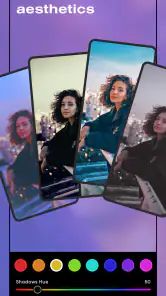
The biggest advantage is the balance between speed and personal control. I can start with an aesthetic direction, but I do not have to accept the preset’s exact strength. That matters because the same effect can look tasteful on a portrait and distracting on a landscape. Being able to pull the look back is often more valuable than having another flashy option.
I also like using the app for mood matching. Instead of asking, “Which filter makes this picture pop?” I ask whether I want the image to feel warm, quiet, crisp, nostalgic, or more subdued. That small change in thinking produces better results. It turns the editor into a decision tool: first choose the feeling, then make the technical adjustments support it.
Another useful habit is to edit a copy mentally, even when the app makes experimentation easy. I compare the edited version with the original before committing to a strong look. This catches changes that seem attractive at first but remove skin detail, flatten shadows, or make neutral surfaces look tinted. Polarr rewards that pause because its visual options can be tempting to overuse.
The app is also a good fit for people who want their photos to look intentional without learning a full professional workflow. I would recommend it to a student creating a visual diary, a traveler organizing a small set of images, or a casual creator who wants more control than a social network’s built-in editor provides.
Three less obvious ways I would use it
First, I would use Polarr to create a personal reference style rather than editing every image from scratch. I can choose one image that represents the look I want, note which adjustments made the difference, and use that as a visual guide for later photos. Even without treating the app like a formal color-management system, this reduces the random look that often appears when every picture receives a different filter.
Second, I would use it to rescue a mixed set of photos from one event. A phone may capture indoor pictures with yellow light, outdoor pictures with cool shadows, and portraits with uneven exposure. Instead of applying the same effect blindly, I would first bring the images closer in mood, then apply a lighter common treatment. The trade-off is time: the result can feel more coherent, but it is not the fastest one-tap workflow.
Third, I would use strong effects as a preview tool before making a restrained final version. An exaggerated treatment can reveal whether a picture benefits from warmer color, deeper contrast, or a faded atmosphere. I then reduce the intensity and keep only the part that supports the subject. This is more reliable than searching endlessly for a preset that happens to be perfect at full strength.
These methods are not obvious from the short store description, but they explain why I see Polarr as more than an effects browser. Its value appears when I use the available looks to make decisions, not when I collect effects without a purpose.
How it compares with simpler photo editors
Compared with the usual one-tap editor built into a phone or social platform, Polarr gives me a more considered middle ground. Basic alternatives are usually better when speed is the only goal. They reduce the number of decisions, which is helpful when I am posting a temporary image or correcting a picture quickly.
Polarr becomes more attractive when the first filter is not quite right. I can keep working instead of opening another app to fix an overly strong color cast or an unbalanced mood. That can make the process feel slower at the beginning, but it may save time when I care about the final appearance.
The trade-off is mental effort. A simple editor protects me from too many choices; Polarr gives me more responsibility. If I do not know what I am trying to improve, I can spend longer browsing effects and end up with an image that looks processed rather than polished.
How it compares with advanced editing tools
Against a full professional editor, Polarr is easier to approach and better suited to casual mobile work. I would choose it when I want to edit during a commute, prepare a small group of images, or explore a style without building a complex desktop project.
A specialist tool may be the better choice for photographers who need highly controlled retouching, precise production workflows, or a complete set of professional adjustments. I would also look elsewhere if my work depends on exact output requirements rather than visual experimentation. Polarr’s strength is flexible aesthetic editing, not replacing every serious photography application.
This distinction is important before switching. Someone moving from a simple editor may need patience to learn how to stop at the right moment. Someone moving from a professional editor may miss the depth or precision they are accustomed to. The app is most comfortable for the large group between those extremes.
The cost of changing your workflow
Trying Polarr costs little at the start because the app is free to download and use as an entry point. The more meaningful cost is attention. I have to learn which adjustments improve my images and which ones merely make them louder. That learning curve is manageable, but it exists.
There is also a content decision around in-app purchases. Since individual items range from $0.99 to $34.99, I would explore the free experience first and only pay when I know a particular addition fits my regular work. I would not buy something simply because its preview looks attractive; an effect that suits one holiday photo may not help the portraits, food images, or everyday scenes I edit most often.
Switching from another editor can also mean rebuilding habits. I would begin with a small folder of familiar photos and edit each one in both apps, focusing on the time required to reach a result I would actually share. This comparison is more useful than judging the interfaces after a few minutes. It shows whether Polarr’s extra control genuinely improves my pictures or only gives me more ways to hesitate.
For people concerned about making mistakes, the safest approach is gradual: start with subtle effects, compare against the original, and save the more dramatic experiments for copies. That workflow limits frustration and makes it easier to discover a personal style without damaging the image you wanted to keep.
Who should choose it, and who should skip it
I think Polarr is a strong choice for mobile photographers who enjoy visual experimentation but do not want a professional editor to dominate their routine. It is especially suitable if you often edit portraits, travel pictures, lifestyle scenes, or collections where a shared mood matters more than technical perfection.
I would also recommend it to someone who has outgrown the filters included with a phone. The app gives that person a place to learn why a picture works better with a softer effect, a different color balance, or a less aggressive treatment. It can be a useful bridge between casual editing and more deliberate image-making.
I would skip it if my only requirement were instant results with almost no decisions. I would also look for a more specialized alternative if I needed a highly technical professional workflow, extensive retouching, or exact control over every stage of production. More options are not automatically better when the job is simply to share a picture now.
The average rating is 3.8 from around 146 thousand ratings, while the app has received roughly 2.2 thousand written reviews and passed 10 million installs. Those figures suggest a widely tried product with a mixed but substantial audience. I read that as a reason to test the workflow personally rather than assuming it will suit every editing style.
My recommendation after using it
Polarr is worth trying when you want filters to become a starting point, not a finish line. I like that it lets me explore an atmosphere and then pull the result back into something believable. That combination makes it more useful than a basic filter picker for thoughtful everyday editing, while keeping it less intimidating than a full professional suite.
My recommendation is clearest for users who are willing to spend a few extra moments comparing versions. Start with your own photos, use a light touch, and judge the app by whether it helps you reach a consistent look faster than your current editor. If it does, the free entry point makes the switch easy to justify.
If you want a completely automatic result, Polarr may feel unnecessarily involved. If you need advanced professional precision, it may not be the final tool in your workflow. For everyone in between, I see it as a flexible photography app with enough creative range to remain useful after the novelty of the first effects wears off.
In the end, I would keep it installed for moments when a picture needs more personality than a standard phone editor can provide, but not so much intervention that the photo stops feeling like itself. That is where Polarr works best: helping me shape an image’s mood while leaving the final judgment in my hands.
Pros
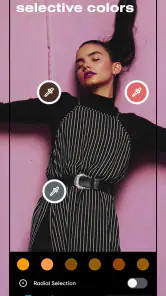
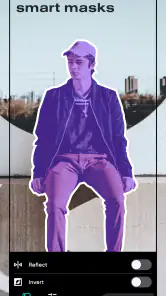
- Advanced selective adjustments let you edit specific areas precisely.
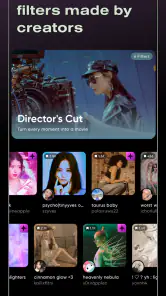
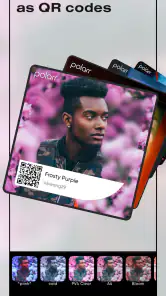
- Large filter library includes customizable community-created styles.
- Supports RAW photos and high-resolution exports on compatible devices.
- Masking
- overlays
- and blending tools offer creative editing flexibility.
- Edits can be saved as reusable custom filters for faster workflows.
Cons
- Some advanced tools and content require a paid subscription.
- The many editing controls may feel overwhelming for beginners.
- Export options and performance can vary between older devices.
- Community filters may differ widely in quality and consistency.
- Cloud-based features may require an account and reliable internet access.
- Category
- Photography
- Version
- 6.12.0











