Pokémon HOME
- 11.26K
- 3.8
- Installs
- 10.00M
- Price
- Free

Screenshots
Analysis by Reviewed
Ever wondered what it would be like to have a home for all your Pokémon? Well, let me introduce you to Pokémon HOME. This app is like a cozy digital home for your favorite pocket monsters, bridging the gap between different Pokémon games. Whether you're a casual player or a seasoned trainer, this app has something for everyone. Let’s dive in and see what makes it tick!
Who gets the most from a shared collection?
I’d recommend this tools app most to players who move between compatible Pokémon games and want one place to keep track of their collection. It can also suit someone who enjoys trading but doesn’t want to be tied to a console every time they make a decision. If you only play one game and rarely move Pokémon out of it, though, the extra account and transfer steps may feel like work rather than a benefit.
A useful everyday example is finishing a gaming session, placing a Pokémon you don’t need right now into storage, then checking the mobile app later to plan a trade or review what you have. That makes the phone version a companion to the games, not a replacement for them. I wouldn’t treat it as a way to play Pokémon on mobile; its value is in organizing and moving a collection around the wider ecosystem.
What is Pokémon HOME?
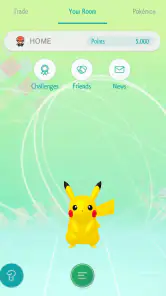
In simple terms, Pokémon HOME is a cloud-based service that lets you store and transfer Pokémon among compatible games. Imagine having a virtual Poké Ball where you can keep all your Pokémon from different adventures. The app is available on both Android and iOS, which means you can access your Pokémon stash anytime, anywhere. Pretty neat, right?
Setting Up Your Pokémon HOME
Getting started with Pokémon HOME is a breeze. Just download it from the app store, and you’re good to go. Once you’re in, you’ll need to link it to your Nintendo Account. This part is crucial because it’s how the app connects with your Pokémon games on the Nintendo Switch. The interface is user-friendly, even for someone who’s not tech-savvy.
The app offers both a free plan and a premium plan. While the free plan is great for beginners, the premium version unlocks features like the ability to store up to 6,000 Pokémon and access the Judge function, which helps you evaluate your Pokémon’s stats. Trust me, if you’re serious about your collection, the premium plan is worth considering.
Features That Make Pokémon HOME Shine
One of the coolest features is the ability to trade Pokémon with players around the world. The Global Trade System (GTS) is back, and it’s more accessible than ever. You can put up your Pokémon for trade and specify what you’re looking for in return. It’s like having a Pokémon marketplace at your fingertips!
More From Our News Desk

Weather by Xiaomi Review: Clear at a Glance, Less Clear Up Close

X Under Pressure: Can It Recover When Posting Goes Wrong?

Clash of Clans Is Won Between the Battles

Android Auto Makes the Case for Quieter Car Software

MobiOffice: Transforming Mobile Productivity with Seamless Integration

EA SPORTS FC™ Mobile Soccer: Redefining Mobile Sports Gaming
Then there’s the Wonder Box. This feature lets you trade Pokémon even when you’re not actively using the app. Just drop your Pokémon in the Wonder Box, and you might get a surprise when you log back in. It’s like hitting the jackpot when you find a rare Pokémon waiting for you!
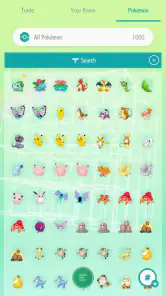
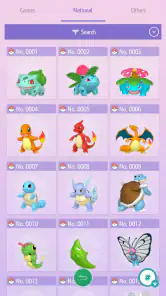
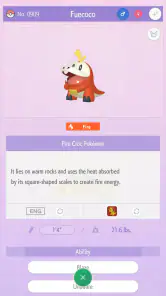
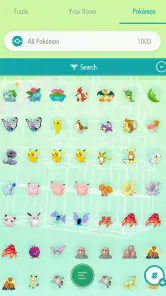
For those who love completing their Pokédex, the app offers a National Pokédex feature. You can view your entire collection, complete with beautiful 3D models of each Pokémon. It’s a Pokémon fan’s dream come true!
Making trades and transfers more deliberately
I find it helps to decide what a Pokémon is for before moving it: a trade candidate, a keeper, or one I’m sending to a particular compatible game. That small pause matters because transfers aren’t always a reversible trip. Check the destination game’s compatibility before moving a favorite, and avoid treating cloud storage as a guarantee that every Pokémon can go wherever you want next.
The GTS and Wonder Box also suit different moods. With the GTS, I can ask for a specific kind of exchange, but that means thinking through whether my request is realistic and whether I’m comfortable leaving that Pokémon listed. The Wonder Box is better when I’m happy to accept a surprise rather than hunt for a precise match. I’d use it for extras, not for a Pokémon I would regret losing from my plans.
Compatibility and Connectivity
One of the app’s strengths is its wide compatibility. You can transfer Pokémon from games like Pokémon Sword and Shield, Pokémon Let’s Go, and even Pokémon Go. However, not all Pokémon can be transferred back to the original games, so keep that in mind when organizing your collection.
The app also connects with Pokémon Bank, a service for older 3DS games. This means your cherished Pokémon from previous generations can join you on your current adventures. It’s heartwarming to see your old favorites back in action.
What to expect from the mobile app
Compared with keeping notes in a separate collection tracker, HOME has the practical advantage of being connected to Pokémon storage and trade workflows. A manual tracker can be simpler if all you want is a checklist, but it cannot move Pokémon between compatible games. On the other hand, if you mainly want to play, the games themselves remain the better place to spend your time; the mobile app is most useful between sessions, when you’re sorting, checking, or arranging trades.
Before relying on it for a particular task, I’d check whether that task is available in the mobile app or requires the Switch version. The service spans both, but that doesn’t mean every action is identical on every device. Keeping that distinction in mind helps avoid the frustration of opening the phone app expecting it to do something that belongs in the console workflow.
Keeping a collection manageable
For a large collection, I’d make a habit of deciding what each transfer is meant to accomplish before starting. A Pokémon being held temporarily, one being prepared for a trade, and one you hope to use in a particular game are different cases. Treating them as separate decisions helps prevent an impulsive move that later becomes inconvenient.
It also helps to use the mobile app as a planning space rather than a substitute for checking compatibility. If you’re returning to a game after a break, review which Pokémon you have available and make a short list of what you want to move. That is more reliable than assuming your entire collection can travel to every destination. For a favorite with personal value, I’d verify the route first and leave it where it is until I’m sure.
When another approach is easier
HOME is more useful than a handwritten or standalone checklist when the task involves actual storage, transfers, or trades. But if I only wanted to remember which Pokémon I had seen, a simple tracker would be quicker and would not involve linking an account or learning the service’s separate workflows. The trade-off is clear: a tracker can organize information, while HOME is intended to work with Pokémon themselves.
Likewise, a player who wants uninterrupted play should stay in the game rather than expecting the phone app to deliver that experience. HOME is for the pauses around play: sorting a box, deciding what to trade, or checking a collection. That makes it a strong companion for a multi-game player, but a needless extra step for someone content with a single game and its built-in storage.
Smooth Sailing or Rocky Roads?
While Pokémon HOME is packed with features, it’s not without its hiccups. Some users have reported connectivity issues and occasional bugs. However, the developers are pretty responsive and updates are frequent, so most issues get resolved fairly quickly.
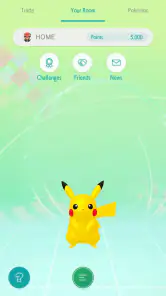
The app’s design is sleek, but navigating through all the features can be a bit overwhelming at first. My advice? Take it slow and explore each feature one step at a time. Before you know it, you’ll be a Pokémon HOME pro!
Questions worth answering before you move anything
Can I use it without paying? Starting with the free option is a sensible way to see whether the service fits your habits. I’d try the tasks I expect to use most, then decide whether the additional storage or functions matter enough to justify an in-app purchase. There is no need to pay simply because I have a Pokémon collection; the value depends on how often I use the extra capacity and tools.
Can I use the mobile app instead of a console game? No: I see it as a companion for managing a collection, not a mobile Pokémon adventure. Can I move every Pokémon anywhere? Also no; compatibility and transfer direction matter, so I’d check the intended destination before moving something important. Those two distinctions answer most of the early surprises new users run into.
Current state and what may change
The Pokémon Company developed this app, which is free to download and rated for Everyone. It has a 3.8 average from around 118,000 ratings, and has passed 10 million installs. The current version is 3.4.3; it was released on February 4, 2020, and runs on Android 6.0 or later. Optional in-app purchases range from $2.99 to $15.99 per item.
Those details describe the app’s present listing, but they don’t establish what a future release will add. I’d judge it by the collection and transfer tasks it supports now, rather than installing it in expectation of a particular upcoming feature. For existing users, that means the central question is still whether HOME fits the games they currently play and the Pokémon they want to keep accessible.
What to watch as an existing user
If you already use the service, I’d pay attention to compatibility and workflow changes when deciding whether to move a Pokémon, rather than assuming a familiar routine will apply to every game. The version number tells me which release is current, but it isn’t a promise about what has changed or what will come next. For a careful collector, the practical habit is to check the task at hand each time: where the Pokémon is going, whether that destination supports it, and whether the move suits your longer-term plans.
That caution is not a reason to avoid the app. It is simply the difference between using HOME as flexible shared storage and treating it like a universal one-way-free transfer box. Keep a few especially meaningful Pokémon out of casual trade workflows, and use Wonder Box only when the surprise is part of the fun. Those choices make the service easier to trust without expecting it to remove every boundary between games.
Final Thoughts
So, is Pokémon HOME worth it? If you’re a Pokémon enthusiast, the answer is a resounding yes! The app provides a centralized hub for your collection and offers fun ways to trade and interact with other players. The premium plan adds even more depth, making it a great investment for dedicated trainers.
All in all, Pokémon HOME is a must-have for anyone who loves Pokémon. It’s like having your own private island where your Pokémon can roam free. So go ahead, give it a try, and let your Pokémon journey continue!
My recommendation
I’d start with the free option and see whether storage, transfers, or trading becomes part of your regular routine before paying for more. If you value a long-running collection and often switch between compatible games, the service can make those connections feel much more manageable. If you want a straightforward mobile game, or you don’t want to keep track of transfer limits and destinations, it’s probably not the right fit.
Pokémon HOME Frequently Asked Questions
Can Pokémon HOME help me keep my collection in one place?
Yes. Pokémon HOME is a cloud-based service that gives you a central place to manage Pokémon from supported games. This can make it easier to keep track of a collection and move Pokémon between compatible titles, rather than treating each game’s collection as entirely separate. Before relying on it for a particular Pokémon or game, check that the title and transfer you have in mind are supported.
Do I need a Nintendo Account to use Pokémon HOME?
The existing answer describes account linking with Nintendo as part of Pokémon HOME’s login and data-protection approach. Linking an account can also help connect your use of the service across supported platforms. If you already use Nintendo services, you may find that setup familiar; make sure you can access the account you intend to use before getting started, especially if you plan to manage a long-term collection.
Can I move every Pokémon from one game to another with Pokémon HOME?
Pokémon HOME supports transfers involving multiple games, but that does not mean every Pokémon can be moved freely between every title. Compatibility depends on the games involved and the transfer route, so it is worth checking the specific Pokémon and destination game before making a move. If you are organizing a collection for a particular game, plan transfers around the titles you actually play.
Can Pokémon HOME be used on both a phone and Nintendo Switch?
Yes. Pokémon HOME is available on Android and iOS devices, and it also supports Nintendo Switch. Using the service on different platforms can make it more convenient to manage a collection, although the app and console experience may differ. The existing answer describes synchronized data across devices, so using compatible platforms can help you move between mobile and console when managing Pokémon.
What should I know before downloading Pokémon HOME?
Pokémon HOME is a free Tools app from The Pokémon Company that serves as a cloud-based service for managing Pokémon. It is rated for Everyone and is available for Android and iOS. The app has an average rating of around 3.8 from about 118,000 ratings, and it includes optional in-app purchases. You can start with the free option and consider whether its features suit your needs.
Pros
- Easy transfer between games and platforms.
- User-friendly interface for all ages.
- Supports a wide range of Pokémon games.
- Cloud storage for your Pokémon collection.
- Integrates with Pokémon Bank on 3DS.
Cons
- Subscription required for full features.
- Initial setup can be time-consuming.
- Limited free storage options.
- No offline access to your Pokémon.
- Occasional connectivity issues.
- Category
- Tools
- Version
- 3.4.3









