Podcast Player - Castbox
- 28.93K
- 4.7
- Installs
- 10.00M
- Price
- Free

Screenshots


Analysis by Reviewed
When I’m choosing a podcast app, I care less about a crowded feature list than whether I can get from “I have ten minutes” to something worth hearing without fuss. Podcast Player - Castbox is built for that everyday habit: it combines finding shows with listening and organizing episodes, so I don’t have to treat discovery and playback as separate jobs. Its broad scope is useful, though it can feel like more app than someone needs if they already follow only a few shows.
Quick starts and sensible expectations
In ordinary use, I expect the basics—opening a show, choosing an episode, and resuming playback—to matter more than flashy transitions. Castbox’s straightforward layout helps keep those steps approachable. I wouldn’t judge its speed by how quickly a page appears on one particular phone: connection quality, the size of a podcast’s catalog, and the device itself can all affect browsing. When I already know what I want, searching for the show is a more direct route than scrolling through recommendations.
The app is free to download, with optional in-app purchases ranging from $0.99 to $99.99 per item. That makes it easy to try before deciding whether any paid options are worth considering. Castbox is developed by Castbox.FM - Radio & Podcast & AudioBooks, and its 4.7 average from around 365,000 ratings suggests it has found a large audience. It has over 10 million installs, is rated Teen, and version 11.23.2-251110384 supports Android 6.0 and later.
When listening gets more demanding
Castbox makes more sense when podcast listening is part of a routine rather than an occasional experiment. For example, I might look for a new series at home, save episodes for a commute, and use a playlist to keep a few different moods in reach. Downloading over Wi-Fi is a practical way to avoid relying on mobile data during a trip, but it does mean thinking ahead about which episodes I will actually want. A large queue is convenient until it becomes another thing to manage.
Playback speed and the sleep timer serve different needs: speed can help me get through a backlog, while the timer suits a bedtime episode that I don’t want playing all night. I’d use faster playback selectively, especially for interviews where pauses and tone matter. In-audio search is another useful tool when I remember a topic but not the episode. It can save time compared with scrubbing blindly, although it works best as a way to locate a known subject, not as a replacement for browsing whole shows.
Discovery, community, and trade-offs
Castbox’s discovery features are helpful if I want to move beyond shows I already know. Recommendations can reduce the effort of choosing something new, while comments and discussion threads give listeners a place to respond to episodes. Those social elements are a bonus for people who enjoy comparing reactions, but they won’t matter to everyone. If I simply want a quiet player and already have a settled subscription list, the extra discovery and community layer may be unnecessary.
Compared with a basic podcast player, Castbox puts more emphasis on exploring a wide range of listening and interacting around episodes. That breadth is a real advantage for curious listeners, but it can also make the experience feel busier than a minimal app. I’d choose a simpler alternative if my priority were only a short, no-frills queue. I’d choose Castbox when I want one place to search, organize, and revisit shows, and I’m willing to spend a little time shaping the app around my habits.
More From Our News Desk

Weather by Xiaomi Review: Clear at a Glance, Less Clear Up Close

X Under Pressure: Can It Recover When Posting Goes Wrong?

Clash of Clans Is Won Between the Battles

Android Auto Makes the Case for Quieter Car Software

MobiOffice: Transforming Mobile Productivity with Seamless Integration

EA SPORTS FC™ Mobile Soccer: Redefining Mobile Sports Gaming
Why Choose Castbox?
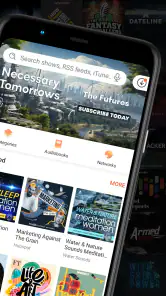
First off, let's talk about the user interface. Castbox has a clean, intuitive design that makes it super easy to navigate. Whether you’re tech-savvy or not, you’ll find it a breeze to search for your favorite podcasts or discover new ones. The app’s layout is straightforward, and it doesn’t overwhelm you with unnecessary features.
Vast Library of Podcasts
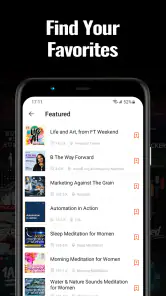
One of the things I absolutely love about Castbox is its vast library of podcasts. With over 95 million contents to choose from, there’s something for everyone. Whether you’re into true crime, comedy, or learning a new language, Castbox has got you covered. The app also features curated recommendations, which is a lifesaver when you’re unsure what to listen to next.
Offline Listening & Cross-Device Sync
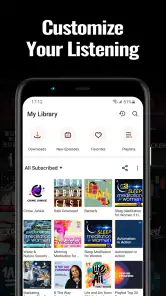
For those of us who are always on the go, Castbox offers offline listening. You can download episodes while connected to Wi-Fi and listen to them later without using your data. How cool is that? Plus, with cross-device syncing, you can pick up where you left off on any device. This feature alone has made my commutes and gym sessions much more enjoyable.
Customizable Features
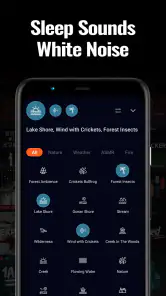
Castbox also provides a range of customizable features. You can create playlists, adjust playback speed, and even set a sleep timer. These features allow you to tailor your podcast experience to your personal preferences, making it so much more enjoyable. I often find myself using the sleep timer when I’m listening to podcasts in bed.
Another standout feature is the in-audio search function, which is a game-changer. It allows you to search for specific words or topics within podcast episodes. This means you can easily find the content most relevant to you without having to listen to entire episodes.
Engage with the Community
What sets Castbox apart from many other podcast apps is its community feature. You can engage with other podcast enthusiasts by commenting on episodes and joining discussion threads. It’s a great way to connect with others who share your interests and get involved in lively discussions.
To wrap it up, Podcast Player - Castbox is a must-have app for any podcast lover, whether you’re a newbie or a seasoned listener. Its vast library, user-friendly interface, and customizable features make it a top choice. So why not give it a try? Dive into the world of podcasts with Castbox, and you might just find your next favorite show!
A commute that rewards a little planning
A useful way to make Castbox feel less busy is to give each listening session a simple purpose. On a Sunday evening, I could pick a few episodes for the week, download only the ones I expect to finish, and arrange them so a short commute does not begin with a hunt through a long list. That small routine makes the app more dependable when I’m leaving home in a hurry. It also keeps offline listening practical: downloaded audio is most valuable when I’ve chosen it intentionally, rather than treating every episode as something I might someday hear.
For a longer trip, I’d mix episode lengths instead of building a queue entirely from hour-long conversations. A shorter installment can fit an unexpected wait, while a longer one is better saved for a drive or uninterrupted stretch. This is not a special Castbox feature, but the app’s playlists and downloads make that sort of planning easier to carry out in one place. The trade-off is that a queue needs occasional pruning; otherwise, the episodes I actually care about can get buried among old intentions.
Making discovery work for you
Recommendations are most useful when I treat them as a starting point, not a verdict. If a suggested show catches my attention, I’d sample an episode before following it and adding every new release to my listening routine. That keeps discovery from turning into subscription clutter. It also helps separate a podcast I enjoy in theory from one whose pacing, presentation, or episode length fits the way I really listen.
When I’m searching for a particular topic, in-audio search can serve a different purpose from ordinary show discovery. I might remember hearing a useful explanation but forget which episode contained it; searching within audio offers a route back to that moment without replaying everything. I would still use the show page and episode context to make sure I’ve found the right discussion, since a matching word alone may not capture what a speaker meant. For learning or reference listening, that distinction matters: search can shorten the hunt, but it does not replace listening to the surrounding explanation.
The community tools also suit a particular kind of listener. I can imagine checking comments after a complex episode to see which points other people noticed, or adding a thought while the discussion is fresh. But I would not make those interactions part of every listening session. Someone who wants podcasts as quiet background company may be happier ignoring the social side entirely, and someone who prefers a strictly private, minimal player may find it unnecessary. Castbox’s advantage is that these layers are available alongside playback, not that every listener needs to use them.
Where it fits among podcast apps
The usual alternatives tend to fall into two broad camps: a lightweight player for people who already know their subscriptions, and a more expansive app that combines listening with discovery. Castbox sits closer to the second camp. That makes it a sensible fit if I move between familiar shows and new subjects, or if I want search, playlists, offline episodes, and discussion in the same listening environment. A stripped-down player may be a better match when I already have a stable list and value a very focused interface above exploration.
It is also worth thinking about how much setup I enjoy. A person who likes adjusting playback, building queues, and browsing recommendations can make the breadth feel useful. Someone who wants to press play immediately and never organize anything may experience the same breadth as extra decisions. I’d give Castbox a fair trial with a small, deliberate set of followed shows before building a large library. That reveals whether its discovery tools genuinely improve the habit or merely add another screen to check.
Comfort, battery, and interrupted sessions
For long listening sessions, I pay attention to the whole routine rather than assuming that a podcast app alone determines battery use or smoothness. Streaming depends on a connection, while downloaded episodes avoid repeated reliance on mobile data during playback; either way, the phone’s age, other running apps, and network conditions can shape the experience. If I’m heading out with limited battery, preparing a few episodes over Wi-Fi and lowering screen use is a more sensible plan than leaving the app open while browsing for something to hear.
Playback recovery matters too. If I’m interrupted by a call, a change of task, or simply putting the phone away, I want to return to the episode and continue from the point I reached. In my experience, this is the sort of everyday reliability that matters more than a polished animation. I’d still make a quick check after switching devices or changing a queue, rather than assuming every listening detail will always carry over exactly as I expect. That habit is especially helpful when I use Castbox in short sessions throughout the day.
Who will enjoy it, and who may not
I’d recommend Castbox to curious listeners who want to discover shows as well as manage the ones they already follow. It is particularly appealing if your listening shifts between commuting, chores, winding down at night, and looking up a topic you heard earlier. The combination of discovery, playlists, speed controls, a sleep timer, offline listening, and episode discussion gives those different situations room to coexist without requiring a separate app for each one.
I’d be less enthusiastic about it for someone who listens to only a handful of known shows and wants the most minimal possible player. If the main goal is a short queue with almost no browsing or social interaction, a simpler alternative may take less attention. I’d also avoid treating faster playback as a universal productivity trick: it can make a routine commute feel more efficient, but it can flatten the delivery of comedy, storytelling, or a careful interview. Choosing the right speed for the content is more useful than simply choosing the fastest one.
Getting started without creating clutter
My practical advice is to begin with one familiar show, one new discovery, and a small playlist for a real part of the day, such as the trip to work. Download only the episodes that matter for the next few days, then see whether the queue stays easy to use. If it grows quickly, remove episodes I have decided not to hear instead of keeping them as a guilt-inducing backlog. This simple approach lets the app’s range help without turning podcast listening into a maintenance project.
I’d also test the features against actual habits rather than setting everything up at once. Use the sleep timer on a night when you want an episode before bed; try a modest speed adjustment on a familiar talk show; and use in-audio search when you have a real topic to find. Those small trials answer the practical questions that matter: whether the controls suit your listening, whether offline preparation is worth the effort, and whether recommendations lead to shows you genuinely want to follow.
My performance verdict
Castbox is best understood as a capable, feature-rich listening space rather than a bare-bones player built around a single queue. Its speed will depend on the device and connection, so I would judge it by how well it supports the repeated actions that make a routine easy: finding an episode, preparing it for later, and returning to a useful place in the audio. Its broad toolkit can save time once I know which parts I use, although browsing and organizing can feel like extra work if I only want to press play.
As a free music and audio app with optional purchases, it is easy to try without making a commitment up front. The Teen content rating is also worth keeping in mind for households choosing apps for younger listeners. Overall, I’d choose Castbox when variety and discovery are part of the appeal, and I’d choose a simpler player when quiet, minimal playback is the priority. For my own mixed routine, its strongest quality is not any one control but the way search, listening, and organization can support one another when I use them deliberately.
Podcast Player - Castbox Frequently Asked Questions
Does Castbox require a particular Android version?
On Android, Castbox requires Android 6.0 or later. If your device runs an older version, check its system settings before downloading so you can avoid compatibility surprises. The app is designed for listening to and subscribing to podcasts, and its free-to-download format makes it easy to try once you know your phone meets the requirement.
Is Castbox suitable for younger listeners?
Castbox is rated for Teen audiences, so parents and guardians may want to consider that guidance before installing it for a younger listener. The app is focused on podcasts, and the shows available can cover many subjects and audiences. Reviewing the app together and helping a young listener choose suitable programs can make it easier to decide whether it is appropriate for your household.
Who develops Podcast Player - Castbox, and what kind of app is it?
Podcast Player - Castbox is a podcast-listening app in the Music & Audio category, developed by Castbox.FM - Radio & Podcast & AudioBooks. Its focus is helping listeners find podcasts, subscribe to shows, and play episodes in a highly customizable app. It is rated for Teen audiences, so it is worth keeping that age guidance in mind when deciding whether it is suitable for you or your family.
Can I use Castbox on Android and iOS?
Castbox is available for Android and iOS, so listeners can use it on either platform rather than being limited to one kind of phone. On Android, the listed minimum operating-system requirement is Android 6.0. The app is free to download, and its podcast-player focus makes it useful for people who want to browse, subscribe to shows, and listen from a mobile device.
What is Podcast Player - Castbox?
Podcast Player - Castbox is a versatile and user-friendly podcast app that allows users to discover, subscribe to, and listen to podcasts from a wide range of genres and languages. With an intuitive interface, users can easily browse through popular podcasts, create playlists, and even download episodes for offline listening. It is available for both Android and iOS platforms, making it accessible to a wide audience.
Pros
- Intuitive user interface for easy navigation.
- Supports a wide variety of podcast formats.
- Offline listening available for convenience.
- Personalized recommendations based on interests.
- Syncs across all your devices seamlessly.
Cons
- Ads can be intrusive for free version users.
- Premium features require a subscription.
- Occasional playback glitches reported.
- Limited free features without subscription.
- Some users find search function lacking.
- Category
- Music & Audio
- Version
- 11.23.2-251110384












