PicFusion Lab
- 34.00
- 3.6
- Installs
- 100.00K
- Price
- Free

Screenshots

Analysis by Reviewed
I judge a photo app less by how many effects it promises than by how well it fits the moment I actually want to take a picture. PicFusion Lab, made by X PhotoKit, is a free photography app for creating and adjusting photos. Its appeal is easy to understand: it gives people a place to work on images on a phone rather than reaching for a more involved desktop editor. The practical question is whether that convenience holds up when the connection is slow, the picture matters, or I just want to make a quick change and move on.
My overall view is that PicFusion Lab is worth a try if you want a lightweight starting point for everyday photo work and are comfortable exploring its tools for yourself. I would be more cautious if you need a dependable, fully specified editing workflow, or if you expect every capability to be obvious before you begin. It has an average rating of 3.6 from around 432 ratings, which suggests a mixed reception rather than an effortless recommendation. That is not a verdict on any single feature, but it is a good reason to install with realistic expectations.
Where a connection can change the experience
When you want to edit right away
The most useful way to approach PicFusion Lab is to treat connectivity as part of the workflow, not as an afterthought. If I am editing a picture while connected reliably, I can focus on the creative decision: which version feels natural, whether the crop keeps the subject clear, and how much adjustment is enough. If the app’s response depends on network access at a particular point, a weak signal can turn that simple task into waiting and second-guessing.
I would not plan an important edit around assumptions about what works without a connection. Instead, I would open the app and try a small, unimportant image before relying on it for a time-sensitive job. That quick check answers the questions that matter in practice: whether the screen opens as expected, whether the action I need responds, and whether I can complete the edit in the setting where I intend to use it.
This is especially relevant for anyone who edits while commuting, in a large building, or outdoors where coverage shifts. A short pause may be harmless when making a casual image for a group chat, but frustrating when you are trying to post a timely event photo. For those situations, I would keep a familiar alternative available rather than assume the same workflow will feel equally smooth on every connection.
Quick edits on a phone
PicFusion Lab makes most sense for mobile moments when I want to improve a picture without turning the task into a project. Imagine taking a family photo at a café: the background is distracting, the framing is a little loose, and I want a version that looks more intentional before sharing it. A sensible workflow is to make one change at a time, compare the result with the original, and stop once the image looks better rather than piling on adjustments just because they are available.
That last step matters. On a small screen, it is easy to overwork a photo because the edited version fills the display and tiny differences are hard to judge. I would periodically zoom out or return to the original view, especially if the result starts looking less like the scene I remember. This is a practical safeguard with any phone editor, but it is particularly useful when you are experimenting rather than following a familiar routine.
The app is in the photography category, and its store presence has reached over 100,000 installs. It is rated for Everyone, so its intended audience is broad. That does not mean it will suit every editing style: someone who only wants a fast, familiar crop may prefer the phone’s built-in photo tools, while a user who enjoys testing different treatments may be more willing to spend time learning a separate app.
What to do when editing gets interrupted
Mobile editing is vulnerable to ordinary interruptions: a call comes in, you switch apps, the signal changes, or the phone needs attention. I recommend finishing one small task before moving on, then checking the result rather than assuming the last action was applied. For an important picture, keep the original intact and confirm that the finished version is present in the place you expect before deleting or changing anything else.
I would also avoid starting a batch of edits when I have only a brief window or an unreliable connection. Work through one photo first. If the app behaves consistently in that situation, continue; if it stalls or makes the next step unclear, pause and return when conditions are better. This approach prevents a minor inconvenience from becoming a lost evening of trying to reconstruct which changes were saved.
PicFusion Lab is currently at version 1.1.9. That gives a useful point of reference when considering how current the app is, but it does not guarantee how it will behave on a particular phone or network. My advice is to test the exact job you care about—such as preparing a portrait or adjusting a travel snapshot—before making the app part of a routine that you cannot easily change.
Keeping an eye on data and spending
If you are careful with mobile data, do your first exploration on a trusted connection and pay attention to how the app behaves before making it part of your on-the-go habits. Avoid repeatedly reopening or redoing an action simply because the screen seemed slow; first give it a moment, then check whether the previous step took effect. This reduces needless retries and makes it easier to tell whether a delay is a network issue or simply part of the app’s response.
The app is free to download, while in-app purchases range from $7.99 to $15.99 per item. I would start with the free experience and identify a specific limitation before paying for anything. That is more sensible than buying an upgrade based on a vague hope that it will improve every part of the workflow. If you do consider a purchase, check what that item unlocks in the app and whether it addresses a task you actually repeat.
For occasional edits, the free entry point may be enough to decide whether the app suits you. Frequent users should think about their habits: do they return to the same editing task, or are they mostly looking for a quick one-off improvement? Paying only makes sense when the extra value is concrete to you. With a modest average rating and a relatively small pool of written reviews—34—there is less public feedback to lean on than I would want for a confident purchase decision, so trying the app first is the better route.
How it compares with familiar alternatives
Compared with a phone’s built-in editor, a dedicated app is worthwhile only if it gives you a reason to leave the familiar tools. The built-in option is often the simplest choice for basic fixes, especially when you want minimal setup and a quick result. PicFusion Lab is more appealing if you want a separate space to experiment with your photos and are willing to learn how its approach fits your taste.
At the other end, established editing suites tend to appeal to people who need a precise, repeatable process and already know which controls they depend on. I would choose one of those when consistency across many images matters more than getting started quickly. PicFusion Lab is better considered as a casual mobile option, not an automatic replacement for a carefully developed desktop workflow or a professional tool you already trust.
A useful test is to edit the same ordinary picture in both PicFusion Lab and your usual editor. Compare not just the final image, but the number of steps, how easy it is to undo a choice, and whether the result is easy to retrieve for sharing. That small comparison tells you more than an abstract feature checklist because it reflects your own phone, connection, and editing habits.
Who I would recommend it to
I would suggest trying PicFusion Lab if you take photos regularly, enjoy making small improvements on your phone, and do not mind spending a little time finding a comfortable workflow. It may also suit someone who wants a separate app for experimenting without committing to a more demanding editing setup. The best fit is a patient casual user who can test the app on a few low-stakes images before depending on it.
I would skip it, or at least keep another editor ready, if you need predictable performance in places with poor connectivity, a highly controlled process for a large set of pictures, or an interface whose key actions are immediately familiar. It is also not the right purchase for someone who has not yet found a clear need for paid extras. The free download makes a trial straightforward, but the decision to keep using it should come from how it handles your own pictures, not from its name or broad promise.
My connectivity verdict
PicFusion Lab is a reasonable free option to explore, but I would let a practical test decide whether it earns a place in my regular editing routine. Try one everyday photo on a reliable connection, then repeat a simple task in the mobile setting where you are most likely to use it. If the process feels dependable and the results match your taste, it can be a convenient companion. If network interruptions or uncertainty about the workflow get in the way, your built-in editor or a more established alternative may be a better fit.
Ultimately, PicFusion Lab is most convincing as an approachable experiment rather than a tool I would recommend blindly for every photographer. Its free entry point is useful, and its broad audience makes it easy to consider, but a 3.6 average rating is a reminder to check the experience for yourself. I would install it for casual photo improvements, test it before relying on it away from a stable connection, and spend money only when a clearly useful paid option fits a repeated need.
PicFusion Lab Frequently Asked Questions
What is PicFusion Lab, and what can I use it for?
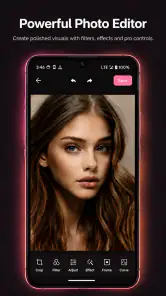
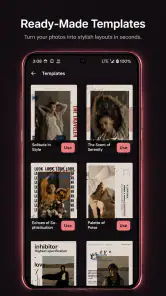
PicFusion Lab appears to be a photo-editing app, but its exact tools and supported features may vary by version or platform. Before downloading, check the store listing for details such as filters, image effects, collage or layering options, and any AI-powered features. Also review screenshots and the developer’s description so you can confirm that the app suits the kind of photo edits you want to make.
Is PicFusion Lab free to download and use?
The download may be free, but that does not necessarily mean every editing tool is available at no cost. Some photo apps offer optional subscriptions, in-app purchases, or paid upgrades for premium effects, exports, or removal of ads. Check the app-store listing for pricing and trial terms before installing, and review the purchase screen carefully so you know whether a recurring charge will begin after a free trial.
Does PicFusion Lab require an internet connection?
Whether PicFusion Lab works offline depends on how its editing features are implemented. Basic edits may be available on your device, while features that process images online, download effect packs, or use cloud-based tools may need an internet connection. Check the app description and permissions, and consider testing the features you plan to use before relying on the app while travelling or somewhere with limited connectivity.
What permissions and privacy considerations should I check before using PicFusion Lab?
A photo editor may need access to selected images or your camera to import pictures and capture new ones. Review the permissions requested by PicFusion Lab and allow only those that make sense for the features you intend to use. Read the privacy policy and store disclosures to understand whether images or usage data may be collected, stored, or shared, particularly if you plan to edit personal or sensitive photos.
Can I save and share edited photos from PicFusion Lab?
Look for information in the app listing about export formats, image quality, and whether edited pictures can be saved to your device or shared directly to other apps. Some editors limit resolution, add a watermark, or reserve certain export options for paid plans. Before spending time on a project, try a small edit and confirm that the finished image saves correctly and meets your quality needs.
Pros
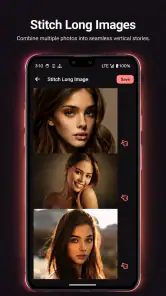
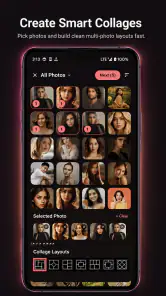
- Combines multiple photos into a single composition.
- Useful for creating collages and social-ready visuals.
- Offers a creative way to experiment with photo layouts.
- Can help turn a collection of images into a shareable design.
- Suitable for quick edits without needing desktop software.
Cons
- Results may depend on the quality and resolution of source photos.
- Complex designs can take longer to arrange on a small screen.
- Some editing options may be limited compared with desktop tools.
- Export settings may affect the sharpness of finished images.
- Availability of features may vary by device or app version.

- Category
- Photography
- Version
- 1.1.9












