PhotoSolve: AI Homework Helper
- 151.00
- 4.2
- Installs
- 1.00M
- Price
- Free

Screenshots



Analysis by Reviewed
When I get stuck on a homework question, the most useful help is often not another search result but a clear way to examine the exact problem in front of me. PhotoSolve: AI Homework Helper is built around that idea: you take a picture, get help working through the question, and use the explanation to decide what to try next. I find that approach handy for a quick, specific blockage, though it works best when I stay involved rather than treating the answer as something to copy.
Where it fits in a study routine
I see this education app as most useful when a student has already tried a question but cannot spot the next move. A photo-based prompt can be quicker than typing a long equation, especially when symbols, fractions, or a diagram are involved. The key is to treat the result as a worked example to inspect, not a finished assignment to copy. I would cover the solution afterward and try the same steps unaided; that small extra effort turns a quick lookup into practice.
For example, imagine doing homework at the kitchen table and getting stuck on one algebra step before a deadline. Rather than abandoning the exercise or asking someone to repeat a lesson from memory, you can photograph the problem, compare the explanation with your own working, then return to the rest of the worksheet. That is a sensible use of an AI helper: it gets you past a blockage while leaving the actual learning to you.
Getting Started with PhotoSolve
First things first, installing PhotoSolve: AI Homework Helper is a breeze. Available for both Android and iOS, it's just a quick download away from becoming your academic sidekick. Once you have it on your device, the setup process is straightforward. No unnecessary frills—just open the app and you're ready to dive in. The user interface is intuitive, guiding you through the process with minimal effort. I found the design sleek and user-friendly, making it easy for even the tech-challenged among us to navigate.
CoinCircle, Inc. develops the app, which is free to install and rated for Everyone. It has an average rating of 4.2 from around 28,000 ratings, with more than a million installs. The current version is 5.1.6, and in-app purchases range from $6.49 to $69.99 per item. I would start with the free experience and decide whether any paid option is worthwhile only after seeing how often it helps with your actual coursework. The app first appeared on April 27, 2023, and its current version gives returning users a clear reference point when checking that they have the latest release.
The Magic of AI Assistance
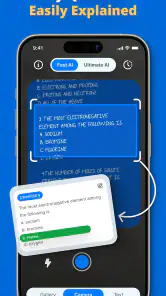
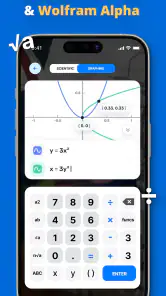
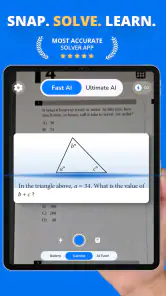
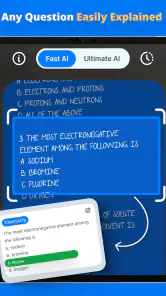
So, how does it work? Simply snap a picture of the problem you're struggling with, and let the AI do its magic. The app uses advanced algorithms to analyze the image and provide detailed solutions. I was curious to see how it would handle a complex algebra problem, and to my surprise, it not only solved it but also provided a step-by-step breakdown. This feature is a game-changer for anyone who struggles to understand the logic behind the answers. It's like having a personal tutor in your pocket!
Photo-based solving has a practical trade-off: the picture is part of the question. Before taking it, I would crop out unrelated notes, keep the entire expression in frame, and make sure small symbols are legible. A minus sign, exponent, or faint handwritten digit can change what the app thinks you asked. If the result looks surprising, rewrite the problem clearly and compare; do not assume the first interpretation is correct. This quick check is especially valuable when a worksheet has several questions close together.
More From Our News Desk

Clash of Clans Is Won Between the Battles

Android Auto Makes the Case for Quieter Car Software

MobiOffice: Transforming Mobile Productivity with Seamless Integration

EA SPORTS FC™ Mobile Soccer: Redefining Mobile Sports Gaming

How Microsoft OneDrive Became a Mobile Productivity Giant

How Google Translate Breaks Language Barriers Effortlessly
For students who need a hint rather than a complete solution, a useful habit is to pause before opening the explanation and predict the next step. Then compare that prediction with the app’s reasoning. It makes the tool less tempting as an answer shortcut and more useful for finding exactly where your understanding breaks down. I would still use a teacher, textbook, or class notes for foundational explanations, since a generated solution is not a substitute for a course’s preferred method.
Beyond Just Answers
But wait, there's more! One aspect of PhotoSolve that really impressed me is its educational value. It doesn't just spoon-feed you the answers; it actually helps you learn. The app explains each step in a way that's easy to understand, reinforcing learning and comprehension. This makes it an excellent tool not just for students, but also for parents who might need a little refresher themselves. Trust me, it’s a lifesaver during those "I have no idea what this is" moments.
The same step-by-step approach can help a parent check a child’s working without pretending to remember every rule from school. I would use it to identify the point that needs explaining, then ask the student to describe why that step makes sense. That keeps the conversation focused on reasoning instead of turning the phone into an answer key. It is also a better fit for short, specific doubts than for learning an entire topic from scratch.
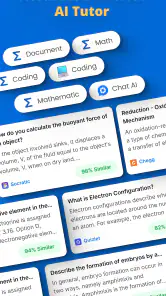
Another feature worth mentioning is the app's versatility. It's not limited to just math problems. Whether it's chemistry or physics, this app has got your back. I tested it with a chemistry equation, and it worked like a charm. The ability to handle multiple subjects is a huge plus for students juggling various classes.
That range is convenient, but I would not treat every subject question as equally easy to verify. In a numerical exercise, you can often check a result by substituting it back into the problem or comparing the steps with your notes. For a chemistry or physics question, pay attention to units, symbols, and the assumptions behind a calculation. If those do not match the assignment, use a textbook or ask a teacher rather than building more work on a possibly misread prompt.
Making a photo-based answer more useful
A small change in how I use a camera helper makes a real difference: I keep one question in the frame rather than photographing a whole page. It is easier to notice if the app has read the intended expression, and I can compare its steps with the work directly beside it. If there is a diagram, I make sure its labels are visible and do not crop away a condition that affects the answer. This is not extra fuss for its own sake; it reduces the chance of following a solution to a different problem.
I also treat the explanation as a diagnostic tool. If the first step is unfamiliar, I stop there and look up that idea in my notes instead of reading ahead until the final answer appears. When I already know the method, I can use the result as a quick check; when I do not, the mismatch points me toward the precise concept I need to review. That distinction helps keep a fast lookup from creating false confidence.
When another study method is better
Compared with searching the web for a worked example, a camera-first helper can save time when the question is printed or handwritten and you need help with that exact expression. A textbook or class notes are better when you want a carefully structured lesson, while a teacher can clarify why a method is expected in your class. I would skip this app as a main study plan if you need a full course, dependable verification for high-stakes work, or explanations tailored to a particular teacher’s notation. It works best as one tool alongside those sources.
It is also worth checking the purchase screen carefully before choosing any paid option. The app is free to download, but optional in-app purchases have a broad price range, so I would not assume every useful function is included at no cost. For occasional homework checks, the free starting point may be enough; frequent users should judge value based on how often they genuinely use it, not on the promise of faster answers alone.
For a student who is comfortable checking a result and wants help with isolated questions across maths and science, this is a more direct fit than a general web search. Someone who needs a planned revision schedule, broad lessons, or an instructor to respond to follow-up questions will likely get more from a dedicated course, a tutor, or class materials. I would also be cautious about using any generated response as the sole authority on a graded assignment: understanding the method and following the teacher’s instructions still matter.
One practical way to decide whether it belongs in your routine is to try it on a question you have already completed, then check the reasoning against your own work. If the image is read correctly and the steps help you see a useful alternative, it may be worth keeping for moments when you hit a snag. If you find yourself opening it before making an attempt, or cannot explain the answer afterward, the faster workflow may be working against your learning rather than for it.
What I would watch as a returning user
The version number is useful context for existing users: 5.1.6 is the current release, but a newer version number by itself does not tell me which changes matter in daily study. I would pay attention to whether image interpretation feels dependable on the kinds of questions I actually bring, whether explanations remain clear, and whether the free-to-paid boundary suits my routine. Those are more meaningful signs of progress than a version label alone.
If you are deciding whether to keep it on your phone, try it first on a familiar problem whose answer you can check. That gives you a low-risk way to judge both image recognition and the usefulness of the explanation. Then use it on a genuine sticking point, compare the method with your notes, and see whether you can solve a similar question afterward. If it only supplies answers without improving your confidence, a textbook, tutor, or class resource may serve you better.
For existing users, I would judge changes by how they affect the same small set of tasks over time: a clearly printed equation, a handwritten question, and a problem with a diagram or units. Keeping those examples in mind makes it easier to tell whether a release has improved the experience that matters to you, rather than assuming that a higher version number automatically means better results. The release history is a point of reference, not a guarantee about what will change next.
Before relying on it during a rushed evening, I would also test the steps on a non-urgent question and note which types of prompts need extra checking. That gives you a realistic sense of when a photo is enough and when typing or consulting your notes is the safer route. If an explanation is unclear, I would not keep tapping for a more convenient answer; I would switch to a source that can teach the missing idea more fully.
Final Thoughts
In conclusion, if you're looking for a reliable, easy-to-use homework helper, PhotoSolve: AI Homework Helper is definitely worth checking out. It's not just about getting to the right answer but understanding how you got there. The app is a solid investment for anyone looking to enhance their learning experience. Just remember, while it might feel like a magic wand, it's your effort and practice that truly make a difference. Happy solving!
My recommendation is most positive for students who want a quick second look at a specific problem and are willing to verify what they see. Parents can also use it to find a starting point for helping with a question, while keeping the child’s own reasoning at the center. If you mainly need long-form teaching or guaranteed alignment with a classroom method, I would choose a human explanation or a structured learning resource instead. Used with that boundary in mind, this can be a convenient study companion rather than a replacement for learning.
PhotoSolve: AI Homework Helper Frequently Asked Questions
Is PhotoSolve: AI Homework Helper free to download, and what should I know about paid features?
PhotoSolve is free to download, so you can try the app without paying upfront. It also offers in-app purchases, which may unlock paid features or access. Before making a purchase, review the options shown in the app and make sure they suit your needs. If you are installing it for a student, it can be helpful to discuss purchases with them first.
What is PhotoSolve’s current version, and when was it released?
PhotoSolve: AI Homework Helper was released on April 27, 2023, and its current version is 5.1.6. These details can help you identify the app and check whether an installed copy is up to date. Since app updates can change how features work, it is sensible to use the latest version available for your device when you want the most current experience.
Who makes PhotoSolve: AI Homework Helper, and is it suitable for younger students?
PhotoSolve: AI Homework Helper is an education app from CoinCircle, Inc. Its content rating is Everyone, so it is presented as suitable for a broad audience, including younger students. As with any homework tool, parents and students can consider how it fits their learning habits and use its explanations to support understanding rather than relying on answers alone.
What devices and operating systems can I use PhotoSolve: AI Homework Helper on?
PhotoSolve is available for Android and iOS devices. For Android, it requires version 8.0 or later, so it is worth checking your device’s software version before downloading. The app is listed as a free download, though it also offers in-app purchases. Make sure you install the edition intended for your device’s platform.
What is PhotoSolve: AI Homework Helper and how does it work?
PhotoSolve: AI Homework Helper is an innovative application designed to assist students with their homework by using artificial intelligence. Users simply need to take a picture of their homework problem, and the app analyzes the image to provide detailed solutions and explanations. It covers a variety of subjects, including math, science, and literature, making it a versatile tool for students of all ages.
Pros
- AI-powered solutions for quick help.
- Supports a wide range of subjects.
- User-friendly interface and design.
- Offers step-by-step explanations.
- Available offline after download.
Cons
- Limited free version features.
- Requires internet for initial setup.
- Occasional inaccuracies in answers.
- Heavy app size for older devices.
- Subscriptions can be pricey.

- Category
- Education
- Version
- 5.1.6