Incognito Browser - Go Private
- 2.15K
- 4.8
- Installs
- 5.00M
- Price
- Free

Screenshots




Analysis by Reviewed
Ever had that moment when you just want to browse the internet without worrying about leaving a trace? Well, that's where Incognito Browser - Go Private comes into play. This nifty app promises to give you a seamless and private browsing experience on your Android device. So, let's dive in and see if it truly lives up to its promise.
First Impressions and Features
Upon downloading and installing the Incognito Browser - Go Private, the first thing you'll notice is its minimalist interface. It doesn’t bombard you with unnecessary tabs or buttons, keeping things simple and straightforward. This app is all about privacy, and it makes it clear from the get-go. The main feature here, obviously, is its ability to let you browse anonymously. No history, no cookies, no trackers - it's like having a clean slate every time you open the app.
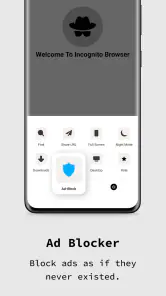
Another feature worth mentioning is its built-in ad blocker. We all know how annoying pop-ups can be, especially when you’re in the middle of something important. With this browser, you get to enjoy a clutter-free experience. Plus, it’s surprisingly fast. You’d think with all the privacy features, it might slow down a bit, but nope! Pages load quickly and efficiently.
Privacy: Is It All That?
Now, let's talk about the core aspect of this app - privacy. In a world where data breaches and privacy invasions are becoming more common, having a tool that offers a secure browsing experience is invaluable. The app doesn’t store any data, and it doesn’t allow third-party trackers. For those who are extra cautious, there’s also a feature to lock the app with a password or fingerprint, adding an extra layer of security.
I did try to nitpick and find any potential privacy loopholes, but it seems the developers have done their homework. The app is open source, meaning anyone can inspect the code. This transparency is a huge plus in my book as it builds trust with the users.
User Experience
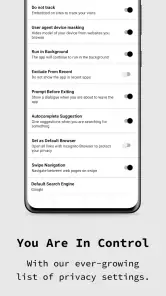
Using Incognito Browser - Go Private is a breeze. It’s intuitive, and even if you're not tech-savvy, you won’t have a hard time navigating through it. The settings are easy to access, and you can customize your browsing experience to suit your needs. Whether it’s changing the default search engine or enabling night mode for those late-night browsing sessions, it’s all there.
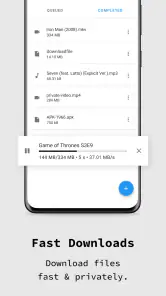
One thing I particularly liked is the download manager. It’s efficient and keeps everything organized, which is something I always look for in a browser. The app supports multiple tabs, which is great for multitasking. However, remember that each tab is isolated, so if you close one, it’s gone for good.
Overall, I'd say the user experience is quite positive. It does exactly what it claims and doesn’t try to be something it’s not. For those looking for a simple, no-frills browser that keeps their online activities private, this is a solid choice.
In conclusion, Incognito Browser - Go Private is a fantastic app for anyone concerned about their privacy online. It’s fast, efficient, and doesn’t compromise on security. If you're someone who values your privacy and wants to keep your browsing history to yourself, give this app a try. You might just find it to be your new favorite browser.
Pros
- Fast and responsive browsing experience.
- No registration required for use.
- Supports multiple tabs for multitasking.
- Built-in ad blocker enhances privacy.
- Compact and user-friendly interface.
Cons
- Limited customization options available.
- No built-in VPN for extra security.
- Occasional crashes on older devices.
- Lacks advanced features like desktop mode.
- Some ads bypass the ad blocker.

- Category
- Communication
- Version
- 689











