Photobooth mini FULL
- 205.00
- 4.0
- Installs
- 10.00K
- Price
- $13.00

Screenshots
Analysis by Reviewed
I enjoy the energy of a photo booth: people loosen up, take a few silly poses, and leave with a small record of the moment. Photobooth mini FULL aims to bring that casual activity to a phone, making it more suited to a shared gathering than to careful, one-person photo editing. I’d look at it as a simple way to make taking pictures part of the occasion, rather than a replacement for a full-featured camera app.
Readability and navigation
When people are taking turns, clear controls matter more than a long list of editing tools. The app is presented as straightforward to use, which fits the photo-booth idea: set it up, let someone take a turn, and keep the group moving. In practice, I’d still give guests a quick look at the controls before the camera is passed around. That small handoff helps avoid pauses while people work out which option to choose.
The app is a photography product from medtoure, and its focus is more specific than that of the camera app most people already have. A regular camera is better when I want to frame one polished shot; this is more appealing when a group wants a sequence of playful pictures. Its average rating is four out of five from 887 ratings, with 205 written reviews, and it has been installed over 10,000 times. Those figures suggest an established niche, not that every person will find its style a fit.
Bringing the Booth to You
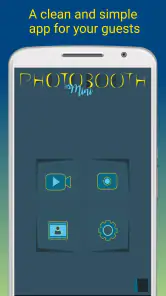
Photobooth mini FULL is like having a photo booth in your pocket. The app is incredibly easy to use, with a straightforward interface that lets you focus on having fun rather than figuring out how it works. You can set it up anywhere—at home, at a friend's place, or even outdoors. With just a few taps, you're ready to snap some fun pictures.
Features That Stand Out
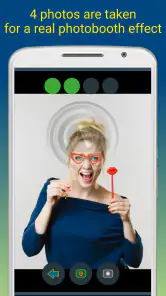
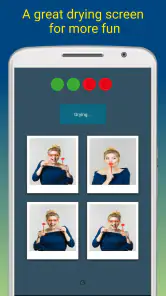
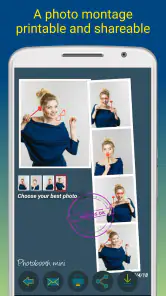
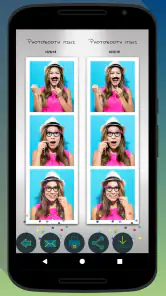
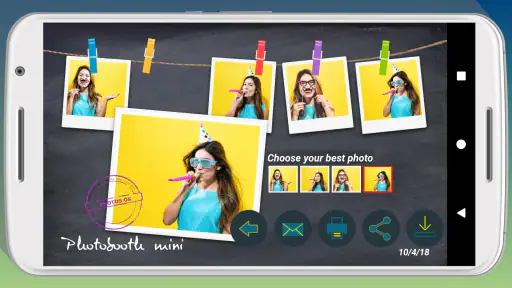
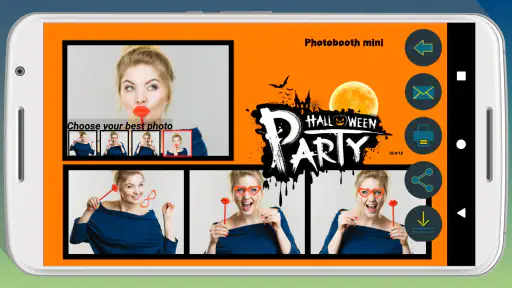
One of the standout features is the app's ability to take a series of photos, just like a real photo booth. You can choose between black and white or color photos, and there's even an option to add a timer to give you a few seconds to strike the perfect pose. Plus, you can print your photos directly from the app, which is a game-changer for those who love to have physical copies of their memories.
Another cool feature is the app's ability to create animated GIFs. This adds a modern twist to the traditional photo booth concept, letting you capture movement and bring your photos to life. It's a fun way to share moments with friends on social media or just to keep for yourself as a digital keepsake.
Making it work for different people and places
For a family gathering, I’d place the phone where the camera can see the group and let people take turns rather than asking one person to operate it throughout. The timer can be especially useful when nobody wants to be left behind the camera, while a short sequence gives guests a shared activity instead of another round of posed portraits. If someone finds motion distracting, the still-photo approach may feel calmer than making a GIF; the animated option is best treated as a choice, not the point of every session.
More From Our News Desk

Weather by Xiaomi Review: Clear at a Glance, Less Clear Up Close

X Under Pressure: Can It Recover When Posting Goes Wrong?

Clash of Clans Is Won Between the Battles

Android Auto Makes the Case for Quieter Car Software

MobiOffice: Transforming Mobile Productivity with Seamless Integration

EA SPORTS FC™ Mobile Soccer: Redefining Mobile Sports Gaming
Compared with the usual alternatives, this is a more focused experience than a general camera or an editor built around detailed retouching. That focus is useful when speed and a playful result matter, but it also means I wouldn’t choose it for a formal portrait, precise image adjustments, or a workflow that depends on extensive organization. Before guests arrive, I’d decide whether the group wants color or black and white and test the framing. Those small choices reduce fiddling once everyone is ready.
User Experience
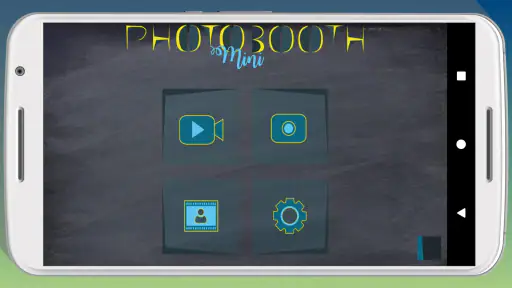
The user experience is smooth and intuitive. From the moment you open the app, it's clear that it's designed with the user in mind. The controls are simple, and everything is labeled clearly, so there's no confusion about what each button does. Plus, the app runs smoothly without annoying ads popping up every few seconds, which is a relief.
One thing I particularly appreciate about Photobooth mini FULL is how customizable it is. You can adjust the camera settings to fit your needs, and there are plenty of options for frames and backgrounds to personalize your photos. Whether you want something classic or quirky, this app has you covered.
Motor, sensory, and situational access
A timer can make the activity easier for someone who needs extra time to join a pose or cannot reach the phone quickly, because another person can start the shot and step into the frame. On the other hand, the group still needs someone to position and operate the device, so it is not a hands-free setup. For a sensory-friendly gathering, I’d keep the sequence brief and let people opt out of animated images; a busy room, changing poses, and anticipation between shots can be tiring for some guests.
For outdoor use, I’d choose a stable, shaded place where the screen is easier to see and the phone is less likely to be jostled. At a party, a quiet corner can help guests who prefer not to pose in front of the whole room. If printing matters, I’d test the intended print workflow before the event rather than discovering a connection or setup snag when everyone is waiting. The app costs $13, is rated for Everyone, and its current version is 400; it requires operating system version 7.0 or later. It was released on December 8, 2016, so it is a long-running option, though that history alone does not tell me how well it fits a particular phone or current routine.
Small-group workflows and practical trade-offs
The best way to use a phone booth is not necessarily to have everyone crowd around the screen. I’d appoint one person to choose the framing and start the first sequence, then move them into the group once the timer is set. For a mixed-age gathering, a second person can stay nearby to help anyone who is unsure about the controls without turning the activity into a performance. This division keeps the phone from being passed rapidly between guests and makes the setup less stressful for someone who needs a little more time.
There is also a useful choice between keeping the pictures spontaneous and making them easy to use afterward. If the goal is a printed keepsake, I’d settle on a simple pose and consistent framing before starting; people can then take turns without producing a set that varies wildly in composition. If the goal is a playful GIF, I’d make sure everyone in the frame is comfortable with movement and knows what the sequence is for. A still image is the more private, low-pressure option for guests who do not want their expressions animated or shared.
For a small celebration in a living room, I’d put the phone on a stable surface with enough space in front of it, test the lighting from the guests’ position, and take a trial picture before inviting people over. That quick check catches a common problem: a setup can look well lit from behind the phone while faces appear dim from the camera’s viewpoint. It is also a chance to see whether the screen is readable from where the group will stand. If not, I’d ask one helper to manage the controls rather than expecting everyone to approach the device.
Choosing it over a camera or editor
A standard phone camera remains the sensible choice when I want one carefully composed image, quick access to familiar controls, or a broad set of everyday shooting options. A photo editor is more appropriate when I need to refine individual pictures after taking them. This app’s appeal is the activity itself: a repeated sequence, a timer, optional monochrome treatment, animated output, and the possibility of printing. It makes the most sense when those choices help a group interact, not simply because another camera tool is available.
That distinction matters when deciding whether the $13 price is worthwhile. I’d see more value if I expected to use the booth format for recurring family occasions or small gatherings and wanted its specific mix of playful capture and output options. If I only need a quick group photo once in a while, the camera already on my phone may be enough. Someone who expects detailed editing, extensive file management, or a highly controlled print process should compare other tools before paying for a more focused experience.
Remaining barriers and who should choose it
The biggest practical trade-off is that a phone screen and camera have limits as a shared booth: people need room to gather, the device needs a steady position, and the person arranging the setup may have to help others take turns. I’d skip it if I needed professional-looking portraits, advanced editing, or a dependable event-printing workflow without testing it first. It makes more sense for friends, families, and hosts who want a light activity and don’t mind keeping the setup simple.
It is also not the best fit for every group. A guest who would rather not be photographed needs an easy way to sit out, and I would not make participation the price of joining the party. For someone with limited reach or dexterity, a helper may need to position the phone and start the timer; the timer can reduce the need to rush into place, but it does not remove the need to operate the device. If the screen is hard to see in a bright room, or the person taking part is uncomfortable with a busy group, a quieter one-to-one picture may be kinder than insisting on the booth format.
One useful approach is to make a quick test strip before the real group session: check how many people fit, whether the timer gives everyone enough time, and whether the chosen color style suits the room. For a casual birthday evening, for example, I’d put the phone on a stable surface, take a few test shots with one or two people, then invite the group in. That avoids spending the best moment adjusting the setup, and it gives guests a clear idea of how the sequence works.
An inclusive verdict
For me, the strongest case for this app is a small group that wants to make pictures together without turning the moment into a photography project. It can work well for family visits, relaxed parties, or a quiet evening with friends, especially when the host is willing to prepare the phone and explain the sequence. The monochrome option can suit a simple, consistent look, while the timer and animated output offer different ways to play with the format. I’d keep the choices optional so guests can take part in the way that feels comfortable to them.
The limits are just as important: the phone still needs positioning and operation, the room and lighting affect the result, and people may prefer not to be photographed or animated. The Everyone age rating makes it suitable for a broad audience, but that does not mean every group setting or sensory preference is automatically a fit. I’d treat it as a social photography tool, not as an accessibility solution or a substitute for a camera setup designed around a particular person’s needs.
Final Thoughts
In a world where capturing moments is more important than ever, Photobooth mini FULL offers a fun and convenient way to do just that. It's perfect for parties, gatherings, or just a quiet night in with friends. The combination of its ease of use, fun features, and quality output makes it a top choice for anyone looking to add a little extra fun to their photography.
So, if you're ready to bring the magic of a photo booth to your smartphone, give Photobooth mini FULL a try. It's bound to become one of your favorite apps, just as it has mine.
Photobooth mini FULL Frequently Asked Questions
How much does Photobooth mini FULL cost, and what should I know before buying it?
Photobooth mini FULL is a paid photography app priced at $13.00. Before downloading, consider whether its photo-booth style experience suits the parties or other occasions where you want to use it. It is intended to add fun to parties, and its Everyone age rating makes it suitable for a broad audience. Check that the purchase fits your budget and that your device meets the app’s requirements.
What is Photobooth mini FULL and what are its main features?
Photobooth mini FULL is a fun and easy-to-use app designed for creating instant photo booth experiences on your Android or iOS device. Its main features include customizable photo strips, a variety of photo effects, and the ability to share your creations instantly on social media or via email. The app also supports video recording, making it perfect for capturing special events and memories.
Is Photobooth mini FULL suitable for professional use or only for personal enjoyment?
While Photobooth mini FULL is primarily designed for personal enjoyment, its robust features make it suitable for professional use as well. Event planners and photographers can leverage the app's high-quality photo and video capabilities to enhance weddings, parties, and corporate events. With customizable settings and easy sharing options, it offers a versatile solution for both personal and professional photo booth needs.
Does Photobooth mini FULL require an internet connection to function?
Photobooth mini FULL does not require an internet connection for its core functions, such as taking photos, applying effects, and saving them to your device. However, if you wish to share your photos and videos directly to social media platforms or via email, an internet connection will be necessary. This makes the app versatile and convenient for offline use, with optional online features.
What are the system requirements for installing Photobooth mini FULL on Android and iOS devices?
The app is compatible with most modern Android and iOS devices. For Android users, it requires Android version 7.0 or later. It is optimized for both smartphones and tablets, ensuring a smooth and user-friendly experience across different screen sizes and device capabilities. Always check the app store for the latest compatibility information.
Pros
- User-friendly interface
- easy to navigate.
- High-quality photo outputs.
- Multiple photo layouts and customization options.
- Offline functionality available.
- Affordable pricing for full features.
Cons
- Limited editing tools compared to other apps.
- Occasional app crashes reported.
- Ads present in free version.
- Limited sharing options.
- Requires frequent updates.
- Category
- Photography
- Version
- 400











