Photo Studio: pictures editor!
- 32.42K
- 4.7
- Installs
- 50.00M
- Price
- Free
Screenshots
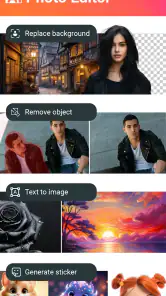
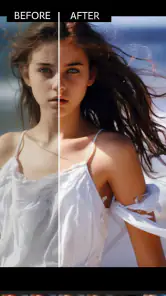
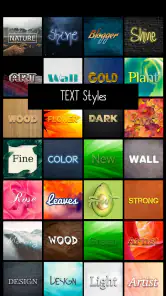
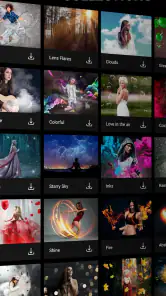
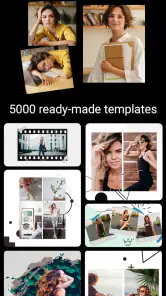



Analysis by Reviewed
Ever stumbled upon a moment so picture-perfect that you wish your phone could do justice to it? Well, that's where Photo Studio comes into play. This nifty app is not just any ordinary picture editor; it's like having a mini studio right in your pocket. So, let me walk you through my experience with this app and why it might just become your new best friend.
Unleashing Creativity with Ease
Once you download Photo Studio, you're greeted with an interface that feels both familiar and intuitive. It's like meeting an old friend who knows exactly what you need. The main screen is uncluttered with all the essential tools within easy reach. Whether you're a newbie trying to enhance your travel photos or a seasoned pro in need of quick edits, this app caters to all.
What really sets Photo Studio apart is its vast array of editing tools. From basic adjustments like brightness and contrast to more complex features such as layers and masks, it’s all there. Imagine being able to tweak every little detail until your photos look just the way you envisioned them. And the best part? It doesn't require a master's degree in photo editing to get started.
Filters, Effects, and More!
Now, let’s talk about the filters and effects because, honestly, who doesn’t love a good filter? Photo Studio offers dozens of them, each uniquely crafted to transform your photos into works of art. Vintage, black and white, sepia – you name it, they have it. Plus, the real-time preview feature lets you see the changes before you commit, saving you from any editing mishaps.
Aside from filters, the app boasts an impressive collection of effects. Whether you want to add some bokeh magic to your night shots or give your landscapes a dreamy look, it’s all just a tap away. The effects are so diverse that you’ll find yourself experimenting for hours, which, trust me, is time well spent!
Collages and Texts: Tell Your Story
Ever wanted to create a collage of your favorite memories? This app makes it effortless. With a plethora of templates and customizable options, you can easily stitch together your photos to narrate your story. And if you’re someone who loves adding text to images, Photo Studio doesn’t disappoint. Choose from a variety of fonts and colors to make your captions pop.
One of my personal favorites is the ability to add quotes or phrases in a way that feels organic and part of the image rather than just slapped on. It’s these little touches that make your creations stand out.
More From Our News Desk

Weather by Xiaomi Review: Clear at a Glance, Less Clear Up Close

X Under Pressure: Can It Recover When Posting Goes Wrong?

Clash of Clans Is Won Between the Battles

Android Auto Makes the Case for Quieter Car Software

MobiOffice: Transforming Mobile Productivity with Seamless Integration

EA SPORTS FC™ Mobile Soccer: Redefining Mobile Sports Gaming
Making the controls work for you
Although the layout feels approachable, a large toolset can still take a little exploring. I find it easier to begin with one clear goal—brighten a face, soften a busy background, or prepare a square collage—rather than browse every effect at once. That keeps the process focused and makes it easier to notice which change actually improves the image.
For anyone who finds small controls tiring, I’d suggest working slowly and checking each adjustment before moving on. The app is designed around visual editing, so people who prefer large, simple controls or spoken guidance may find a dedicated accessibility-focused editor more comfortable. I wouldn’t assume that a busy editing screen will suit every vision, dexterity, or sensory need.
A practical edit from camera roll to share
For a realistic everyday job, imagine taking a family photo indoors where the lighting looks flat and the background draws attention away from the people. I’d start with a modest brightness or contrast adjustment, preview a filter without committing, and then decide whether a subtle effect helps or merely competes with the faces. If the image is intended for a message or social post, a short caption or a collage can finish it without needing a separate design app.
One useful habit is to make the smallest correction first, then compare the preview with the original. Strong filters and effects can be fun, but they can also make skin tones or fine details look less natural. I treat the more decorative tools as optional finishing touches, not automatic improvements. That restraint is especially helpful when editing pictures I want to keep looking like real memories.
Where it fits among photo editors
Compared with a basic gallery editor, Photo Studio gives me more room to combine adjustments with creative effects, layers, masks, text, and collage layouts. That breadth is useful when I want to finish a picture in one place. A simpler editor may be quicker for a single crop or light correction, while a desktop photo program is a better fit for precise, repeatable professional work. This app sits between those approaches: more flexible than a bare-bones editor, but still intended for phone-based editing.
The trade-off is choice. With many tools available, it can be tempting to keep adding changes after the photo already looks good. I’d save a clean version before trying a dramatic treatment, particularly if the picture matters, and avoid relying on an effect to fix a composition that needs a crop or a retake. For polished product images, complex selections, or a consistent workflow across many photos, I’d choose a specialist editor instead.
Cost, compatibility, and who should consider it
The app is free to install, with optional in-app purchases ranging from under a dollar to around thirty dollars per item. I’d explore the free experience first and only consider a purchase if a particular paid option becomes part of my routine. It is made by KVADGroup App Studio, is rated for everyone, and its current version is 2.8.7.4630; the listed minimum Android requirement is version 6.0.
It has been available since 2012 and has built a 4.7 average from around 666,000 ratings, with over 50 million installs. Those figures suggest it has reached a broad audience, but they don’t tell me whether its editing style suits my own needs. I’d recommend trying it if you enjoy experimenting with photos, making collages, or adding expressive text. If you want only the quickest possible correction, or need an especially uncluttered and accessible interface, a simpler alternative may be a better match.
Why You Should Try It
In a world where capturing and sharing moments is second nature, having a reliable photo editing app is crucial. Photo Studio not only provides an extensive suite of tools but also ensures that the editing process is enjoyable and rewarding. It bridges the gap between professional editing software and user-friendly mobile apps, making it accessible for everyone.
So, whether you’re looking to give your photos a quick touch-up or transform them into pieces of art, Photo Studio is your go-to app. Trust me, once you start using it, you’ll wonder how you ever managed without it!
Photo Studio: pictures editor! Frequently Asked Questions
Who develops Photo Studio: pictures editor!, and what kind of app is it?
Photo Studio: pictures editor! is a photography app developed by KVADGroup App Studio. Its focus is editing pictures, with the store summary highlighting AI photo editing, photo effects, retouching, and changing a photo’s background. It may suit people looking for creative edits as well as practical touch-ups, though the best fit depends on the tools and workflow you prefer.
Is Photo Studio: pictures editor! suitable for children and families?
The app is rated Everyone, so its stated content rating is suitable for a broad audience. Families can consider it for general photo editing, including effects and retouching. As with any app that offers optional purchases, it is sensible for parents to review purchase settings on the device if children may use the app, so they understand how paid extras are handled.
Is Photo Studio: pictures editor! available for my device, and is it free to download?
Photo Studio: pictures editor! is a photography app from KVADGroup App Studio, and it is free to download. It requires Android 6.0 or later, so check your device’s operating system before installing. The app is rated for Everyone, making it suitable for a broad audience. Optional in-app purchases are available, so you can start with the free offering and decide later whether you want paid extras.
What features does Photo Studio offer for editing images?
Photo Studio: pictures editor! offers a comprehensive suite of editing tools to enhance your photos. It includes features such as filters, color adjustments, cropping, resizing, and special effects. Users can also find advanced tools like background editing, collage creation, and text addition. This app is designed to cater to both amateur and professional photographers, providing everything needed for high-quality image editing on your mobile device.
Is Photo Studio: pictures editor! user-friendly for beginners?
Yes, Photo Studio: pictures editor! is designed with a user-friendly interface that makes it accessible for beginners. The app offers intuitive controls and step-by-step tutorials to guide new users through the editing process. Whether you're new to photo editing or an experienced user, you'll find the layout easy to navigate, allowing you to start enhancing your photos right away without any hassle.
Pros
- Intuitive user interface
- Wide range of editing tools
- High-quality filter options
- Supports multiple file formats
- Easy sharing options
Cons
- Contains ads
- Limited free features
- Occasional crashes
- Some tools require in-app purchases
- High battery consumption
- Category
- Photography
- Version
- 2.8.7.4630











