Photo Editor by BeFunky
- 21.71K
- 3.7
- Installs
- 10.00M
- Price
- Free

Screenshots
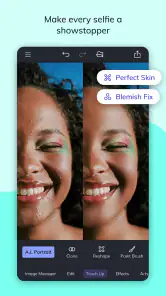
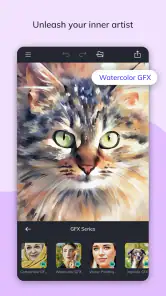
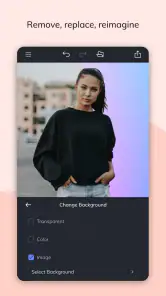
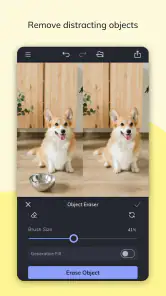
Analysis by Reviewed
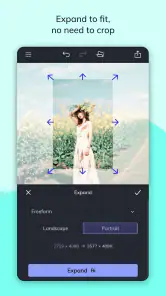
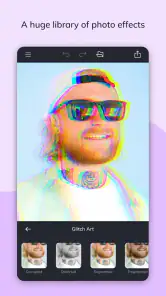
I tried Photo Editor by BeFunky with a practical question in mind: would I still open it after the first burst of curiosity, or would it become another editing app forgotten in a crowded folder? My first impression was positive because it makes everyday photo work feel approachable. The app sits in the photography category and combines editing, collage creation, and simple graphic design in one place, which is useful when I want to move from a single image to a small visual project without changing tools.
What makes it appealing is not that every control is aimed at professionals. It is that the experience is built around quick decisions. I can start with a photo, adjust its appearance, try a different visual treatment, and prepare something more presentable without needing to understand a complicated editing workflow. That simplicity is the main reason I would recommend it to a friend who wants more than basic phone filters but does not want to learn desktop software.
What the first week feels like
During the first week, the strongest use case is casual improvement. A photo that looks flat, slightly dull, or poorly framed can usually benefit from a few deliberate changes rather than a complete redesign. I found the app most enjoyable when I treated it as a finishing tool: improve the mood, clean up the composition, and decide whether the image works better alone, in a collage, or as part of a small design.
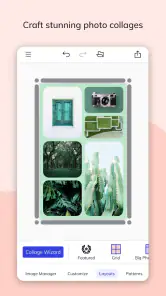
The combination of photo editing and collage making gives the app a useful rhythm. I might edit a selection of pictures from an outing, then arrange several of them together for a family update or a personal memory board. That transition matters because many alternatives are excellent at one job but less comfortable when the task changes. A dedicated editor may offer deeper control, while a template-focused design app may be better for polished layouts. BeFunky occupies the middle ground, where the same session can cover both.
I also like that the app is suitable for different levels of confidence. Someone who normally applies one filter and stops can still get value from it, while a more curious user can spend time comparing adjustments and combinations. The interface does not force every person into the same depth of editing. That makes it easier to recommend for households or friend groups where one person wants speed and another enjoys experimenting.
A realistic everyday scenario is preparing a small set of photos after a weekend trip. I would first choose the images that tell the story, make restrained corrections so they look consistent, and then create a collage for sharing. The important trick is to edit the individual pictures before arranging them. If I build the collage first and make every correction afterward, the result can feel uneven because each image may need a different amount of attention.
Useful habits for better early results
My best first-week tip is to resist using the most noticeable effect on every picture. Strong treatments can look exciting in isolation but make a group of photos feel disconnected. I get a more convincing result by choosing one visual direction and using small changes to support it. This is especially helpful for collages, where consistency matters more than making one image dramatic.
Another useful habit is saving the original photo separately before committing to an edited version. That gives me room to compare rather than trusting memory. It also prevents a common mistake with mobile editing: gradually increasing intensity because the eyes become accustomed to each change. A short break followed by a fresh look often reveals that a lighter adjustment works better.
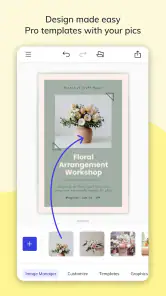
For graphic design tasks, I would begin with the message and the intended viewing size rather than decorating immediately. A simple image with readable text is more useful than a crowded composition filled with effects. BeFunky is approachable enough for quick social visuals, personal announcements, and casual project graphics, but the quality still depends on restraint. The app can make the process easier; it cannot decide what deserves attention in the finished image.
The developer behind the app is BeFunky, and its long presence in mobile photography gives the product a familiar, established feel. It was released on March 14, 2011, and the current version is 7.1.35. I mention that because the app is not a short-lived novelty built around one fashionable effect. It has had time to become a broad tool, although that breadth also creates some decisions for the user once the initial excitement fades.
Month-to-month value depends on your routine
After the first week, the question changes from “What can this do?” to “What do I repeatedly need it to do?” In my experience, the app earns a regular place when my photo tasks vary. If I only want a single automatic filter for occasional snapshots, a simpler camera app may be faster. If I regularly edit several images, make collages, and prepare informal graphics, the range becomes more valuable over time.
The recurring benefit is the ability to keep small creative jobs together. I do not need to open one app for corrections, another for a collage, and a third for a basic visual announcement. That does not make every result equally sophisticated, but it reduces the friction between stages. For people who create content in bursts rather than following a professional production pipeline, that convenience can matter more than having the deepest possible control in one narrow area.
I would particularly recommend it to students, families, casual creators, and small community groups that need presentable visuals without a formal design workflow. It can also suit someone who wants to turn a collection of ordinary phone photos into something more intentional. The app is less compelling for a photographer who needs highly specialized retouching, precise color management, or a carefully repeatable professional process.
The free price lowers the barrier to trying it, and the content rating is Everyone, so it is positioned as a broadly accessible photography app. There are in-app purchases ranging from $9.99 to $83.88 per item, which is worth keeping in mind before building a routine around every available option. I would start with the free experience and ask whether the features I actually use justify spending money, rather than assuming that more tools automatically mean better results.
The app has passed 10 million installs, with an average rating of 3.7 from around 211 thousand ratings and about 22 thousand written reviews. Those figures suggest a product with a substantial audience but also a mixed experience across users. I would read that as a reason to judge it by your workflow, not by popularity alone. A widely used editor can still feel wrong if its balance between simplicity and control does not match the way you work.
Where it compares well with familiar alternatives
Compared with a basic phone editor, BeFunky gives me a more deliberate creative space. Standard gallery tools are convenient for quick crops, rotations, and minor corrections, but they usually stop being useful when I want a collage or a small designed composition. Here, the move from correcting an image to arranging several images feels more natural.
Compared with a professional desktop editor, it is much easier to approach but less suited to demanding precision. I would not choose it for a workflow that depends on exact technical consistency across a large archive. Its strength is the middle: faster and friendlier than advanced software, while more flexible than the editing controls already built into a phone.
Compared with template-heavy design platforms, it feels more photo-centered. That is an advantage when the image itself is the starting point and the design is secondary. The trade-off is that users who mainly need ready-made branded layouts may find a specialized design service more efficient. BeFunky makes sense when I want to shape the visual myself instead of simply replacing text in a predetermined format.
One non-obvious trade-off is that the app’s breadth can encourage unnecessary work. Because I can keep adjusting, arranging, and redesigning, I may spend longer on a picture that only needed a crop and a small tonal correction. The best monthly routine is not to use every capability. It is to decide whether the task is correction, presentation, or experimentation, then stop when that goal is met.
Maintenance, friction, and the point where fatigue appears
The maintenance burden is not technical complexity so much as decision fatigue. An app with several creative directions can make a simple task feel open-ended. I sometimes find myself comparing too many versions instead of choosing the first clean solution. That is not a flaw unique to BeFunky, but the all-in-one design makes it especially important to create personal limits.
I keep the burden lower by using a repeatable sequence. First I remove images that do not contribute anything. Then I make basic corrections, check the crop, and only afterward consider a more expressive treatment. For collages, I choose the layout based on the story I want the images to tell, not on which arrangement looks most decorative at first glance. This turns the app from a playground into a dependable tool.
Another source of fatigue is the difference between exploring and finishing. Exploration is enjoyable during the first few sessions, but a monthly habit needs a clear endpoint. I find the app more satisfying when I decide in advance whether I am making a quick shareable image, a memory collage, or a graphic with a specific message. Without that boundary, the editing process can become a loop of minor changes that do not improve the result.
Users may also wonder whether it is suitable for serious work. My answer is conditional. It is suitable for personal projects, informal publishing, and many everyday visual tasks where speed and accessibility matter. I would look elsewhere when the job requires advanced retouching, exact production specifications, or a highly controlled brand system. The app is not a replacement for every type of image software, and expecting it to be one would create unnecessary frustration.
There is also a question of whether it works for complete beginners. I think it does, provided they are willing to learn through small experiments rather than trying to master everything at once. Start with one photo, make one change at a time, and compare the result with the original. That approach is more useful than applying a long chain of effects without understanding which decision changed the image.
For experienced mobile editors, the issue is different: will it offer enough control to remain interesting? It can, when the appeal is moving between editing, collage work, and simple design. If the user is seeking only specialist-level adjustments, the broader workflow may feel less focused. In that situation, a dedicated app with a narrower purpose could be a better long-term companion.
How to keep the app useful instead of noisy
I would organize personal projects before opening the editor. Selecting the final images first prevents the common habit of polishing every picture simply because it is available. For a collage, I also prefer a small visual hierarchy: one image should lead, while the others support it. Equal emphasis across every frame often makes the finished piece harder to read.
When making a graphic, I would check it at the size where people will actually see it. Details that look attractive while editing can disappear on a smaller screen, while text that seems acceptable up close may become difficult to read. This is a practical limitation of designing on a phone, not a reason to avoid the app. It simply means the final check should happen at the intended viewing scale.
I also recommend keeping a personal “stop rule.” For example, once the image is clear, balanced, and consistent with the intended mood, I stop exploring alternatives. This sounds simple, but it is the difference between using the app as a helpful tool and letting it consume time without producing a better result. The lasting value comes from a repeatable workflow, not from endless access to effects.
My long-term verdict after the novelty wears off
Photo Editor by BeFunky has enough range to earn lasting space on my phone, but only for the right kind of user. I would keep it because it covers several recurring needs: improving ordinary photos, combining images into collages, and creating straightforward visual designs. That combination is more useful month after month than a collection of flashy effects that I would try once and never revisit.
I would recommend it to someone who wants a friendly step up from the default gallery editor. It is especially practical for people who regularly prepare photos for sharing, assemble small visual stories, or need occasional graphics without committing to advanced software. The free entry point makes experimentation easy, while the paid options mean I would pay attention to which tools become part of my real routine.
I would skip it if my priority were either extreme simplicity or professional precision. A built-in phone editor may be better for a one-tap correction, and a specialized editing application may be better for demanding control. BeFunky is strongest between those two ends, where I want creative flexibility without a steep learning curve.
The mixed average rating of 3.7 is consistent with my overall view: this is a capable, accessible app, but it will not satisfy every editing style equally. Its success depends on whether the user values an all-in-one workflow more than a tightly specialized tool. For me, the answer is yes when I am handling varied personal projects, and no when I need a technically exact production environment.
In the end, I see it as a practical app rather than a novelty. Its real test is whether it helps me finish visual tasks I would otherwise postpone. When I use a clear process and avoid chasing every possible variation, it does exactly that. BeFunky is worth keeping for flexible everyday photo work, as long as you treat its variety as a resource rather than an obligation to use everything.
Pros
- Simple tools make quick edits easy for beginners.
- Collage templates help create polished layouts in minutes.
- Includes creative effects
- frames
- stickers
- and graphic elements.
- Works well for preparing images for social media posts.
- Basic editing features are available without advanced knowledge.
Cons
- Many premium effects
- templates
- and tools require a subscription.
- Some features may feel limited compared with professional editors.
- Export options and higher-quality results may depend on the plan.
- The interface can feel crowded when browsing its many creative tools.
- Cloud-based features may require a stable internet connection.

- Category
- Photography
- Version
- 7.1.35











