Package Tracker - pkge Mobile
- 2.09K
- 3.2
- Installs
- 5.00M
- Price
- Free

Screenshots
Analysis by Reviewed
Have you ever been in that situation where you’re eagerly waiting for a package, and you just can't stop checking your phone? Well, let me introduce you to Package Tracker - pkge Mobile, your new best friend in package tracking. This nifty app is designed to make your package tracking experience as seamless as possible, and trust me, it does just that!
Why a shared tracking view can help
I find a multi-carrier tracker most useful when several orders are moving at once. Instead of keeping separate carrier pages open, I can use one place to check a delivery from FedEx, USPS, UPS, or DHL. That is the practical appeal of this business app: it turns a scattered set of tracking checks into one routine. DARADDO APPS LTD develops it, and its focus is straightforward—monitoring parcels rather than managing every part of an online purchase.
A realistic example is a week when I have a work supply arriving by courier and a personal order travelling through the postal service. I can add each shipment as it becomes available, then check the list before heading out or planning around a delivery. This does not make a parcel arrive sooner, but it can reduce the small hassle of remembering which carrier site to visit. I would still keep the merchant’s order confirmation, since that is where I would go for purchase details or help with a missing item.
The app is free to install and is rated for Everyone. It has more than five million installs, with an average rating of 3.2 from around thirty-seven thousand ratings and roughly 2.1 thousand written reviews. I read that middling rating as a reason to set sensible expectations, not as proof that it will fail for every user. It may suit someone who wants a central tracking view, while a person who needs consistently polished service should compare it with their carriers’ own apps before settling on a routine.
Tracking Made Easy
First things first, let's talk about how easy it is to get started with Package Tracker - pkge Mobile. The app is available for both Android and iOS, so no matter what device you're using, you're covered. Once installed, you'll notice how user-friendly the interface is. You won't need to be a tech wizard to navigate through this app. Just pop in your tracking number, and voila! You're all set.
All Your Packages in One Place
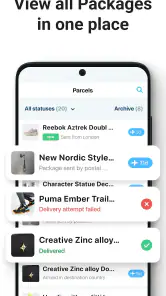
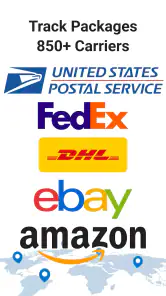
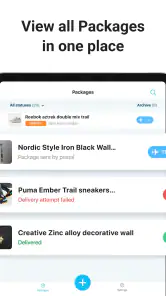
One of the features I absolutely love is the ability to track multiple packages from different carriers all in one place. Whether you’re waiting for a parcel from FedEx, UPS, or your local postal service, this app has got you covered. It supports tracking for over 700 carriers worldwide. Having everything in one place just makes life so much easier, don’t you think?
The main trade-off with an all-in-one tracker is that the carrier remains the source of the shipment’s underlying scans. A combined view is handy for checking several parcels, but I would not treat it as a replacement for a carrier’s own account or delivery-management tools. If a shipment is delayed, the carrier’s service is usually the better place to investigate delivery instructions or contact the company. For a normal “where is it now?” check, the consolidated approach is the part I would use first.
More From Our News Desk

Weather by Xiaomi Review: Clear at a Glance, Less Clear Up Close

X Under Pressure: Can It Recover When Posting Goes Wrong?

Clash of Clans Is Won Between the Battles

Android Auto Makes the Case for Quieter Car Software

MobiOffice: Transforming Mobile Productivity with Seamless Integration

EA SPORTS FC™ Mobile Soccer: Redefining Mobile Sports Gaming
One small workflow tip is to add a number as soon as the seller sends it, then check whether the shipment appears under the expected carrier before relying on it. If a number is not recognized right away, I would wait until the first carrier scan rather than repeatedly re-entering it. A label can be created before a parcel has actually entered the delivery network, so an unchanged status at that stage may reflect the shipment’s progress rather than a problem with the app. This distinction can save unnecessary checking.
For someone handling a handful of orders, a single list can make it easier to spot which parcel needs attention. For a small business receiving supplies, that can be more useful than repeatedly searching email for tracking numbers. But I would not use a consumer tracker as a full logistics system: it is meant to help monitor orders, not coordinate stock, dispatch, or customer support. If those are the needs, a dedicated business shipping tool is the more appropriate choice.
Real-Time Updates
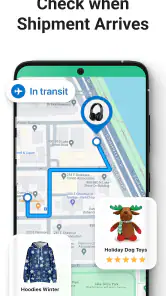
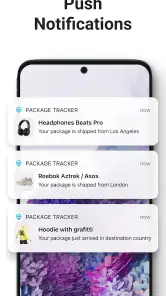
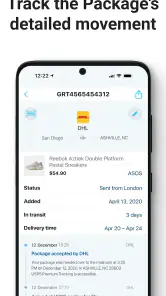
Now, let’s get into the nitty-gritty. Package Tracker - pkge Mobile gives you real-time updates on your package's whereabouts. No more guessing games! You can see exactly where your package is at any given moment. Plus, the app sends you notifications whenever there’s an update, so you're always in the loop. This feature is a real game-changer, especially if you're someone like me who loves knowing every detail.
I would interpret “real-time” as a convenient way to see new tracking information when it becomes available, not as a promise that every movement appears instantly. Parcel status depends on scans and carrier reporting, and quiet stretches between updates are normal. A shipment crossing a long distance may have no fresh event for a while; repeated refreshes cannot create a scan that has not been recorded. My practical habit would be to check after a meaningful change—such as a dispatch notice or an expected delivery day—rather than watch the screen continuously.
Notifications can be helpful when I am busy, but they are not a substitute for checking the status before making a time-sensitive plan. If I need to be home for a delivery, I would verify the latest carrier information and use the carrier’s own options where available. That is a useful boundary: this app can reduce the effort of monitoring, while the delivery company controls the actual route and handoff. For a parcel that needs special handling, I would rely on the carrier’s instructions rather than assume a tracker notification can change them.
There is also a sensible way to avoid notification fatigue. I would keep alerts for parcels that matter soon and avoid treating every routine scan as urgent. When several orders are moving, frequent notices can become noise rather than help. The value is strongest when an update changes what I need to do, such as deciding whether to stay in or check a delivery window; less so when I am merely curious about every transit step.
Speed, Stability, and Everyday Reliability
The design of the app is sleek and modern, without any unnecessary clutter. The developers have really put some thought into making the user experience enjoyable. I found the app to be very responsive, and it didn’t lag, which is always a plus.
For ordinary use, I would expect the quickest part to be opening the tracker and reviewing information already available. The less predictable part is getting a new shipment event, because that depends on the carrier’s scans and the tracking number being recognized. This difference matters when judging speed: a screen that opens promptly can still show an older status if the delivery network has not reported anything new. I would separate interface responsiveness from the speed of the parcel’s tracking feed.
Heavy-use moments are likely to come when several orders are active at once, especially around a busy shopping period or before a trip. That is when one consolidated list has a clear advantage over switching between carrier pages. At the same time, adding more shipments means there are more statuses to interpret and more possible notifications to manage. I would keep the list focused on parcels I still care about, rather than turning it into a permanent archive of every order I have ever placed.
If a shipment stops updating, I would first check the tracking number and carrier, then compare the latest event with the carrier’s own tracking page. If both show the same pause, the likely issue is the shipment’s progress or a gap in scanning, not a need to repeatedly reinstall the app. If the carrier has newer information, using its page gives me a practical cross-check. This is a low-effort recovery routine that avoids mistaking delayed data for a frozen interface.
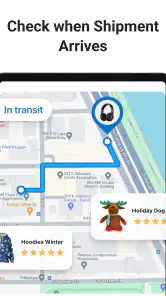
Performance also depends on the phone and its software. The current version is 17.0.8, and the minimum Android requirement is 8.0, so people using older Android devices should check compatibility before planning around it. I would not assume that a tracker needs constant attention in the background: checking when useful is a more measured approach, particularly on an older phone or when conserving battery matters. The app’s role is periodic monitoring, not continuous navigation or a live map of a delivery vehicle.
On iOS, the app is also available, which makes it an option for people who move between Apple devices and carrier websites less often. Either way, I would judge reliability by whether the shipment numbers I use are recognized and whether updates are clear enough to act on. A single delayed scan is not enough to conclude that the app is broken; repeated mismatches against carrier information would be a stronger reason to switch to direct tracking.
Who Will Get the Most from It
I think this app is a sensible fit for people who regularly order from different shops and want one place to check familiar carriers. It is especially useful when I have a few parcels in transit and do not want to keep order emails, browser tabs, and carrier apps open at the same time. People who only receive an occasional package may find the carrier’s own tracking page simple enough and may not need another app at all.
It is also worth considering what “tracking” means for your particular situation. If you are waiting for a standard parcel and only need status updates, a multi-carrier view is convenient. If you need to change a delivery address, arrange a hold, submit a claim, or speak with a driver, I would go straight to the carrier. Those tasks are tied to the delivery provider, and a general tracker is not the place I would rely on to resolve them.
Compared with using each carrier’s app, this one trades some provider-specific depth for a simpler overview across services. Compared with a store’s order page, it can be more useful once you have orders from several merchants, while the store remains better for payment, returns, and order support. I would choose based on the job: use the tracker to scan the overall picture, and use the relevant retailer or carrier when the question is about a purchase or a delivery change.
There are in-app purchases ranging from $0.99 to $59.99 per item. I would review any purchase prompt carefully and decide whether an added option addresses a real need before paying. If my only goal is checking a few tracking numbers, I would begin with the free app and see whether its normal workflow is enough. That keeps the decision grounded in my own usage instead of assuming a paid item is necessary.
The app first appeared on June 19, 2018, and its ongoing version number shows that it has continued to be updated. That history can be useful context, but I would still make my decision based on how it handles my current shipments and how well it fits my phone. A long-running app is not automatically the best choice for every person; the important test is whether its central tracking view saves more time than it adds in setup or checking.
Final Thoughts
Overall, Package Tracker - pkge Mobile is a fantastic app for anyone who frequently receives packages. It’s reliable, easy to use, and most importantly, it keeps you informed. If you’re tired of constantly checking various websites to track your packages, then this app is definitely worth a try. So, go ahead, download it, and take the stress out of package tracking. You won’t be disappointed!
My recommendation is more measured: I would try it if multiple carriers make order monitoring tedious, but I would not make it my only source for urgent delivery decisions. Its strongest case is convenience—one place to review parcels and notifications when something changes. Its weaker case is any situation that needs a carrier-specific action or guaranteed instant status. For that, the direct carrier route is still the safer choice.
In short, this free business app is worth considering if a unified parcel list would genuinely simplify your week. Its 3.2 average rating suggests experiences are mixed, so I would test it with a routine shipment before depending on it for an important delivery. If it recognizes your carriers and presents updates clearly, it can earn a useful place in your phone; if you need deeper delivery controls, stick with the provider that is carrying the parcel.
Package Tracker - pkge Mobile Frequently Asked Questions
Is Package Tracker - pkge Mobile free to download?
Package Tracker - pkge Mobile is free to download, with in-app purchases ranging from $0.99 to $59.99 per item. Review the purchase options in the app before buying so you understand which features require payment. The app’s price and optional purchases may matter if you plan to use it regularly or track several orders.
Who develops Package Tracker - pkge Mobile, and what kind of app is it?
Package Tracker - pkge Mobile is a business app developed by DARADDO APPS LTD. Its purpose is to help users monitor orders and follow package deliveries through supported carriers. If you want one place to check shipment progress, that focus may suit your needs; you can also consider the app’s carrier coverage and purchase options before deciding whether to install it.
Can I use Package Tracker - pkge Mobile on my phone?
Package Tracker - pkge Mobile is available for Android devices running version 8.0 or later. It is a business app from DARADDO APPS LTD, and its Everyone content rating makes it suitable for a general audience. Check your device’s operating system before downloading so you can confirm it meets the app’s minimum requirement.
Which delivery services can I track with Package Tracker - pkge Mobile?
The app’s store description highlights tracking with FedEx, USPS, UPS, and DHL. Package Tracker - pkge Mobile is designed to help users monitor their orders in one place, so it may be useful if you regularly receive deliveries handled by these services. Make sure the carrier shown for your shipment is supported before relying on the app for updates.
What features does Package Tracker - pkge Mobile offer?
Package Tracker - pkge Mobile provides real-time tracking for all your packages from various carriers worldwide. It offers push notifications for status updates, a user-friendly interface, and the ability to track multiple shipments simultaneously. Additionally, the app supports barcode scanning for easy input and offers detailed tracking history for your records.
Pros
- Supports tracking from multiple carriers globally.
- User-friendly interface with intuitive navigation.
- Provides real-time updates on package location.
- Customizable notifications for delivery status.
- Secure login with data protection features.
Cons
- Ads present in free version can be disruptive.
- Some features require a premium subscription.
- Occasional delay in package status updates.
- Limited offline functionality.
- Lacks in-app customer support chat.
- Category
- Business
- Version
- 17.0.8











