ONE@Work (formerly Even)
- 25.60K
- 4.8
- Installs
- 1.00M
- Price
- Free

Screenshots
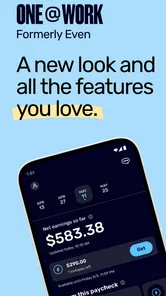
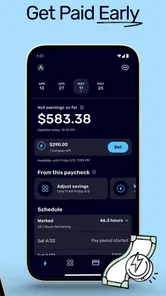
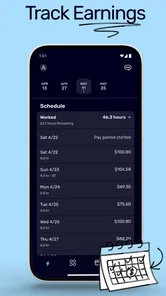
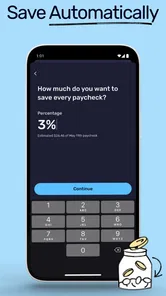
Analysis by Reviewed
When I think about a finance app, I care less about a flashy dashboard than whether it helps me make a sensible choice at the moment I need one. ONE@Work (formerly Even) is aimed at everyday money management, with budgeting, savings goals, expense categories and access to earned wages among the tools described here. That mix can be useful when payday feels far away, but I would treat it as a practical aid rather than a replacement for a full financial plan.
Quick checks before relying on it
The app is free, and its Everyone age rating makes it broadly accessible. ONE Finance, Inc. is the developer. It has a 4.8 average from around 78 thousand ratings, with more than a million installs. Those figures suggest plenty of people have tried it, but popularity alone cannot tell you whether its setup will suit your work and money situation.
One important question is whether the earned-wage option fits your own circumstances. I’d check the terms and eligibility shown in the app before building bills around early access. It can help bridge a timing gap, but it is not extra income: money accessed sooner is still money from a paycheck you have already earned. I’d use it for a genuine short-term need, not as a routine way to stretch spending.
Useful for a payday-to-payday routine
A realistic use case is a surprise grocery or travel cost landing before payday. I’d first check the budget and categorized spending to see whether there is room to adjust; if the app makes earned wages available to me, I’d compare that option with delaying a nonessential purchase. That small pause matters. The strongest use of an early-pay feature is solving a timing problem while keeping the next pay cycle in view.
The savings-goal tool can make a different kind of routine easier. For example, I’d name a goal for an upcoming expense and check it alongside ordinary spending, rather than treating savings as whatever happens to remain at the end of the month. Expense categories can help reveal recurring habits, but I’d still review them: an automatic label is a useful starting point, not a guarantee that every purchase has been interpreted perfectly.
Where it fits among money tools
Compared with a basic bank app, ONE@Work puts budgeting and savings habits closer to the center of the experience, and its earned-wage access gives it a different role from a simple spending tracker. A spreadsheet or manual budget offers more control over how every item is recorded, while a bank’s own tools may be more convenient if I only want to check balances and transactions. I’d choose ONE@Work when I want a guided view of spending and goals; I’d choose a manual system if I need custom categories or a detailed household budget.
It also works best when I’m willing to check in regularly. A budget cannot make decisions for me, and a savings goal only helps if I revisit it when plans change. I’d use categories to spot a pattern, then decide on one manageable adjustment instead of trying to overhaul every expense at once. That keeps the app’s information connected to an action rather than turning it into another screen I glance at and forget.
More From Our News Desk

 Bolt: Request a Ride
Bolt and the Shift from One-Tap Rides to More Legible Trips
Bolt shows how ride-hailing is shifting from a one-tap taxi request toward a more legible, choice-driven trip, while leaving the hardest questions of price and reliability unresolved.

 Farm Land - Farming life game
Farm Land Review: A Small Island Farm with a Satisfying Loop
A bright, breezy island farm turns a few quick chores into a satisfying cycle of planting, harvesting, expanding, and deciding what to build next.

 Android Auto
’s Community Takes Shape in the Passenger Seat
Its most valuable network is not a public feed but a shared set of routes, voice habits, app integrations, and advice that make driving less isolating—and sometimes more complicated.

 My Talking Angela
 Makes the Virtual Pet Feel Personal
A polished pet-raising game built on small rituals, playful customization, and a character who gives everyday screen time a surprisingly personal rhythm.

 Google Translate
 Review: A Pocket Tool for the Small Frictions of Travel
From menus and signs to quick conversations, Google Translate earns its place by cutting the little delays that make unfamiliar language feel like a barrier.

 Shazam: Find Music & Concerts
Shazam’s Best Trick Is Turning a Song Into a Night Out
A few seconds of recognition can settle an argument, rescue a half-remembered chorus, and point toward a live show. Shazam’s real trick is what happens after the match.
Latest News



Making the numbers useful
For a practical weekly routine, I’d look at the same few things each time: whether everyday spending is tracking as expected, whether a category needs a closer look, and whether the savings goal still matches the next known expense. This is more useful than checking every transaction repeatedly. It also limits the chance that one unusual purchase becomes a reason to abandon a budget that is otherwise working.
If pay varies from week to week, I’d be cautious about setting a savings target that assumes every payday will be identical. A goal can still help, but I would treat it as a direction rather than a promise and revisit it when income or upcoming costs change. The key trade-off is convenience versus precision: the app can make a broad picture easier to follow, while a personal spreadsheet may better suit someone who wants to model every irregular payment.
Getting Started with ONE@Work
Picture this: you've just downloaded the app, and you're ready to dive into the world of financial management. Signing up is a breeze, and before you know it, you're greeted with a sleek, user-friendly interface that's as inviting as a warm cup of coffee on a cold morning. The app's design is intuitive, making navigation a walk in the park even for those who aren't tech-savvy.
Features That Stand Out
ONE@Work comes packed with features that are designed to make your life easier. One of the standout features is the automatic budgeting tool. Instead of spending hours with a calculator trying to figure out where your money went, this app does all the heavy lifting for you. It tracks your spending habits and creates a budget that's tailored to your lifestyle. It's like having a personal financial advisor in your pocket.
Another feature worth mentioning is the early access to earned wages. This is a game-changer, especially when unexpected expenses pop up. You no longer have to wait for payday to get your hands on your hard-earned money. It's financial flexibility at its finest, giving you peace of mind knowing that you can handle whatever life throws your way.
Why You'll Love It
Let’s talk about the thing we all love – saving money. With ONE@Work, not only can you save, but you can also set savings goals. Whether you're planning a vacation or saving for a rainy day, the app helps you stay on track. Plus, the satisfaction of watching your savings grow is a feeling that's hard to beat.
For those of us who love to keep things organized, the app offers a nifty feature that categorizes your expenses. It's a bit like having Marie Kondo organize your finances. You can see exactly where your money is going, and maybe even spot a few areas where you can cut back. It's all about making your money work for you.
Performance in everyday use
I’d judge speed by the jobs that matter here: opening the app when a purchase is on my mind, checking a spending category, or revisiting a savings goal. The current version is 10.106.1, and the app supports Android 7.0 and up. Those details help with compatibility planning, but they don’t guarantee the same response on every device or network. I’d keep the app updated and avoid making a time-sensitive money decision until the screen has finished refreshing.
For heavier use, such as reviewing several categories and then adjusting a goal, I’d treat the app as a companion for a short budgeting session rather than expect it to replace careful record-keeping. If something looks out of place, compare the category with the underlying purchase information before changing your spending plan. That extra check is especially useful when a single unusual expense could distort your impression of a normal week.
When a busy money week needs a calmer workflow
Imagine a week with a grocery shop, a commute cost, and an unexpected household purchase all arriving before payday. I’d avoid making several decisions based on the first screen I open. Instead, I’d review the relevant category, check whether the surprise item changes the week’s picture, and then decide whether to adjust another expense, pause a nonessential plan, or consider eligible access to earned wages. Separating those choices prevents a short-term cash gap from becoming a reason to ignore the rest of the budget.
A useful habit is to make one note outside the app when an unusual expense is temporary, such as a one-off trip or repair. That way, when I revisit the category, I can distinguish a lasting pattern from an exceptional week. It is a small manual step, but it helps avoid overcorrecting a budget based on data that may not represent normal spending.
For someone deciding whether to try the app, the main practical question is whether a guided overview is enough. If I mainly want a quick way to think about spending, goals, and paycheck timing, this approach makes sense. If I need to reconcile shared bills, track cash purchases precisely, or create several custom scenarios, I’d keep a separate record or choose a more configurable budgeting tool rather than expect one app to cover every edge case.
Reliability, limits, and who should choose it
A finance app earns trust through consistent information and clear routines, not just a polished first screen. I’d avoid relying on a single glance for a bill or urgent payment; confirm important details through the relevant account or service before acting. If the app feels slow or stops responding, closing and reopening it is a reasonable first step, then I’d check again once the connection is stable. I wouldn’t assume that an early-wage request or budget change has gone through until the app shows a clear result.
This is a better fit for someone who wants approachable spending awareness and a nudge toward savings, especially if paycheck timing is part of their budgeting challenge. It is less suitable for people who need detailed investment planning, highly customized bookkeeping, or a budget shared across a complex household. In those cases, a spreadsheet, specialist finance tool, or the features built into a primary bank account may offer more control. The app is free, but I’d still read any in-app terms before using a money feature so there are no surprises about how it works for me.
Device constraints and sensible expectations
On a phone that meets the Android 7.0 minimum, compatibility is one less basic hurdle, but an older device may still feel different from a newer one when switching between screens or returning to the app after a pause. I would keep enough storage available and use a stable connection for any task where the final status matters. These are ordinary precautions, not a promise that every screen will respond instantly.
If I were setting it up on a device I share with someone else, I’d be deliberate about when I open financial information and make sure the phone itself is protected. I’d also avoid treating a notification or a quick glance as proof that a change is complete; I would reopen the relevant part of the app and check the displayed result. That extra moment is worthwhile whenever a decision affects a spending plan or access to wages.
The Final Verdict
So, is ONE@Work worth it? Absolutely. It's more than just an app; it's a comprehensive financial tool that empowers you to take control of your money. From budgeting and saving to accessing wages early, it covers all the bases. It's like having a financial superhero right in your pocket, ready to swoop in and save the day.
In a world where financial stress is all too common, having an app like ONE@Work is a blessing. It simplifies the complex world of finance, making it accessible to everyone. So, if you're looking to take charge of your financial future, this app is definitely worth checking out.
ONE@Work (formerly Even) Frequently Asked Questions
Is ONE@Work only useful if my employer participates?
ONE@Work is a finance app focused on employee pay, so its usefulness depends on whether you can connect the payroll information needed for its pay features. Before downloading, consider whether the app fits your work situation and whether you have access to the relevant payroll details. This can help you decide whether its paycheck and everyday-finance tools are likely to be useful to you.
What should I expect when setting up a ONE@Work account?
Getting started involves setting up the app and connecting payroll information for the pay features. Have the details you use to access your payroll ready, and review each step before you authorize a connection. Since ONE@Work is intended to help employees manage pay and finances, the setup experience is closely tied to your work and payroll situation rather than being a general-purpose budgeting app alone.
Who can use ONE@Work, and what should I check before installing it?
ONE@Work is a finance app focused on helping employees manage pay and everyday finances. Before downloading, check that it is relevant to your work situation and that you can connect the payroll information needed to use its pay features. The app is free and rated for Everyone, and it is developed by ONE Finance, Inc. Its store summary is “Your Pay, Your Way.”
What is ONE@Work (formerly Even) and how does it function?
ONE@Work is a financial management app designed to help employees manage their paycheck and better handle their finances. It offers features like early access to earned wages, budgeting tools, and savings options. By connecting to your payroll, the app allows users to get paid before payday, track expenses, and set financial goals. This makes it easier for users to manage cash flow and reduce financial stress.
Is ONE@Work safe and secure to use for financial transactions?
Yes, ONE@Work prioritizes user security and financial safety. It uses bank-level security measures, including encryption and secure data storage, to protect users' personal and financial information. Additionally, the app complies with relevant regulations and standards to ensure a trustworthy experience. Users can feel confident when using the app for financial transactions and management.
Pros
- User-friendly interface for quick navigation.
- Integrates well with payroll systems.
- Offers financial planning tools.
- Provides instant access to earned wages.
- Secure and protects user data.
Cons
- Limited customer service availability.
- Occasional app crashes reported.
- Requires consistent internet access.
- Limited features without premium.
- May have privacy concerns with data.