OldRoll - Vintage Film Camera
- 694.00
- 4.4
- Installs
- 10.00M
- Price
- Free

Screenshots
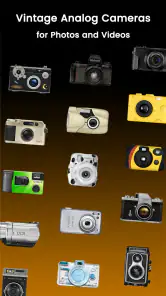
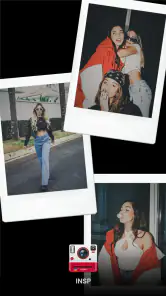
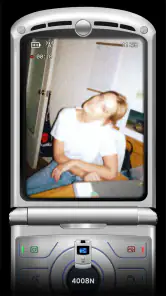
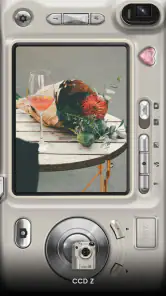
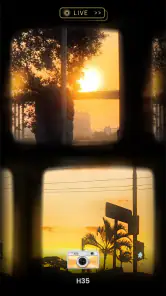
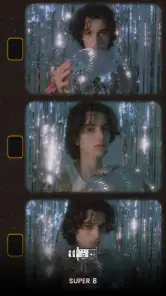
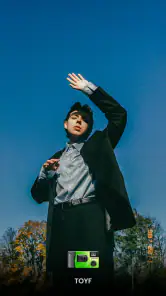
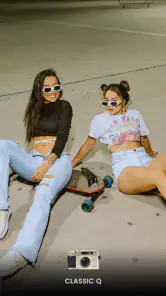
Analysis by Reviewed
I reach for a retro camera app when I want a picture to carry a mood, not just record what was in front of me. OldRoll - Vintage Film Camera is built around that idea: it turns casual phone photography into a more deliberate, film-inspired activity. I find it most appealing when I’m taking snapshots of friends, a favorite corner of town, or small details I want to remember with a little extra character.
Who will get the most from it?
I’d recommend this vintage camera app to people who want a recognizable look without turning a casual photo into a long editing project. It suits café snapshots, outfits, street details, travel memories, and small everyday scenes where mood matters more than exact color accuracy. If your goal is to make a picture feel like a memory, rather than reproduce a scene neutrally, its retro approach makes sense.
It is less suited to someone who needs dependable, true-to-life color for work, wants extensive retouching tools, or expects the kind of precise controls found in a dedicated manual camera app. I’d keep a standard camera app available for important documents, difficult lighting, or moments when getting the cleanest possible image matters more than getting a particular look.
Getting That Retro Vibe
The first thing that struck me about OldRoll - Vintage Film Camera is its ability to transport you back in time. As soon as you open the app, you’re greeted with a user interface that mimics a vintage camera. It’s like holding a piece of history right in your hands! The developers have done a fantastic job capturing the essence of analogue photography, and I found myself feeling a bit like a professional photographer from the 80s or 90s.
One of the coolest features is the variety of film effects available. From classic black and white to vibrant color palettes, you can explore different eras of photography. I had a blast trying out the various options, and each photo felt like a little time capsule. Plus, with the app’s easy-to-use controls, even a newbie like me could produce some seriously stunning shots!
Features That Stand Out
OldRoll doesn’t just stop at filters; it offers a range of features that make it a must-have for any photography lover. The manual focus and exposure settings give you complete control over your shots, allowing you to experiment and get creative. I particularly enjoyed the light leak effects that add a touch of unpredictability to your photos, reminiscent of those happy accidents in traditional film photography.
A simple workflow for everyday pictures
For a quick outing, I’d choose the look before taking a string of photos rather than try to make every image match later. That keeps the camera-like experience fun and gives a set of pictures a more coherent mood. If I’m unsure which treatment fits a scene, I’d take a moment to compare the available looks on an unimportant subject first; a bright window or a face in shade can reveal more than a plain wall.
More From Our News Desk

Weather by Xiaomi Review: Clear at a Glance, Less Clear Up Close

X Under Pressure: Can It Recover When Posting Goes Wrong?

Clash of Clans Is Won Between the Battles

Android Auto Makes the Case for Quieter Car Software

MobiOffice: Transforming Mobile Productivity with Seamless Integration

EA SPORTS FC™ Mobile Soccer: Redefining Mobile Sports Gaming
The manual controls are most useful when the scene gives the automatic look a tough job. For a portrait near a bright window, for example, I’d pay attention to exposure so the person does not become too dark against the light. I’d use focus deliberately for a close detail, then return to a simpler approach for moving subjects. These controls invite experimentation, but they also mean a rushed shot can take more attention than simply pressing the shutter in the phone’s default camera.
Another nifty feature is the timestamp option, which lets you add a date stamp to your photos, just like the old days. It’s a small detail, but it adds to the overall authenticity of the vintage experience. And let’s not forget the ability to import photos from your gallery and give them a retro makeover. It’s like a digital time machine for all your memories!
When the camera roll gets busy
Importing an existing picture is handy when I like the composition but want a different atmosphere. It also gives me a way to test a look without retaking a fleeting moment. I would keep the original image untouched and treat the edited version as a separate choice, especially for family photos or travel shots I may want to use in more than one way. A strong retro treatment can be charming, but it can also make skin tones or subtle colors less faithful to the scene.
For a realistic everyday example, imagine taking a few pictures on the way home: a friend outside a shop, a rainy street, and a sign glowing at dusk. I’d use one look across the set if I wanted it to feel like a small photo diary, then decide whether the timestamp adds anything before sharing. For a picture that needs to stay clear and neutral, I’d switch back to the regular camera instead of forcing a vintage effect onto it.
User Experience and Accessibility
Using OldRoll - Vintage Film Camera is a breeze. The app is intuitively designed, making navigation feel natural and fluid. Everything is laid out in a way that’s accessible even for the most tech-averse users. I found myself spending hours just experimenting with different settings and having a ton of fun in the process.
Moreover, the app doesn’t bombard you with ads, which is a huge plus in my book. It’s refreshing to use an app that respects your creative process without constant interruptions. The developers have really focused on providing a seamless user experience, and it shows.
Speed, stability, and phone demands
I’d think of this as a creative camera first, not a performance-heavy editing suite. Its basic appeal is trying a look as you take a picture or applying one to an image you already have, rather than building a complex edit with many layers. In ordinary use, that makes it a reasonable choice for quick experiments; still, I wouldn’t assume that every effect or imported image will feel equally immediate on every phone.
When I’m shooting several scenes in a row, I’d keep an eye on framing and exposure rather than rapidly switching looks between every shot. That is partly a creative choice: a consistent treatment makes a sequence feel intentional. It is also a practical one, since pausing to choose a camera style can interrupt a moment that is already moving. For a child, pet, or passing street scene, the phone’s standard camera may be the safer option when speed matters more than the vintage finish.
As with any camera app, I’d avoid judging reliability from one missed or awkward shot. A dim room, bright backlight, or a subject that will not stay still can make photography harder regardless of the app. If a shot matters, I’d take a second frame with a different exposure or use the regular camera as a backup. That small habit is more useful than trusting one stylized capture to preserve a one-time moment perfectly.
On a phone with limited free space, imported images and edited versions are worth managing thoughtfully. I’d review the camera roll now and then and remove duplicate experiments I no longer want, rather than keep every variation. For longer sessions, closing other demanding apps can also be a sensible general precaution, though I wouldn’t treat that as a requirement for using this camera. The best workflow is the one that leaves enough room for the photos you actually care about.
Making a short session feel intentional
One useful way to avoid a cluttered camera roll is to decide what a set of pictures is for before shooting. If I’m documenting a meal with friends, I might choose a consistent look and take a few frames of the table, the people, and one small detail. That gives the images a shared feel without needing to edit each one repeatedly. For a mixed album covering several days, I’d be less strict and choose the treatment picture by picture so the effect doesn’t become the whole story.
I’d also test a new effect on a scene where the result is easy to judge: a familiar object with both light and shadow, rather than a once-in-a-lifetime moment. That makes it easier to tell whether the treatment is helping or simply adding color shifts and texture. Once I know which looks suit portraits, night scenes, or bright outdoor shots, I can make faster choices when I’m out with friends and don’t want to keep everyone waiting.
How it compares with other camera choices
Compared with a phone’s standard camera, this app trades neutral, practical capture for character and a more playful shooting ritual. Compared with a general photo editor, it puts the camera metaphor and retro finish closer to the center of the experience. That focus is a strength if you want the result to feel cohesive without adjusting many separate sliders; it is a limitation if you want detailed correction, precise color work, or a clean image first and effects second.
If I were choosing a gift for someone who enjoys film-like pictures but does not want to learn a complicated editing workflow, I’d consider it. If the person mostly photographs receipts, products for sale, or scenes where color must be accurate, I’d point them toward a conventional camera or a more flexible editor instead. Its appeal depends on wanting the distinctive treatment, not simply needing another shutter button.
Where it fits in a photography routine
I see it as a companion camera rather than a replacement for the phone’s default option. The regular camera is the sensible choice when I need to capture a moment quickly or preserve an unaltered record; this one is more rewarding when I have a few seconds to frame a scene and choose its mood. Keeping both approaches available avoids the false choice between expressive pictures and practical ones.
That distinction matters for travel, too. I might use the app for a walk through a neighborhood, where the goal is a set of atmospheric impressions, but rely on the standard camera for a sign I need to read later or a detail whose color matters. For sharing, a stylized image can give a feed or personal album a clear visual thread. For archiving something important, I’d preserve a straightforward version as well.
Availability and value
OldRoll is a free photography app from accordion, with optional in-app purchases ranging from about fifty cents to around ninety-five dollars per item. It has a 4.4 average from around 202,000 ratings and more than 10 million installs, so it is clearly a widely used option. The app is rated Teen, and version 6.1.4 supports Android 6.0 and later. I’d start with the free experience and only consider a purchase if a particular paid option is something I know I’ll use; the broad price range makes checking the specific item worthwhile before buying.
What to expect from a first try
I’d begin with a small, low-stakes outing rather than importing a whole archive or buying an extra option immediately. Take a few ordinary scenes in different light, compare how the available looks treat them, and notice whether the camera-style process feels enjoyable or slows you down. That quick test answers the practical question better than judging the app by its most dramatic sample image: the right effect is the one you’ll actually want to use on your own pictures.
If the first results feel too strong, I wouldn’t assume that every image needs the same treatment. A vintage finish can flatter a textured street scene and feel distracting on a clean product shot. The point is not to make every photograph look old; it is to have another visual choice when a scene benefits from one. That flexibility is why I’d keep the app around even if I still use the default camera more often.
Final Thoughts
All in all, OldRoll - Vintage Film Camera is a delightful app that brings the charm of vintage photography to your smartphone. Whether you’re a seasoned photographer or just someone who loves capturing moments, this app offers a unique and enjoyable experience. The blend of retro aesthetics with modern convenience makes it a standout in the crowded world of photography apps.
So, if you’re itching to add a touch of nostalgia to your photos, give OldRoll a try. It’s like having a little slice of photographic history in your pocket, ready to capture moments in a way that’s both familiar and refreshing. Happy snapping!
OldRoll - Vintage Film Camera Frequently Asked Questions
Is OldRoll - Vintage Film Camera suitable for people who mainly take pictures for social media?
OldRoll is aimed at creating photos with a nostalgic, analog-inspired appearance, making it a natural option for people who like that look in social posts. Its store summary points to disposable-camera, analog-digicam, Polaroid, 35mm, and VHS-style effects. You can use those visual treatments to give images a distinct mood, then decide whether the result fits the platform or audience you have in mind.
Can I use OldRoll to make new photos, or is it only for editing pictures I already have?
OldRoll is presented as a vintage film camera app, with camera-inspired effects intended to shape the look of photos. Its emphasis is on recreating the feel of disposable and analog cameras rather than serving only as a general-purpose photo editor. If you are choosing an app specifically for a retro aesthetic, that camera-focused approach is the main distinction to keep in mind before installing it.
What devices and operating systems can run OldRoll - Vintage Film Camera?
OldRoll - Vintage Film Camera is a photography app for Android, and its current version is 6.1.4. It requires Android 6.0 or later, so checking your device’s operating system before downloading can help avoid compatibility issues. The app is rated for Teen audiences, which is also worth considering when deciding whether it is appropriate for everyone who uses your device.
Who makes OldRoll, and is it a widely used app?
OldRoll is developed by accordion and is focused on giving digital photos a vintage-camera look. It has more than 10 million installs and an average rating of 4.4 from around 202,000 ratings, making it a well-established option for people interested in retro-style photography. Its store description highlights disposable-camera, analog-digicam, Polaroid, 35mm, and VHS-inspired effects.
What is OldRoll - Vintage Film Camera and what are its main features?
OldRoll - Vintage Film Camera is a specialized app designed to simulate the experience of using classic film cameras. It offers a variety of vintage camera filters and effects to give your photos a nostalgic, retro look. The app includes features such as adjustable focus, exposure control, and a range of film effects that mimic classic film stocks. It's perfect for photography enthusiasts who enjoy the aesthetics of analog photography but want the convenience of digital tools.
Pros
- Authentic vintage filters.
- User-friendly interface.
- High-resolution photo output.
- Diverse camera models to choose.
- No intrusive ads.
Cons
- Limited editing tools.
- Requires in-app purchases.
- Slow loading times.
- Occasional app crashes.
- Limited free features.
- Category
- Photography
- Version
- 6.1.4












