

PrettyUp - Video Body Editor
- 1.12K
- 4.4
- Installs
- 10.00M
- Price
- Free

Screenshots
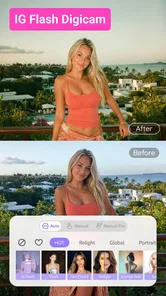

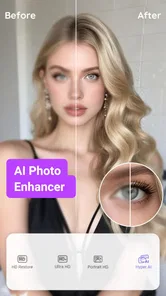
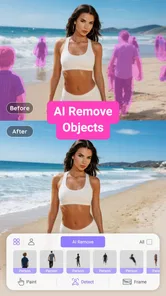
Analysis by Reviewed
I’d choose PrettyUp when my main goal is to refine how a person looks in a video, rather than build a full edit from several clips. That distinction matters: a general mobile editor is usually the better fit for trimming, arranging footage, titles, and transitions, while this app is aimed at personal retouching. If you want to make a selfie clip feel a little more polished without learning a complicated editing workflow, PrettyUp - Video Body Editor is worth considering.
Start with a light touch
My most useful tip is to make one adjustment at a time and check the whole clip before saving. A change that looks subtle on a paused frame can become distracting when the person moves, turns, or shifts in the shot. I’d begin with a small face or body correction, preview several moments, and only then decide whether to add another edit. This approach keeps the result closer to natural and makes it easier to spot when an adjustment is no longer helping.
That matters most with footage that has a moving subject or a changing background. Retouching is most convincing when it supports the original image instead of drawing attention to itself. If a clip is shaky, poorly lit, or filmed from an awkward angle, I would fix the recording conditions where possible rather than expecting a beauty edit to solve everything. A clean starting clip gives these tools more room to work well.
A practical use for everyday clips
Imagine recording a short outfit video before heading out, then noticing that the lighting makes your face look tired or that you want a slightly more even appearance. I’d use PrettyUp for a restrained touch-up, preview the movement from beginning to end, and keep the edit modest before sharing. For a quick personal post, that focused workflow can be easier than importing the clip into a broader editor and searching through tools meant for an entirely different job.
It also makes sense for someone who posts occasional talking clips or selfie videos and wants a consistent look without turning each recording into a long editing session. I would be less likely to recommend it for documentary footage, product demonstrations, or videos where viewers need to trust that a person’s appearance has not been reshaped. The same tools that help a casual creator feel camera-ready can undermine credibility when realistic representation is the point.
What the focused approach trades away
PrettyUp is a video app in the video editing and player space, but its appeal is narrower than that label might suggest. The developer is accordion, and the app’s central value is adjusting the appearance of people in clips. Compared with a general-purpose editor, that focus can save time when retouching is the task; it is not a reason to expect a complete production suite. If your priority is arranging scenes, adding detailed titles, or shaping a story from several shots, a conventional timeline editor is likely a better starting point.
There is a personal trade-off, too. Strong body or face changes may make a clip feel less like you, and repeated retouching can encourage an unrealistic standard for ordinary posts. I prefer using such edits as optional finishing touches rather than treating them as a requirement. If your goal is simply to crop a clip, remove a section, or add captions, the extra appearance-focused workflow may be unnecessary.
More From Our News Desk

 Gmail
GmailGmail in a Busy Inbox: Who Benefits Most?
From first account to crowded workday, Gmail earns its place through dependable search and flexible sorting—but its best fit depends on how much inbox maintenance you can tolerate.

 Prime Video
Switching to Prime Video: What Changes in Your Viewing Routine
Prime Video can make a compelling second home for streaming, but switching means learning a different catalog, rental layer, and route from browsing to playback.

 Universal TV Remote Control
Universal TV Remote Control Works Best as a Reliable Backup
A phone remote earns its place through quick setup and reliable habits. Here is how to get more from Universal TV Remote Control—and where its limits show.

 Weather - By Xiaomi
Weather by Xiaomi Review: Clear at a Glance, Less Clear Up Close
Xiaomi’s weather app makes everyday forecasts quick to scan, but its calm surface can leave useful details and recovery paths harder to find than they should be.

 X
XX Under Pressure: Can It Recover When Posting Goes Wrong?
A resilience-focused review of X, examining setup, mistaken posts, interruptions, weak connections, and the gaps that matter when recovery needs to be dependable.

 Clash of Clans
Clash of Clans Is Won Between the Battles
Its raids are quick; its community is a long-term project of coordination, teaching, rivalry, and shared responsibility—with all the friction that entails.
Latest News



Check the cost and fit before committing
The app is free to install, with optional in-app purchases ranging from under a dollar to around thirty-five dollars per item. I’d try the free experience with a low-stakes clip before paying for anything, then judge whether the controls and results suit the way I actually edit. The price range means it is sensible to check the purchase screen carefully and avoid assuming every tool is included at no cost.
It has a Teen content rating, and the current version is 6.8.1.1. It runs on Android 7.0 or later. Its 4.5 average comes from around sixty-eight thousand ratings, and it has been installed over ten million times. Those figures suggest that many people have tried it, but they cannot tell you whether its particular retouching style will look right on your footage; a brief personal test is more useful than popularity alone.
Aesthetic Enhancements at Your Fingertips
So, what’s the buzz about PrettyUp - Video Body Editor? Well, it’s all about giving you the power to tweak and enhance your videos with just a few taps. This app is an absolute game-changer for anyone who loves creating content but wants that extra sprinkle of magic.
Easy Peasy Editing
First off, let’s talk about how user-friendly this app is. You don’t need to be a tech wizard to figure it out. Right from downloading, the interface is intuitive and smooth. You can easily navigate through the options, which is a huge plus if you’re like me and don’t have the patience for overly complicated tools.
Features That Stand Out
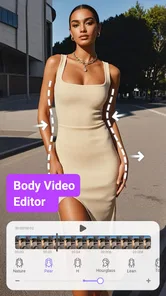
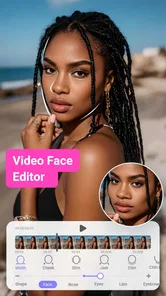
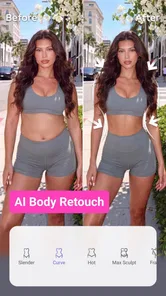
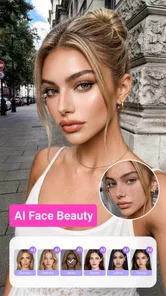
Now, onto the features. The app lets you reshape and retouch video clips, ensuring you look your best in every frame. Want to slim down a bit or smooth out those pesky wrinkles? PrettyUp has got you covered. It also offers features to enhance your video’s aesthetic with filters that can make your clips pop. Plus, the app provides tools to adjust the lighting and contrast, giving your videos a professional feel without the hefty price tag of high-end software.
Real-Time Editing Magic
One of the coolest things I found is that you can see the changes in real-time. This means no more guessing how your edits will look until after you’ve saved them. You can tweak and adjust to your heart’s content and immediately see the results. It’s like having a mini studio right in your pocket.
Also, let’s not forget the social sharing aspect. Once you’re happy with your masterpiece, sharing it on platforms like Instagram or TikTok is a breeze. The app ensures your videos remain high-quality, so you’re always putting your best foot forward in the digital world.
Final Thoughts
All in all, PrettyUp - Video Body Editor is a fantastic tool for anyone looking to enhance their video content with ease. Whether you’re a seasoned content creator or just someone who likes to dabble in video editing for fun, this app offers a range of features that cater to all levels.
In a world where visuals speak volumes, having an app like PrettyUp can really make a difference. It’s not just about editing; it’s about empowering you to present yourself in the best light possible. So go ahead, give it a try and unleash your creativity!
PrettyUp - Video Body Editor Frequently Asked Questions
Can I use PrettyUp to edit photos as well as videos?
PrettyUp is presented as a video face editor, with tools focused on retouching body and face features and enhancing selfie beauty in video. If your main goal is to refine moving footage, its purpose is clear; before downloading, consider whether that video-centered focus matches what you want, rather than assuming it is a general photo-editing app.
Is PrettyUp suitable for editing clips before sharing them on social media?
PrettyUp is intended for adjusting the appearance of people in video clips, including face and body retouching. That makes it relevant if you want to prepare a clip before sharing it or keeping it for personal use. The editing style is appearance-focused, so it is best suited to users who want that kind of enhancement rather than broad video-production tools.
What kind of edits can I make to a video in PrettyUp?
PrettyUp is a video face editor for retouching the body and face and enhancing selfie beauty. Its editing focus makes it suitable for people who want to adjust the look of themselves in video clips before sharing or keeping them. The app is free to download, with some features available through in-app purchases.
What is PrettyUp - Video Body Editor used for?
PrettyUp - Video Body Editor is designed to enhance your video content by allowing users to retouch and reshape their body features directly within videos. It offers a suite of tools to adjust body proportions, smooth skin, and apply filters, making it ideal for users looking to improve their video appearance for social media or personal enjoyment.
Is PrettyUp available for both Android and iOS devices?
Yes, PrettyUp - Video Body Editor is available for both Android and iOS platforms. Users can download the app from the Google Play Store for Android devices and the Apple App Store for iOS devices, ensuring a wide range of compatibility for users regardless of their smartphone model or operating system.
Pros
- Intuitive user interface
- Wide range of editing features
- High-quality output
- Fast processing time
- Supports various video formats
Cons
- In-app purchases required
- Can be resource-intensive
- Limited free features
- Occasional bugs
- Requires internet connection












