Offline Music Player - MP3 App
- 119.00
- 3.6
- Installs
- 10.00M
- Price
- Free

Screenshots
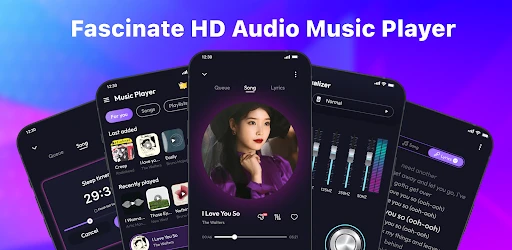
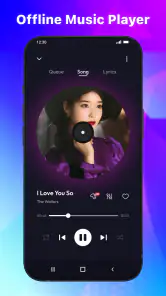

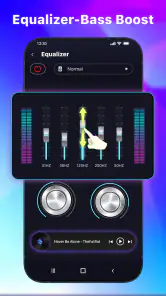
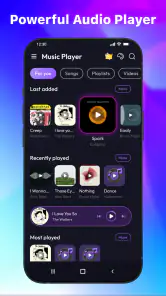
Analysis by Reviewed
Have you ever found yourself in a spot where Wi-Fi is scarce, and you just want to jam to your favorite tunes without the dreaded buffering? Well, let me introduce you to the Offline Music Player - MP3 App. This app is like a trusty sidekick that lets you groove on the go, no internet required. Let's dive into what makes this app tick and why it might just become your new music buddy.
Bringing Your Music Offline
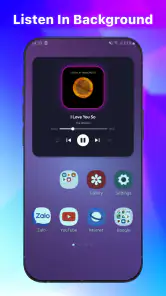
First things first, the Offline Music Player - MP3 App is all about letting you enjoy music without being tethered to an internet connection. How does it work? Simple. Just download your favorite tracks when you have Wi-Fi, and voilà, your music library is ready to rock anytime, anywhere. This feature is especially handy when you're traveling or in places where connectivity is a bit iffy.
User-Friendly Interface
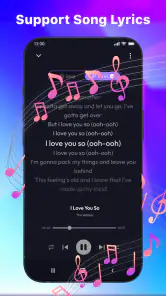
One of the things I loved about this app is its user-friendly interface. Navigating through your music collection is a breeze, thanks to the clean and intuitive design. You won't find yourself lost in a maze of menus; everything is laid out just where you'd expect it to be. Plus, the app supports a wide range of audio formats, including MP3, AAC, and FLAC, so you're not limited to just one type of music file.
Customization and Features
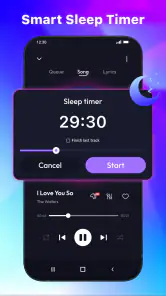
The app isn't just about offline playback; it comes packed with features that make your music experience even better. You can create playlists, shuffle songs, and even tweak the equalizer settings to get the sound just right. And let's not forget the sleep timer feature – perfect for those who like to drift off to some soothing tunes without the music playing all night.
Another cool aspect is the ability to customize the app's appearance. You can switch themes to match your mood or the time of day, making the app feel a bit more personal. It's these little touches that make a big difference in user experience.
Performance and Reliability
Now, let's talk about performance. The app runs smoothly without any noticeable lags or crashes, which is a big plus in my book. The songs load quickly, and the transition between tracks is seamless. Whether you're playing a single track or shuffling through a playlist, the app handles it all with ease.
Conclusion
All in all, the Offline Music Player - MP3 App is a solid choice for anyone looking to enjoy music without the hassle of internet dependency. With its easy-to-use interface, robust features, and reliable performance, it stands out as a fantastic option for music lovers. So, if you're tired of buffering and just want to enjoy your tunes uninterrupted, give this app a shot. You might just find it hitting all the right notes for your offline music needs.
More From Our News Desk

Clash of Clans Is Won Between the Battles

Android Auto Makes the Case for Quieter Car Software

MobiOffice: Transforming Mobile Productivity with Seamless Integration

EA SPORTS FC™ Mobile Soccer: Redefining Mobile Sports Gaming

How Microsoft OneDrive Became a Mobile Productivity Giant

How Google Translate Breaks Language Barriers Effortlessly
Offline Music Player - MP3 App Frequently Asked Questions
What is Offline Music Player - MP3 App?
Offline Music Player - MP3 App is a versatile application designed for music enthusiasts who prefer to enjoy their favorite tunes without being tethered to an internet connection. It supports various audio formats and offers features such as playlists, equalizer settings, and a user-friendly interface, making it a convenient choice for offline music playback.
How do I download songs to the Offline Music Player?
To download songs, you can either transfer music files from your computer or use the app's built-in browser to download tracks directly from the internet. Simply navigate to the desired audio file and follow the prompts to save it to your device for offline listening. Ensure you have enough storage space on your device.
Does the app support all audio file formats?
Yes, the Offline Music Player - MP3 App supports a wide range of audio file formats, including MP3, WAV, AAC, and more. This flexibility ensures that you can play almost any audio file you have, without worrying about format compatibility issues. Always check the latest app updates for any new format support.
Is there a cost associated with using the Offline Music Player?
The app itself is generally free to download, but it may include in-app purchases or advertisements to unlock additional features or remove ads. It's important to review the app's pricing details in the app store before downloading, so you understand any potential costs or subscriptions involved.
Can I create and manage playlists within the app?
Absolutely! The Offline Music Player - MP3 App allows users to create and manage custom playlists easily. You can organize your music collection into various playlists based on genre, mood, or personal preference. The intuitive interface makes it simple to add, remove, or rearrange tracks within your playlists.
Pros
- High-quality audio playback
- User-friendly interface
- Supports various audio formats
- No internet required
- Customizable playlists
Cons
- Limited advanced features
- No online streaming
- Ads present in free version
- Basic equalizer options
- Requires storage space

- Category
- Music & Audio
- Version
- 91