Nintendo Switch Parental Cont…
- 8.11K
- 4.6
- Installs
- 10.00M
- Price
- Free

Screenshots
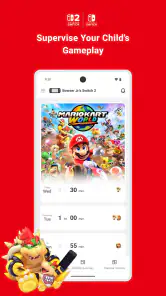
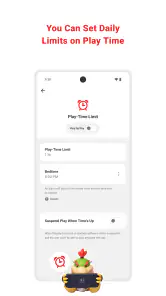
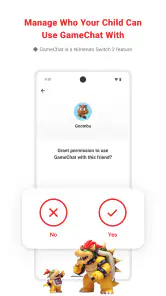
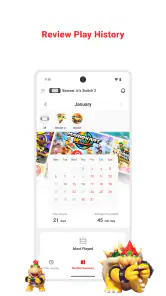
Analysis by Reviewed
I think Nintendo Switch Parental Controls is most useful when the goal is to guide a child’s play on one particular console, rather than to manage every device in the household. That distinction matters: it is a focused companion for Nintendo Switch, not a general-purpose family safety dashboard. I’d consider it when gaming time and age-appropriate access are the specific concerns, and look elsewhere if the main need is to supervise phones, computers, or several different platforms from one place.
Choose it for a console-specific routine
Before installing, I’d decide what I actually want to change: setting a clear stopping point, checking which games are holding a child’s attention, or keeping content choices age-conscious. Those are related but different jobs. A time limit can make a household rule easier to follow, while a play summary can help start a conversation about habits; neither replaces talking with a child about why the boundary exists.
That makes this a good fit for parents who want a practical way to oversee Switch use without turning every evening into a negotiation. It is less suitable if a child rarely uses the console, if several caregivers need a shared system across many devices, or if you want one app to manage all screen activity. In those cases, a broader family-control tool or the controls built into each device may be a better match.
A routine that makes the controls useful
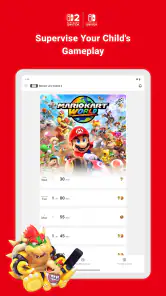
One realistic approach is to set expectations before a busy school night: agree on when play should end, use the app’s limit as the consistent reminder, then review the activity summary at a calm moment rather than treating it as a report card. I’d use the game-by-game view to ask what the child enjoys and whether play is crowding out sleep, homework, or family plans. That turns monitoring into a conversation instead of a surprise confrontation.
A small but useful distinction is that a time boundary and an age-rating restriction solve different problems. If the concern is a late finish, changing content restrictions will not address it; if the concern is mature material, a daily time rule alone will not address that either. I’d set only the controls that match the concern, explain them in advance, and revisit them when routines or the child’s needs change.
What it especially suits
Nintendo Switch Parental Controls is a Lifestyle app from Nintendo Co., Ltd., built around a very specific household task: overseeing play on a Switch. That focus is its main advantage. The app has a 4.6 average from around 142,000 ratings and has been installed over 10 million times, but popularity is less important than whether a Switch is the screen you actually need to manage. For a family whose concern is console gaming rather than every connected device, its narrow scope can make the controls easier to understand and use consistently.
The practical question is whether you want help setting boundaries or a full account of a child’s digital life. This app is for the former. It can support choices about playtime and age-conscious access, and the activity information can help you notice patterns. It does not replace a conversation about online behavior, school responsibilities, or what a child should do when something in a game makes them uncomfortable. I’d see it as one part of a parenting routine, not a substitute for being involved.
More From Our News Desk

Weather by Xiaomi Review: Clear at a Glance, Less Clear Up Close

X Under Pressure: Can It Recover When Posting Goes Wrong?

Clash of Clans Is Won Between the Battles

Android Auto Makes the Case for Quieter Car Software

MobiOffice: Transforming Mobile Productivity with Seamless Integration

EA SPORTS FC™ Mobile Soccer: Redefining Mobile Sports Gaming
Getting started without making it feel like surveillance
Pairing the app with the console is more than a technical chore: it is a good moment to explain what the family is setting up and why. I’d show a child which limits are in place, clarify what happens when playtime is up, and invite them to say if a rule clashes with a normal routine. That makes the arrangement more predictable and can reduce the feeling that a parent is secretly watching.
If the Switch is shared, make the household rule explicit before adjusting controls. Siblings may take turns, share a play session, or have different expectations, and a single console-level routine can feel different to each child. Agreeing in advance on how it applies is more useful than trying to settle fairness after a limit interrupts play. The app can make a decision consistent; it cannot make a decision fair by itself.
Where broader tools have the advantage
Compared with general parental-control services, Nintendo’s app has a clearer target: the Switch. A broader tool is usually the more natural starting point when the priority is bringing phones, tablets, computers, and consoles under one family plan. Conversely, relying only on rules spoken aloud may suit a household that rarely has disputes and does not need summaries or app-based limits. I’d choose this app between those approaches when console play is frequent enough to need a reliable routine, but the family does not need one control center for every device.
There is a trade-off in keeping the system focused. If a child moves between a Switch and other devices, the app’s console-specific rules will not create a single screen-time picture across that mix. You may end up using separate settings and household agreements. That is not a reason to avoid it when Switch play is the real concern, but it is worth recognizing before expecting it to solve a broader supervision problem.
Small decisions that make the routine work better
Rather than choosing a limit in the middle of an argument, I’d decide on it at a neutral time and connect it to the family schedule. For example, on a school night, a parent and child can agree on a stopping point that leaves time to put the console away and get ready for bed. The app’s boundary then supports a rule that has already been discussed. If the rule changes for a weekend or a special occasion, explain that change too, so flexibility does not look arbitrary.
It also helps to distinguish a warning from a hard stop in the way you talk about the limit. If a child expects one last moment to save or finish, an alert that arrives without warning can feel unfair even when the rule is clear to the parent. I’d build a transition into the routine and avoid setting a boundary at a moment when the family is already rushing. The useful outcome is not merely ending play on time; it is making the end predictable enough that it does not become the main event of the evening.
What activity information can and cannot tell you
A play summary is most valuable when used to guide a question, not deliver a verdict. If one game dominates the activity, that may simply be the child’s current favorite. If play repeatedly pushes into time set aside for other things, that pattern is a reason to revisit the routine. I’d ask what makes a particular game appealing and whether the child feels able to stop, rather than treating a summary as proof of a problem.
That approach also helps avoid a common trap: responding to one unusual day as though it represents a lasting habit. A rainy afternoon or a holiday may look different from an ordinary school day. Looking across the general pattern and comparing it with the household’s own expectations is more useful than reacting to an isolated entry. The app can make those conversations more concrete, but judgment still belongs to the parent who knows the child and the circumstances.
When this is not the right choice
I would skip it as the main solution if the child barely uses a Switch, if the family’s priority is supervising several platforms together, or if app-based oversight would create more tension than the console routine currently causes. In those situations, built-in controls on the relevant devices or a broader family-management approach may be a better fit. A family that already has clear, workable rules may also need no extra layer unless consistency or a record of play would genuinely help.
It is also not a replacement for supervision in situations where a parent needs to discuss a child’s choices, reactions, or experiences. Setting a boundary can make expectations easier to follow, but it cannot explain why a game is suitable, resolve a disagreement between siblings, or teach a child how to balance play with other responsibilities. I’d avoid installing it with the expectation that a setting alone will do the parenting work.
What it does especially well
Nintendo Switch Parental Controls is a game-changer for parents like me who want to keep an eye on their kids' gaming habits without becoming the ultimate party pooper. This nifty app is available for both Android and iOS, and it’s packed with features that help you manage and monitor your child's gaming experience on their Nintendo Switch Console. Here's everything you need to know about this app, wrapped up in a neat little review.
Getting Started with the App
First things first, setting up the Nintendo Switch Parental Controls app is a breeze. You just download it from the Google Play Store or the Apple App Store, install it, and pair it with your kid's Nintendo Switch. Once that's done, you can control the console remotely from the app. It's like having a magic wand, but for gaming control!
Features that Pack a Punch
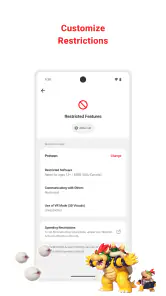
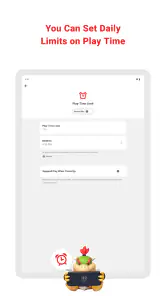
The app is loaded with features that make monitoring super easy. You can set playtime limits and get notified when the time is up, which is perfect for avoiding those "just five more minutes" negotiations. There's also an option to set game restrictions based on age ratings, so you can make sure your little one isn't playing something that's too mature for them. And let's not forget the monthly summary report, which shows you what games your child is playing and how long they’re spending on each one. This feature is a real eye-opener!
User Experience
Using the app feels like a walk in the park. The interface is intuitive and user-friendly, making it easy for even the least tech-savvy parents to navigate. The app doesn't bombard you with unnecessary bells and whistles. Instead, it focuses on delivering a seamless experience that helps keep your child's gaming in check without making you feel like you're invading their fun.
Why It Stands Out
What makes the Nintendo Switch Parental Controls app stand out is its ability to maintain a balance between fun and safety. It's not about restricting your child's freedom but about ensuring a healthy gaming environment. Plus, the peace of mind it brings is invaluable. Knowing that you can keep tabs on your child's gaming habits without hovering over their shoulder is a great relief.
Who should choose another approach
The main trade-off is its close connection to the Switch. It is not a replacement for the controls on a phone or tablet, and it will not give a parent a single view of every screen a child uses. Compared with broad parental-control apps, this one is more directly tied to console play; compared with relying only on household rules, it offers a clearer way to set limits and review activity. I’d choose the broader option for mixed-device supervision, but choose this app when the Switch is the specific concern.
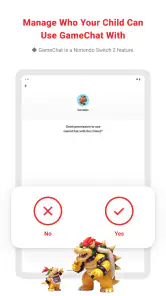
There is also a human side to the setup. Pairing the app with the child’s console is the step that makes remote management possible, so I’d do it together and explain what the limits mean. If the console is shared by siblings, agree on how the rules apply to everyone before setting them; a limit that feels fair to one child may not suit another. The app can support a household agreement, but it cannot decide what that agreement should be.
Practical trade-offs before relying on it
I would not treat a notification as a substitute for being available at the end of play. If a child is in the middle of a game when the limit arrives, a calm, predictable transition works better than using the alert as a sudden punishment. Try choosing a stopping time that leaves room to finish a session, and make clear whether the rule is a reminder or a firm boundary. That small bit of planning can prevent the control itself from becoming a source of friction.
The monthly summary is most helpful as a pattern-finder, not as a precise judgment of whether a child has played “too much.” A single unusually busy day may have a reasonable explanation, while repeated long sessions might suggest a useful family discussion. I’d look at which games draw attention and when play tends to happen, then adjust the routine rather than reacting to one number in isolation.
For parents wondering whether it costs anything, the app is free. It is rated for Everyone, first arrived on March 1, 2017, and version 2.2.1 supports Android 8.0 and later. Those details make it an established option, though I’d still check that the phone and console setup in your home suits the way you plan to use it.
My recommendation for the right household
My overall recommendation is straightforward: if your child plays on a Nintendo Switch and you want a focused way to set playtime boundaries, apply age-based game restrictions, and review play patterns, this is a sensible tool to try. If you need controls across a range of devices, start with a broader family-management option instead. For the right household, the strongest result comes not from tighter limits but from using the app to make expectations visible, consistent, and easier to discuss.
Nintendo Switch Parental Cont… Frequently Asked Questions
Does Nintendo Switch Parental Controls work without a Nintendo Switch console?
No. Nintendo Switch Parental Controls is a companion app intended to supervise play on a Nintendo Switch console, rather than a standalone phone game or general device-monitoring tool. You need to link the app with the console before using its play-time limits, activity reports, or content restrictions. If you do not have a Nintendo Switch, the app’s main features will not be useful to you.
Who develops Nintendo Switch Parental Controls, and what is the app designed to do?
Nintendo Switch Parental Controls is made by Nintendo Co., Ltd. and is a Lifestyle app focused on helping parents supervise a child’s play on a Nintendo Switch. It gives adults a way to manage settings and review gaming activity from a smartphone after connecting the app to the console. It is not a game to play on your phone or a tool for monitoring other devices.
Is Nintendo Switch Parental Controls free, and which devices can use it?
Nintendo Switch Parental Controls is a free Lifestyle app from Nintendo Co., Ltd., designed to work alongside a Nintendo Switch console. It is available for smartphones running Android 8.0 or later. The app is rated for Everyone, and its focus is helping parents supervise a child’s play rather than providing games to play on the phone.
What is Nintendo Switch Parental Controls app?
Nintendo Switch Parental Controls is a free app that allows parents to monitor and manage their children's gaming activities on the Nintendo Switch. Through this app, parents can set play time limits, monitor gaming activity, and restrict access to certain games based on age ratings, ensuring a safe and controlled gaming environment for their children.
How do I set up Nintendo Switch Parental Controls?
To set up Nintendo Switch Parental Controls, download the app on your smartphone and link it to your Nintendo Switch console by following the in-app instructions. Once linked, you can access various parental controls, such as setting play time limits, monitoring play activity, and managing restrictions directly from your smartphone.
Pros
- User-friendly interface for easy navigation.
- Customizable settings for different age groups.
- Supports multiple profiles for family use.
- Allows remote management via smartphone.
- Comprehensive activity reports for parents.
Cons
- Limited to Nintendo Switch console only.
- Some settings might be complex for beginners.
- Requires internet for certain features.
- Limited game restriction options.
- Notifications can be delayed occasionally.
- Category
- Lifestyle
- Version
- 2.2.1













