Nintendo Switch Online
- 10.87K
- 3.9
- Installs
- 10.00M
- Price
- Free

Screenshots
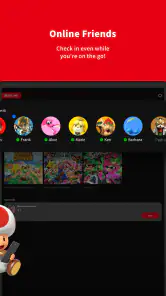
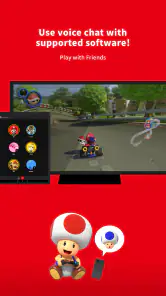
Analysis by Reviewed
I judge a companion app by what it lets me do, what choices it puts in my hands, and whether I can understand its role before signing in. Nintendo Switch Online is Nintendo Co., Ltd.’s free Entertainment app for people who use a Nintendo Switch, and its purpose is to complement console play rather than replace it. The service around it involves online play and other connected features, so I would treat the app as part of a wider account experience, not as a standalone game or a general-purpose chat tool.
Who gets the most from it
The app makes the most sense if you already play compatible Switch games with friends and want the mobile companion features alongside them. If you mainly play alone, or rarely use online functions, it may add little to your routine. I would also avoid installing it just because you expect it to work like a universal voice-chat app: its usefulness depends on the Nintendo games and services you actually use.
A practical way to decide is to start with one specific need. Do you want to coordinate during a session, use a game-related mobile feature, or check what the service offers? If none of those comes up in your normal week, the app may not deserve a place on your phone. If one does, it can be a convenient extra without becoming the center of your gaming setup.
Trust and account choices
I’m careful with any app tied to an account, especially one that connects a phone to a gaming service. Before using it, I would check the sign-in screen and the choices presented there, then review the account and device controls available to me. I don’t assume that an app is private simply because it comes from a familiar company; I want to see what I’m agreeing to and keep access limited to what I need.
That matters most when a phone is shared, handed to a child, or left signed in at home. I’d make sure the person using the device understands which account is active and avoid treating a borrowed phone as a private gaming companion. The app is rated for Everyone, but an age rating is not a substitute for an adult checking account access and deciding what is appropriate for a particular child.
Where the phone fits into play
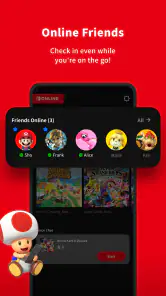
In an ordinary evening, I might use the phone to arrange a session with a friend, then keep the Switch as the main screen and controller setup. That division is useful: the console remains where the game happens, while the mobile app can support selected parts of the experience. It is less appealing if I want every social feature in one place, because Nintendo’s app-based approach can feel less direct than using a chat service that is designed to work across many games and devices.
There is also a small but important trade-off in adding a second device. A phone can be handy for companion features, yet it means another battery, another screen to manage, and potentially another step before play begins. I’d open the app before friends are waiting rather than assume everything will be ready the moment a match starts. That simple habit makes the phone feel like a helper instead of an interruption.
More From Our News Desk

Weather by Xiaomi Review: Clear at a Glance, Less Clear Up Close

X Under Pressure: Can It Recover When Posting Goes Wrong?

Clash of Clans Is Won Between the Battles

Android Auto Makes the Case for Quieter Car Software

MobiOffice: Transforming Mobile Productivity with Seamless Integration

EA SPORTS FC™ Mobile Soccer: Redefining Mobile Sports Gaming
What to expect from the app itself
The current version is 3.2.0, and it requires Android 9 or later. I’d check compatibility before relying on it with an older phone. It is free to download, while online services and subscription choices should be considered separately from the app’s download price. Nintendo Switch Online has a 3.9 average from around 75,000 ratings, and more than 10 million installs; those figures suggest broad use, but they can’t tell me whether its particular features match my habits.
For comparison, a general messaging or voice-chat app may be a better fit when the same group plays across different platforms or wants one shared place to talk. Nintendo’s companion app is the more focused choice when the group’s activity is tied to Switch play and its supported features. I would not choose it as a replacement for every gaming conversation; I’d use it when the Nintendo connection is the reason I need the companion in the first place.
What is Nintendo Switch Online?
Nintendo Switch Online is a subscription service for the Nintendo Switch console, offering a mix of online multiplayer gaming, a library of classic games, and other fun features. It’s like getting an all-access pass to a world of gaming nostalgia and new challenges.
Online Multiplayer Gaming
If you’re like me and love competing against friends or random players worldwide, this feature is a game-changer. The service lets you play compatible games online, from racing in Mario Kart 8 Deluxe to battling it out in Super Smash Bros. Ultimate. It’s seamless, quick, and frankly, a lot of fun. The thrill of online competitions really adds a new layer to the gaming experience.
Classic Games Galore
For those of us who grew up with the NES and SNES, the nostalgia factor here is off the charts. The service offers a library of classic games that you can play anytime. Titles like Super Mario Bros. and The Legend of Zelda are just a few taps away. It’s like having a retro arcade in your pocket!
Special Features and Offers
Beyond gaming, Nintendo Switch Online offers cloud saves, which is a lifesaver if your console needs resetting or if you’re switching devices. The service also comes with special offers and discounts on select games and in-game content, making it a real treat for avid gamers.
Voice Chat and App Integration
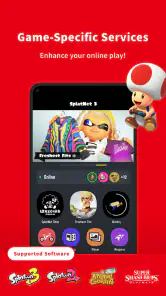
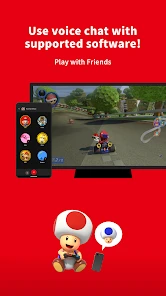
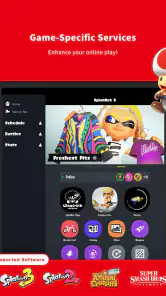
One of the modern features that caught my eye was the voice chat capability through the Switch Online app. Although it’s not as integrated as I’d like, it’s still a handy tool for coordinating with friends during intense gameplay sessions. The app also provides game-specific services, adding more depth to your gaming adventures.
Is It Worth It?
So, is Nintendo Switch Online worth your hard-earned bucks? If you’re a casual player who enjoys occasional online sessions, it might not be necessary. But for those who love diving deep into multiplayer battles, revisiting classic games, or enjoying exclusive offers, it’s a fantastic investment.
In conclusion, Nintendo Switch Online enriches the gaming experience with its diverse offerings. Whether you’re in it for the competition or the nostalgia, it’s a service that brings added joy to Nintendo’s gaming universe. So grab your console, subscribe, and may the best gamer win!
Make the companion features earn their place
I would judge the phone app separately from the console subscription, because installing an app and paying for a service are different decisions. The app is free, but that does not mean every feature around it is included at no cost. Before planning a regular routine around online play, I would check the service options and terms shown for my account. That small distinction avoids the common surprise of assuming a free download automatically unlocks everything discussed in the app.
A useful first test is to choose one game you already play and see whether its companion feature solves a real inconvenience. If you only open the app out of curiosity, it may be difficult to remember why it is on your phone. If a particular game makes use of it, keep the app available for those sessions and ignore it the rest of the time. I find that selective use is a better fit than expecting the phone to become a permanent control panel for the console.
There is a practical preparation step that can save frustration: set up the account and become familiar with the app before a group session, not while everyone is waiting to start. Check that you can sign in, understand the screens you need, and know how you will switch back to the game. That does not guarantee every session will be effortless, but it lets you discover account or setup friction at a calm moment rather than in the middle of a match.
How it compares with other ways to play and talk
The most relevant alternative depends on what is missing from your gaming routine. If the goal is simply to talk with friends who use different consoles or computers, a cross-platform chat service is usually more convenient because the group can keep using one familiar place. If the goal is to use Nintendo-related companion features while playing on Switch, this app has a clearer purpose than a general chat tool. It is a focused accessory, not an all-in-one social hub.
For classic games, the comparison is different: a dedicated collection on another platform may offer a broader or more convenient library for someone who primarily wants retro play. The appeal here is the connection to Nintendo’s console and its service, rather than a promise to replace every way of accessing older games. I would choose it when classic titles are one part of my Switch use, not when I want a phone-based emulator-style experience or a library independent of the console.
Likewise, players who mostly enjoy offline single-player games may get more value from spending their time directly in those games than from maintaining a companion app. The service becomes easier to justify when online multiplayer, classic titles, or other included benefits are things you will actually return to. It is not a better choice simply because it bundles several kinds of benefits; the value depends on which of them matter to you.
Small habits that reduce friction
When playing with friends, I would agree on the communication method before launching a game. If everyone expects the app to handle voice chat but one person would rather use another service, the extra setup can become the evening’s first obstacle. Settling that choice in advance also makes it clearer whether the app is doing useful work or whether the group would be happier staying with its existing chat routine.
On a shared device, I would make signing out or switching accounts part of the handoff rather than assuming the next person will notice whose account is open. This is especially sensible in a household where adults and children use the same phone. The Everyone content rating describes the app’s age suitability, but it does not decide who should be able to access an account or which connected activities are suitable for each family.
I would also avoid treating the mobile app as a substitute for checking the console itself. The phone can support selected parts of play, but the Switch remains the place where the game is controlled and displayed. Keeping that distinction in mind prevents a mismatch between what I expect from a companion app and what it is designed to contribute.
Who should skip it, and what to check first
I would skip the app if I rarely play compatible games online, do not use the connected features, or already have a communication setup that works well for my group. It can also be the wrong fit if I want one universal voice-chat tool across devices. In those cases, downloading it may add another sign-in and another screen without solving a problem I actually have.
If you are deciding whether it will work on your phone, check the operating-system requirement before installing; Android users need version 9 or later. The app is also available for iOS, so iPhone owners can look for it through their usual app store. Since this is a mobile companion for Switch play, an iOS or Android phone does not replace the console or make the app a standalone gaming service.
People often ask whether the app alone is enough to play online. I would not assume so: the app is a companion, while the online service and any subscription choice are separate considerations. Another sensible question is whether the app is worthwhile without friends. It may still be useful if you personally use its game-related features, but if neither multiplayer coordination nor those features are part of your routine, its practical value is limited.
A cautious verdict for Switch owners
My view is that this app works best when I can name the exact part of my Switch routine it improves. It has a defined role alongside the console, and that focus can be useful for people who play supported games with friends or want access to relevant companion features. It is less convincing as a general entertainment app or a replacement for communication tools that already work across a whole group’s devices.
Nintendo Switch Online launched on July 18, 2017, and has accumulated around 11,000 written reviews. Its age and reach show that it has become a familiar companion for many Switch users, but neither popularity nor a 3.9 average tells me whether its approach suits a particular household. I would make that decision based on the games I play, the people I play with, and the account controls I am comfortable using.
If you are already invested in Switch multiplayer or want the service’s connected benefits, I think it is reasonable to try the app and see whether its mobile role feels useful in practice. If you mainly want broad, device-independent chat or play offline, I would keep using the simpler option that already fits. The best reason to install it is not that every Switch owner must have it; it is that one specific feature makes your next session easier.
Nintendo Switch Online Frequently Asked Questions
Can I download the Nintendo Switch Online app without owning a Nintendo Switch?
You can install the Nintendo Switch Online app on a compatible mobile device without a Nintendo Switch, but its purpose is to complement Nintendo Switch gaming. It is most useful for people who play on the console and want a mobile companion to that experience. If you do not play Nintendo Switch games, the app may have limited relevance to your everyday use.
Do I need a Nintendo Account to use the Nintendo Switch Online app?
The app is designed to accompany Nintendo Switch play, so a Nintendo Account is relevant to using its connected features. The app and the Nintendo Switch Online membership are separate: downloading it does not itself grant subscription benefits. Before installing, consider whether you already use Nintendo Switch and have an account for the console services you want to access.
What is the Nintendo Switch Online app used for?
The Nintendo Switch Online app is an Entertainment app from Nintendo Co., Ltd. that complements the Nintendo Switch experience. The app is free to download, and its store summary describes its purpose as enhancing your gaming experience. It is designed for Nintendo Switch players who want a companion app alongside their console gaming, while the Nintendo Switch Online service itself provides features such as online play and access to classic games.
What devices and software versions can run the Nintendo Switch Online app?
The app is available for mobile devices running Android or iOS, so check that your device meets the platform’s requirements before installing. For Android, it requires version 9 or later. The app’s current version is 3.2.0, and keeping it updated can help ensure you have the latest available experience. It is rated Everyone, making its listed content suitable for a broad audience.
What is Nintendo Switch Online, and what does it offer?
Nintendo Switch Online is a subscription service that enhances your Nintendo Switch gaming experience by allowing you to play multiplayer games online. In addition to online play, the service offers access to a growing library of classic NES and SNES games, cloud saves for your game data, and exclusive offers and deals. It's a must-have for anyone looking to get the most out of their Nintendo Switch.
Pros
- Enhances online gaming experience.
- Access to classic NES/SNES games.
- Affordable subscription cost.
- Cloud saves for game data.
- Exclusive offers and deals.
Cons
- Limited voice chat options.
- No free trial available.
- Requires internet connection.
- Some games not included.
- Interface could be improved.
- Category
- Entertainment
- Version
- 3.2.0













