MySynchrony
- 25.85K
- 4.5
- Installs
- 5.00M
- Price
- Free

Screenshots


Analysis by Reviewed
Have you ever found yourself daydreaming about that new sofa or the latest tech gadget, only to realize that your wallet isn’t quite as enthusiastic as your heart? Well, enter MySynchrony, the app that might just be the sidekick you need to turn those dreams into a reality.
What to expect from an account app
I’d approach this as a companion for accounts you already have with Synchrony, not as a general-purpose banking app or a way to shop for financing. Synchrony develops it, and its focus is keeping consumer financing accounts manageable from a phone. It’s free, rated for Everyone, and has a 4.6 average from around 63,000 ratings, with over a million installs. That gives a new user a useful sense of its reach, but the practical question is whether it fits the accounts and payment routine they need to manage.
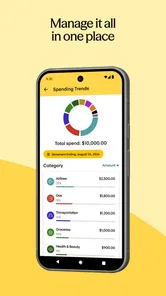
The main benefit is having account information and payment tasks in one place rather than relying on paper statements or searching through a browser each time. I’d still keep a separate household budget or bank app for the bigger picture: this is most useful for handling Synchrony account tasks, not for replacing a full view of income, spending, and debts across different providers.
What’s the Deal with MySynchrony?
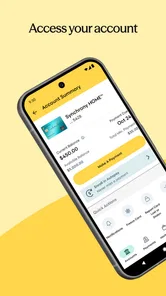
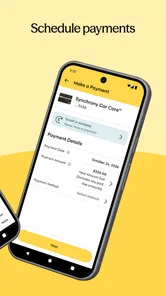
First things first, let’s talk about what this app actually does. MySynchrony is designed to help you manage your consumer financing accounts on the go. It’s like having a financial advisor in your pocket, minus the fees and awkward small talk. You can access your account information, pay your bills, and even schedule future payments, all while sipping your morning coffee.
Getting set up and finding a first win
For a first-time user, I’d start by installing the current 5.1.0 release on a device running at least iOS 11, then sign in using the account information associated with the Synchrony account you want to manage. Once inside, take a moment to check that you’re looking at the intended account and that the balance and payment details make sense before scheduling anything. That small pause matters if you have more than one account: a payment made from the wrong account view can create avoidable confusion.
A good first success is straightforward: review the amount due and due date, then make a payment or schedule one that matches your own cash-flow plan. If you prefer paying bills on a set day, scheduling ahead can help you build a repeatable routine instead of relying on memory. I’d keep the confirmation or account activity available until I’m comfortable with how the app reflects a completed action, rather than assuming that tapping a button alone means the task is finished.
Easy Peasy Navigation
I’ve got to say, one of the first things that struck me about the app is how user-friendly it is. Navigating through MySynchrony feels like a breeze, even for someone who struggles with tech more than they’d like to admit. The interface is clean and intuitive, making it easy to find what you’re looking for without any unnecessary fuss.
More From Our News Desk

 Bolt: Request a Ride
Bolt and the Shift from One-Tap Rides to More Legible Trips
Bolt shows how ride-hailing is shifting from a one-tap taxi request toward a more legible, choice-driven trip, while leaving the hardest questions of price and reliability unresolved.

 Farm Land - Farming life game
Farm Land Review: A Small Island Farm with a Satisfying Loop
A bright, breezy island farm turns a few quick chores into a satisfying cycle of planting, harvesting, expanding, and deciding what to build next.

 Android Auto
’s Community Takes Shape in the Passenger Seat
Its most valuable network is not a public feed but a shared set of routes, voice habits, app integrations, and advice that make driving less isolating—and sometimes more complicated.

 My Talking Angela
 Makes the Virtual Pet Feel Personal
A polished pet-raising game built on small rituals, playful customization, and a character who gives everyday screen time a surprisingly personal rhythm.

 Google Translate
 Review: A Pocket Tool for the Small Frictions of Travel
From menus and signs to quick conversations, Google Translate earns its place by cutting the little delays that make unfamiliar language feel like a barrier.

 Shazam: Find Music & Concerts
Shazam’s Best Trick Is Turning a Song Into a Night Out
A few seconds of recognition can settle an argument, rescue a half-remembered chorus, and point toward a live show. Shazam’s real trick is what happens after the match.
Latest News



Making payment tools work for you
The payment calculator is more useful as a planning aid than as a promise. I’d use it to compare possible payment amounts and think through whether paying extra is realistic alongside rent, groceries, and other bills. A scenario that looks attractive on screen is only helpful if it leaves enough room in the monthly budget; I wouldn’t treat a displayed payoff estimate as a reason to stretch beyond what I can sustain.
Alerts can also support a practical routine, especially if you tend to lose track of several payment dates. I’d check which notifications are available and make sure the phone’s notification settings allow the ones I want to receive. Alerts are reminders, not a substitute for checking the account itself, so before acting on a message I’d open the app and verify the relevant account details there.
Features That Stand Out
Now, let’s dive into some of the features that really caught my eye. For starters, the app offers real-time account alerts. Imagine getting a heads-up before your payment is due or if there’s any suspicious activity on your account. It’s like having a personal alarm system for your finances.
Another feature worth mentioning is the payment calculator. This nifty tool lets you explore different payment scenarios. You can see how a few extra bucks here and there can speed up your payoff timeline, which is honestly a game-changer for anyone trying to manage their finances better.
Where it fits—and where it doesn’t
Compared with checking a statement in a browser, a phone app can make a quick balance check or payment feel more convenient, especially when you’re away from home. Compared with a general banking app, though, its value is narrower: it is for Synchrony account management, while a bank’s app is usually the place to see deposits and everyday spending. I’d use both if I needed both jobs done, rather than expecting this one app to consolidate all of my finances.
Picture a busy weekday: I remember that a payment is coming up while I’m between errands, open the account, review the due information, and schedule the payment rather than postponing it until I’m back at a computer. That’s the kind of small, specific task where the app makes sense. It’s a strong fit for someone who already has a Synchrony account and wants a simple way to check it and handle payments. If you don’t have an account to manage, or you’re looking for a tool that tracks spending across several banks, I’d choose a different kind of finance app.
A Few Quirks
Of course, no app is perfect, and MySynchrony is no exception. While it’s packed with useful features, I did notice that sometimes the app can lag a bit, especially during peak times. It’s not a deal-breaker, but it’s something to keep in mind if you’re in a hurry.
When something seems unclear
If an account or payment detail doesn’t look right, I wouldn’t guess or repeat a payment just to see whether it goes through. I’d first refresh the account view, check the activity, and give the app a moment if it appears slow. For a time-sensitive payment, it’s sensible to allow room for processing rather than waiting until the last minute; the app is convenient, but a phone interface cannot remove the need to pay attention to timing and confirmation.
One other trade-off is that a focused account app can feel limited if you expect it to explain your whole financial situation. It helps with the Synchrony side of the picture, while budgeting across lenders, comparing borrowing options, or tracking household expenses still calls for other tools and your own judgment. That division is not a flaw so much as a reason to be clear about what you want the app to do before you install it.
Choosing a routine you can stick with
I find it helps to decide what job the app should do before opening it: checking the account, reviewing a due amount, or arranging a payment. That sounds basic, but it keeps a quick visit from turning into an unfocused look around, especially if you manage more than one Synchrony account. After handling the immediate task, I’d note the next due date in the same calendar or budget system I already use, rather than creating a second, competing reminder routine.
For someone helping a partner keep household bills organized, the app can be one part of a shared routine, but I would not assume that sharing a phone or login is the right approach. Each person should use the account access intended for them and protect their sign-in details. If you’re coordinating payments together, agree on who checks the account and who makes the payment; duplicate effort can be just as confusing as forgetting it.
Questions worth settling before a payment
A natural first question is whether the app is useful without an existing Synchrony account. In practice, its value is tied to managing one, so I wouldn’t install it expecting a general finance dashboard or a way to browse for a loan. If you already have an account, the next useful question is whether you can manage every account you care about from the same view. I’d sign in and check which accounts appear before building a routine around it, rather than assuming that every account relationship will be represented in the same way.
Another question is whether an app payment is a good substitute for an automatic bill arrangement. I’d choose the method that gives me the clearest confirmation and fits how I handle cash flow; scheduling a payment in advance can help, but it still deserves a check afterward. When an amount, date, or status looks unexpected, I’d pause and verify it before trying again. That habit is especially useful when the app is slow, because repeated attempts can make it harder to tell what has actually happened.
Who will get the most from it
I’d recommend trying it if you already manage Synchrony financing and often need to check account details or make payments while away from a computer. It is particularly handy for people who prefer handling one account task at a time on a phone, rather than waiting until a monthly statement arrives. The app’s finance focus is also a useful boundary: it keeps the account-management job distinct from broader budgeting, which can make a simple bill routine easier to follow.
I’d skip it if your main need is tracking transactions across several banks, planning a household budget, or comparing financial products. A general bank app or budgeting tool is better suited to those jobs, while a browser may be enough if you rarely need mobile access. The right choice depends less on the number of tools you own than on whether you want a dedicated place for Synchrony account tasks or one dashboard for your whole financial life.
Final Thoughts
All in all, MySynchrony is a solid app for anyone looking to keep their finances in check without breaking a sweat. Whether you’re managing multiple accounts or just want an easier way to stay on top of your payments, this app has got your back. Plus, with the added security features and user-friendly design, it’s definitely worth giving a shot.
So, next time you’re eyeing that big purchase, remember that with a little help from MySynchrony, it might just be closer within reach than you think!
MySynchrony Frequently Asked Questions
Is MySynchrony available for both Android and iOS devices?
MySynchrony is a mobile finance app developed by Synchrony, available for Android and iOS devices that meet the relevant operating-system requirements. The listed minimum is iOS 11, so iPhone users should check their software version before installing. The app is free to download, and its Everyone age rating makes it suitable for a general audience.
Can I manage more than one Synchrony account in MySynchrony?
MySynchrony is designed to help users manage Synchrony accounts from a mobile device. Its described tools include checking balances, reviewing transaction history, making payments, and managing account settings. If you have more than one account, the app may be a convenient place to access account-management features, but make sure you can register or link each account you want to manage.
Does MySynchrony require an internet connection?
MySynchrony is a mobile app for managing Synchrony accounts, so you should expect to need an internet connection to access account information and use its account-management features. A Wi-Fi connection can help you avoid using mobile data while you check balances, review activity, or make payments. Your carrier’s standard data rates may apply when you use the app over a cellular connection.
Is MySynchrony suitable for people who are new to mobile account management?
The app brings common account tasks together on a smartphone, including checking balances, reviewing transactions, making payments, and managing settings. That can make it a practical option if you are beginning to handle your account digitally. As with any finance app, take time to review the available options and keep your sign-in details private while using it.
Can I use MySynchrony without creating or signing into an account?
MySynchrony is intended for managing Synchrony accounts, so its account-specific features require access to an account. You should expect to sign in or complete the app’s account setup before viewing balances, transactions, or payment options. If you do not have a Synchrony account, the app’s main management tools are unlikely to be useful to you.
Pros
- User-friendly interface for easy navigation.
- Secure account management with encryption.
- Access to promotional offers and deals.
- Real-time account alerts and notifications.
- Convenient bill payment options.
Cons
- Limited customer support availability.
- Occasional app crashes reported.
- Some features require strong internet.
- Limited language support.
- No dark mode option.