CareCredit Mobile
- 17.40K
- 4.2
- Installs
- 1.00M
- Price
- Free

Screenshots

Analysis by Reviewed
I think of CareCredit Mobile as a focused companion for people who already use CareCredit, not as an all-purpose money manager. Its job is to make account tasks easier to handle from a phone: checking the account, making a payment, and using a digital card. If those are things you need to do while arranging or paying for care, keeping them together can save a little friction. If you’re looking for a budgeting app to organize every household bill, this is a much narrower tool.
A useful routine starts before the appointment
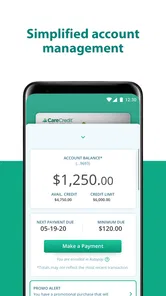
My practical advice is to open the app before you need it in a hurry. Check the account and become familiar with the payment and digital-card options while you have time, rather than trying to work them out at a provider’s front desk. That simple habit helps you know where to look when a visit is coming up and gives you a chance to spot an account question early.
For example, imagine you have a dental appointment after work and expect to use your CareCredit account. I would check the account beforehand, make sure I can access the digital card, and keep the app ready for any payment step I need to take. That’s more useful than treating the app as something to open only after a bill arrives. It doesn’t replace planning what you can afford, but it can make the account side of that planning easier.
What to check in the app and on your phone
Because this is a financial account app, I’d make sure my sign-in details are current and that I can reliably get into the account before depending on it away from home. I’d also check my phone’s notification settings if I want reminders to be noticeable; a useful alert is easy to miss if notifications are silenced. Treat notifications as prompts, not as a substitute for keeping track of payment obligations yourself.
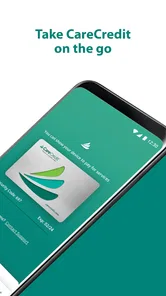
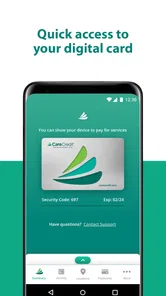
The digital card is especially handy when carrying a physical card is inconvenient, but I would not assume that every provider or payment situation handles it in exactly the same way. Before relying on it for a particular visit, check with the provider about how they accept CareCredit. That quick confirmation can prevent an awkward last-minute surprise and is a good example of where the app helps with access but cannot control a provider’s process.
All About CareCredit Mobile
The CareCredit Mobile app is designed to help you handle your healthcare payments with ease. Whether it's for a routine dentist visit, a sudden medical expense, or even that long-awaited LASIK surgery, this app has got you covered. Available for both Android and iOS, it's a handy tool that you can access right from your smartphone.
Features That Make Life Easier
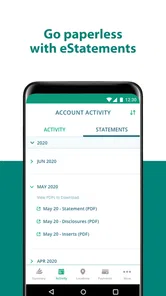
First off, let’s chat about the features that make this app stand out. One of the coolest aspects is its simple and intuitive user interface. Seriously, even if you're not a tech whiz, you'll find it pretty straightforward to navigate. You can effortlessly check your available credit, view your transaction history, and pay your healthcare providers directly from the app.
More From Our News Desk

 Bolt: Request a Ride
Bolt and the Shift from One-Tap Rides to More Legible Trips
Bolt shows how ride-hailing is shifting from a one-tap taxi request toward a more legible, choice-driven trip, while leaving the hardest questions of price and reliability unresolved.

 Farm Land - Farming life game
Farm Land Review: A Small Island Farm with a Satisfying Loop
A bright, breezy island farm turns a few quick chores into a satisfying cycle of planting, harvesting, expanding, and deciding what to build next.

 Android Auto
’s Community Takes Shape in the Passenger Seat
Its most valuable network is not a public feed but a shared set of routes, voice habits, app integrations, and advice that make driving less isolating—and sometimes more complicated.

 My Talking Angela
 Makes the Virtual Pet Feel Personal
A polished pet-raising game built on small rituals, playful customization, and a character who gives everyday screen time a surprisingly personal rhythm.

 Google Translate
 Review: A Pocket Tool for the Small Frictions of Travel
From menus and signs to quick conversations, Google Translate earns its place by cutting the little delays that make unfamiliar language feel like a barrier.

 Shazam: Find Music & Concerts
Shazam’s Best Trick Is Turning a Song Into a Night Out
A few seconds of recognition can settle an argument, rescue a half-remembered chorus, and point toward a live show. Shazam’s real trick is what happens after the match.
Latest News



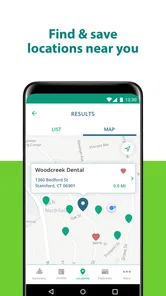
Another nifty feature is the ability to locate providers in your area who accept CareCredit. This is super useful if you're in a new city or just want to switch to a new healthcare provider. The app uses your phone's GPS to find nearby options, ensuring you're never too far from a CareCredit-friendly service.
My Personal Experience
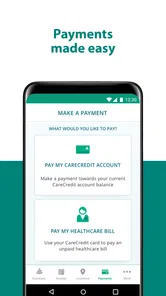
Now, onto my personal experience with the app. Setting it up was a breeze. After downloading, I quickly linked my CareCredit account and was ready to roll. The first thing I noticed was how much time I saved on paying bills. Instead of logging into different portals or writing checks, I could just tap a few buttons and voila, payment done!
I also appreciated the push notifications reminding me of upcoming due dates. It’s like having a little nudge just when you need it, so there’s no risk of late fees sneaking up on you. Plus, the secure login ensures that all your data remains private and protected, which is a must for any financial app.
Where it fits among money apps
CareCredit Mobile is free, developed by Synchrony, and sits in the finance category. It has a 4.3 average from around 44,000 ratings, with over one million installs, which suggests that many account holders find a phone-based way to manage their account worthwhile. It is rated for everyone, though the account itself is most relevant to people who use CareCredit for healthcare costs. The app is not a replacement for a bank’s broader bill-pay tools: those are better for coordinating rent, utilities, and everyday spending, while this app keeps the focus on CareCredit.
That distinction matters if you are comparing it with logging in through a browser or using a provider’s own payment portal. A provider portal may be the right place for appointment details or a bill specific to that office; CareCredit Mobile is more useful when your task concerns your CareCredit account itself. I would choose the app for quick account access and keep the provider’s contact details handy for questions about what a particular office accepts.
Small habits that make it more dependable
One helpful pattern is to check the account after a healthcare purchase, then compare what you see with the receipt or paperwork you were given. That makes it easier to notice a mismatch while the visit is still fresh in your mind. It is not a substitute for reviewing statements carefully, but it gives you a repeatable checkpoint rather than relying on memory weeks later.
If you manage care expenses with another person, agree on who will check the account and when, instead of assuming both people will see the same alerts or account activity. That avoids duplicated payments or confusion over who is handling a bill. For anyone who prefers one dashboard for all finances, this extra coordination may feel like a drawback; a general budgeting tool can offer a wider view, while CareCredit Mobile remains the more direct choice for its specific account tasks.
Limits to keep in mind
The app’s convenience depends on being able to sign in and on the provider accepting CareCredit for the payment you have in mind. I would not make it my only way to prepare for a time-sensitive expense: keep the account information accessible through your usual means and confirm unfamiliar payment arrangements in advance. A mobile shortcut is valuable, but it does not change the terms of an account or guarantee that every healthcare office will handle payment the same way.
CareCredit Mobile is best for people who already have a CareCredit account and want a phone-friendly way to manage it between appointments. If you do not use CareCredit, or mainly want a complete picture of income, savings, and bills, this app is unlikely to become a central part of your routine. For everyone else, I’d treat it as a practical account tool: check it before a visit, use its account functions when needed, and keep broader financial planning somewhere designed for that job.
Wrapping It Up
In conclusion, if you're looking for a convenient way to manage your healthcare expenses, the CareCredit Mobile app is definitely worth checking out. It's user-friendly, packed with features, and makes the whole process of paying for healthcare much less daunting. So why not give it a try? It might just become your go-to app for managing those pesky medical bills.
So, what are you waiting for? Download the app today and take control of your healthcare finances with ease. You might just find yourself wondering how you ever managed without it!
CareCredit Mobile Frequently Asked Questions
Who is CareCredit Mobile designed for, and do I need a CareCredit account to use it?
CareCredit Mobile is a finance app from Synchrony built around managing a CareCredit account. Its tools are most useful to people who already have a CareCredit account and want to handle account tasks from a phone, including making payments and using a digital card. If you are considering the app, think about whether you need mobile access to those account features before installing it.
What can I do with the digital card in CareCredit Mobile?
The app’s store summary highlights a digital card as one of its core features, alongside account management and payments. Having access to a digital card in the app can be useful when you want to use CareCredit from your phone rather than relying only on a physical card. It is part of the account-management experience for CareCredit users.
Is CareCredit Mobile free to download, and what should I check before installing it?
CareCredit Mobile is a free finance app from Synchrony for managing a CareCredit account. Before downloading, check that your device runs Android or iOS 11 or later, as the app requires version 11 at minimum. Its content rating is Everyone. The app is intended for CareCredit account holders who want to manage their account and use its digital card features.
What is CareCredit Mobile and how does it work?
CareCredit Mobile is a handy application designed to help you manage your CareCredit credit card account. It allows users to easily track their spending, view account balances, make payments, and find participating healthcare providers. The app is user-friendly, making it simple for cardholders to manage their finances on-the-go. Users can also set up payment reminders and notifications to avoid missing due dates.
Is CareCredit Mobile secure to use for managing my financial information?
Yes, CareCredit Mobile is designed with robust security protocols to protect your financial information. The app uses encryption to safeguard your data and has features like biometric login (fingerprint or facial recognition) for enhanced security. Additionally, users are encouraged to regularly update their passwords and utilize the app's security settings to ensure their account remains protected.
Pros
- Easy bill management and payment.
- Secure login with biometric options.
- Track transactions in real-time.
- Accessible customer service support.
- User-friendly interface.
Cons
- Limited payment method options.
- Occasional app crashes.
- Slow customer support response.
- No dark mode feature.
- Limited international use.