My Ride K-12
- 901.00
- 4.3
- Installs
- 500.00K
- Price
- Free
Screenshots
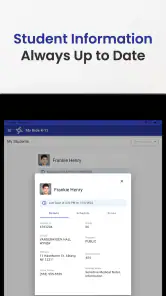
Analysis by Reviewed
Getting children to the right bus at the right time sounds simple until a route changes, a pickup window moves, or a parent is trying to check transport information during a rushed morning. My Ride K-12 is an education app from Tyler Technologies, Inc designed around that everyday problem. I found its appeal less in flashy presentation and more in the idea of putting school transportation details in one place, where families can check them before leaving home.
The app is free, rated for Everyone, and available for devices using Android 8.0 or later. It has reached over 500 thousand installs and holds a 4.3 average from around 5 thousand ratings, which suggests that many families find the basic concept useful while experiences may still depend heavily on the school system using it. That last point matters: this is not a universal bus tracker that works independently of a district. Its value begins when the relevant school transportation service has connected it to the family’s information.
Where families usually get stuck
The first difficulty is often not using the app but getting past the initial connection. A parent can install My Ride K-12 expecting to see a route immediately, only to discover that the app needs the correct school or transportation setup before it can show anything meaningful. If the district has supplied instructions, the exact details in those instructions matter. Choosing a similarly named school system, entering a child’s information differently from the school’s records, or using an old account can make the app appear empty even when transportation has been arranged.
I would treat the first screen as a setup checkpoint rather than proof that the app is malfunctioning. Before trying repeated logins, I would check the child’s school notice, confirm the district or transportation provider selected in the app, and make sure the child’s name or identifier is entered in the expected form. This is a practical distinction: a blank result can come from a mismatch between the app and school records, not from a failure to load.
Another common source of confusion is timing. A route may not display the same way outside the school’s active planning period, or a family may be looking for information before the district has published an update. I would avoid assuming that an unchanged screen means the bus is running exactly as it did yesterday. The safer habit is to check the current information close to departure and compare it with any message sent directly by the school.
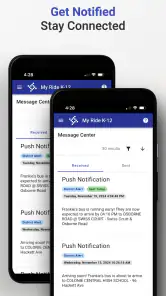
Notifications can also lead users astray. If a family expects an alert but receives nothing, several explanations are possible: the device may be restricting notifications, the app may not be connected to the correct child, or there may simply be no new event to report. I prefer using the app as a place to check transportation information rather than relying on an alert as the only warning. That small change in routine prevents a missed notification from becoming a missed bus.
What I check before blaming the app
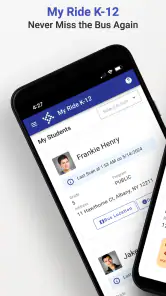
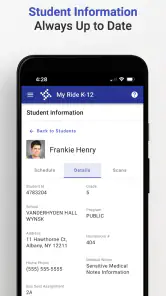
My first check is whether the app is showing the correct student and school context. If more than one child uses the same device, I would slow down and verify that I am viewing the intended child before interpreting a route or pickup detail. A family can easily mistake an empty or different-looking schedule for an error when the selected profile is the real issue.
More From Our News Desk

Clash of Clans Is Won Between the Battles

Android Auto Makes the Case for Quieter Car Software

MobiOffice: Transforming Mobile Productivity with Seamless Integration

EA SPORTS FC™ Mobile Soccer: Redefining Mobile Sports Gaming

How Microsoft OneDrive Became a Mobile Productivity Giant

How Google Translate Breaks Language Barriers Effortlessly
Next, I check the phone’s connection and date and time settings. Transportation information is time-sensitive, so an unreliable connection or incorrect device clock can make a current update look late or make a past item seem relevant. I also close and reopen the app after confirming the connection, rather than repeatedly tapping the same control while the screen is unresponsive.
Finally, I compare what I see with the school’s latest communication. My Ride K-12 is useful for the information made available through its connected transportation service, but it should not override a direct notice about a temporary change, cancellation, or special arrangement. In a transport app, context outside the screen is part of using the product responsibly.
Setup checks that save time later
My best setup advice is to install the app before the first morning when you actually need it. That gives you time to identify the correct school connection, confirm the child’s information, and learn where the relevant transportation details appear. Doing this while everyone is rushing out the door turns a manageable setup task into a stressful troubleshooting session.
I would also keep the school’s instructions nearby during setup instead of relying on memory. If the district uses a particular identifier or enrollment detail, copying it carefully is more reliable than guessing. Small differences in spelling, spaces, or account details can matter when an app is matching a child to records maintained by a school transportation system.
Once the setup looks correct, I would perform a simple test on a normal school day: open the app, locate the child’s transportation information, and make sure I understand which part of the screen answers the practical questions I care about. For most families, those questions are whether the route is the expected one, when the pickup is planned, and whether a recent change is visible. Knowing where to look is more useful than merely knowing that the app is installed.
If your household shares one phone, decide who will check the app and how the information will be passed to the child. If each parent uses a different device, make sure both adults understand the same setup rather than having one person become the only household expert. This is one of the less obvious benefits of a short practice run: it exposes account and profile confusion before it affects the morning routine.
The current release is listed as version 2026.3.27. I would keep the app updated through the normal app-store process, especially if an issue begins after a school transportation change or an operating-system update. At the same time, updating should not be treated as a cure for every problem. If the underlying student record or district connection is wrong, a newer app version will not correct that administrative mismatch.
A realistic morning workflow
Imagine a parent preparing for school on a rainy weekday. Rather than waiting until the child is standing outside, I would open My Ride K-12 while breakfast is being prepared, verify the child’s profile, and review the available transportation information. If something looks different, I would take a moment to compare it with a school message and explain the plan to the child before leaving the house.
If the app does not load, I would not keep refreshing indefinitely. I would check the connection, close and reopen it, and then use the school’s established communication channel if the information is urgent. The app can reduce uncertainty, but it should not become the sole safety plan for a child who must reach school at a particular time.
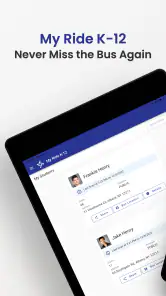
For families with more than one child, I would check each profile separately and avoid assuming that one child’s route or schedule applies to the other. This is a simple workflow improvement, but it prevents one of the most serious practical mistakes: reading accurate information for the wrong student.
Recovering when the workflow breaks
When the app behaves unexpectedly, I use a layered recovery process. First, I confirm the obvious: the phone is online, the correct student is selected, and the app is not waiting on a screen that has been left open for too long. Then I restart the app. These steps are basic, but they are low-risk and often separate a temporary display problem from a deeper account issue.
If the problem continues, I repeat the setup check rather than immediately deleting the app. Removing an app can erase convenient local state and force the family to start again without solving the record mismatch that caused the problem. I would preserve any school instructions and note exactly what happens: whether the app shows an error, remains blank, displays old information, or opens normally but lacks the expected transportation details. That description is far more useful when asking the school or transportation contact for help.
A helpful recovery habit is to identify the last point at which the app worked. If it worked yesterday and stopped after a phone update, that points toward a device or app compatibility question. If it stopped after a change of school, address, or transportation arrangement, the school record becomes a more likely place to investigate. If it works for one child but not another, the issue may be tied to the individual student record rather than the installation itself.
I would also avoid making several changes at once. Switching accounts, reinstalling the app, changing device settings, and asking the school to alter a record simultaneously makes it difficult to know what fixed the issue. A calm sequence is better: verify, restart, document, then contact the appropriate school transportation support if necessary.
For an urgent pickup, use the quickest reliable source available rather than waiting for a technical fix. That might be a school message or a direct contact method already used by the family. My Ride K-12 is most helpful when it is part of a prepared routine, not when it is being tested for the first time during a time-critical disruption.
When the app is not the cause
School transportation is a chain involving family records, route planning, school communication, the vehicle operation, and the phone itself. An app can display incorrect or delayed information if the source record has changed or if a district has not yet published an update. That does not necessarily mean the software is broken.
For example, a new address or transportation request may need to be processed by the school before it appears in the app. A temporary route adjustment may also be communicated separately while the digital information catches up. In these situations, contacting the school’s transportation office is more productive than repeatedly reinstalling the application.
The reverse can happen too: the school may have updated its records, but the phone may be offline, restricting background activity, or preventing notifications. I would check the device’s general notification and connection behavior without changing settings blindly. If other apps also fail to update, the problem is probably broader than My Ride K-12.
This is where the app’s role needs to be understood clearly. It is a convenient education tool for checking school transportation information, not a replacement for every official communication channel. Families who expect it to independently discover every route change may be disappointed. Families who use it alongside the school’s normal notices are more likely to get practical value from it.
Who will benefit and who should look elsewhere
I think My Ride K-12 is a good fit for parents and guardians whose school transportation provider supports the app and who want a central way to review their child’s bus information. It is especially useful for households where pickup routines change, adults share responsibility for school mornings, or a child needs a clearer reminder of the planned transportation arrangement.
It can also help families reduce repeated questions. Instead of searching through old messages for a route detail, a parent can establish a habit of checking the app at a consistent time. The real advantage is not that it removes all uncertainty; it gives the family a repeatable place to begin.
I would be more cautious about recommending it to someone who expects a citywide transit app, live public transport navigation, or a service that works without school-system participation. That is a different category of need. A general mapping or transit application may be better for planning a public journey, while My Ride K-12 is aimed at the school-bus relationship between a child, family, and participating transportation service.
It may also be a poor fit for a family that rarely uses school transportation or already receives clear, timely information through another official channel. Installing another app adds a small amount of maintenance: keeping the device ready, remembering the correct profile, and checking the right source when details conflict. The free price removes a financial barrier, but it does not remove that organizational cost.
Compared with paper notices, the app is easier to check repeatedly and less likely to be buried in a backpack. Compared with text or email updates, it can offer a more focused place for transportation information instead of mixing it with unrelated messages. Compared with a general transit app, it is more closely tied to school-specific arrangements but less suitable for planning an independent public-transit trip. That trade-off explains both its strength and its limits.
My practical verdict
After looking at the way this app fits into a real school morning, I see My Ride K-12 as a useful companion rather than a complete transportation safety net. Its strongest quality is focus: it is built for families who need to check school-bus information without searching through scattered conversations. The experience becomes much better when setup is completed early and the family knows which information should be confirmed in the app and which changes still require the school.
The developer, Tyler Technologies, Inc, has positioned the product in the education space, and the Everyone age rating makes it approachable for family use. Its 4.3 average and broad installation base indicate a service that many people find worthwhile, although the quality of the experience will naturally depend on how accurately and promptly the connected school transportation system maintains its information.
My strongest recommendation is to treat the app as part of a three-step routine: check the child’s profile, review the current transportation details, and compare unusual changes with official school communication. That workflow is more dependable than waiting for a notification or assuming yesterday’s route will always apply. It also gives parents a clear way to diagnose problems without jumping straight to drastic fixes.
The app is most valuable when it turns a rushed guess into a quick, informed check. I would recommend trying it if your child’s school supports it and bus information is a recurring source of stress. I would skip it if you need general transit navigation or if your school does not use the connected service. For the right family, the free download can make school mornings more organized; for everyone else, its usefulness may be limited by the transportation system behind the screen rather than by the app itself.
My Ride K-12 Frequently Asked Questions
Who is My Ride K-12 intended for?
My Ride K-12 is intended for families connected to school transportation services, especially parents and guardians who want to keep track of a student’s bus journey. It is an education app, but access and the available tools are tied to the participating school district or transportation provider. Before downloading, check with your school to make sure it uses My Ride K-12 and can provide the right account details.
What devices can run My Ride K-12?
My Ride K-12 is available for Android and iOS devices, so families can use a compatible phone or tablet to access transportation information. On Android, the app requires version 8.0 or later. As with any mobile app, keeping the device’s operating system and the app updated can help provide a smoother experience and access to current features.
What is My Ride K-12 used for?
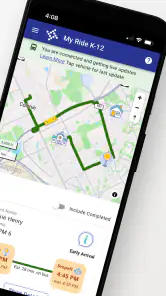
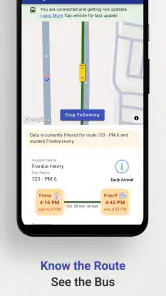
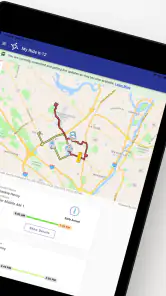
My Ride K-12 is a school transportation app designed to help families follow assigned bus routes and receive important travel updates. Depending on the school district’s setup, parents or guardians may be able to view a student’s bus information, monitor estimated vehicle location, check pickup and drop-off details, and receive notifications when the bus is approaching or delayed.
How do I log in to My Ride K-12?
Access usually depends on your school district or transportation provider. In most cases, you must use the email address, phone number, student information, or account credentials connected to your child’s school transportation record. If the app does not recognize your details, contact the school or transportation department rather than creating multiple accounts, because access is generally controlled by the district.
Does My Ride K-12 show the bus location in real time?
The app may provide live or near-real-time bus tracking, but the exact features depend on the district, the vehicle’s tracking equipment, and the quality of the mobile connection. Location information can occasionally be delayed, unavailable, or less precise than expected. Treat the map and arrival estimates as helpful guidance, not as a guarantee that the bus will arrive at an exact minute.
Pros
- Real-time bus tracking helps families monitor routes and arrival times.
- Push notifications can alert parents about delays
- changes
- or vehicle arrivals.
- Route and stop details make daily school transportation easier to organize.
- Supports safer student transportation with trip and rider status updates.
- Useful for managing multiple children when the district enables linked accounts.
Cons
- Features depend heavily on school district setup and available vehicle data.
- Location updates may occasionally lag because of GPS or network issues.
- Parents may need login credentials supplied by the school or transportation provider.
- The interface can feel limited outside supported districts and transportation systems.
- Frequent notifications may become distracting if alert preferences are not customized.
- Category
- Education
- Version
- 2026.3.27












