Muzio I Music Player & MP3 App
- 46.64K
- 3.6
- Installs
- 100.00M
- Price
- Free

Screenshots
Analysis by Reviewed
I’d treat Muzio Music Player & MP3 App as a practical starting point for listening to music already available on your device, rather than as a service for discovering or streaming a huge online catalog. That distinction makes the first steps much less confusing: the app’s value is in playing local audio and putting tools like an equalizer and ringtone editing close at hand. If that matches how you listen, getting from installation to your first playlist can be straightforward.
What to expect from a local music player
Muzio is a free music and audio app from Red Sky Labs. It has an average rating of 3.6 from around 2.1 million ratings, and has been installed over 100 million times. Those figures suggest it has reached a broad audience, but they are not a promise that every device or music library will behave the same way. The app is rated for Everyone, and in-app purchases are available, so I’d check the purchase details in the app before assuming every option is included at no cost.
Before installing, I’d ask one simple question: do you already have audio files you want to play? If yes, a local player can be a useful alternative to a streaming app, especially when you want to listen without relying on a connection or a monthly music subscription. If you mainly want recommendations, online radio, or a vast licensed catalog, a streaming service is likely a better fit. Muzio’s appeal is more hands-on: you bring the music, then use the player and its tools to organize or adjust how you listen.
Getting set up without overthinking it
After installing, I’d start by opening the music library and checking what audio appears. If a track you expect isn’t there, first make sure it is actually stored on the device and in a format your player can read; a player cannot make an online-only song into an offline file. Once the library looks right, try a familiar track before changing settings. That gives you a reliable baseline for judging the controls and sound on your own headphones or speaker.
The current version is 7.8.3, and the minimum operating system listed is Android 7.0. Because operating-system support can differ by platform and device, I’d check compatibility on the store page for the phone I plan to use. I would also leave optional tweaks until after the first playback. It is easier to tell whether the basic experience works before exploring the equalizer, playlists, or the MP3 cutter.
Making the first listening session useful
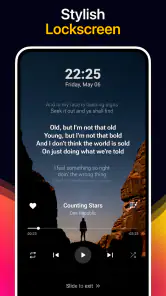
Once a track plays, create a small playlist for a specific moment rather than trying to organize your entire collection at once. For example, I’d make a short commute mix from songs already on the phone, then test it with the screen locked and the device disconnected from Wi-Fi. That quick check answers two practical questions: whether the tracks are truly available offline and whether the playback controls suit the way you listen day to day.
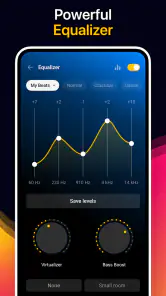
The equalizer is best approached with small adjustments. I’d change one setting at a time, listen to a familiar song, and compare it with the original sound rather than trying to make every track louder or brighter. Different headphones and speakers can make the same adjustment feel very different, so a setting that works for one setup may be tiring on another. Keeping a light touch makes it easier to return to a sound you enjoy.
More From Our News Desk

Weather by Xiaomi Review: Clear at a Glance, Less Clear Up Close

X Under Pressure: Can It Recover When Posting Goes Wrong?

Clash of Clans Is Won Between the Battles

Android Auto Makes the Case for Quieter Car Software

MobiOffice: Transforming Mobile Productivity with Seamless Integration

EA SPORTS FC™ Mobile Soccer: Redefining Mobile Sports Gaming
Useful tools beyond pressing play
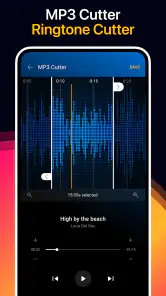
The MP3 cutter is a practical reason to try Muzio if you want to turn part of an audio file into a ringtone. A sensible workflow is to choose a file you own, listen for the exact start and end points, and preview the cut before using it. Short previews help avoid trimming too much off the beginning of a vocal or leaving an awkward fade. I’d keep the full original file untouched until I’m happy with the result.
That kind of editing is different from streaming apps, which usually focus on playing and discovering tracks rather than making a personal ringtone from a local file. The trade-off is that the source audio has to be available to you in the first place. If you do not keep music files on your phone, the cutter and offline player may be less useful than a streaming app with a strong library and discovery tools.
Where it fits—and where it may not
For an everyday example, imagine getting ready for a trip and wanting a few familiar albums available when the connection drops. I’d check that the files appear in the library, put them in a travel playlist, and test playback before leaving home. This is more dependable than discovering at the destination that a track was only accessible through an online service. It also keeps the playlist focused instead of making you scroll through a whole library while traveling.
Muzio is a good match for people who keep their own audio files, like adjusting playback, or want a simple route from a song file to a ringtone. It is less compelling if you expect cloud syncing to keep several devices in step, social sharing to be a central music feature, or a subscription-style catalog of songs ready to stream. Those are different jobs, and a dedicated streaming service or a player already built into your phone may suit them better.
One useful habit is to build playlists around situations—exercise, winding down, or a short drive—rather than relying only on folders or broad genre labels. That makes local listening quicker when you are in a hurry and helps reveal missing files before you need them. If the library feels crowded, start with one small playlist and add tracks as you listen; there is no need to sort everything before the app becomes useful.
Another trade-off to keep in mind is attention. A player with several tools can be more convenient than switching between separate apps, but its extra options may take a little exploration before they feel natural. I’d learn the basic playback and playlist controls first, then try the equalizer or cutter only when I have a clear reason. That keeps setup from turning into a project and makes it easier to tell which features you actually use.
Your Music Companion, with a Few Caveats
I find that the best way to judge this kind of player is to focus on one everyday job rather than exploring every tool at once. A familiar track can show whether the app fits your listening habits, while a small playlist gives you something practical to use immediately. From there, I’d consider which extra controls are worth learning and which are better left alone.
Interface and User Experience
For a first-time user, the most reassuring route is to begin with one familiar file and postpone any attempt to customize the whole library. The interface feels approachable, and finding a track to test is a more useful first goal than adjusting every available option. I’d also make a note of where the basic playback controls sit before relying on the app during a walk or drive; that small bit of familiarity can save fumbling later.
The app’s extra tools make it feel busier than a barebones player, but they do not need to be part of every listening session. If all you want is to tap an album and listen, keep your first setup simple. If you later find yourself wanting a ringtone or a different tonal balance, the related controls are there to explore without requiring you to change how you organize your music.
Sound Quality That Packs a Punch
I’d be cautious about treating an equalizer as a universal sound upgrade. It changes the character of playback, not the quality of the source file, and a strong boost can make one pair of headphones sound harsh while helping another feel more balanced. For a fair comparison, use the same song and listening device, make one modest adjustment, and switch back to the original setting before deciding whether the change genuinely helps.
This also gives you a way to troubleshoot a disappointing first impression. If a track sounds wrong, check the source and your headphones before assuming the player is the cause. A local player’s appeal is control over music you already have; it cannot improve a poor recording simply by offering more sound controls.
Features Galore
The most useful way to approach the feature set is to choose a single job for each tool. Play a local track, build a playlist for a recurring situation, and only then decide whether you need audio trimming. That keeps a first session focused and makes it easier to spot whether the app is solving a real problem for you.
- Offline listening: Use audio files stored on your device when you want playback without depending on a live connection.
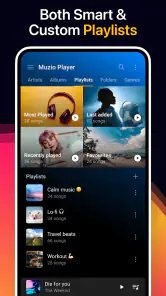
- Playlist management: Group a few tracks for a commute or workout instead of reorganizing your entire collection at once.
- Sleep timer: If you listen as you settle down, set a stopping point rather than leaving playback running indefinitely.
- Widgets: A home-screen control can be convenient once you know which playlist or track you want to reach quickly.
Those functions are most valuable when they fit a routine. A small wind-down playlist and a sleep timer, for instance, solve a different problem from a travel mix tested offline. I wouldn’t add a widget or build several playlists just because the options exist; start with the task you repeat most often and let the rest wait.
Seamless Integration
I would not choose Muzio on the assumption that it will synchronize a personal collection across several devices. Its strongest use here is listening to files available on the device at hand, so anyone moving between phones or expecting a cloud library to stay aligned should favor a service or player designed around that workflow. For a single phone with music already stored locally, keeping the first playlist modest also makes it easier to notice if a track is missing.
Sharing music socially is another area where expectations matter. If sending friends a track or maintaining shared playlists is central to how you listen, a streaming platform may make that interaction more natural. Muzio makes more sense when your priority is private, practical playback and occasional editing rather than building a social music hub.
Room for Improvement
There is a learning curve when a player combines everyday playback with editing and sound controls. I’d avoid exploring every menu in one sitting: first confirm that your music appears, then play a track, and only afterward try a specific extra. That sequence helps separate a library issue from a settings question and avoids changing several things before you know what caused a problem.
The free version may include ads, which can interrupt the otherwise simple act of choosing music. In-app purchases range from $0.99 to $49.99 per item, so I’d inspect the purchase screen carefully before paying and decide whether the particular option solves a problem I actually have. If I only need straightforward playback and do not use the additional tools, a simpler player may be less distracting.
For someone whose music lives almost entirely in streaming libraries, the local-file focus is the bigger limitation. Songs saved for offline use inside a streaming service are not necessarily ordinary files that another player can browse or edit. I’d keep the distinction clear: use Muzio for audio files you can access on the device, and use a streaming app when discovery, licensing, or an online catalog is the main need.
A sensible next step
My recommendation is to give Muzio Music Player & MP3 App a focused trial rather than judging it by every tool at once. Start with one known audio file, confirm that it plays, then make a playlist you can use this week. If that works smoothly, try a modest equalizer change or trim a copy of a file for a ringtone. Keeping the original safe and testing the result before relying on it are small habits that make the editing side less stressful.
In short, I’d choose Muzio for local listening with useful extras, not as a replacement for a streaming catalog or a cross-device music service. It is best for people who already have audio files and want playback, playlists, sound adjustments, and ringtone editing together. If your first goal is simply to hear music you own, the path is reassuringly direct; if your goal is to discover and stream almost everything, another kind of app will suit you better.
Muzio I Music Player & MP3 App Frequently Asked Questions
Can I use Muzio I Music Player & MP3 App to create ringtones?
Yes. Ringtone creation is one of the audio tools highlighted for Muzio I Music Player & MP3 App, alongside its MP3 cutter. These features may suit you if you want to work with audio files on your device and make a ringtone from a track. The app’s main focus remains local music playback, so it is worth considering whether those tools match the way you manage music.
Does Muzio I Music Player & MP3 App include an equalizer?
Yes. Muzio I Music Player & MP3 App is described as a music player with an equalizer, giving it an audio-adjustment tool in addition to offline playback and MP3 cutting. If you like changing how music sounds while listening, the equalizer is a useful reason to try the app. Its value will depend on your preferences and on how much you want to adjust playback.
Who develops Muzio I Music Player & MP3 App, and what kind of app is it?
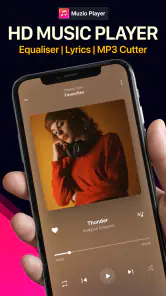
Muzio I Music Player & MP3 App is a Music & Audio app developed by Red Sky Labs. Its focus is local music playback, with the store summary highlighting an equalizer, an MP3 cutter, offline audio playback, and ringtone creation. If you are looking for a player centered on audio files and music tools, those are the main reasons to consider downloading it.
What features does Muzio I Music Player & MP3 App offer?
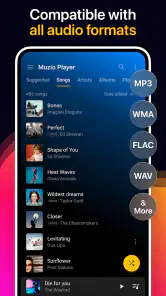
Muzio I Music Player & MP3 App provides a comprehensive set of features including a customizable equalizer, playlist management, and support for various audio formats. It also includes a sleek user interface, widgets for home screen control, and integration with other music services, making it a versatile choice for music lovers.
Is Muzio I Music Player & MP3 App free to use?
Yes, Muzio I Music Player & MP3 App is free to download and use. However, it may offer in-app purchases or ads to enhance user experience or to unlock premium features. Users can choose to subscribe or make purchases for an ad-free experience and additional functionalities. In-app purchases are available, ranging from under a dollar to around fifty dollars per item, so check the purchase details before confirming any transaction.
Pros
- Intuitive and user-friendly interface
- Supports a wide range of audio formats
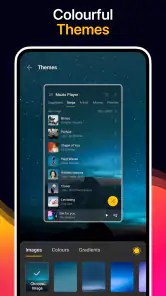
- Customizable playlists and themes
- Offline playback without data usage
- High-quality sound enhancement tools
Cons
- Ad-supported with occasional pop-ups
- Advanced features require in-app purchases
- Limited cloud integration options
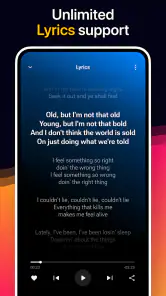
- No built-in lyrics feature
- Occasional bugs with large libraries
- Category
- Music & Audio
- Version
- 7.8.3












