Moon+ Reader
- 15.17K
- 3.7
- Installs
- 10.00M
- Price
- Free

Screenshots
Analysis by Reviewed
I first noticed Moon+ Reader because I wanted a more flexible way to read books already saved on my device. It is an Android eBook app from Moon+, listed as free and rated for Everyone. For a first-time reader, the useful thing to know is that it is built around adjusting the reading experience rather than supplying a reason to read: you bring a book, then shape the page to suit you.
Who will feel at home with it
I would recommend it first to readers who keep books in different places and want one app for opening them, rather than to someone choosing a digital bookstore. It suits people who read in bursts, revisit passages, or like to adjust text until a page feels comfortable. Its flexibility is useful, but it is not automatically an advantage for everybody: if a standard page and a tightly guided storefront are what you want, a simpler retailer-linked reader may involve less setup.
For a realistic first day, imagine saving a chapter for a lunch break. I would open the book before leaving home, adjust the type until it is easy to scan on my phone, and mark the stopping point when the break ends. Later, I could return to the same passage without relying on memory. That modest routine shows the app’s value more clearly than exploring every setting at once.
Why Moon+ Reader Stands Out
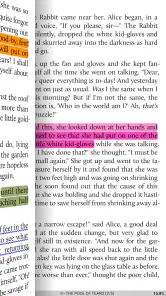
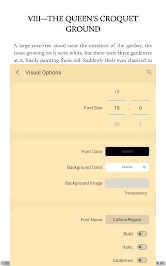
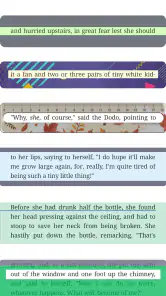
I've tried my fair share of eBook apps, but there's something about Moon+ Reader that really sets it apart. First off, the customization options are off the charts. Whether you're picky about your fonts, need a specific background color, or even want to adjust the spacing between lines, this app has got you covered. Trust me, it's like having a personal reading assistant right in your pocket.
What to expect from the reading experience
Think of it as a reading workspace rather than a bookstore. That distinction matters if you are deciding between a dedicated reader and an app tied to a particular shop: this is a better fit when you already have files you want to read and prefer to control how the text looks. The trade-off is that a highly adjustable reader can take more exploring than a simpler app with one standard page style.
The app has a 3.7 average from around 271,000 ratings, and it has passed 10 million installs. Those figures suggest a substantial audience, but they do not guarantee that every part of the interface will feel natural to you. I would treat the first session as a short setup, not a test of whether the app is right for you forever.
Set up a comfortable first session
After installing, start with one book rather than trying to organize an entire collection. Open a file you already have, adjust the font and line spacing until the page feels easy to follow, and choose a background that works in your room. A small practical tip: change one setting at a time and read a few paragraphs before changing the next. That makes it easier to tell which adjustment actually helped.
You May Like

Clash of Clans Is Won Between the Battles

Android Auto Makes the Case for Quieter Car Software

MobiOffice: Transforming Mobile Productivity with Seamless Integration

EA SPORTS FC™ Mobile Soccer: Redefining Mobile Sports Gaming

How Microsoft OneDrive Became a Mobile Productivity Giant

How Google Translate Breaks Language Barriers Effortlessly
Moon+ Reader supports formats including EPUB, PDF, and MOBI. If a document opens but its page feels awkward, remember that a fixed-layout PDF behaves differently from a reflowable book: changing text size may not produce the same result. For long stretches of ordinary prose, I would begin with an EPUB when I have a choice; for a page whose layout must stay intact, a PDF may make more sense.
User Experience and Interface
Let's talk about the user interface for a second. It’s sleek, intuitive, and super easy to navigate. You don't have to be a tech wizard to figure it out, which I personally find to be a huge plus. The app supports a ton of formats too—like EPUB, PDF, MOBI, and more. So, no matter where your eBooks come from, you can pretty much count on Moon+ Reader to handle them with ease.
For your first meaningful success, aim for something simple: open a book, settle on a readable page style, and use a bookmark or annotation when you reach a useful stopping point. That gives you a clear way back without needing to master every menu. In an everyday situation, I might read a chapter while waiting for an appointment, bookmark the page before putting my phone away, then return to it during a commute. It is a small workflow, but it is more reassuring than repeatedly guessing where I left off.
Features that Make a Difference
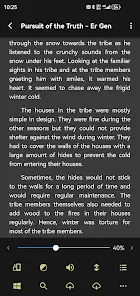
One of the features I absolutely adore is the auto-scroll function. Picture this: you’re all cozy in bed, wrapped in a blanket, and you don’t want to keep swiping to turn the page. Just set the auto-scroll, and voilà! It’s like magic. Plus, there’s a night mode feature that’s a lifesaver for late-night reading sessions.
Auto-scroll is also worth trying when one hand is occupied, though I would test the pace before settling in: too fast can interrupt comprehension, while a slower setting may feel more natural for familiar material. Night mode can make a dark room more comfortable, but it is a preference rather than a substitute for adjusting the screen to suit your eyes. These small controls are most useful when they solve a real reading annoyance, not when they become another set of options to fiddle with.
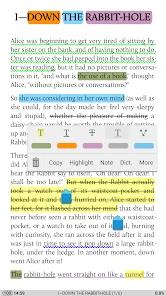
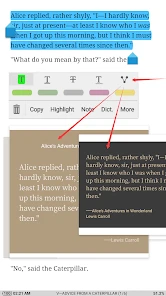
Oh, and did I mention the built-in dictionary? It's a game-changer for those moments when you come across a word that just leaves you stumped. A quick tap, and you have all the information you need without having to leave the app.
Make the library work for you
The bookshelf becomes more helpful once you have several titles in rotation. I would use categories for books with different purposes—say, a novel, a reference text, and something I read in short sessions—rather than trying to design an elaborate filing system on day one. Reading statistics can help you notice your own habits, but they are optional; if tracking turns reading into a task, ignore them and keep the library simple.
Cloud syncing is useful if you genuinely switch between a phone and a tablet, especially when bookmarks and annotations matter to you. If you read on just one device, it may add little to your routine, so there is no need to make it part of the initial setup. Syncing also works best when you check that the same book is available where you plan to continue; a saved reading position is only useful if you can open the corresponding text.
Small habits that prevent frustration
When a page looks wrong, I would first work out whether the issue belongs to the file or to the reader. A reflowable book gives you room to adjust how text sits on the screen, while a fixed page has its own layout to preserve. That distinction can save a lot of unproductive tweaking. If the document is a scan or has unusual formatting, changing fonts and spacing may not fix it; in that situation, a document-focused reader can be the more comfortable choice.
For books you plan to study, a useful habit is to make an annotation only when it will help you find or understand something later. Marking every interesting sentence can leave a cluttered trail that is harder to use than the original text. I prefer to reserve notes for a definition, a question, or a passage I expect to revisit, and use a plain bookmark for an ordinary stopping place. This keeps the reading flow intact while still making the app’s tools practical.
Where it fits—and where it may not
Compared with the usual store-centered reading apps, this one puts more emphasis on local books, page controls, and arranging your own shelf. That is appealing if you collect files from different sources and want a consistent reader. A retailer’s own app may be easier if most of your reading comes from that shop and you want purchasing and reading kept together. Someone who mainly reads scanned documents may also prefer a tool designed around document navigation rather than a book-focused interface.
There is a learning curve hidden inside the freedom to customize: a newcomer can spend more time tuning a page than reading it. I would skip it if you want a bare, fixed interface or expect every book to display identically without adjustment. It is also sensible to check the format of a file before blaming the reader when its layout looks unusual. The free entry point makes it easy to try, while in-app purchases are available at $0.99 per item; you can decide whether paid extras are relevant after you have tested your ordinary reading routine.
Questions worth answering before you settle in
Do you need to buy a book inside the app to begin? No: the reading workflow is centered on opening books you already have, so the sensible first test is a compatible file from your own collection. If you are still choosing between formats, an EPUB is generally the easier starting point for text you want to resize, while a PDF is more appropriate when preserving the page arrangement matters.
Is it a good fit for study? It can be, especially if you want to look up a word, annotate a passage, or return to a marked location. I would still avoid treating it as a complete study system: keep notes selective, and use a different tool when your work depends on extensive document navigation or a scanned page’s exact layout.
Will it suit someone who dislikes adjusting settings? It can, provided you are willing to choose a comfortable page style once and then leave it alone. The app’s range of controls is an option, not homework. If the initial menus feel like more effort than the reading is worth, a simpler reader is likely the better match.
Syncing and Cloud Support
If you’re someone who reads across multiple devices, the cloud syncing feature will be your new favorite thing. You can sync your books, bookmarks, and annotations seamlessly. So, whether you're on your phone or tablet, you can pick up right where you left off. It's these little things that really elevate the reading experience.
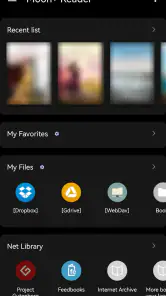
Also, for those who like to keep their library organized, the bookshelf feature is super handy. You can categorize your books and even track your reading progress with detailed statistics. It's like having your own personal library assistant!
The app has been available since August 7, 2010, and version 10.2 supports devices running Android 5.0 or later. That long-running presence may reassure readers looking for an established option, though I would still judge it by whether its controls suit your habits. It is a practical choice for people who want one reader for varied files, adjustable pages, and optional organization—not necessarily for someone who wants a curated shop or the simplest possible screen.
For a first-time user, my advice is to give it a fair but limited trial: bring in one book, make the page comfortable, and read long enough to see whether the controls fade into the background. If they do, you have a useful everyday reader; if you find yourself repeatedly adjusting things or fighting a document’s layout, there is no shame in choosing a more specialized alternative. The 15,000 reviews reflect a large range of experiences, so your own file and reading habits are a better guide than popularity alone.
In conclusion, if you're on the hunt for an eBook reader that offers robust features and a smooth reading experience, I can't recommend it enough. Whether you're a casual reader or a full-blown bibliophile, this app is bound to enhance your digital reading journey in more ways than one. Give it a try, and you might just find yourself loving it as much as I do!
Moon+ Reader Frequently Asked Questions
Can Moon+ Reader help me organize my e-book collection?
Moon+ Reader is designed as a dedicated e-book reading app, so it can be a practical place to open and manage books on your device. Keeping your files organized before adding them can make it easier to find a particular title later. If you already use cloud storage for your reading files, that can also help you access your collection across devices.
Is Moon+ Reader suitable for reading on a phone as well as a tablet?
Moon+ Reader is an Android e-book reader that can be used on a compatible phone or tablet. Its adjustable reading settings, including font size and style, let you tailor the page to the screen and your preferences. Before installing, make sure your device meets the Android requirement and consider whether you have enough storage for the books you want to keep.
Does Moon+ Reader work on my Android device?
Moon+ Reader is an Android app for reading e-books, and it requires Android 5.0 or later. It is listed as suitable for everyone, so its age rating is not limited to adults. Before downloading, check your device’s Android version and available storage, especially if you plan to keep a large collection of books on your phone or tablet.
Can I read books offline with Moon+ Reader?
Moon+ Reader is an e-book reader, so it can be useful for reading books stored on your device without relying on an internet connection while you read. Online library and cloud options can help you access or manage books, but they are separate from opening a locally stored file. Download or transfer the book beforehand if you expect to read somewhere without internet access.
Who makes Moon+ Reader, and is it a widely used app?
Moon+ Reader is developed by Moon+ and belongs to the Books & Reference category. It has been available since August 7, 2010, and is a long-established option for people who want a dedicated e-book reader. Its Google Play listing shows over 10 million installs, giving prospective users a sense of its broad adoption without guaranteeing that it will suit every reading preference.
Pros
- Highly customizable reading options.
- Supports various eBook formats.
- Syncs books across devices.
- Offline reading available.
- Integrated dictionary and translator.
Cons
- Occasional ads in free version.
- Some features require premium upgrade.
- Complex interface for new users.
- Limited cloud storage options.
- Syncing can be slow at times.

- Category
- Books & Reference
- Version
- 10.2