Moon+ Reader Pro
- 12.66K
- 4.2
- Installs
- 1.00M
- Price
- $11.99
Screenshots

Analysis by Reviewed
I judge an ebook reader not only by how comfortable it makes a page look, but also by how clearly I can manage my own files and reading habits. Moon+ Reader Pro is a paid Books & Reference app from Moon+, and its long presence in the reading space makes it familiar to many ebook fans. It has a 4.3 average from around 106,000 ratings, with over a million installs. That kind of reach is reassuring, though popularity alone doesn’t tell me whether a reader’s workflow will suit you.
Trust starts with a clear reading routine
I’d consider this app most carefully if you already keep ebooks on your device and want to read them on your own terms. It is rated for Everyone, and the current version is 10.2, with Android 5.0 as the minimum operating system. The one-time price is $10.99, so I’d think of it as a purchase for readers who expect to use its flexibility regularly, rather than a casual download to try for one evening.
When privacy matters, I avoid assuming that a familiar app or a polished interface tells the whole story. I look at the choices presented on the device and at the permissions an app requests before deciding what I’m comfortable with. I’d use the same care here, especially if I planned to open personal documents as well as novels. Keeping books in a folder I recognize and reviewing access prompts before approving them are practical habits for any local reading library.
Make the controls work for you
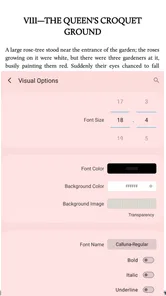
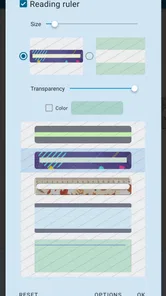
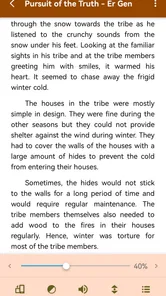
The biggest advantage for me is how much the reading display can be adjusted. I can change type size, font, background and spacing until a page feels comfortable, rather than accepting one fixed layout. That matters when I’m reading for a few minutes on a small phone screen and later returning to the same book on a larger device. I’d make those adjustments early, then leave the layout alone for a while so that frequent tweaking doesn’t become its own distraction.
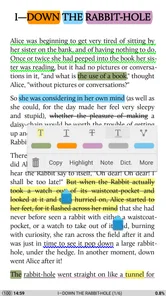
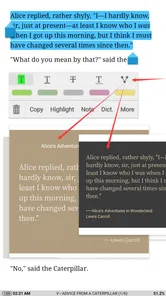
Highlights and notes are useful when I want to return to an idea, but they also make the reader part of my personal study routine. I’d keep notes focused and consider what I’m comfortable storing alongside a book. The dictionary and translation tools can also help when I’m reading in another language: instead of leaving the page to look up every unfamiliar word, I can use the reading session to work through a passage more deliberately.
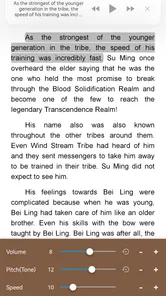
For a real everyday example, I might read a few pages on the bus, switch to text-to-speech while doing a quiet chore, and come back to the text later with the night mode enabled. That mix of reading and listening is convenient, although speech is not a substitute for carefully checking pronunciation or following complex material. If I’m studying a passage closely, I’d rather keep the screen open and use notes than rely on audio alone.
Features That Shine
First off, let’s talk about what makes Moon+ Reader Pro stand out in the crowded market of e-reader apps. This app is packed with features that cater to both casual readers and hardcore bibliophiles. From the moment you install it, you’ll notice the sleek and intuitive interface. It’s like walking into a well-organized library where everything is at your fingertips.
More From Our News Desk

Weather by Xiaomi Review: Clear at a Glance, Less Clear Up Close

X Under Pressure: Can It Recover When Posting Goes Wrong?

Clash of Clans Is Won Between the Battles

Android Auto Makes the Case for Quieter Car Software

MobiOffice: Transforming Mobile Productivity with Seamless Integration

EA SPORTS FC™ Mobile Soccer: Redefining Mobile Sports Gaming
One of the standout features is the extensive support for various file formats. Whether you’re reading EPUB, PDF, MOBI, or even comics, Moon+ Reader Pro handles it all with ease. The app also offers highly customizable reading settings. You can tweak the font style, size, background color, and even adjust the spacing to suit your reading preferences. It’s like having a personal reading nook tailored just for you.
Reading Experience
Now, let’s get into the reading experience itself. The app supports text-to-speech, which is a game-changer for those long commutes or when you just want to relax and listen to a book. The night mode is another nifty feature, ensuring that your late-night reading sessions don’t strain your eyes. And for those who love to annotate, the app allows for highlights and notes, making it easier to keep track of those memorable quotes.
Another great aspect is the seamless cloud synchronization. You can sync your books and reading progress across multiple devices, so whether you’re on your phone, tablet, or even switching between Android and iOS, your library is always up to date.
Performance and Usability
Performance-wise, Moon+ Reader Pro is smooth and responsive. I didn’t encounter any lags or crashes, which is crucial for uninterrupted reading. The app also offers a robust dictionary and translation support, which is perfect if you’re tackling books in different languages.
Usability is top-notch. Even if you’re not tech-savvy, navigating through the app is a breeze. The developers have done a fantastic job of making sure that every feature is easily accessible without cluttering the interface.
Choosing the right reading workflow
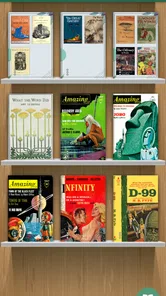
The choice between this app and a typical bookseller’s reader comes down to where your books come from and how much control you want. A store-based app is often more convenient when most of your reading is purchased inside that store: the catalogue and reading experience are designed to work together. Moon+ Reader Pro makes more sense when you already have a collection of files and want one place to open different kinds of reading material. That freedom is useful, but it also means you take more responsibility for locating and sorting your files.
For a student, that difference can matter more than the number of display options. I’d keep course readings in a clearly named folder, open the relevant document, and use highlights sparingly for passages I expect to revisit. If I were preparing for an exam, I would not treat an annotation in the reader as my only copy of an important note; I’d keep essential study points in the system I already use for revision. The reader is handy for marking and returning to text, while a dedicated note-taking workflow may be better for building a larger set of connected ideas.
Comic reading is another case where file support can be a deciding factor. Being able to read comics in the same app as novels avoids switching tools, but a person who mainly reads comics may prefer an app built around browsing and navigating comic collections. Likewise, someone who mostly reads PDFs with dense layouts should try a representative document before settling on a daily routine. A reflowable novel and a fixed-page reference document ask different things of a reader, so the best settings for one may not suit the other.
Small habits that prevent friction
One practical way to make a personal library easier to use is to decide on a simple naming and folder system before adding lots of files. I’d separate books from work or study documents, then use names that are easy to recognize at a glance. This is not a special feature of the app; it is a small bit of housekeeping that pays off when a reader supports several kinds of content. It also helps me avoid opening a private document by mistake when I only wanted to pick up a novel.
I’d also test a few different pages when setting the display, rather than judging a font or spacing choice from the first screen alone. A setting that looks pleasant in a short paragraph may become tiring in a long chapter, and a scanned or image-heavy page will not behave like ordinary flowing text. Once I find a comfortable setup, I’d leave it in place and make changes only when the kind of book or lighting actually calls for them. That keeps the app’s flexibility useful instead of turning reading into constant configuration.
For listening, I’d treat text-to-speech as a convenient second mode rather than a perfect substitute for reading. It can help me continue through familiar material while my hands are occupied, but names, dialogue, or technical terms may be harder to follow by ear. A sensible routine is to use listening for a light reread or an easy section, then return to the page when I need to examine a passage, add a note, or check a translation. This division of labor makes the feature more practical than expecting it to handle every reading situation equally well.
Who will appreciate the flexibility?
My overall view is positive, but I’d choose this reader for local files, fine-grained display control, annotations and multiple ways to get through a book—not simply for the sake of having another reading app. A store-centered reader may be a better fit if you want your purchases and reading experience tied to one bookselling ecosystem with minimal setup. Someone who prefers a plain interface and never changes fonts, margins or page appearance may find Moon+ Reader Pro’s range of choices more than they need.
I think it is strongest for people with a mixed library: perhaps a novel in one format, a reference document in another, and a comic they want to open without switching apps. A useful tip is to settle on a small set of display settings for different situations—one comfortable text size for ordinary reading and a separate night-friendly appearance—rather than continually adjusting every control. That helps the customization serve the book instead of taking attention away from it.
There is also a trade-off in managing a personal collection. Supporting different files is valuable, but readers still need to keep their books organized and know where their files are stored. If you mainly borrow or buy books through a specific service, check that your normal way of getting books fits the app before paying. The same goes for cross-device use: synchronization is appealing when you move between devices, but I would test the way my own library and reading progress behave before relying on it as the only copy of my reading setup.
A cautious verdict before you pay
Readers often want to know whether they can simply install the app and start reading, or whether they need to rebuild their library first. If your books are already available as files on your device, you can begin with a small test collection and see how your usual titles display. If your reading depends on a particular borrowing or bookselling service, check that service’s normal file workflow before making this your main reader. The important question is not just whether a format is supported, but whether you can get the books you actually read into a routine that feels simple.
People also ask whether the paid version makes sense for occasional reading. I’d say the $10.99 purchase is easier to justify when the customization, file flexibility, and annotation options solve a recurring problem for you. If you read only now and then, use one source for every book, and rarely adjust the page, a simpler reader may be enough. I would not pay just because a long feature list sounds impressive; I’d identify two or three controls or workflows I expect to use often and decide from there.
On privacy, my advice is to make the decision at the level of your own device and habits. Review any access prompts when they appear, consider which folders contain material you want to open, and avoid treating cloud synchronization as an automatic choice if you would rather keep a reading setup local. I don’t assume that a feature label tells me how every account, permission, or data choice works. The useful approach is to read the controls actually shown to you and choose only what fits your comfort level.
So, is Moon+ Reader Pro worth it? In my opinion, absolutely. It’s a powerful tool for any avid reader who wants flexibility and customization in their reading experience. Whether you’re catching up on the latest bestseller or diving into the classics, this app is sure to enhance your reading journey. Give it a try and let it turn your smartphone into a portable library!
Moon+ Reader Pro Frequently Asked Questions
Can I change the font, page layout, or other display settings in Moon+ Reader Pro?
Moon+ Reader Pro is built for readers who like to adjust how an ebook looks on screen. Its reading tools include customizable settings, themes, and modes, so you can tailor the presentation to your preferences rather than settle for one fixed layout. If detailed control over the reading experience matters to you, those options are worth exploring after installation.
Can Moon+ Reader Pro read books aloud?
Yes. Moon+ Reader Pro includes text-to-speech, allowing supported text to be read aloud rather than followed only on screen. This can be useful when you want to listen while doing something else or prefer audio for part of a reading session. The app also includes other reading controls, so you can choose between listening and adjusting the page for regular reading.
What kinds of books and documents can I read with Moon+ Reader Pro?
Moon+ Reader Pro is designed for reading e-books and managing ebook documents, so it may suit readers with collections in different formats. Before downloading, consider whether the files you already own are among the formats the app supports and whether you want a reader with tools for organizing a personal library. Its broad format support is one of the reasons it can work as an all-in-one reading app.
Is Moon+ Reader Pro suitable for someone who reads at night or for long periods?
The app offers customizable reading settings, a selection of themes and a night mode, making it possible to adjust the screen for different environments and preferences. Features such as auto-scrolling and gesture commands can also make longer sessions more convenient. The experience will depend on the settings you choose and your device, but readers who like to tailor text and background presentation have plenty to explore.
What is Moon+ Reader Pro and what features does it offer?
Moon+ Reader Pro is a premium e-book reader app that offers a wide range of features for avid readers. It supports various file formats such as EPUB, PDF, MOBI, CHM, CBR, CBZ, UMD, FB2, TXT, HTML, RAR, ZIP, and OPDS. The app includes customizable reading settings, smart scrolls, and an intelligent paragraph adjustment system. It also provides features like TTS (Text-to-Speech), multi-touch and gesture commands, auto-scrolling, and support for online eBook libraries. Additionally, it offers a clean, ad-free reading experience with various themes and modes, including a night mode for comfortable reading in low-light conditions.
Pros
- Highly customizable reading experience
- Supports various file formats
- Offline reading available
- Syncs across devices
- Ad-free interface
Cons
- No free version available
- Initial setup can be complex
- Limited customer support
- Some advanced features are paid
- Occasional bugs with large files












