Monster Job Search
- 15.88K
- 4.4
- Installs
- 5.00M
- Price
- Free

Screenshots




Analysis by Reviewed
I’d treat Monster Job Search as a practical place to start a job hunt, rather than a promise that a new role will appear with little effort. In my experience, a job app is most useful when it helps me find relevant openings, compare them quickly, and keep applications from slipping through the cracks. Monster is a free business app from Monster Worldwide, and its focus is straightforward: searching for jobs and applying from a phone.
What free access means in practice
The app is free, so I can try it without weighing a purchase against an uncertain job search. That makes it easy to keep alongside other job-search tools and judge it by the listings and workflow I actually find useful. Free access is a clear advantage, but it doesn’t tell me anything about the time an application takes or whether an employer will respond; those outcomes still depend on the role and hiring process.
For me, “free” is useful in a very specific way: it lowers the barrier to testing the app as one channel, rather than asking me to commit money before I know whether its listings suit my goals. I’d still count the time spent reviewing postings and preparing applications as part of the cost of using any job-search tool. The app can make discovery more convenient, but it can’t make a weak match worthwhile or remove the need to check what I’m applying for.
Useful as one part of a wider search
Monster has an average rating of 4.4 from around 80,000 ratings, and it has been installed over five million times. Those figures suggest that it has reached a broad audience, but I wouldn’t use popularity as a substitute for checking whether the openings fit my location, experience, and preferred schedule. Job search quality is personal: a strong match for one person can be irrelevant to another.
A practical approach is to use it for discovery and organization while keeping a simple record of the roles that deserve a closer look. Before applying, I’d read the full posting, compare its requirements with my resume, and make sure the application details are current. That small pause matters: applying quickly is convenient, but sending the same untailored application everywhere can make speed less valuable.
Where I’d be cautious
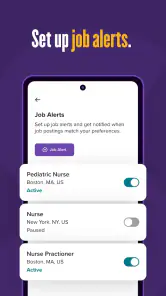
Quick applications are helpful when a listing fits, but they can also encourage a rushed decision. I’d check the job title, location, responsibilities, and employer details before sharing personal information or submitting an application. Alerts can save repeated searches, though too many loosely defined alerts may create noise rather than useful leads. Narrowing the criteria is often better than reacting to every notification.
Monster Job Search is best for people who want a mobile-friendly way to browse openings and manage applications as one part of a broader search. If you need highly specialized career guidance, direct networking, or a very focused local source, another route may be more useful alongside it. The app is available for Everyone, and its current version is 20.1.3, with Android 7.0 or later required.
More From Our News Desk

Weather by Xiaomi Review: Clear at a Glance, Less Clear Up Close

X Under Pressure: Can It Recover When Posting Goes Wrong?

Clash of Clans Is Won Between the Battles

Android Auto Makes the Case for Quieter Car Software

MobiOffice: Transforming Mobile Productivity with Seamless Integration

EA SPORTS FC™ Mobile Soccer: Redefining Mobile Sports Gaming
Getting Started with Monster Job Search
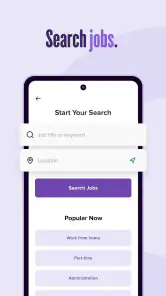
First things first, downloading the app was a breeze. It's available on both Android and iOS, so no matter what device you're rocking, you're covered. Once I had it installed, I was greeted with a sleek, intuitive interface. You know how some apps just overwhelm you with information right off the bat? Not Monster Job Search. The design is simple, yet effective, making it easy to navigate even if you aren’t super tech-savvy.
Setting Up Your Profile
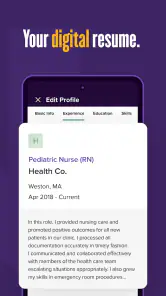
The app guided me through setting up my profile step-by-step. It's kind of like setting up an online dating profile, but instead of finding Mr. or Ms. Right, you're on the hunt for the perfect job match. You input your skills, experiences, and what you're looking for in a job. The app even lets you upload your resume directly, which is a nice touch and saves you the hassle of constantly retyping your information.
I’d treat that profile as a useful starting point, not a finished application for every role. A broad summary can help when I’m exploring several job types, but the more specific the opening, the more important it is to check that the resume foregrounds the relevant experience. One practical habit is to review the uploaded document after making edits elsewhere; an old version can quietly undermine an otherwise strong application.
Searching for Jobs
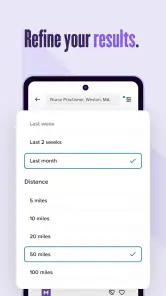
Now, onto the main event: the job search itself. The search function is pretty robust. I could filter jobs based on location, salary, job type, and more. There’s even an option to set up job alerts, so I don’t miss out on any new postings that match my criteria. I loved how the app displayed job listings with all the necessary details at a glance. No more clicking into every single job post to find out it doesn’t suit you - a huge time saver!
There’s a trade-off between making a search broad enough to reveal unexpected options and narrow enough to keep the results manageable. I’d begin with the essentials—such as the location and kind of work I’m willing to consider—then adjust one filter at a time if the results are too thin or too noisy. Changing several criteria together makes it harder to tell which choice is hiding good opportunities. For people open to a commute or a change in role, a second, looser search can complement the main one without muddying its alerts.
Applying Made Easy
When it comes to applying for jobs, Monster Job Search shines. You can apply to most jobs with just a couple of taps, directly through the app. For someone who's always on the go, like me, this feature is a game changer. Plus, there's a section in the app where you can see all the applications you've submitted, which helps keep everything organized.
That application history is especially useful when I’m comparing several opportunities, but I wouldn’t assume it contains every detail I’ll need for a follow-up conversation. I’d record the role, employer, date, and any next step in a separate note if I were applying across multiple services. This avoids the familiar problem of remembering that I applied somewhere but forgetting which version of my resume I sent or what stood out in the posting.
Final Thoughts
Overall, using the Monster Job Search app has been a delightful experience. It takes a lot of the stress out of job hunting, which is saying something. From its user-friendly interface to the ease of applying for jobs, it's clear why this app is a favorite among job seekers. If you're in the market for a new job, I'd definitely recommend giving this app a try. It might just be the tool that lands you your dream job!
A routine that keeps the search manageable
One useful way to make the app work harder is to separate browsing from applying. I’d save a few focused searches for the kinds of roles I genuinely want, then review the results at a set time instead of opening the app every time I have a spare minute. That reduces distraction and makes it easier to notice whether a new listing is meaningfully different from the ones I’ve already considered.
For example, someone commuting home could scan the day’s matches, shortlist two plausible openings, and revisit them later on a larger screen before submitting. The phone is convenient for catching an opportunity, but a careful review of the employer and role is still worthwhile. I’d also keep a separate note of follow-up dates and contact details; an in-app application list helps with organization, but a personal tracker makes next steps easier to see across multiple job sites.
A similar routine works for someone fitting a search around a busy week: check focused results during a short break, save promising roles for a calmer review, and apply only after confirming the essentials. I find that this protects the convenience of mobile browsing without turning every spare moment into an invitation to submit another application. It also makes it easier to spot patterns in the roles I’m saving, such as recurring qualifications I may want to address in my resume.
How it fits beside other job-search options
Compared with searching only through employer career pages, Monster can bring browsing and applications into a single mobile routine, which is handy when I’m exploring several kinds of roles. Compared with professional networking or niche industry boards, though, a general job app may be less useful for warm introductions or specialized openings. I wouldn’t make it my only channel if a particular field relies heavily on referrals or has its own established hiring sites.
Those options solve different problems, so I wouldn’t frame the choice as one tool replacing all the others. Employer sites are useful when I already know which organizations interest me; networking helps when context and introductions matter; specialist boards can be a better fit when a role is unusually specific. Monster’s advantage is having a general search and application routine on a phone. I’d use it to widen discovery, then move to the channel best suited to the opportunity.
It’s also worth deciding what “good results” mean before judging the app. A person urgently seeking any suitable opening may value a broad set of listings, while someone targeting a narrow senior role may care more about relevance than volume. If the first searches bring mostly unsuitable options, I’d refine the criteria and compare a few days of results before deciding whether the app deserves regular attention. That is a better test than counting how quickly I can send applications.
Who should give it a try
I’d recommend it to someone starting a general job search, changing roles, or wanting to check openings while away from a computer. The filters and alerts can help turn a vague search into a routine, while the application history makes it easier to remember what has already been sent. It can also be a useful second source for people who already rely on referrals or company websites and want another place to discover opportunities.
I’d skip relying on it alone if I were pursuing a narrow specialty, prioritizing personal introductions, or needing detailed career coaching. Likewise, anyone who finds frequent job notifications distracting should keep alerts tightly focused or check manually. The app’s usefulness depends less on applying at maximum speed and more on choosing good criteria and taking the time to assess each listing.
It is also a sensible option for someone who prefers to begin with a phone rather than sit down for a full desktop search. A job seeker can use the mobile workflow to identify possibilities during the day, then reserve a longer session for tailoring application materials and researching employers. On the other hand, if I were applying to a small number of highly tailored roles, I’d probably spend less time browsing a general feed and more time on employer pages, specialist communities, and direct conversations.
My verdict on the value
Monster Job Search earns a place on my phone because it offers a free, accessible way to browse and apply without making the process feel complicated. Monster Worldwide released it on March 17, 2015, and the app has continued to a current version of 20.1.3. I see its strongest value in convenient discovery and application tracking, not as a replacement for research, networking, or a tailored resume.
If I were actively looking, I’d try it and judge the results against my own goals: are the listings relevant, are the alerts useful, and does the application flow save effort without making me careless? If the answers are yes, it’s a worthwhile tool to keep in rotation. If not, I’d put more time into employer sites, specialist boards, or direct contacts instead. My recommendation is to use Monster as a helpful channel in a considered search, rather than expecting any single app to do the whole job.
Monster Job Search Frequently Asked Questions
Can I save jobs in Monster Job Search and return to them later?
Saving interesting openings can help you keep your search organized while comparing roles, requirements, and application details. Monster Job Search is built around browsing job listings and applying through the app, so checking whether a save option is available in the listing interface can be useful before you begin. Keeping a shortlist also makes it easier to focus on positions that fit your experience and career goals.
Can I use Monster Job Search to look for opportunities in my field?
Monster Job Search is a business app for people exploring employment opportunities. You can browse job listings and use the app’s matching features to find roles suited to your experience and skills. Its store summary emphasizes finding jobs quickly and applying in seconds, while tools such as job alerts, resume tips, and career advice can support your search.
Who develops Monster Job Search, and is it suitable for general audiences?
Monster Job Search is developed by Monster Worldwide and is rated Everyone, so it is presented as suitable for a general audience. It is designed for job seekers, with features such as job listings, resume tools, and career guidance. The app is free to download, and its store short description identifies it simply as “Monster Job.”
What is Monster Job Search and how does it work?
Monster Job Search is a comprehensive job search application that connects job seekers with potential employers. It provides a platform where users can upload their resumes and apply to a wide range of job listings. The app uses advanced algorithms to match users with jobs that fit their experience and skills, offering features like job alerts, resume tips, and career advice.
Is Monster Job Search free to use?
Yes, Monster Job Search is free to download and use. However, it also offers premium features that require a subscription. These premium features include enhanced visibility of your resume to employers, personalized job recommendations, and advanced career resources to help you stand out in the competitive job market.
Pros
- User-friendly interface for easy navigation
- Wide range of job opportunities available
- Customizable job alerts
- In-app resume builder
- Strong employer network
Cons
- Limited international job listings
- Some job postings may be outdated
- Requires internet connection
- Occasional app crashes
- Limited customer support
- Category
- Business
- Version
- 20.1.3











