Mojo: Reels and Video Captions
- 1.70K
- 4.5
- Installs
- 10.00M
- Price
- Free

Screenshots

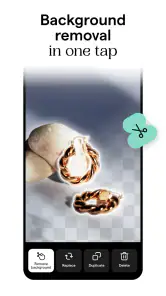
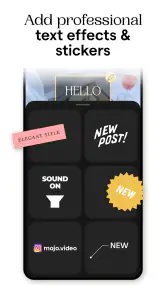
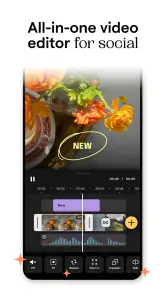
Analysis by Reviewed
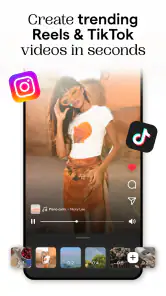
My first meaningful result with a social video app is usually not a perfectly polished reel; it is a short clip that looks tidy enough to share without spending the whole evening editing. Mojo: Reels and Video Captions is built for that kind of quick, visual work. I’d approach it as a creative shortcut for shaping social posts, rather than as a full replacement for a desktop editor or a camera app.
What to expect when you open it
Mojo is a photography app from Archery Inc., though its practical focus is making video and other social content. It brings editing and presentation tasks into one place, which is useful when I want a post to feel designed without assembling every element manually. The app is free to install, rated for Everyone, and has optional in-app purchases ranging from $9.99 to $39.99 per item. Its average rating is 4.5 from around 239,000 ratings, and it has over 10 million installs.
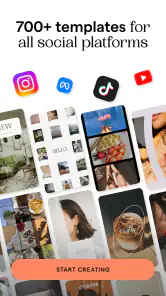
The main appeal is not that every video suddenly becomes professional. It is that a template can give a rough idea a clear visual structure: a place for footage, text, and movement. That can help when I have a message ready but do not want to start with an empty editing timeline. The trade-off is that a template also gives the result a recognizable style. If I want a completely individual look, I need to spend time adjusting it rather than accepting the first design unchanged.
A low-pressure first setup
For a first session, I’d keep the goal small: choose one clip or a handful of images, decide what the post needs to say, and make one short piece. Mojo’s interface is presented as approachable, so I would not expect to need editing experience just to find my way around. The current version is 3.19.1 and the minimum operating-system requirement is 10. Before installing, it is worth checking that your device meets that requirement; once inside, start with a simple project instead of trying to learn every tool at once.
Think about the destination before you design. A story, a reel, and a collage do not all need the same pacing or amount of text. I get a cleaner result when I select footage that already suits the message, then make the caption short enough to read while the clip plays. This small bit of preparation is more helpful than adding extra decoration later.
Getting to a first successful post
My first-project workflow would be to choose a template that fits the mood, replace its sample material with my own, and check every line of text at normal viewing size. Then I would preview the sequence and remove anything that distracts from the central point. Animated wording can make a post easier to follow, especially when someone is watching casually, but motion should support the message rather than compete with the footage.
A realistic use is a small shop owner preparing a quick announcement between other tasks: a product photo or short clip, a clear line about what is new, and a design that makes the post look considered. Someone sharing a personal trip could use the same basic process to turn a few images into a compact story. In both cases, the useful win is getting from scattered media to a coherent post without having to build the layout from scratch.
More From Our News Desk

Weather by Xiaomi Review: Clear at a Glance, Less Clear Up Close

X Under Pressure: Can It Recover When Posting Goes Wrong?

Clash of Clans Is Won Between the Battles

Android Auto Makes the Case for Quieter Car Software

MobiOffice: Transforming Mobile Productivity with Seamless Integration

EA SPORTS FC™ Mobile Soccer: Redefining Mobile Sports Gaming
First Impressions and User Interface
The first time I opened Mojo: Reels and Video Captions, I was greeted by a sleek and intuitive interface. Everything is laid out so clearly that even if you’re not tech-savvy, you can still navigate through with ease. The minimalistic design ensures that you can focus on what truly matters – crafting your content.
Features That Stand Out
One thing I love about Mojo is its wide array of templates. Whether you’re looking for something chic, funky, or professional, there’s a template for every mood and occasion. The app offers templates that are not only eye-catching but also customizable, allowing you to add your personal touch with ease.
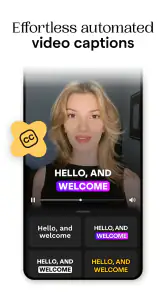
Another standout feature is the text animation. You can create captivating captions that move with your video, making your content more engaging. This is perfect for those who want to tell a story or convey a message without losing their audience’s attention.
Easy-to-Use Editing Tools
The video editing tools in Mojo are straightforward yet powerful. You don’t need a degree in film editing to use them. Trimming, cutting, and adding effects are as simple as a few taps. Plus, with features like background music and voiceovers, you can add that extra layer of creativity to your projects.
What’s more, Mojo supports high-quality exports, ensuring that your content looks professional on any platform. Whether you're uploading to Instagram, Snapchat, or any other social media, your videos will stand out for all the right reasons.
Why You Should Consider It
In a world where content is king, and the demand for high-quality, engaging videos is ever-growing, having a tool like Mojo at your disposal is invaluable. It streamlines the creation process and inspires creativity, making it a must-have for content creators of all levels.
Overall, Mojo: Reels and Video Captions isn’t just an app; it’s a game-changer for anyone serious about their social media presence. Whether you're a seasoned influencer or just starting, this app provides all the tools you need to shine. So why not give it a try and let your creativity flow?
Where the templates help—and where they can get in the way
The strongest reason I would keep Mojo on my phone is consistency. If I post regularly, using a similar visual language can make a set of stories or short clips feel connected, even when the subjects change. I would pick a small group of designs that suit my usual content, then vary the footage and wording. That is often more effective than choosing a completely different style for every post, which can make a feed feel scattered.
There is a flip side: template-led editing can make different creators’ posts feel alike. I would treat the first design as a starting point, not a finished identity. Change the wording, choose material with a clear focal point, and avoid piling animated text over a busy clip. A restrained edit often looks more personal than using every visual option available.
Small workflow choices that save time
One practical habit is to write the caption before opening the editor. A short sentence with one main idea is easier to fit into an animated layout than a paragraph squeezed onto a screen. If the post needs several details, I would split them across a sequence rather than shrink the text until it becomes difficult to read. The point of moving captions is to guide attention, not to make viewers work harder.
I would also review a draft once with the sound on and once without relying on it. Music or a voiceover can add mood, but many people encounter social clips while scrolling in situations where audio is inconvenient. The visual message should still make sense on its own. This is a useful check even when the video’s main appeal is its soundtrack.
For repeat posts, keep a simple note of the design choices that worked: the style of template, the amount of text, and the kind of footage that stayed legible. That gives you a repeatable process without turning every post into a copy. It also helps you spot when a particular template is forcing a layout that does not suit the material.
How it compares with other ways to make social posts
Compared with editing directly inside a social platform, Mojo makes sense when I want more control over the visual arrangement before sharing. Its templates and animated text put presentation near the center of the process. Built-in social editors can be more convenient for a quick clip that needs only a trim or a simple caption, especially if I am already posting immediately and do not need a separate design step.
Compared with a general-purpose video editor, Mojo is the more approachable choice when the goal is a polished social format rather than detailed control over every cut. A fuller editor is better for precise timing, layered storytelling, or a project where fine-grained adjustments matter. I would not choose a template-first workflow for a long interview or a carefully paced narrative if I needed exact control of the edit.
For still-image collages, a dedicated layout tool may be quicker if all I want is a static arrangement. Mojo’s appeal is stronger when I want a designed social asset that can include movement or video as part of the same creative session. The right choice depends on the end result, not on which app has the longest feature list.
Common points of confusion for a new user
The first thing I would clarify is the difference between making a post look finished and making it communicate well. A template can solve the layout problem, but it cannot decide which clip matters or what the viewer should remember. If the result feels busy, I would remove an effect or shorten the copy before changing the whole design.
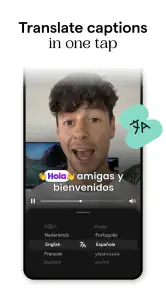
It is also easy to mistake a moving caption for automatic subtitles. Mojo’s short description highlights auto subtitles, but I would still check the generated wording and timing before relying on it. Names, unusual terms, background noise, and quick speech can all make captions less dependable in practice. Correcting an error before export is far better than discovering it after publishing.
Another point to watch is the difference between a free starting point and the full range of choices. Mojo is free to download, while in-app purchases are available. If I am only testing whether its workflow suits me, I would first make a modest project and see how far the available options take me before deciding whether any paid item is worth it. The listed purchase range is $9.99 to $39.99 per item, so I would check the specific item and its value to my own routine rather than assume every tool is included without charge.
Who is likely to enjoy using it
I think Mojo suits people who make short social content often enough to value a repeatable process: creators, small businesses, community organizers, and anyone who wants stories or short videos to look more deliberate. It is especially helpful if visual design feels like the slowest part of posting. A template can give you a framework, while simple edits let you make the result feel closer to your own voice.
I would skip it, or use it only for occasional posts, if I prefer editing every detail manually, need a highly controlled production workflow, or dislike template-based design. It may also be unnecessary if my usual posts are already simple and the social app’s own editor handles them comfortably. More tools do not automatically mean a better result; for a plain announcement, a clear photo and direct caption can be the smarter choice.
For a first-time user, I would judge success by whether the finished post is clear, readable, and quick enough to make—not by how many effects it contains. That makes the app easier to learn and helps avoid turning a small update into an overworked project.
Making the next project easier
After one successful post, I would try a second project with a different kind of source material, such as a short video after starting with photos. That reveals whether the templates and editing approach fit the content I actually make. I would keep the same basic check: does the opening make sense, can the text be read at a glance, and does each visual element earn its place?
Mojo is at its best when speed and presentation matter more than frame-by-frame precision. It combines the confidence of a ready-made design with enough room to adjust the result, but its template-led character is a real creative constraint rather than a flaw to ignore. Used thoughtfully, that structure can help me publish more consistently; used without editing or judgement, it can make a post look generic.
With a 4.5 average from around 239,000 ratings and more than 10 million installs, Mojo is an established option in social content creation. I would recommend trying it if you want a friendly path from raw media to a designed post, especially if animated text and templates match your style. It is currently version 3.19.1, and the app first appeared on September 16, 2019. For me, the sensible approach is to begin with one small project, learn which parts genuinely save time, and decide from there whether it belongs in my regular posting routine.
Mojo: Reels and Video Captions Frequently Asked Questions
What is Mojo: Reels and Video Captions, and what can I create with it?
Mojo is a photography app for making social content, including videos, reels, captions, stories, and collages. Its all-in-one approach brings these creative tasks together on a mobile device, which can be handy when you want to prepare visual posts without switching between several tools. It is designed for people who want to shape video and image content for sharing.
Who makes Mojo, and what should I know about its release and current version?
Mojo is developed by Archery Inc. It was released on September 16, 2019, and its current version is 3.19.1. The app has been around long enough to build an established presence in the photography category, while its current version gives prospective users a useful point of reference when checking compatibility and deciding whether to try it.
Can Mojo help me add subtitles or captions to videos?
Yes. Mojo’s store summary highlights automatic subtitles alongside video editing, making captions a central part of its social-content toolkit. This can be useful when you want a video to communicate clearly in a social feed, including for viewers who prefer to watch with the sound off. You can also use the app to prepare the surrounding visual content, such as stories and collages.
Is Mojo: Reels and Video Captions suitable for all ages?
Mojo has an Everyone content rating, so it is presented as suitable for a broad audience. Its focus is on creating social content, including videos, captions, stories, and collages. As with any creative app, younger users may benefit from guidance when sharing content publicly or choosing what personal information to include in posts.
Will Mojo work on my phone?
Mojo is available for devices running Android 10 or later. Before downloading, check your phone’s operating system version to make sure it meets that requirement. The app is a photography and social-content creation tool, so it is intended for people who want to prepare visual posts on a mobile device rather than edit on a desktop.
Pros
- User-friendly interface for quick editing
- Variety of templates for creative projects
- Regular updates with new features
- High-quality output for social media sharing
- Compatible with most video formats
Cons
- Limited free features
- requires subscription
- Occasional lag on older devices
- Exporting can be slow for long videos
- Watermark on free version exports
- Limited music library compared to competitors
- Category
- Photography
- Version
- 3.19.1











