MSN
- 14.94K
- 4.4
- Installs
- 10.00M
- Price
- Free

Screenshots


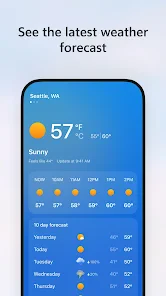
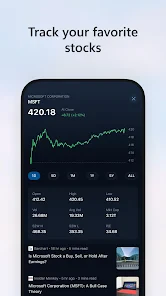

Analysis by Reviewed
I use a general news app differently from a newspaper: I want a quick sense of what deserves my attention, not the feeling that I have read everything. That is the role MSN (Start) fills for me. It brings a mix of subjects into one browsing routine, so I can check the day’s headlines, follow a few interests, and decide which stories merit a closer look. Its strength is convenience; its limits become clearer when I want a narrow, carefully controlled reading list.
A practical first pass through the day
My most useful routine is simple: open the feed when I have a few spare minutes, scan for stories that affect my plans or answer a question, and leave the rest for later. That makes this news app a good fit for short breaks, a morning check before leaving home, or a quick catch-up while waiting for an appointment. I would not try to read every item in one sitting. A broad feed works best when I treat it as an entrance to the news, not as a daily reading quota.
For example, on a weekday when I am deciding whether to take an umbrella, I can check the weather alongside headlines and the subjects I follow, then save a story that needs more attention for a quieter moment. The useful part is the sequence: scan now, choose deliberately, and return to the saved piece when I have time. That is more manageable than opening several separate apps just to get oriented, though it does not remove the need to consult a dedicated source when accuracy or depth matters.
All-in-One News Hub
First off, MSN (Start) is like that trusty Swiss army knife of news apps. Imagine having access to a plethora of topics right at your fingertips. From breaking news, sports updates, and entertainment bits, to weather forecasts and even lifestyle tips, this app has got it all. It's sort of like having your own personal newsroom that fits snugly in your pocket.
That mix suits me best when I treat the feed as a starting point rather than a complete picture of the day. I can check several interests in one place, then open a story when a headline genuinely matters. For a quick morning scan before work or school, that is more convenient than jumping between separate sports, weather, and general-news apps. If I need deep reporting on one subject, though, I still prefer going directly to a publication that specializes in it.
Intuitive User Experience
One of the things I appreciate most about this app is its user-friendly interface. You know how some apps can be a bit of a maze? Not this one. Everything is laid out so intuitively, you never feel lost. The clean design makes it easy to navigate through various sections, and the responsive layout ensures that everything loads smoothly, even during those frantic morning scrolls.
A useful habit is to avoid treating every headline as an invitation to stop scrolling. I scan the topics I care about, open only the stories that answer a question I actually have, and return to the feed when I am done. That small routine makes a broad news stream feel less distracting. On a busy day, the app works well for orientation; for a long, focused reading session, a dedicated news site or e-reader-style experience may feel calmer.
More From Our News Desk

Weather by Xiaomi Review: Clear at a Glance, Less Clear Up Close

X Under Pressure: Can It Recover When Posting Goes Wrong?

Clash of Clans Is Won Between the Battles

Android Auto Makes the Case for Quieter Car Software

MobiOffice: Transforming Mobile Productivity with Seamless Integration

EA SPORTS FC™ Mobile Soccer: Redefining Mobile Sports Gaming
Customization at Its Best
Another cool feature is the level of customization it offers. You can tailor the news feed according to your interests. Whether you're a sports fanatic, a tech geek, or just someone who loves keeping up with the latest celebrity gossip, you can tweak the settings to prioritize what matters most to you. It's like having a news app that's personally designed for you!
I recommend checking those preferences after you have used the app long enough to notice what you skip. A feed tuned around a few steady interests is often more useful than trying to include every passing curiosity. This is also where expectations matter: personalization can shape what appears prominently, but I would not use it as a substitute for deliberately checking a range of sources when a story is important. If you prefer to choose every publisher yourself, a traditional reader built around followed outlets may be a better fit.
Settings that make the feed easier to live with
I would begin with interests, then consider notifications separately. Those two choices solve different problems: interests influence what I am likely to browse, while alerts decide whether news reaches me when I am doing something else. Keeping that distinction in mind makes setup less of an all-or-nothing decision. I can have a broad enough feed for discovery without agreeing to be interrupted by every development.
It also helps to revisit preferences after a week of ordinary use rather than trying to perfect them on the first launch. If I repeatedly skip a subject, that is a useful signal to adjust the mix; if I keep opening a topic, I know it earns space in my regular scan. This is a small, repeatable way to make personalization practical instead of treating it as a one-time setup task. I would still keep a deliberate source-checking habit for consequential stories, since a tailored feed is not the same thing as a complete survey of coverage.
Stay Updated, Stay Notified
And let's talk about notifications. They're timely and relevant, ensuring you never miss out on important updates. The app sends out alerts that are concise and to the point, without being overbearing. It's perfect for those who like to stay informed but hate being bombarded with unnecessary pings.
My practical advice is to decide which alerts deserve to interrupt your day, then review notification settings rather than accepting every prompt by default. A commuter who wants a quick glance at major developments may welcome a small number of alerts; someone who checks news at set times can keep interruptions to a minimum and open the app when convenient. The trade-off is simple: fewer notifications mean less disruption, but you may notice a developing story later.
Faster habits for people who check often
If I know I will only have a minute, I avoid opening stories out of reflex. I scan the visible mix, choose one item that is genuinely relevant, and stop there rather than turning a quick check into an aimless scroll. When I have more time, I can follow a headline into a longer read or explore another topic. The same app can therefore serve both a brief check-in and a more deliberate browse, provided I set the purpose before opening it.
Saving is another useful part of that routine. I can mark an article for a later window instead of keeping it open while I am supposed to be working or travelling. Later, I can decide whether it still matters and read it with more attention. This is a modest but helpful way to separate discovery from reading: the feed helps me find something, while saved pieces give me a short queue to revisit. I would not use that queue as a permanent research archive, though; a dedicated reading or note-taking tool is better when I need long-term organization.
Offline Reading
One more thing that's worth mentioning is the offline reading feature. You can save articles to read later, which is a lifesaver during commutes or when you're stuck in areas with spotty internet connections. No more staring blankly at your screen when the signal drops - just dive into your saved articles and keep reading.
This is especially handy if I have a predictable stretch without reliable service: I can save pieces while connected, then use the commute to catch up instead of repeatedly refreshing a page. It is worth making saving part of the routine before leaving, rather than assuming anything I have not saved will be available later. If you mainly want to archive long reads and organize them into a personal library, a dedicated read-it-later app may offer a more focused workflow.
Where a news hub reaches its limits
The broad approach is also the main trade-off. A personalized selection is convenient, but I would not assume it includes every important perspective or that the first headline I see is the whole story. When an issue affects a decision, I open the article and, where appropriate, check a specialist publication or another reliable source. That extra step is worthwhile for complex topics, local details, or stories where context matters more than speed.
Compared with a single newspaper app, MSN is more useful when I want variety without committing to one publication’s coverage. Compared with a conventional RSS reader, it asks less of me upfront because I do not have to build the entire experience around a hand-picked list of outlets. The flip side is control: readers who want a strictly chosen set of publishers or a chronological stream may prefer an RSS-style tool. For long-form reading, a publication’s own app can also offer a more focused experience than moving between mixed topics.
There is a practical question behind the free price: the app is free to use, while in-app purchases are listed at $20 per item. I would check the details shown for any optional purchase before deciding whether it is useful to me. The app is from Microsoft Corporation, is rated Everyone 10+, and has an average rating of 4.4 from around 296,000 ratings, with over 10 million installs. I see those figures as a sign that it is an established option, not proof that its mix will suit every reader. It was released on December 11, 2014, and its place in the news category is clear; the real test is whether its browsing style fits my habits.
Who It Suits in Everyday Use
Picture a weekday morning: I have a few minutes before heading out, want to see what is happening locally and nationally, and also want a quick look at sport or weather. A single pass through a personalized feed is a practical way to get oriented without opening several apps. Later, I can save a story for the ride home and read it when the connection is unreliable. That repeatable pattern—scan, select, save, revisit—is where the app makes the most sense to me.
It is a strong choice if you want one general-purpose place to browse varied coverage and adjust the mix to your interests. I would steer away if you need a strict chronological feed, want to follow only hand-picked publishers, or expect specialist-level analysis from every topic. The app is better as a convenient news hub than as a replacement for a trusted source you consult closely on a particular subject.
A sensible way to make it your own
I would give the feed a short trial as part of a real routine rather than judging it from a single session. Use it at the time you normally catch up, notice which topics you actually open, and adjust the mix once you have a little evidence about your habits. Then decide whether alerts help or merely pull your attention away. That approach makes it easier to answer the central question: does this app save me time while helping me find worthwhile coverage?
For readers who want a quick, varied scan, the answer can be yes. For someone who wants a carefully curated list of publications, a quiet long-read environment, or a specialist source for every subject, another tool may be a better primary choice. I would keep MSN as a convenient starting point in the first case, and use it alongside more focused sources in the second. Its value comes from fitting into a repeatable routine, not from replacing every other way of following the news.
In conclusion, if you're on the lookout for a reliable and versatile news app, MSN (Start) is definitely worth checking out. It's comprehensive, customizable, and just plain convenient. Give it a whirl and see how it fits into your daily routine. Happy reading!
MSN Frequently Asked Questions
Is MSN free to download, and what should I know about purchases?
MSN is free to download, so you can try its news and content feed without paying an upfront price. In-app purchases are listed at $20.00 per item, so review the purchase details before confirming a transaction. The app’s free download and its optional purchase costs are separate considerations when deciding whether it fits your budget.
Who develops MSN, and what kind of app is it?
MSN is a news and magazines app developed by Microsoft Corporation. It brings news and other content together in a mobile feed, with the aim of making updates easier to browse while you are on the go. The app is free to download, and its content rating is Everyone 10+, which can help families decide whether it suits their intended users.
What is MSN (Start) and what features does it offer?
MSN (Start) is a comprehensive app that aggregates news, weather, sports updates, and lifestyle content into one easy-to-navigate platform. It offers personalized news feeds, live weather updates, sports scores, and entertainment trends, making it a go-to app for staying informed. Its user-friendly interface and customizable settings provide a seamless experience for users seeking versatile content.
Is the MSN (Start) app free to use or does it require a subscription?
The MSN (Start) app is completely free to download and use. It provides users with access to a wide range of content without requiring any subscription fees. However, users should be aware that some features might include advertisements or sponsored content, which helps keep the app free. In-app purchases are also listed at $20.00 per item, so check the purchase details before confirming anything.
Can I customize the news and content that appear on my MSN (Start) app?
Yes, MSN (Start) allows users to customize their news feed according to their interests. Users can select specific topics, sources, or categories they prefer to follow. This customization ensures that the app delivers relevant content tailored to individual preferences, enhancing the overall user experience.
Pros
- Fast and reliable news updates.
- User-friendly interface design.
- Customizable news categories.
- Multilingual support available.
- Real-time weather forecasts.
Cons
- Contains ads in free version.
- Limited offline content access.
- Occasional app crashes.
- Requires constant internet connection.
- Some features need premium.
- Category
- News & Magazines
- Version
- Varies with device