MeShot: GPS Camera & Geo Stamp
- 41.00
- 3.9
- Installs
- 5.00M
- Price
- Free
Screenshots
Analysis by Reviewed
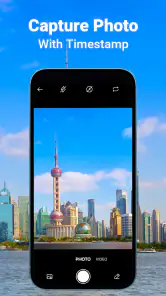
When a photo needs to prove where or when a moment happened, an ordinary camera image can leave you with a memory but not much context. MeShot: GPS Camera & Geo Stamp is built around that practical gap: it puts timestamp and location details on photos. I see the appeal for travel notes, field records, and personal documentation, but I’d treat any location-stamped image as something to handle deliberately, not as a harmless decoration.
Useful context, with location privacy in mind
MeShot sits in the photography category, and its focus is narrower than a full editing suite. Rather than asking you to build a look with filters and layers, it centers on adding place and time information to a picture. That can save effort when the context matters more than a polished edit: think of documenting a repair, remembering which trail viewpoint you visited, or keeping a visual record of a family outing.
HAWKS Technologies makes the app, which is free to install and rated for Everyone. It has a 3.9 average from around 3,400 ratings, with over 5 million installs. Those figures suggest that many people have tried it, but they don’t tell me whether its handling of location suits a particular person’s privacy needs. For this app, that question matters as much as whether the stamp looks good.
A visible place label changes what a photo reveals. A picture shared privately with relatives may be more useful when it says where it was taken; the same detail can be unwelcome in a public post, especially if it points to a home, workplace, or a child’s regular routine. My practical advice is to decide the audience before adding the stamp, rather than assuming every photo is ready to share just because it looks complete.
What the stamp is good for
The strongest use case is a photo that needs to make sense later without relying on memory. If I take a picture of a damaged fence for a landlord, a garden issue for a maintenance log, or a sign beside a walking route, a timestamp and location can make the image easier to interpret. That is a different job from making a portrait more attractive, and it is where a GPS camera can be more convenient than adding a caption by hand afterward.
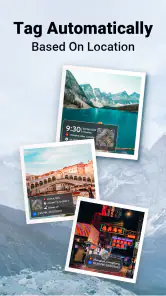
For a casual trip, the benefit is also straightforward: a location mark can turn a folder of similar-looking landscape shots into a record of where each view came from. The trade-off is that the image itself carries that information wherever it goes. If I want a keepsake for myself but not a location reveal for everyone who sees it, I would keep an unstamped original or make a separate shareable copy using a workflow I trust.
Controls to check before relying on it
Location is sensitive enough that I would pause at the first permission prompt instead of tapping through automatically. If the app asks for access to location, consider whether the task requires it at that moment and choose the narrowest option your device offers that still lets the feature work. If you deny access, the location portion may not be available; that is a sensible trade-off when you only want a timestamp or are testing the app.
I would also check the camera and photo access prompts in context. A camera app needs a way to capture an image, while access to existing photos may be relevant if you want to work with pictures already on the device. But the exact permissions and choices depend on the phone and operating system, so I wouldn’t assume that one setup screen tells the whole story. Review the app’s access in your device settings if your needs change.
There is an important distinction between a visible stamp and location information that may be embedded in a photo file. A printed-looking label is easy to notice, but it does not by itself explain every other kind of information an image might carry. Before sending a sensitive picture, use the sharing options you normally trust and inspect the result where possible. If precise location is unnecessary, a cropped or unstamped copy is often the safer choice.
A careful workflow for everyday photos
For a one-off record, I’d start by taking a low-stakes test image and checking the result before using MeShot for anything important. Look at whether the text is legible against a bright sky or a dark surface, whether it covers the subject, and whether the place information is specific enough for your purpose. This simple check can prevent a neat-looking stamp from obscuring the detail you meant to document.
For repeated work, consistency matters more than decoration. Choose a framing habit that leaves a clear corner or strip for the stamp, and keep the subject itself unobstructed. If you photograph a sequence—before, during, and after a repair, for example—similar framing makes the set easier to compare later. The location and time can provide context, but they cannot replace a clear view of the actual change.
When the photo is for a private archive, keep the stamped image with a plain note about what you were recording. That gives future-you useful context without relying entirely on a map label. For a public post, I’d make a separate decision: remove or avoid sensitive place details when they reveal a routine or a private address. This split workflow is a little less convenient than sharing the first image you take, but it gives you more control over what travels with it.
Where it fits among camera and editing alternatives
The usual phone camera is the better choice when you want the simplest capture process, broad familiarity, or maximum flexibility to decide what to add later. A general photo editor is better when the main goal is visual correction, collage work, or creative styling. MeShot makes more sense when the location-and-time context is central and you want it incorporated as part of the photo workflow rather than written in a separate note.
That convenience comes with a constraint: a stamp is part of the image’s presentation, and a location label can be awkward when the picture is meant to feel timeless or when the destination should stay private. I wouldn’t use this as my only camera for portraits, social posts, or images where clean composition matters most. For those, I’d capture normally and add only the information I actually want to show.
It is also worth separating a location stamp from a formal record. A timestamp and place can help organize personal documentation, but they are not a guarantee that a photo will meet a workplace, legal, or insurance process. If another person or organization requires a particular capture method, I’d follow that process rather than treating a stamped image as a substitute.
Version, cost, and who should choose it
MeShot is currently at version 1.2.4 and is listed for devices running Android 10 or later. The download is free, while in-app purchases range from $3.99 to $29.99 per item. I’d try the basic workflow first and check what, if anything, requires a purchase before building a routine around it. That keeps the decision grounded in the feature you actually need instead of paying on the assumption that every extra will be useful.
The app is a good fit for people who regularly need to attach place and time context to photos: travelers keeping a trip record, property owners tracking maintenance, or anyone organizing visual notes from different locations. It is less suitable for someone who wants a general-purpose camera, has no reason to include location, or prefers not to grant location access to a photography app. In those cases, a standard camera plus a private note—or a manual caption added later—may offer better control.
Because MeShot is rated for Everyone, it may be approachable for a broad audience, but that rating doesn’t make location sharing automatically appropriate for every person or situation. If a child uses it, I’d help decide which images should include a place label and where those images can be shared. That small conversation is more useful than treating the age rating as a privacy setting.
My cautious verdict
I like the clear purpose: MeShot is for photos where remembering the place and time is part of the point. It can make a travel memory or practical record easier to understand later, and its focused approach may be quicker than adding context manually. The main drawback is not complicated editing; it is the responsibility that comes with putting location information on an image that may be forwarded or posted.
My recommendation is to use MeShot selectively: test a sample, check the permissions your phone presents, and decide separately whether each stamped photo is suitable to share. If that deliberate workflow sounds reasonable, it can be a handy photography tool. If you want location kept out of your images by default, or need a more creative camera, stick with your regular camera and add context only when you choose. HAWKS Technologies’ app has a 3.9 average and 41 written reviews, but my verdict rests on its practical purpose: useful for documented memories, provided you stay in charge of what each photo reveals.
MeShot: GPS Camera & Geo Stamp Frequently Asked Questions
What is MeShot: GPS Camera & Geo Stamp used for?
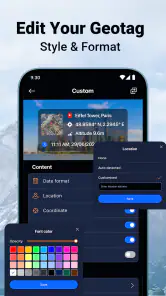
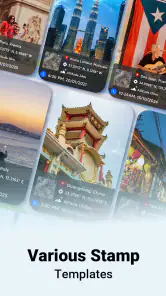
MeShot is a camera app designed to add location and other information to photos as they are taken. Depending on the options available in your version, a photo stamp may include details such as GPS coordinates, an address, the date, or the time. It can be useful for documenting visits, trips, inspections, or outdoor activities, but check the preview and settings to confirm exactly what will appear on your images.
Does MeShot need location permission to add GPS information to photos?
Yes, GPS stamping generally requires permission to access your device’s location. Without that permission, the app may be unable to show coordinates or an address, although ordinary camera features may still work. Location accuracy can vary with GPS reception, network availability, and device settings. Review the permission prompt carefully, and grant location access only if you are comfortable sharing it with the app while taking photos.
Can I use MeShot without an internet connection?
You may be able to take photos and record GPS coordinates without a reliable internet connection if your phone can obtain a satellite location fix. However, features that display a readable street address, load map information, or use online services may require connectivity and could be unavailable or delayed offline. If you plan to use the app in a remote area, test it beforehand and check whether the desired stamp details are saved.
Are MeShot-stamped photos suitable as official proof of a location or event?
A GPS stamp can help provide context, but a stamped image alone should not be treated as verified or tamper-proof evidence. Location readings can be imprecise, and image details may be edited or affected by device settings. For legal, workplace, insurance, or other formal requirements, check the relevant organization’s rules and use an approved documentation method. Keep original files when possible and avoid relying only on the visible stamp.
Is MeShot free, and what should I check before downloading it?
Availability, pricing, advertisements, and any paid features can differ by platform and app version, so review the current Google Play or Apple App Store listing before installing. Check the supported device requirements, recent update information, and the app’s privacy disclosures, especially how it handles location and camera access. Download it from an official store, and confirm that its features meet your needs before relying on it for important photos.
Pros
- Adds location
- date
- time
- and map details directly to photos.
- Useful for documenting trips
- site visits
- and outdoor activities.
- Camera-style interface makes it easy to capture stamped photos.
- Can help preserve the context of when and where a photo was taken.
- Handy for creating visual records without adding details manually.
Cons
- Location stamps require granting access to your device's location.
- Stamped photos may reveal sensitive places when shared publicly.
- GPS accuracy can vary
- especially indoors or in remote areas.
- Text and map overlays may cover parts of the image.
- Some features or settings may vary by device or app version.
- Category
- Photography
- Version
- 1.2.4











